
Niyam
Niyam is an open-source AgentOps control plane for governed autonomous AI development. It provides safety guardrails, portable memory ledgers, and human-in-the-loop approval gates to run AI coding agents (such as Claude Code, Codex, Gemini, and AGY) with production-grade safety and reliability.
One
.niyam/source of truth. Many AI runtimes. Policy-driven autonomy. Portable memory. Evidence-backed delivery.


What is Niyam? AgentOps and AI Governance
Niyam bridges the gap between fast "vibe coding" and production-grade safety. It turns any repository into a governed AI-development workspace where you define the rules, and AI agents follow them.
Niyam acts as an AgentOps control plane for teams that need to govern what AI agents do, what tools they use, what memory they rely on, and what evidence they produce. It is built for:
- AI Agent Governance & Safety: Prevent runaway agents and enforce workspace boundaries.
- Active Command Guardrails: Block or intercept dangerous shell commands (e.g.
rm -rf, database drops). - Model Context Protocol (MCP) Memory Server: Provide structured, inspectable, and portable memory ledgers for AI agents.
- Credential & Secret Redaction: Real-time scanning and redaction of PII and API keys from agent execution logs.
- Browser Agent Supervision: Control and record browser actions executed by autonomous agents.
- FinOps & Token Cost Tracking: Track actual agent spend and token consumption locally.
- Audit-Ready Evidence Reports: Synthesize scan results, command histories, and approval logs into compliance documents.
Installation & Setup
Global Install (Recommended)
pipx install niyam
Upgrade to the latest version:
pipx upgrade niyam
Run on the fly (No install)
uvx --from niyam niyam --help
Enable Smart Autocomplete (Bash/Zsh/Fish/PowerShell)
niyam completion install
How Niyam Works (Visual)


Interactive diagrams: docs/user-flows.html · Written guide: docs/user-guide.md
Niyam in Action
1. Interactive Development (Day-to-Day)
Niyam acts as a governance layer inside your AI agent. Use team-standard slash commands:
/implement "add password complexity rules to auth service"
Niyam ensures the agent writes tests first, respects file freezes, and follows the approved TDD workflow.
2. Autonomous Missions (Batch Tasks)
Orchestrate complex migrations or large-scale refactors with ease:
niyam run "migrate all API endpoints to v2"
Niyam plans the mission, executes dependency-aware task layers, can isolate write tasks in Git worktrees, and records validation evidence.
3. Governed LoopOps (Agentic Loops)
Define strict execution budgets and let agents iterate autonomously until success or intervention:
niyam loop run loops/security-audit.yaml --require-approval-on high-risk
Niyam orchestrates the planner, implementer, and evaluator agents, tracking cost and risk at every iteration.
Key Features
Active Action Governance & Approvals
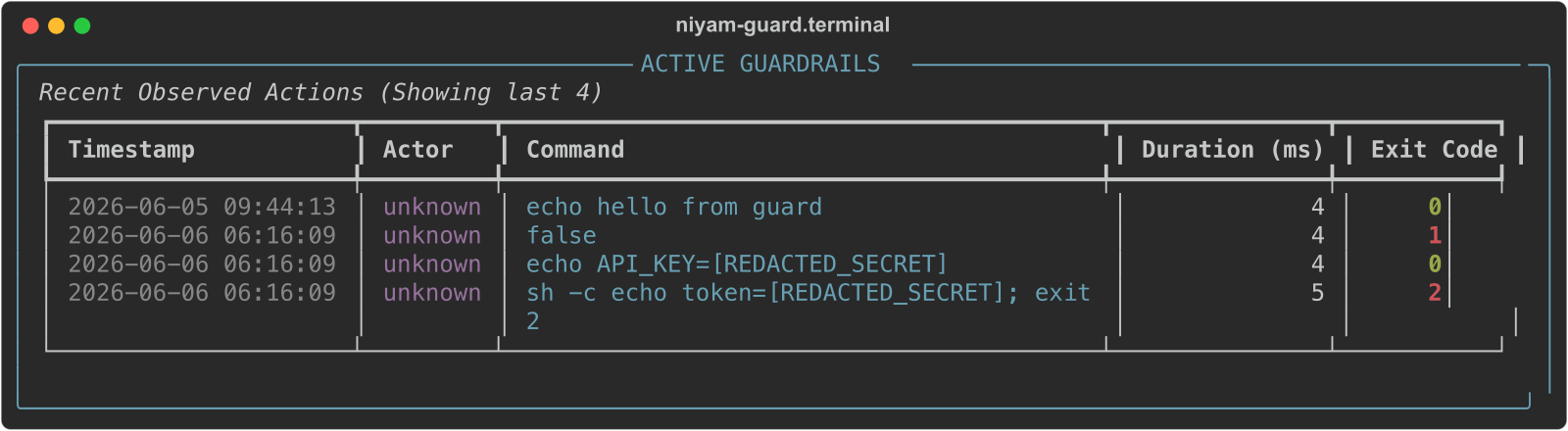
- Command Guardrails: Intercept and block dangerous shell commands (e.g., destructive database drops or global file deletions) before execution.
- Path Freezing: Restrict agents to specific scopes. Protect core files like
LICENSEor sensitiveinfra/folders from unauthorized AI writes. - Credential Redaction: A built-in engine that identifies and redacts secrets, API keys, and PII from agent logs and CLI outputs in real-time.
- Enterprise Approval Gates: Role-based (e.g., Product, QA, Security) manual approval gates for critical tasks and mission plans directly from the CLI or Portal UI.
Multi-Agent Orchestration & Resilience
- Agent Roles: Define specialized AI personas (e.g.,
security-reviewer,qa-engineer) with tailored system prompts and dedicated toolsets. - Isolated Multi-Worktree Parallelism: Run tasks in parallel using isolated Git Worktrees, preventing agent cross-talk and ensuring clean, atomic PRs.
- Swarm Coordination: Track active agents, heartbeats, file locks, and negotiation requests through local swarm state.
- Autonomous Environment Healing: Experimental auto-heal retries feed validation failures back into task prompts and can trigger AI re-planning.
Compliance & Readiness Checking
- Repo Audits: Scan your repository against strict profiles (
startup,team,enterprise,regulated) to detect missing documentation, unpinned dependencies, or secret exposures. - Readiness Scoring: Get a numerical Readiness Score (0-100) and a clear GO / NO-GO decision for every branch or mission.
- CI/CD Pipeline Scaffolding: Generate ready-to-use CI/CD workflows (
niyam ci generate [github/gitlab/azure]) that run strict policy validations (niyam ci verify) directly in your pull requests.
Evidence, Memory, Control Room, and FinOps
- Joint Evidence Reports: Automatically synthesize scan findings, observed command logs, Model Context Protocol (MCP) registry posture, Memory Ledger posture, Control Room activity, browser actions, approvals, and cost data into standardized, audit-ready compliance documents.
- Memory Ledger: Portable, inspectable, policy-governed agent memory with structured records, import/export, diffing, redaction, recall lineage, policy checks, and a Model Context Protocol (MCP) compatible memory server.
- Control Room: Local-first supervised human-agent task rooms with workspace sessions, append-only timelines, approval gates, browser-action recording, takeover state, and task evidence exports.
- FinOps Cost Tracking: A local ledger that logs every token consumed and estimates USD spend against customizable pricing tables.
LoopOps & Fleet Execution
- Governed AI Feedback Loops: Use
niyam loop runto execute multi-step AI tasks with deterministic budgets, automated evaluation, and explicit human-in-the-loop approval gates. - Fleet-Wide Missions: Run loops concurrently across an entire portfolio of repositories via
niyam loop run --fleet, automatically resolving dependency DAGs between repos. - Audit-Ready Loop Reports: Generate evidence and visual HTML reports for every loop execution.
Enhanced CLI UX
- Smart Autosuggestion: Integrated suggestion engine offering typo correction ("Did you mean?"), context-aware flags, and alias resolution.
- Shell Autocompletion: Native
<TAB>completion support for Bash, Zsh, Fish, and PowerShell (niyam completion install).
Live Mission Dashboard & Web Portal
Niyam provides both terminal-based and browser-based interfaces to monitor your autonomous agents and manage approvals:
1. Terminal Dashboard
niyam dashboard --watch
- Live Task Progress: Visual status of all mission tasks (Planned, Running, Completed, Failed).
- Real-time Logs: View active output from implementation agents as they work in isolated worktrees.
- Validation Monitor & Resource Efficiency: Watch unit tests and lint checks run and report results live, alongside actual token spend.
2. Browser-Based Portal UI
niyam portal
- Policy Analytics: Visual cards detailing Active Guardrails, Command Filters, Security Isolation, and active Path Freezing.
- Interactive Approval Center: Review pending tasks/missions and authorize execution by role directly from the Web UI.
- FinOps & Agent Metrics: Monitor token consumption, cost breakdowns, and agent success rates.
Quick Start
- Initialize your workspace:
niyam init --profile fullstack --runtime claude
- Synchronize with AI agent:
niyam sync - Start building:
Open your agent (e.g.
claude) and use/implement,/review, or/ship.
For full user journeys (missions, scan/guard, evidence, Control Room, CI), see the User Guide.
Visual flows (open in a browser): docs/user-flows.html
AgentOps Workflows
Govern portable agent memory:
niyam memory init
niyam memory validate
niyam memory recall "deployment preference"
niyam memory policy-check
niyam memory serve-mcp
Register the Memory Ledger MCP server:
niyam mcp register-memory-server
Run a supervised Control Room task:
niyam workspace create "Research competitor pricing" --session-id TASK-001
niyam workspace browser-start TASK-001 --url https://example.com
niyam workspace browser-action TASK-001 --type submit --target "#publish"
niyam workspace evidence TASK-001 --format markdown
Generate audit-ready evidence with AgentOps sections:
niyam evidence --include scan,guard,mcp,cost,memory,workspace
Maturity Guide
| Capability | Status |
|---|---|
| Workspace init, runtime sync, context refresh | Stable |
| Scan, guard, evidence, cost tracking | Experimental but covered by tests |
| Memory Ledger, MCP memory server, Control Room workspace, browser recorder | Preview |
| Mission planning/execution, worktree isolation | Experimental |
| Swarm coordination, RAG indexing, auto-heal | Preview |
Preview features are local-first and test-covered, but their command shape and defaults may evolve before GA.
Documentation & Architecture
- User Guide — How Niyam is expected to work: setup, day-to-day flows, missions, governance, and command map.
- Visual User Flows — Interactive diagrams for setup, daily work, missions, governance, and ship.
- CLI Reference Guide — Comprehensive command line interface (CLI) usage and commands.
- AgentOps Control Plane Architecture — Under the hood of Niyam's platform design.
- Memory Ledger & Context Portability — Governed agent memory management.
- Model Context Protocol (MCP) Memory Server — Integrating Niyam memory with MCP-compatible agents.
- Control Room Operations Guide — Supervised task rooms and human-in-the-loop approval workflows.
- Browser Sandbox & Safety Guide — Governing autonomous web browser actions.
- Governance Specification & Policy Engine — Rules, exception lifecycles, and blocker logic.
- MCP Tool Governance Registry — Gating and auditing agent tool usage.
- Migration Guide from Sutra to Niyam — Upgrade instructions and compatibility.
Roadmap
See ROADMAP.md for the AgentOps roadmap, including Memory Ledger, Control Room, web dashboards, and enterprise CI/CD integration.
Frequently Asked Questions (FAQ)
What is an AgentOps Control Plane?
An AgentOps control plane is the infrastructure layer that monitors, manages, and governs autonomous AI agents within a development environment. It enforces policy execution, limits budgets (token cost), logs agent behaviors, and registers available tools (via Model Context Protocol) to ensure safe development.
How does Niyam enforce AI agent guardrails?
Niyam sits as a wrapper around command execution and workspace operations. Using the niyam guard module, it intercepts terminal commands before they run, blocks denied commands (e.g., destructive database operations), redacts credentials, and enforces path locks so agents cannot write to frozen directories.
Can Niyam be integrated with Model Context Protocol (MCP)?
Yes. Niyam includes a built-in MCP-compatible memory server. By running niyam mcp register-memory-server, you can expose the Niyam Memory Ledger to any MCP-supporting AI agent (such as Claude Code or Cursor) to retrieve and update task state, workspace rules, and developer context dynamically.
What is a Memory Ledger in AI development?
A Memory Ledger is a structured, append-only ledger of agent context and decisions. Unlike plain text scratchpads, Niyam's Memory Ledger preserves a verifiable lineage of why decisions were made, filters out PII/secrets before saving, and makes context portable so different agents can share the same state.
How do human-in-the-loop approval gates work?
When an agent plans a complex mission (like migrating database tables or refactoring APIs), Niyam generates a mission plan. Critical actions or high-risk tasks require approval from designated roles (Product, QA, Security). The developer or team leads can approve or reject these tasks directly via the CLI or Niyam Portal UI.
License
Distributed under the MIT License. See LICENSE for more information.
1 maintainer

Metadata
1 maintainer
Release files for niyam 1.0.1
For a detailed explanation of source distributions (sdists) and built distributions (wheels), please see the package formats documentation.
Source distribution (sdist)
| File | Size | Uploaded | Provenance | Actions |
|---|---|---|---|---|
| niyam-1.0.1.tar.gz | 382.7 kB | With provenance | Details for niyam-1.0.1.tar.gz |
Built distribution (wheel)
| File | Interpreter | ABI | Platform | Actions Reset |
|---|---|---|---|---|
| niyam-1.0.1-py3-none-any.whl | Python 3 | none | any | Details for niyam-1.0.1-py3-none-any.whl |
Total release size: 915.9 kB
Release files / niyam-1.0.1.tar.gz
| Download URL | niyam-1.0.1.tar.gz |
|---|---|
| Size | 382.7 kB |
| Tags | Source |
|
SHA-256 checksum How to use checksums |
07988de45e97967f5195b121eb5cf8b0a61252298534cb06daade0b8e4e2f78d
|
|
BLAKE2b-256 checksum How to use checksums |
6bed42872cce07b5340b79bdfbf0f339895e695822bccff704476a2ed7157253
|
| Upload date | |
|
Uploaded using Trusted Publishing? What is trusted publishing? |
Yes |
| Uploaded via |
twine/6.1.0 CPython/3.13.12
|
Provenance
Provenance describes where a file came from. On PyPI, provenance is shared via attestations, which provide a verifiable record of the build or publishing details. View details, limitations and caveats.


PyPI Publish Attestation
PyPI verified that this artifact, at this checksum, originated from the publisher listed below.
Signed by GitHub Actions, verified by PyPI on Jul 17, 2026.
Transparency logRelease files / niyam-1.0.1-py3-none-any.whl
| Download URL | niyam-1.0.1-py3-none-any.whl |
|---|---|
| Size | 533.2 kB |
| Tags | Python 3 |
|
SHA-256 checksum How to use checksums |
9ecd4a70d947179d6782d474eabcb1e3b999a62147240394375ddab2ee9a16e2
|
|
BLAKE2b-256 checksum How to use checksums |
037fda4d22602d009517903afe524c98dd1e393ef65f4917b1dd54ca0badc3d0
|
| Upload date | |
|
Uploaded using Trusted Publishing? What is trusted publishing? |
Yes |
| Uploaded via |
twine/6.1.0 CPython/3.13.12
|
Provenance
Provenance describes where a file came from. On PyPI, provenance is shared via attestations, which provide a verifiable record of the build or publishing details. View details, limitations and caveats.
PyPI Publish Attestation
PyPI verified that this artifact, at this checksum, originated from the publisher listed below.
Signed by GitHub Actions, verified by PyPI on Jul 17, 2026.
Transparency logSecurity for niyam 1.0.1
Provenance
Provenance describes where a file came from. On PyPI, provenance is shared via attestations, which provide a verifiable record of the build or publishing details. View details, limitations and caveats.
Full provenance
All 2 files in this release have been uploaded with provenance metadata.
Attestation for niyam-1.0.1.tar.gz
PyPI Publish Attestation
PyPI verified that this artifact, at this checksum, originated from the publisher listed below.
Signed by GitHub Actions, verified by PyPI on Jul 17, 2026.
Transparency logA note on package security
PyPI is a repository for distributing packages, not a service for auditing them. While third-party security researchers and our staff do their best to detect and remove malicious packages, PyPI cannot guarantee the quality, security or suitability of any given package.
To learn more about protecting yourself from malicious actors, visit our package security documentation.














