
A framework for creating scripting interfaces based on natural syntax.

Project description
nlScript: Natural Language Scripting
This is the Python version of nlScript.
The Natural Language Scripting (nlScript) library provides a framework for replacing graphical user interfaces (GUIs) with a unifiedscripting interface based on natural language.
It provides all the tools necessary for creating domain-specific languages with a natural English syntax for any application:
- Means to define custom lanugage sentences conveniently.
- Define for each language expression what should happen upon parsing it.
- A ready editor to be displayed to the user, equipped with autocompletion based on the defined language.
- Integrated parsing engine and evaluation environment.
- Tools for debugging the language.
- Integrated Error handling
Installation
With pip:
python -m -pip install --upgrade nlScript
Basic usage
The Natural Language Scripting framework offers a convenient way to define the sentences your interface should understand, and provides an auto-completion enabled text editor for users to enter their instructions. The following code snippet shows how to create a parser, how to define a pattern for a sentence for it to parse, and how to display the editor:
# Needed for running a PySide2 application
app = QApplication([])

# Create an instance of the processing backend.
preprocessing = Preprocessing(None)

# Load an example image
preprocessing.open('http://imagej.net/images/clown.jpg')
preprocessing.show()

# Create a parser
parser = Parser()

# Define a function to evaluate the sentence below.
def evaluateSentence(pn):
    # The argument given to evaluate(), a ParsedNode, can be used to
    # evaluate the value of the sentence's variables, here 'stddev'.
    # They are accessed by name.
    stddev = pn.evaluate("stddev")

    # Do the actual blurring, using the processing backend.
    preprocessing.gaussianBlur(stddev)


parser.defineSentence(

    # The template of the sentence: any variable which is read from the user's input
    # is written in '{' and '}', and specified by a name, a type and optionally a quantifier
    "Apply Gaussian blurring with a standard deviation of {stddev:float} pixel(s).",

    # The function specified here will be called upon parsing the sentence above
    Evaluator(evaluateSentence))

# Display an editor, to enter and run user input:
editor = ACEditor(parser)
editor.show()

# Needed for running a PySide2 application
exit(app.exec_())
In this example we state that we expect a literal "Apply Gaussian blurring with a standard deviation of ", followed by a floating point number, which we name "stddev" for later reference, followed by the literal "pixel(s).".
Motivation
Graphical user interfaces can easily become complex and confusing as the number of user input parameters increases. This is particularly true if a workflow needs to be configured, where (i) each step has its own set of parameters, (ii) steps can occur in any order and (iii) steps can be repeated arbitrarily. Consider the configuration of an image pre-processing workflow, which consists of the following algorithms, each having its own set of parameters:
- Gaussian blurring (standard deviation)
- Median filtering (window radius)
- Background subtraction (window radius)
- Conversion to grayscale
- Intensity normalization
A traditional graphical user interface (GUI) could e.g. look like this:
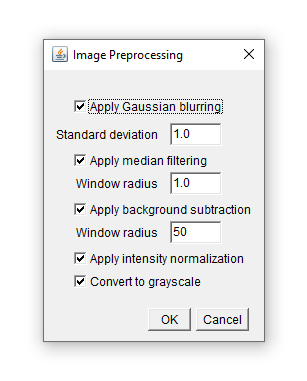
where the user can activate the various algorithms and specify their parameters as necessary. This user interface however does not take into account that different algorithms could occur repeatedly, and it does not allow to change the order.
Using Natural Language Scripting, we want to implement a text-based interface which reads and executes text like:
Apply Gaussian blurring with a standard deviation of 3 pixel(s).
Subtract the background with a window readius of 30 pixel(s).
Apply Median filtering with a window radius of 1 pixel(s).
Normalize intensities.
Apply Gaussian blurring with a standard deviation of 1 pixel(s).
More information
- A step-by-step tutorial
- The tutorial source code
- Details how to define variables
- Built-in types apart from
float - More detail about custom types
License
This project is licensed under the MIT License - see the LICENSE.txt file for details.
This project depends on PySide2, which is licensed under LGPL-3.0 License.
Users are entitled to modify and replace the LGPL-licensed PySide2 library. For more details, please refer to the LGPL-3.0 license text included in the LICENSE file.
If you need to install or modify PySide2, it can be obtained from: PySide2 on PyPI
Release history Release notifications | RSS feed


Download files
Download the file for your platform. If you're not sure which to choose, learn more about installing packages.
Source Distribution
Built Distribution
Filter files by name, interpreter, ABI, and platform.
If you're not sure about the file name format, learn more about wheel file names.
Copy a direct link to the current filters
File details
Details for the file nlscript-0.1.0.tar.gz.
File metadata
- Download URL: nlscript-0.1.0.tar.gz
- Upload date:
- Size: 48.9 kB
- Tags: Source
- Uploaded using Trusted Publishing? No
- Uploaded via: twine/5.1.1 CPython/3.10.5
File hashes
| Algorithm | Hash digest | |
|---|---|---|
| SHA256 |
a0ebf67a85b8e09f5881f702fc6c1bb0d77ae3b83e1aa3cd612f286fc4f60156
|
|
| MD5 |
89f575f3321d8ae7499410bd3d1745c6
|
|
| BLAKE2b-256 |
4e73c6d66fe1890ac465311e6266d730b2a3268c7da3e6904fa3eb9bcb5eb344
|
File details
Details for the file nlScript-0.1.0-py3-none-any.whl.
File metadata
- Download URL: nlScript-0.1.0-py3-none-any.whl
- Upload date:
- Size: 73.5 kB
- Tags: Python 3
- Uploaded using Trusted Publishing? No
- Uploaded via: twine/5.1.1 CPython/3.10.5
File hashes
| Algorithm | Hash digest | |
|---|---|---|
| SHA256 |
06fb0477a1a18202efe2d86b0fbabf78545d502b2e7a32f1037790b03855579b
|
|
| MD5 |
c0139444ef64f4f9c938aecb0b7372bc
|
|
| BLAKE2b-256 |
3948a7da897efbe8dc3445d05168e425f85afff81be6c59592e16fad91e1cb88
|






