
NLDisco
Neural Latent Discovery
Find interpretable features in neural population activity.
Quick start · User guide · Documentation · Paper · Experiments

NLDisco learns sparse, overcomplete representations of neural activity. Each latent is a candidate feature to inspect alongside behavior, stimuli, or other metadata. Training uses neural activity alone; behavioral labels enter during interpretation.
- Discover at multiple scales. Matryoshka dictionaries learn nested sets of latents.
- Capture temporal context. Encode single bins or complete windows with linear or transformer encoders, including an optional shift-equivariant mode.
- Connect populations. Reconstruct the input population or predict an aligned target population.
- Inspect what you learn. Evaluate reconstruction, latent ablations, and spectral fidelity.
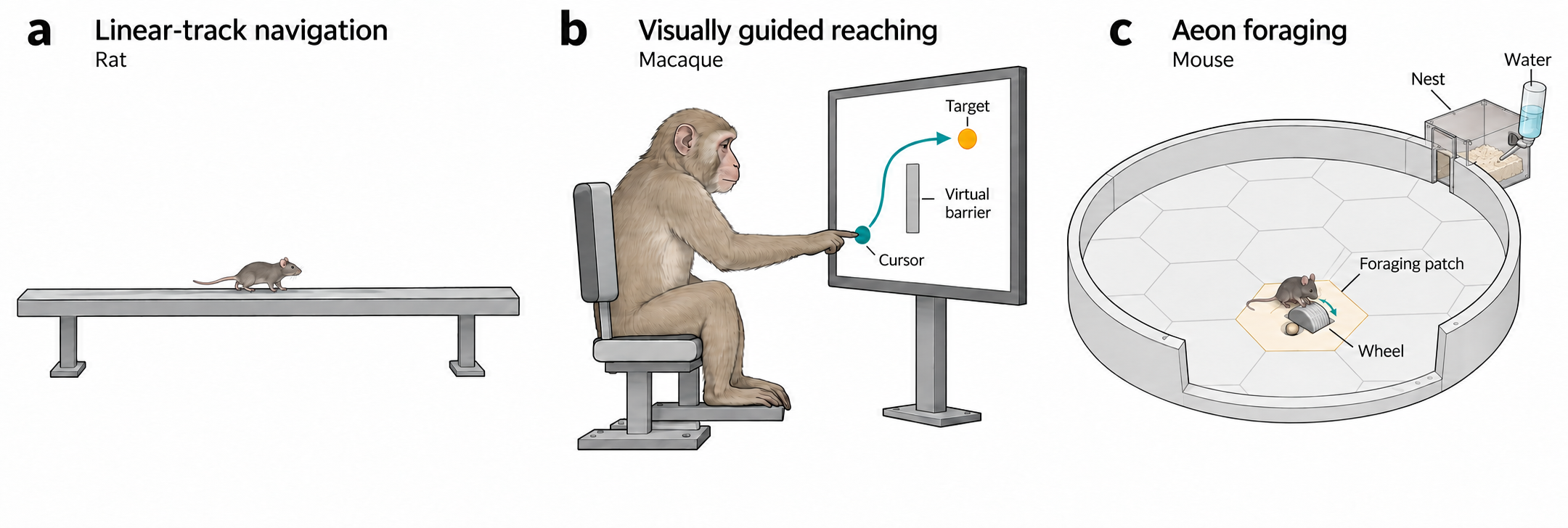
NLDisco across datasets: simulated navigation, macaque reaching, and mouse foraging.
From activity to interpretable latents
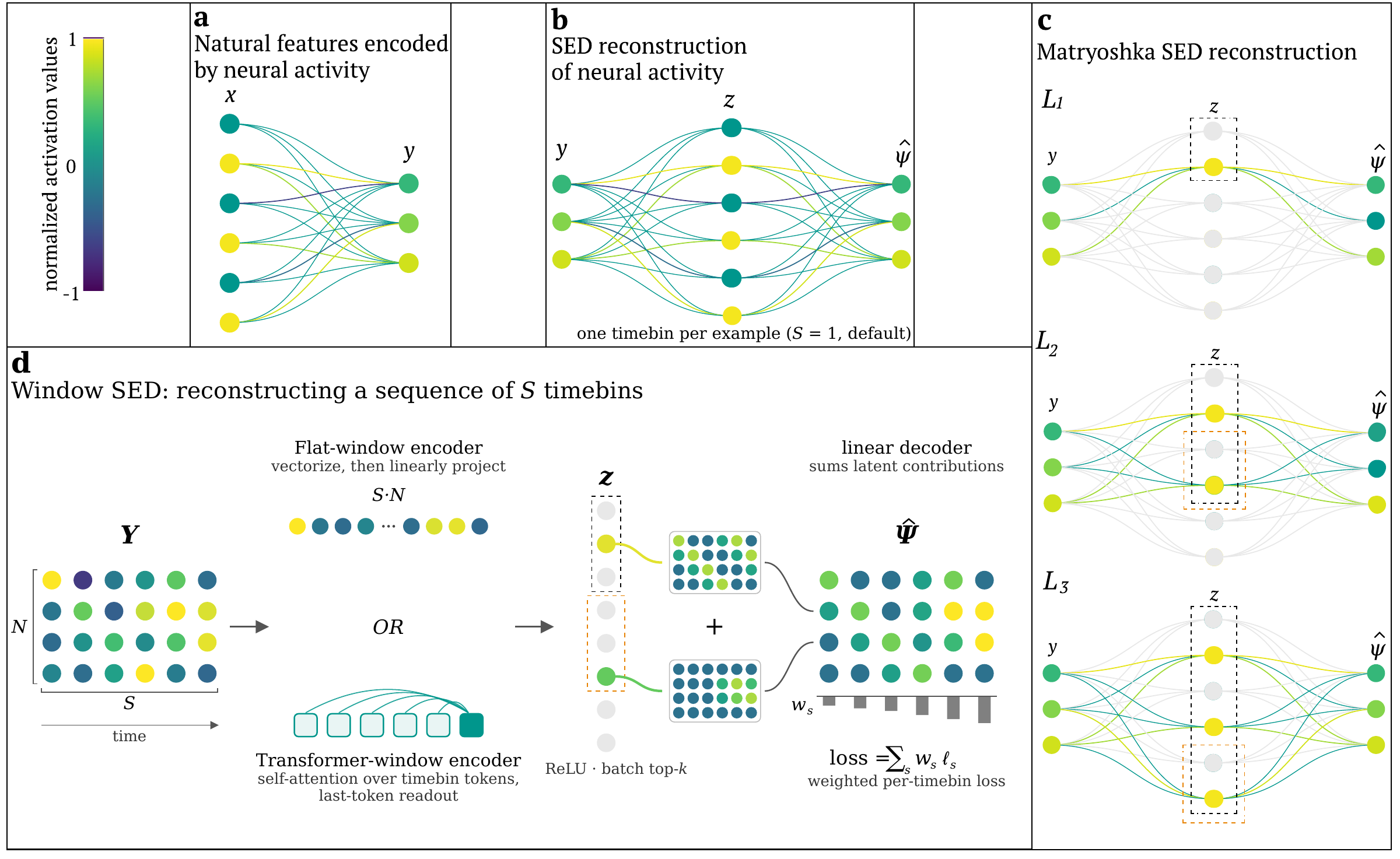
Figure 2 · Model architecture. (a) Natural features are jointly encoded in neural activity. (b) A sparse encoder-decoder reconstructs neural activity through a small set of active latents; targets can be the input population or a separate, aligned population. (c) Matryoshka levels each reconstruct the target using nested latent sets. (d) Window models reconstruct every timebin using either a flattened linear encoder (FW-SED) or a transformer encoder (TW-SED), with reconstruction scored per bin.
The Python API uses [batch, timebin, unit] tensors. Build a window model with:
from nldisco import EncoderConfig, SedConfig, build_sed

model = build_sed(SedConfig(
    n_neurons=100,
    seq_len=8,
    dsed_topk_map={128: 4, 512: 8},
    encoder=EncoderConfig(type="TransformerWindow"),
))
Use FlatWindow for a linear encoder, or set seq_len=1 for a single-bin SED.
For paired populations, set n_output_neurons and supply targets= to
SpikeWindowDataset; the CLI equivalents are data.target_path and
data.target_normalization. Inputs and targets share their time grid and splits,
while unit counts can differ. Inference needs only inputs.
See models and inference, the paired-population example, and evaluation for details.
Why individual latents?
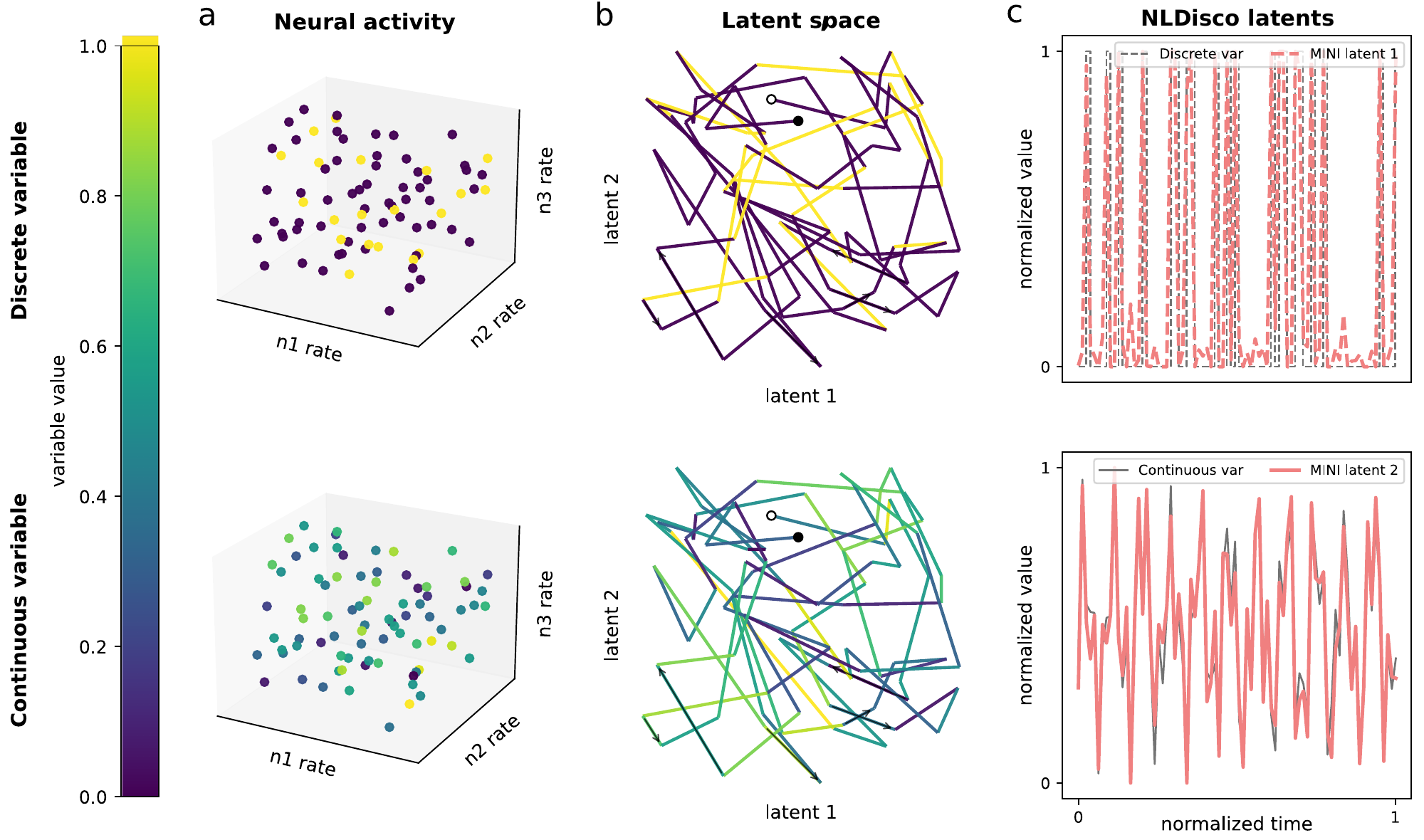
Figure S1 · Interpretable latents in a complex latent space. A toy example with a discrete variable (top) and a continuous variable (bottom). (a) Both are encoded in three neurons' firing rates. (b) A two-dimensional projection creates tangled trajectories; white and black dots mark their start and end. (c) Individual NLDisco latents track the variables, illustrating the aim of interpretable feature discovery. This is a conceptual illustration, not a benchmark result.
Method comparison
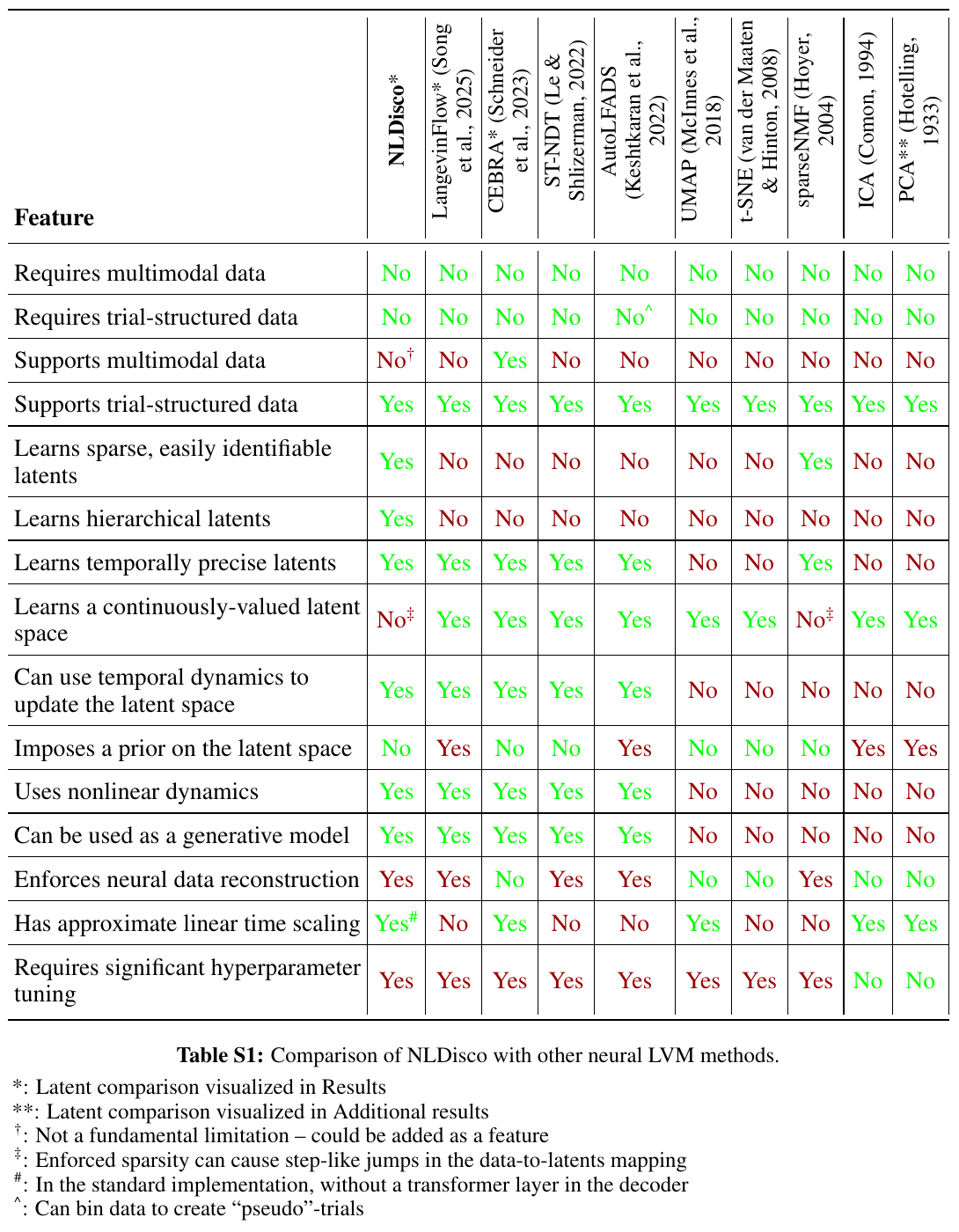
The paper's qualitative comparison of 15 methodological features. Click the table for full resolution; see the paper for context and references.
Explore and develop
| Resource | Contents |
|---|---|
| Documentation | Preprocessing, models, training, checkpoint reloads, and evaluation |
| Examples | Runnable walkthroughs using generated data |
| Experiments | Paper datasets, configurations, notebooks, and result artifacts |
| Library | Model, data, training, evaluation, plotting, and sweep code |
uv run pytest                             # Core library tests
uv run pytest experiments/tests           # Paper-analysis tests
uv run jupyter lab
CEBRA comparisons require uv sync --locked --extra analysis; Churchland data
helpers additionally require --extra churchland. See installation.
To register a Jupyter kernel, run uv run python -m ipykernel install --user --name=nldisco.
Quick start
NLDisco requires Python 3.9–3.13.
To install the library into an existing, activated Python environment, use either:
uv pip install nldisco
# Or:
python -m pip install nldisco
To work with the source, examples, or notebooks, install uv and clone the repository:
git clone https://github.com/jkbhagatio/nldisco.git nldisco
cd nldisco
uv sync --locked
uv run python examples/paired_transcoder.py --layout flat
See installation for editable installs into existing
environments, optional dependencies, and development setup. Commands prefixed
with uv run below assume the source checkout; in an existing environment,
activate it and omit uv run.
The example generates its own data, trains a model, evaluates it, and demonstrates
inference. It also supports single_bin, transformer, and shift_equivariant layouts.
For your own data, supply a numeric .npy array shaped [timebin, unit]:
# Train one model on nonnegative spike counts.
uv run python -m nldisco.sweep --config-name train data.path=/path/to/counts.npy training.epochs=10

# Sweep learning rates and seeds with two local workers.
uv run python -m nldisco.sweep data.path=/path/to/counts.npy execution.max_parallel=2
The defaults use MSLE loss and a ReLU decoder. For signed targets, including z-scores,
set loss.type=mse model.decoder.output_activation=none.
See preprocessing for Kilosort/Phy loading and spike binning,
and training and sweeps for GPU, W&B, and Slurm execution.
User guide
A Kilosort/Phy recording can move through the full pipeline in five steps.
1. Load and bin spikes. load_kilosort reads sorter exports and retains the
unit-ID mapping. Set the actual sampling rate and recording duration:
import numpy as np
from nldisco.data import load_kilosort

binned = load_kilosort(
    "/path/to/kilosort", sampling_rate=30_000, bin_size=0.02,
    start_time=0, stop_time=600,
)
np.save("counts.npy", binned.counts)
np.save("timestamps.npy", binned.timestamps)
np.save("unit_ids.npy", binned.unit_ids)
2. Preprocess and split. Keep the saved counts raw. The runner below fits z-score normalization on training rows only, then applies it to validation rows. It builds 8-bin windows with an 80/20 chronological split. Supply trial/session IDs and validity masks when needed to prevent windows crossing boundaries; see preprocessing.
3. Train with a W&B sweep. Authenticate with uv run wandb login (or set
WANDB_API_KEY in .env), then launch a Bayesian search over learning rates and seeds:
uv run python -m nldisco.sweep --config-name wandb \
  data.path=counts.npy data.timestamps=timestamps.npy data.expected_bin_size=0.02 \
  data.normalization=zscore loss.type=mse model.decoder.output_activation=none \
  training.epochs=20 search.max_runs=10 wandb.project=nldisco-kilosort
W&B minimizes validation/loss. Each trial saves its configuration, calibrated
checkpoint, and reconstruction metrics under outputs/nldisco/.
Training and sweeps covers search spaces and GPU/Slurm settings.
4. Evaluate the model. Pick a trial using validation results and reload its checkpoint. With the original recording files unchanged, rebuild the same split and preprocessing:
from nldisco.sweep.training import load_checkpoint, model_and_loss, prepare_data
from nldisco.train import evaluate_model
from nldisco.plot import plot_reconstruction_by_lag

saved = load_checkpoint("outputs/nldisco/<invocation>/run-0000/model.pt")
model = saved.model
_, loss = model_and_loss(saved.config, model.cfg.n_neurons, model.cfg.n_output_neurons)
_, validation, _ = prepare_data(saved.config, model.cfg)
result = evaluate_model(model, validation, loss)
print(result.metrics_by_lag)
plot_reconstruction_by_lag(result.metrics_by_lag)
Optional ablation and spectral diagnostics test individual latent contributions and frequency fidelity. Keep a separate test set for final reporting.
5. Evaluate the latents. Inspect decoder patterns and align latent activations with behavior. For example, plot latent 0 over the eligible validation positions, retaining zeros where it was inactive:
from nldisco.plot import plot_decoder_feature

plot_decoder_feature(model.decoder, latent_idx=0)
latent = result.evaluation_index[["source_time_idx"]].merge(
    result.activation_table.query("latent_idx == 0")[["source_time_idx", "activation_value"]],
    on="source_time_idx", how="left",
).fillna({"activation_value": 0})
latent["time_s"] = np.load("timestamps.npy")[latent.source_time_idx]
latent.plot(x="time_s", y="activation_value")
Synchronize behavioral measurements to the recording clock, then join them through
source_time_idx. Compare tuning and activating examples; quantify candidate features
with coverage, specificity, and AUROC over both active and inactive positions.
Decoder weights describe reconstructed activity; they are not causal attributions.
See the paper experiments for dataset-specific latent analyses.
License
NLDisco's original software is source-available under the PolyForm Noncommercial License 1.0.0. It permits use, modification, and redistribution for the purposes described in the license, including noncommercial use and use by the educational and research organizations it covers. Commercial uses outside those permissions require a separate license from the copyright holders.
For commercial licensing enquiries, contact Jai Bhagat.
Third-party software and datasets retain their respective licenses and terms. In particular, the bundled LangevinFlow code retains its own license.
1 maintainer

Release files for nldisco 1.0.0
For a detailed explanation of source distributions (sdists) and built distributions (wheels), please see the package formats documentation.
Source distribution (sdist)
| File | Size | Uploaded | |
|---|---|---|---|
| nldisco-1.0.0.tar.gz | 535.4 kB | Details |
Built distribution (wheel)
| File | Interpreter | ABI | Platform | Reset |
|---|---|---|---|---|
| nldisco-1.0.0-py3-none-any.whl | Python 3 | none | any | Details |
Total release size: 595.2 kB
Release files / nldisco-1.0.0.tar.gz
| Download URL | nldisco-1.0.0.tar.gz |
|---|---|
| Size | 535.4 kB |
| Tags | Source |
|
SHA-256 checksum How to use checksums |
3e9e9b736f24239127323e511ba9949f1d86adaf143c89ce31211cd655d97388
|
|
BLAKE2b-256 checksum How to use checksums |
af37b2f6ccc1f21394886038fb3f9b530a1eca59652fae516b191cd937f826fe
|
| Upload date | |
|
Uploaded using Trusted Publishing? What is trusted publishing? |
No |
| Uploaded via |
uv/0.12.7 {"installer":{"name":"uv","version":"0.12.7","subcommand":["publish"]},"python":null,"implementation":{"name":null,"version":null},"distro":{"name":"Ubuntu","version":"24.04","id":"noble","libc":null},"system":{"name":null,"release":null},"cpu":null,"openssl_version":null,"setuptools_version":null,"rustc_version":null,"ci":null}
|
Release files / nldisco-1.0.0-py3-none-any.whl
| Download URL | nldisco-1.0.0-py3-none-any.whl |
|---|---|
| Size | 59.9 kB |
| Tags | Python 3 |
|
SHA-256 checksum How to use checksums |
050a5fb252a3a43ed1e1a9d9e880112c7e1398e6df889b94f720bc1c98181568
|
|
BLAKE2b-256 checksum How to use checksums |
b615ac756cb512411019c963105aaf293390b6fffdc503f418c7b23a7be56f61
|
| Upload date | |
|
Uploaded using Trusted Publishing? What is trusted publishing? |
No |
| Uploaded via |
uv/0.12.7 {"installer":{"name":"uv","version":"0.12.7","subcommand":["publish"]},"python":null,"implementation":{"name":null,"version":null},"distro":{"name":"Ubuntu","version":"24.04","id":"noble","libc":null},"system":{"name":null,"release":null},"cpu":null,"openssl_version":null,"setuptools_version":null,"rustc_version":null,"ci":null}
|













