

NNEditor
Inspect, understand, edit, optimize, and trace neural-network artifacts without loading an entire model into memory or executing artifact-provided code.
NNEditor 1.0 is a capability-aware neural-network workspace for ONNX, PyTorch, safetensors, and textual StableHLO artifacts. It combines semantic graph navigation, lazy tensor access, reversible editing, validated export, and desktop activation tracing in one application.
NNEditor in action
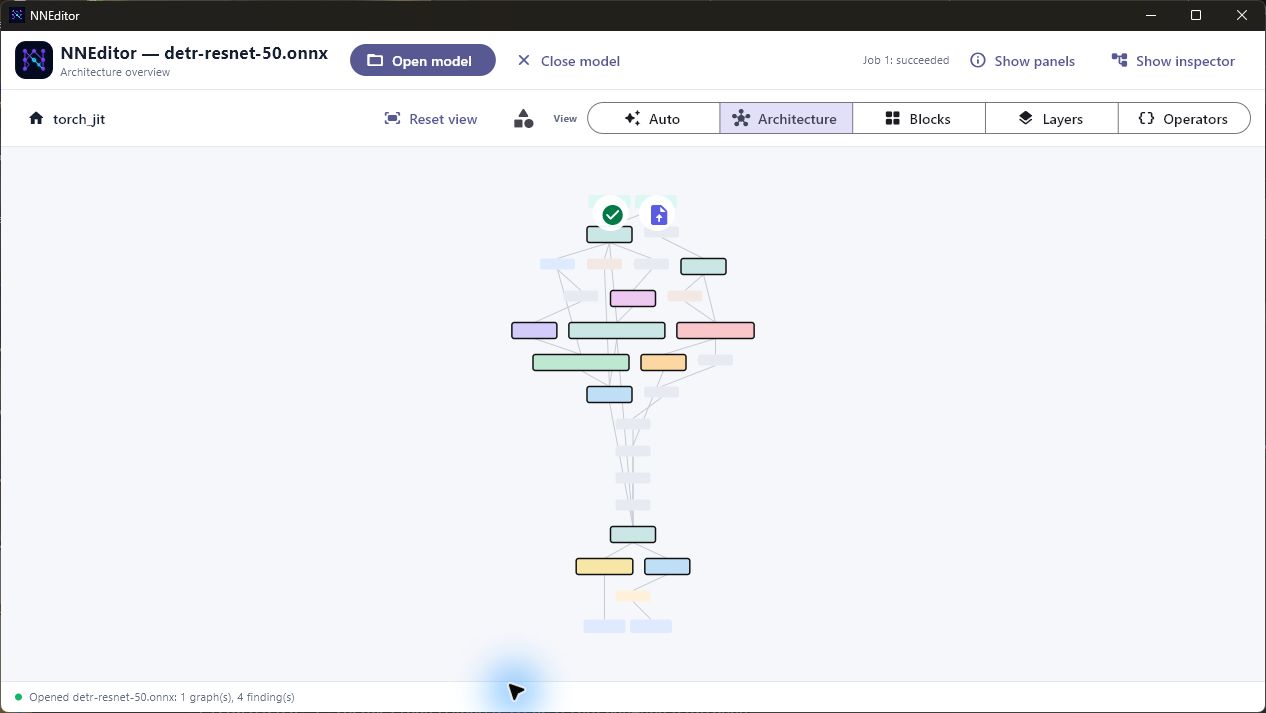
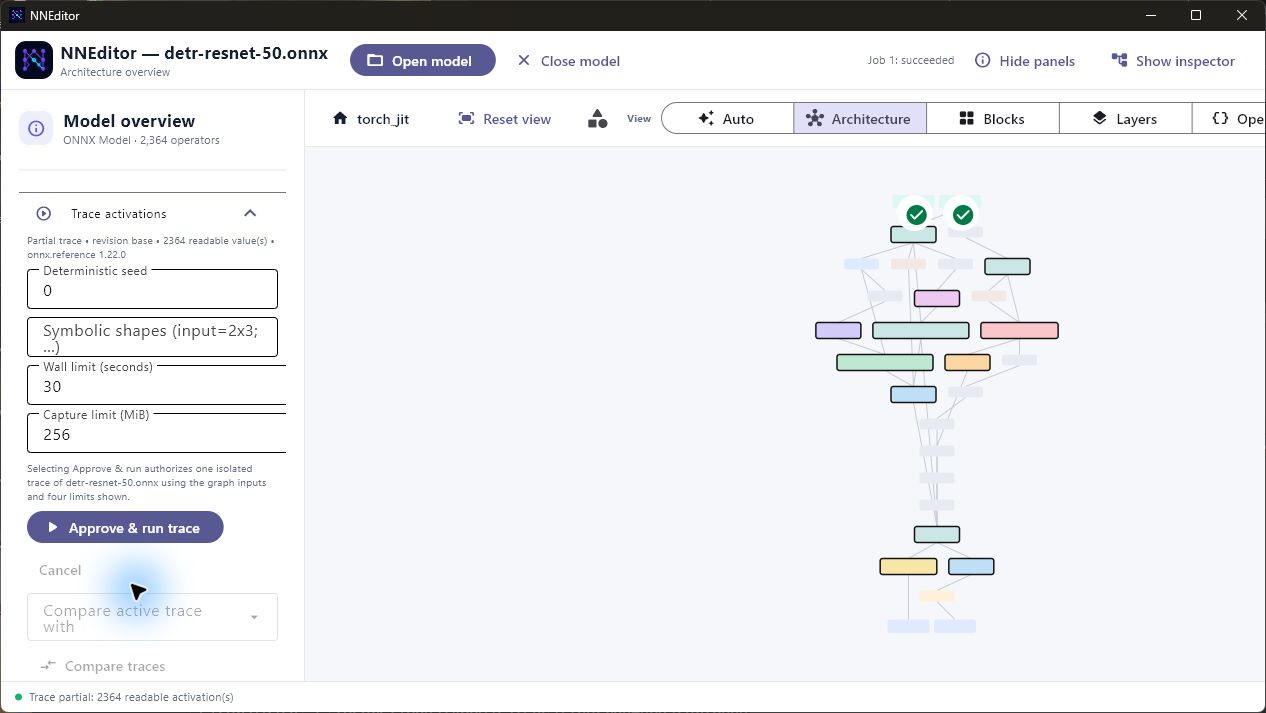
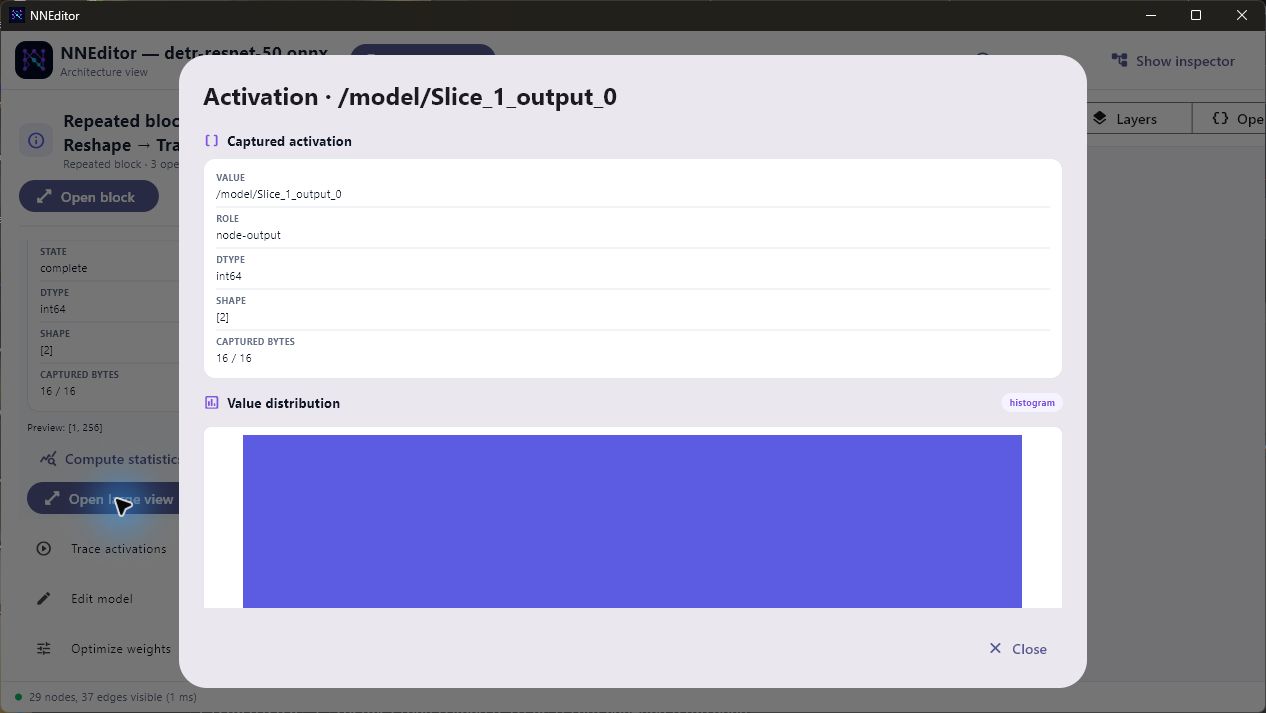
These screenshots come from a real desktop session with the 2,364-operator
detr-resnet-50.onnx model. The trace used the included fox image tensor and an
automatically generated all-valid pixel mask. It reached the approved 256 MiB
capture bound, so NNEditor reported an honest partial result while retaining
2,364 readable activations.
Navigate a model by architecture
Run a bounded activation trace
Open activation data in a large view
Highlights
- Navigate large graphs through architecture, block, layer, and operator views.
- Detect attention, feed-forward, convolutional, repeated, and structural regions with retained evidence and explanations.
- Read embedded and external tensors lazily through bounded byte ranges.
- Inspect tensor metadata, decoded previews, heatmaps, streaming statistics, and paged hexadecimal data.
- Apply reversible graph and tensor changes without modifying the source artifact.
- Save only when needed through a dirty-aware top-bar action, or close the current model without quitting the application.
- Generate safe
.npytest inputs from images, masks, CSV data, synthetic time series, text token ids, or generic tensor patterns, then assign them to model inputs. - Tokenize prompt text into language-model input ids through a selectable
codebook: byte level, Unicode code points, or hashed words with no external
files, plus GPT-2/RoBERTa byte-level BPE loaded from a HuggingFace
vocab.jsonandmerges.txtor a singletokenizer.json. Every codebook states how faithful its ids are to the model's own tokenizer. - Preview quantization and pruning before committing them.
- Export validated ONNX revisions or clearly labelled weights-only artifacts.
- Trace ONNX activations in an isolated desktop worker and inspect values by clicking nodes, blocks, connections, inputs, or outputs.
- Explain every unavailable action through an explicit artifact capability contract.
Supported artifacts
NNEditor identifies artifacts by their contents, not only by their extension. The table describes the built-in readers and the strongest release-level workflow available for each artifact.
| Artifact | Inspection | Editing | Export | Activation tracing |
|---|---|---|---|---|
| ONNX model, including external data | Graphs, weights, metadata | Validated graph and tensor subset | ONNX with validation and provenance | Available on desktop |
| PyTorch exported program | Graph, parameters, buffers, constraints | Parameter and buffer bytes | Weights-only safetensors | Unavailable |
| PyTorch state dictionary | Weights and tensor metadata | Tensor-level changes | Weights-only artifact | Unavailable |
| PyTorch FX graph module | Partial topology and metadata | Unavailable | Unavailable | Unavailable |
| Safetensors | Weights and header metadata | Tensor-level changes | Safetensors | Unavailable |
| Flax or Orbax checkpoint | Weights and tensor metadata | Tensor-level changes | Weights-only artifact | Unavailable |
| Textual StableHLO | Functions, regions, operations, attributes | Inspection only | Unavailable | Unavailable |
Support is intentionally capability-specific. For example, opening a checkpoint does not imply that NNEditor can reconstruct a model graph, and reading StableHLO does not imply that NNEditor can write the dialect back. Unavailable actions explain the format-specific reason directly in the interface.
Installation
NNEditor requires Python 3.12, 3.13, or 3.14.
python -m pip install nneditor==1.1.1
Start the desktop application with either command:
nneditor
python -m nneditor
Open a model directly from the command line:
nneditor path/to/model.onnx
On Windows, select File types in the top bar to register NNEditor for
.onnx, .pb, .pt2, .pt, .pth, .ckpt, .bin, .safetensors,
.mlir, and .stablehlo files. NNEditor then opens Windows Default apps,
where you choose which extensions should launch it. Registration is per-user
and never replaces a protected Windows default without that explicit choice.
First run
- Select Open model and choose a supported artifact. NNEditor detects its format from the file contents.
- Start in the architecture view, then open a block or change the detail level to move through blocks, layers, and operators.
- Select a node to inspect its ports, attributes, weights, and capability information.
- Use search, breadcrumbs, the hierarchy explorer, keyboard navigation, and the minimap to move around large models.
- Prepare edits or transformations in the left panel. NNEditor validates a preview before enabling Commit.
- After a commit, Save changes… appears in the top bar. Select it to export the current revision to a new destination; it disappears after a successful save and returns after another change.
- Select Close model to release the current artifact and return to the start screen without quitting NNEditor.
The opened source remains unchanged throughout this workflow. A recovered sidecar revision is treated as unsaved and offers Save changes… immediately.
Large imports, statistics, exports, and traces run as cancellable background jobs. The interface reports partial or unavailable data instead of presenting it as complete.
Activation tracing
Desktop tracing is available for ONNX models:
- Open Generate test input to resize an image, create a mask, convert
numeric CSV/time-series data, synthesize a signal, or create a generic
tensor. Select a model input and use Generate, save & assign to return
directly to that input node. You can also click the tensor-picker button
inside an input node and choose an existing safe NumPy
.npytensor. Image dimensions are shown and applied as height then width, matching tensor shape conventions. Fixed Qwen3-VLpixel_valuesinputs automatically use the model-compatible flattened-patch profile. Required*_maskinputs left unchanged use an automatically generated all-valid mask; other inputs use deterministic random data. - Open Trace activations, review the execution backend, execution device,
input specification, and wall-clock, memory, capture, and chunk limits.
Automatic tries installed GPU and NPU execution providers before CPU;
an explicit GPU or NPU choice is strict and never silently runs on CPU.
Automatic backend mode falls back from ONNX Runtime to NNEditor's
axis-aware ONNX reference evaluator when no compatible runtime provider is
available. The normalized reference option rewrites nonzero
Scanaxes with semantics-preserving transposes inside the private worker model. - Select Approve & run trace. This click creates an approval bound to the current model, inputs, and limits for that run only.
- Click any operator, semantic block, visible connection, model input, or model output. NNEditor automatically builds the corresponding bounded activation views and shows them in the inspector.
- Select Open large view on an activation card for a scrollable overlay containing its histogram, line view, heatmap, feature-map grid, or attention view, as applicable.
The top-right device indicator shows the provider that actually completed the latest trace. NNEditor recognizes ONNX Runtime's CUDA, TensorRT, DirectML, OpenVINO GPU, MIGraphX, and ROCm GPU providers, plus OpenVINO NPU, Qualcomm QNN HTP, and AMD Vitis AI NPU providers.
The base NNEditor installation ships no ONNX Runtime: every accelerator family
publishes its own distribution and all of them own the same onnxruntime
import name, so a fixed dependency on one would block the others. Install
exactly one runtime extra for the hardware you want to trace on:
| Install | Runtime |
|---|---|
pip install nneditor[runtime] |
CPU |
pip install nneditor[runtime-gpu] |
NVIDIA CUDA / TensorRT |
pip install nneditor[runtime-directml] |
Any Windows GPU via DirectML |
pip install nneditor[runtime-qnn] |
Qualcomm NPU (QNN HTP) |
pip install nneditor[runtime-openvino] |
Intel GPU and NPU via OpenVINO |
Without a runtime, automatic backend selection uses NNEditor's axis-aware ONNX reference evaluator on CPU and says so; an explicit ONNX Runtime, GPU, or NPU request fails with the extra to install. Accelerators additionally need their vendor drivers in the same environment; follow the provider vendor's compatibility and installation instructions.
Ready-made image and time-series tensors are available in examples/trace-inputs.
Input tensors are checked against the model's declared dtype and shape. Approval is created only when Approve & run trace is selected, so a changed input or limit cannot reuse stale consent. The UI captures graph inputs and operator outputs by default so inspection does not depend on the selection that was active when the trace began.
Tracing uses ONNX Runtime or an ONNX reference-evaluator mode in a separate, resource-limited process. The approved memory ceiling limits host RAM; device memory remains under the accelerator provider and driver. A failed or cancelled run publishes no trace. Desktop subprocess isolation is not a multi-tenant security boundary, so tracing is disabled in the browser application until a dedicated worker service is available.
Editing and optimization
Validated ONNX editing
The 1.0 release supports a deliberately bounded entry-graph edit surface:
- rename nodes;
- edit supported scalar and list attributes;
- replace compatible operators;
- insert or remove validated unary operators;
- reconnect compatible inputs; and
- replace same-length tensor byte ranges.
Every change is prepared as a transaction, checked against the graph and ONNX schema, and committed as a reversible revision. Undo, redo, recovery, diff previews, and export provenance use the same revision chain.
Quantization and pruning
NNEditor can preview and commit:
- 8-bit signed or unsigned, symmetric or asymmetric weight conversion;
- per-tensor and per-channel quantization;
- portable ONNX QuantizeLinear/DequantizeLinear insertion;
- threshold, mask, and exact
N:Mlogical pruning; and - a shape-proven terminal
MatMulchannel-pruning pattern.
The UI distinguishes a mathematical conversion from storage reduction or runtime acceleration. Logical sparsity alone is never advertised as a smaller or faster model.
Safety and data integrity
NNEditor is safe-artifact-first:
- Import parses artifact bytes without importing or executing Python stored in the artifact.
- Pickle-based PyTorch containers are inspected through a restricted, non-executing reader.
- Source artifacts are immutable and identified by cryptographic content hashes.
- External tensor files are verified before their bytes are used.
- Tensor reads, caches, statistics, capture storage, and writes are bounded.
- Unsupported or ambiguous edits are rejected rather than approximated.
- Exports are staged, validated, and published as new artifacts.
- Inference requires explicit per-run approval and enforced resource limits.
Large-model design
NNEditor avoids eager model materialization during normal inspection. Its ONNX reader indexes protobuf wire ranges directly, tensor storage uses range reads and bounded caches, and semantic graph levels keep the visible working set manageable. The renderer is behind a toolkit-neutral contract and uses culling, persistent shapes, and deterministic aggregation.
These choices make ordinary navigation responsive without pretending that an unaggregated view containing tens of thousands of visible operators is cheap.
Platform support
The desktop application targets:
- 64-bit Windows 10 and 11;
- macOS 12 or newer; and
- Debian 10–12 and Ubuntu 20.04, 22.04, and 24.04 LTS.
CI exercises Python 3.12, 3.13, and 3.14 on Linux and Python 3.14 on Windows. The dynamic Flet browser application supports model inspection and editing, but desktop-only tracing and browser multi-file export packaging remain unavailable. Mobile packaging is outside the 1.0 release.
Known boundaries
- Structural editing is limited to validated ONNX entry-graph cases.
- Custom or unknown operator schemas may be inspected but are not guessed during editing or tracing.
- PyTorch graph re-serialization and ONNX conversion are not included.
- Textual StableHLO is inspection-only.
- Weights-only exports do not contain executable topology.
- Browser tracing is disabled pending multi-user worker isolation.
- Text tokenization ships no vocabularies: byte, code-point, and hashed-word codebooks are self-contained, while BPE needs the model's own vocabulary files. The BPE pre-tokenizer approximates GPT-2's, so ids can differ from the reference tokenizer on unusual scripts or symbol runs; each codebook reports its own fidelity and the generated tensor records it.
- The original Python, module definitions, and training code cannot be reconstructed from serialized artifacts.
Author
NNEditor was developed by Imed Bouazizi.
License
NNEditor is licensed under the Apache License 2.0. Attribution and copyright information is provided in NOTICE.
Development
The development environment is managed with uv:
uv sync --locked --group dev
Run the desktop application:
uv run flet run src/main.py
Run the browser application:
uv run flet run --web src/main.py
Run the release quality gates:
uv run ruff format --check .
uv run ruff check .
uv run mypy
uv run pytest -m "not performance" \
  --cov=nneditor \
  --cov-report=term-missing \
  --cov-fail-under=90
uv run pytest -m performance tests/performance
Build and validate the distributions:
uv build --clear
uvx twine check --strict dist/*
1 maintainer

Download files
Download the file for your platform. If you're not sure which to choose, learn more about installing packages.
Source Distribution
Built Distribution
Filter files by name, interpreter, ABI, and platform.
If you're not sure about the file name format, learn more about wheel file names.
Copy a direct link to the current filters
File details
Details for the file nneditor-1.3.1.tar.gz.
File metadata
- Download URL: nneditor-1.3.1.tar.gz
- Upload date:
- Size: 1.1 MB
- Tags: Source
- Uploaded using Trusted Publishing? Yes
- Uploaded via: twine/7.0.0 CPython/3.13.14
File hashes
| Algorithm | Hash digest | |
|---|---|---|
| SHA256 |
291753a03677bedf2cc6bc02bc5cc61df3f304a2ea64b1267b3a9aa18dcf8a49
|
|
| MD5 |
887123f35c4ef09a89e987a00710dc88
|
|
| BLAKE2b-256 |
a3cca97bc5dc34fc638387315b0756efe7455367781b88910fc3d1acdac70786
|
Provenance
The following attestation bundles were made for nneditor-1.3.1.tar.gz:
Publisher:
publish.yml on ibouazizi/nneditor
-
Statement:
-
Statement type:
https://in-toto.io/Statement/v1 -
Predicate type:
https://docs.pypi.org/attestations/publish/v1 -
Subject name:
nneditor-1.3.1.tar.gz -
Subject digest:
291753a03677bedf2cc6bc02bc5cc61df3f304a2ea64b1267b3a9aa18dcf8a49 - Sigstore transparency entry: 2340918600
- Sigstore integration time:
-
Permalink:
ibouazizi/nneditor@ae32ac7b12ef9cb6ecebfe13a58a9fa10307572c -
Branch / Tag:
refs/tags/v1.3.1 - Owner: https://github.com/ibouazizi
-
Access:
public
-
Token Issuer:
https://token.actions.githubusercontent.com -
Runner Environment:
github-hosted -
Publication workflow:
publish.yml@ae32ac7b12ef9cb6ecebfe13a58a9fa10307572c -
Trigger Event:
push
-
Statement type:
File details
Details for the file nneditor-1.3.1-py3-none-any.whl.
File metadata
- Download URL: nneditor-1.3.1-py3-none-any.whl
- Upload date:
- Size: 1.2 MB
- Tags: Python 3
- Uploaded using Trusted Publishing? Yes
- Uploaded via: twine/7.0.0 CPython/3.13.14
File hashes
| Algorithm | Hash digest | |
|---|---|---|
| SHA256 |
0493297fe622ab3d76e26afb847f721b6bef45a5afbbc525d9e4f7a9433f6de0
|
|
| MD5 |
510183fb195bc0dce7386b10d2a07a9b
|
|
| BLAKE2b-256 |
9479d3c60b27bf2337902dcb5944b7b2ae11aaef2b6f514b6269a161386d1478
|
Provenance
The following attestation bundles were made for nneditor-1.3.1-py3-none-any.whl:
Publisher:
publish.yml on ibouazizi/nneditor
-
Statement:
-
Statement type:
https://in-toto.io/Statement/v1 -
Predicate type:
https://docs.pypi.org/attestations/publish/v1 -
Subject name:
nneditor-1.3.1-py3-none-any.whl -
Subject digest:
0493297fe622ab3d76e26afb847f721b6bef45a5afbbc525d9e4f7a9433f6de0 - Sigstore transparency entry: 2340918608
- Sigstore integration time:
-
Permalink:
ibouazizi/nneditor@ae32ac7b12ef9cb6ecebfe13a58a9fa10307572c -
Branch / Tag:
refs/tags/v1.3.1 - Owner: https://github.com/ibouazizi
-
Access:
public
-
Token Issuer:
https://token.actions.githubusercontent.com -
Runner Environment:
github-hosted -
Publication workflow:
publish.yml@ae32ac7b12ef9cb6ecebfe13a58a9fa10307572c -
Trigger Event:
push
-
Statement type:







