
A cli notetaking tool

Project description
nnotes
nnotes is a command line note taking tool. The goal is to be able to add, view and manipulate notes quickly and easily.
Installation
pip install nnotes
Main commands help
Features:
- multiple notebooks
- add notes
- delete notes (single, multiple, range)
- create notebook
- delete notebook
- custom notebooks directory
Usage (nnotes can be launched by typing 'n' or 'nnotes'):
    n [command]
    nnotes [command]

Available commands:
    add [note]                                  add note to active notebook
    ls                                          list / view notes from active notebook
    rm 2 3                                      delete note(s) 2 and 3
    rm range 3 7                                delete notes 3 to 7 (included)

    add @[notebook] [note]                      add note [note] to notebook [notebook]
    ls @[notebook]                              show notes from [notebook]
    rm @[notebook] 4                            delete note 4 from [notebook]
    rm range @[notebook] 3 7                    delete notes 3 to 7 (included) from [notebook]

    add @[notebook]                             create notebook [notebook]
    ls @                                        list all notebooks
    ls @ path                                   list notebooks with their path
    rm @[notebook]                              delete notebook

    set active [notebook]                       set active notebook [notebook]
    get active                                  show active notebook

    get notebooks path                          show notebooks directory
    set notebooks path [notebooks path]         set notebooks directory
Note for Windows users:
Windows users must wrap arguments starting with @ with single or double quotes (ex. windows users should type n ls '@' instead of n ls @ ), or escape commands starting with @ with a backtick (ex. n ls `@ instead of n ls @ )
n add '@school' new note would be the way to add 'new note' to the 'school' notebook. Or alternatively:
n add `@school new note would also work.
Example usage
n and nnotes can both be used:
$ n add new note
is the same as:
$ nnotes add new note
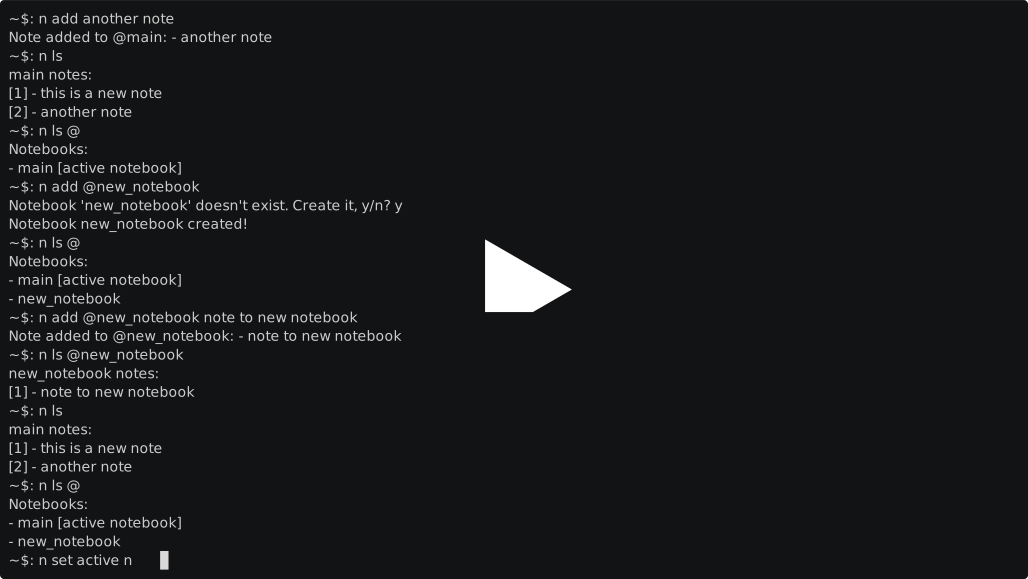
Other example commands:
$ n ls
$ n add @main another note
$ n ls @
etc.
Release history Release notifications | RSS feed


Download files
Download the file for your platform. If you're not sure which to choose, learn more about installing packages.
Source Distribution
Built Distribution
Filter files by name, interpreter, ABI, and platform.
If you're not sure about the file name format, learn more about wheel file names.
Copy a direct link to the current filters
File details
Details for the file nnotes-0.0.3.tar.gz.
File metadata
- Download URL: nnotes-0.0.3.tar.gz
- Upload date:
- Size: 19.4 kB
- Tags: Source
- Uploaded using Trusted Publishing? No
- Uploaded via: twine/3.7.1 importlib_metadata/4.10.1 pkginfo/1.8.2 requests/2.22.0 requests-toolbelt/0.9.1 tqdm/4.56.0 CPython/3.8.2
File hashes
| Algorithm | Hash digest | |
|---|---|---|
| SHA256 |
64c0a2e10a48322afd87e7707257b697b040ced68314d23fbb16d6cb8912cc98
|
|
| MD5 |
05f1b61ddb6bcc8d1406c7b54559bb26
|
|
| BLAKE2b-256 |
f471f44490f832230981aac8e119905431dde7365deb108f3c5941f1d7aa5bf2
|
File details
Details for the file nnotes-0.0.3-py3-none-any.whl.
File metadata
- Download URL: nnotes-0.0.3-py3-none-any.whl
- Upload date:
- Size: 18.6 kB
- Tags: Python 3
- Uploaded using Trusted Publishing? No
- Uploaded via: twine/3.7.1 importlib_metadata/4.10.1 pkginfo/1.8.2 requests/2.22.0 requests-toolbelt/0.9.1 tqdm/4.56.0 CPython/3.8.2
File hashes
| Algorithm | Hash digest | |
|---|---|---|
| SHA256 |
a90201a4d6021fda7c74c8b41c271fa28a49f398695467b59b20a08da0322c31
|
|
| MD5 |
527eb91f63942b96feeb8bae21022d84
|
|
| BLAKE2b-256 |
770fc02e8e890728111603f24dac014730a2aaf1a0cbc45525f0de2b66f344eb
|






