




NNtecture is a Python package for Neural Network architecture visualization.
Install
NNtecture package runs under Python 3.6+. It can be installed from PyPI:
pip install nntecture
To render the generated DOT source code, you also need to install Graphviz (download page).
Make sure that the directory containing the dot executable is on your
systems' path.
Tutorial
Basic Usage
After installation, the package is ready to be imported.
from nntecture import DrawNN
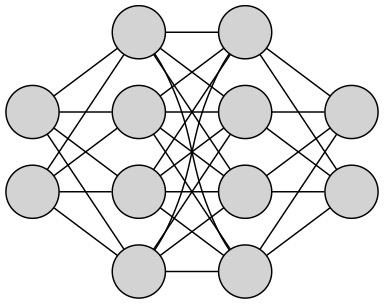
Creating your Neural Network architecture with NNtecture is designed to be as easy and intuitive as possible. Drawing a simple architecture can be done in a single line of code (see below).
DrawNN([2, 4, 4, 2]).draw()
Built In Customization
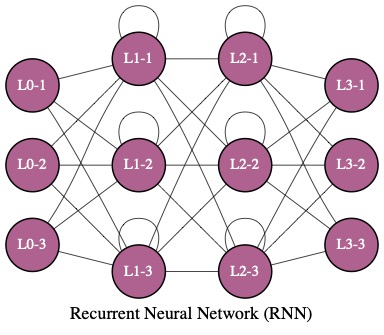
The capabilities are not limited into this base form. The architecture can be easily customised as demonstrated in below example.
# init
nn = DrawNN([3, 3, 3, 3], nn_type='RNN')

# draw
nn.draw(fillcolor='#AF628F',
        graph_label='Recurrent Neural Network (RNN)',
        linewidth=0.5,
        fontname='times',
        node_labels=True,
        node_fontcolor='#ffffff')
Saving Results
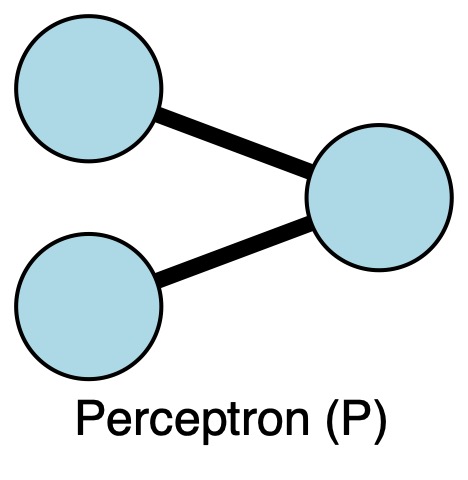
Once satisfied with the architecture, the results can be saved into your desired form.
# create your architecture
perceptron = DrawNN([2, 1])
perceptron.draw(graph_label='Perceptron (P)', fillcolor='lightblue', linewidth=4)

# save to file
perceptron.save(filename='perceptron', output_format='jpg', size='5,5!', view=True)
Advanced Customization Capabilities
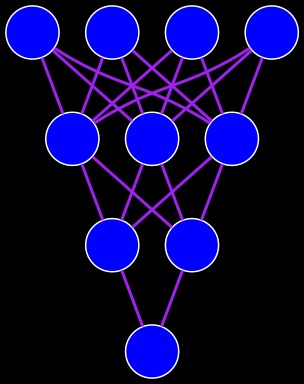
Styling your architecture is not limited into the built-in capabilities. In addition, by accessing graph_object, one can further customise the drawing with graphviz (see example below). For more instructions, see graphviz documentation.
# init
nn = DrawNN([4, 3, 2, 1])
nn.draw(direction='UD', fillcolor='blue')

# further customization
nn.graph_object.edge_attr["style"] = "setlinewidth(2)"
nn.graph_object.edge_attr['color'] = 'purple'
nn.graph_object.graph_attr['bgcolor'] = 'black'
nn.graph_object.node_attr["color"] = "white"

# display
nn.graph_object
1 maintainer

Release files for nntecture 1.0.1
For a detailed explanation of source distributions (sdists) and built distributions (wheels), please see the package formats documentation.
Source distribution (sdist)
| File | Size | Uploaded | |
|---|---|---|---|
| nntecture-1.0.1.tar.gz | 13.4 kB | Details |
Built distribution (wheel)
| File | Interpreter | ABI | Platform | Reset |
|---|---|---|---|---|
| nntecture-1.0.1-py2.py3-none-any.whl | Python 2, Python 3 | none | any | Details |
Total release size: 19.6 kB
Release files / nntecture-1.0.1.tar.gz
| Download URL | nntecture-1.0.1.tar.gz |
|---|---|
| Size | 13.4 kB |
| Tags | Source |
|
SHA-256 checksum How to use checksums |
54d2ea95ff6a7843aa4f672b1da4aca0a7f479350c067ee17fb70d5ce35b5727
|
|
BLAKE2b-256 checksum How to use checksums |
208ade307ad50bec3ccb5a7888de047a207a20d83febcae449a5c3688c72f1c6
|
| Upload date | |
|
Uploaded using Trusted Publishing? What is trusted publishing? |
No |
| Uploaded via |
twine/3.4.1 importlib_metadata/4.3.1 pkginfo/1.7.0 requests/2.25.1 requests-toolbelt/0.9.1 tqdm/4.61.0 CPython/3.8.2
|
Release files / nntecture-1.0.1-py2.py3-none-any.whl
| Download URL | nntecture-1.0.1-py2.py3-none-any.whl |
|---|---|
| Size | 6.2 kB |
| Tags | Python 2 Python 3 |
|
SHA-256 checksum How to use checksums |
16f8ba7bc5b031f9d72ed85cf388d96bb782391c578505b9c12b7cda6a5d1955
|
|
BLAKE2b-256 checksum How to use checksums |
2cf72fd6ddd4868c46ab63b40e62a676e922b1a66bcc890d3baa79a32f4d0261
|
| Upload date | |
|
Uploaded using Trusted Publishing? What is trusted publishing? |
No |
| Uploaded via |
twine/3.4.1 importlib_metadata/4.3.1 pkginfo/1.7.0 requests/2.25.1 requests-toolbelt/0.9.1 tqdm/4.61.0 CPython/3.8.2
|














