
nnzip — neural-network text compression




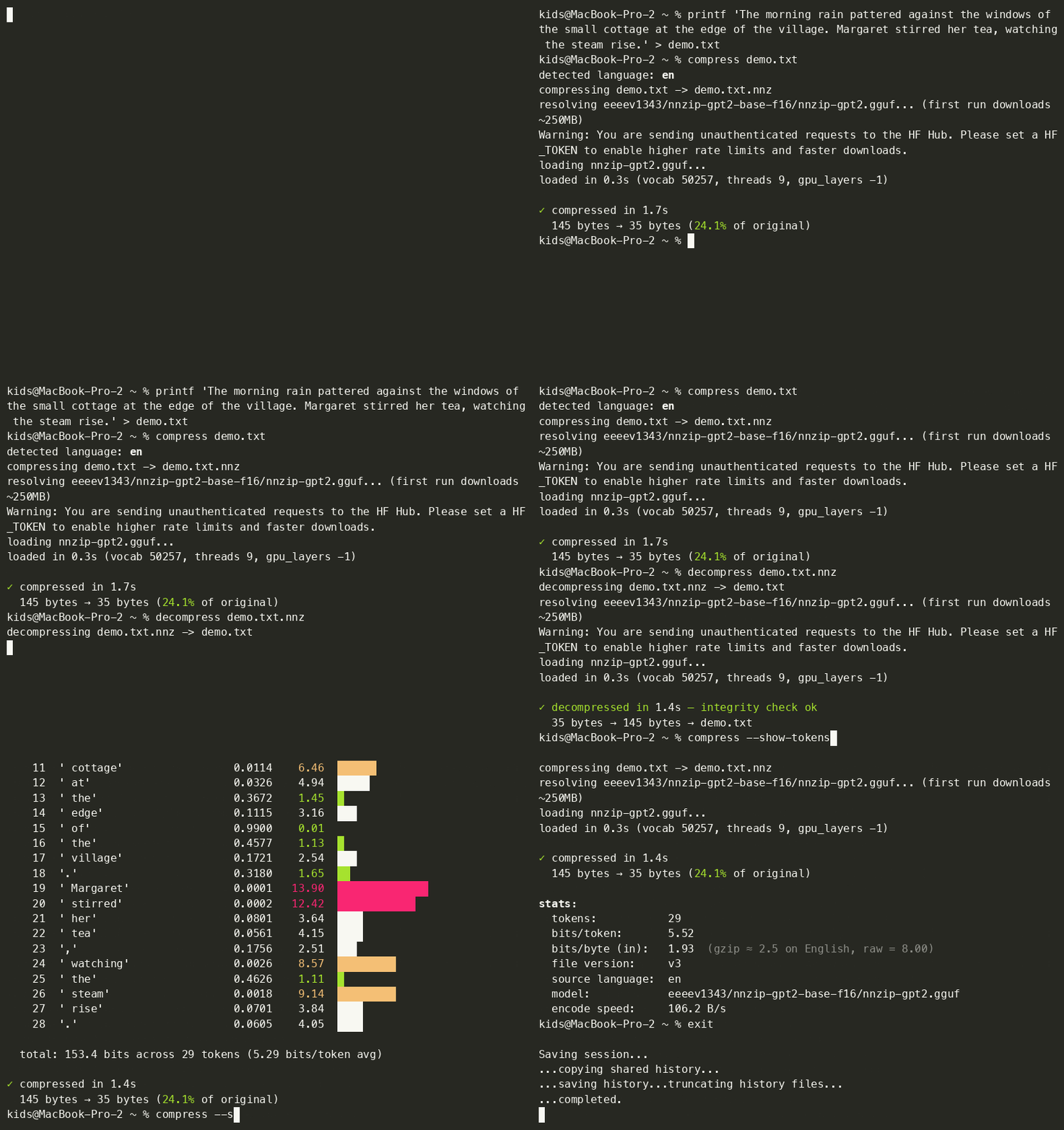
A cross-platform CLI that compresses text using a local GPT-2 as a probability model. On natural prose it lands around 15-25% of the original size — typically 3-5× better than gzip. Multi-language: English, Dutch, Italian, French, Portuguese, with auto-detection.
pip install nnzip
compress book.txt              # produces book.txt.nnz
decompress book.txt.nnz        # restores book.txt
Works on macOS, Linux, and Windows. Uses llama.cpp under the hood — runs on CPU by default, automatically uses Metal on Apple Silicon and CUDA on Linux if a compatible build is installed.
What it actually does
When you compress a file, nnzip walks through it one token at a time. At each position it asks GPT-2: given everything before, what's your probability distribution over the next token? Then it spends -log₂(P(actual token)) bits encoding it with arithmetic coding.
If GPT-2 is 90% sure about the next token (the very common case in fluent English), encoding costs about 0.15 bits. If GPT-2 is totally surprised (1-in-50,000), it costs ~16 bits. The average across natural English ends up around 4-5 bits per token instead of the ~32 bits each token would take if stored naively.
Decompression runs the same forward passes in the same order. Both sides see identical probability distributions and the arithmetic coder unwinds back to the exact original token stream. The decompressed file is bit-identical to the original — and every .nnz carries a CRC32 of the original text in its header, which the decompressor verifies after decoding so silent corruption can't slip through.
The compressed .nnz file contains zero model weights — just a 15-byte header (magic + version + lang + crc32 + token_count) and the arithmetic-coded payload. Both ends rely on the same pinned GGUF model from Hugging Face, downloaded once to ~/.cache/huggingface/ on first use (~252 MB).
Quick demo
$ printf 'The morning rain pattered against the windows of the small cottage at the edge of the village. Margaret stirred her tea slowly.' > demo.txt
$ wc -c demo.txt
130 demo.txt

$ compress demo.txt
detected language: en
compressing demo.txt -> demo.txt.nnz
loading nnzip-gpt2.gguf...
loaded in 0.3s
encoding: 100%|██████████| 130/130 [00:01<00:00, 1.02kB/s]

✓ compressed in 1.4s
  130 bytes → 32 bytes (24.6% of original)

$ decompress demo.txt.nnz
decompressing demo.txt.nnz -> demo.txt
✓ decompressed in 1.4s — integrity check ok
  32 bytes → 130 bytes → demo.txt
A 50 KB chunk of Pride and Prejudice lands at about 23% of the original (~11.5 KB). For comparison, gzip -9 on the same input gets ~57%.
Use --stats to see bits/token, model used, throughput, and the bits/byte number that compares directly to other compressors (gzip ≈ 2.5 bits/byte on English; nnzip ≈ 1.5-1.9).
Performance and limits, plainly
- Speed. On Apple Silicon (Metal) ≈ 1 KB/s. On CPU (Linux/Windows default install, or
NNZIP_NO_GPU=1) ≈ 100 B/s. Either way, this is orders of magnitude slower thangzip. nnzip is not a tool for compressing your downloads folder; it's a tool for showing that a 124M-parameter language model beats classical compressors on prose. - Supported languages: English, Dutch, Italian, French, Portuguese. Each uses a separate fine-tuned GPT-2 model that downloads on first use; the source language is auto-detected from the input. Other languages still work but fall back to the English model with a warning (so the ratio will be worse). Source code and random binary compress to 100%+ of the original — nnzip warns you and suggests
gzipin that case. - Lossless. Provably. The CRC32 stored in each
.nnzis verified on decompress; if it doesn't match, you get a hard error (exit code 2), not silently wrong data. - GPT-2 has a 1024-token context window. Past that, nnzip uses a sliding window of the last 512 tokens to predict the next one. Long-range compression suffers a little after the first ~1000 tokens, but it works on arbitrarily large files.
- Cross-platform install; same-machine round-trip recommended. llama.cpp's float results can differ in the last few bits between Metal/CUDA/AVX/different CPUs. Compressing on Mac and decompressing on Linux might desync. Same machine, or same backend, is reliable.
- No encryption. Anyone with the same nnzip version can decompress a
.nnz. Encrypt separately if you need privacy.
CLI options
compress [--stats] [--quiet] [--lang <code>] <input> [output]
decompress [--stats] [--quiet] <input> [output]
| Flag | Effect |
|---|---|
--stats |
After the operation, print tokens, bits/token, bits/byte, model used, throughput |
--quiet / -q |
Suppress progress output (for scripting) |
--lang <code> |
Force a language (ISO 639-1, e.g. en, fr). Default: auto-detect |
--version |
Print version and exit |
Optional environment variables
| Env var | Effect |
|---|---|
NNZIP_MODEL_PATH=/path/to/your.gguf |
Use a different GGUF model (any llama.cpp-compatible GPT-2 variant). Both sides need to use the same one. |
NNZIP_NO_GPU=1 |
Force CPU even on a machine with Metal/CUDA available. Useful for debugging cross-platform round-trip issues. |
NO_COLOR=1 |
Disable colored output (standard convention; see no-color.org) |
Languages
The file format records the source language (ISO 639-1, 2 bytes) in its header, and the decompressor auto-picks the matching model from LANG_REGISTRY. Currently supported:
| Code | Language | Model | Quality |
|---|---|---|---|
en |
English | own mirror of openai/gpt2 |
FP16 |
nl |
Dutch | RichardErkhov/GroNLP_-_gpt2-small-dutch-gguf |
Q6_K |
it |
Italian | RichardErkhov/GroNLP_-_gpt2-small-italian-gguf |
Q6_K |
fr |
French | RichardErkhov/mavuriRahul_-_french-gpt2-gguf |
Q8_0 |
pt |
Portuguese | PabloHoties/gpt2-small-portuguese-gguf |
FP16 |
Inputs in other languages still compress — they auto-fall-back to the English model with a note: no fine-tuned model for 'xx' yet warning, the round-trip still works, the ratio is just worse than it would be with a language-matched model.
Adding a new language
One line in nnzip/__init__.py:
LANG_REGISTRY = {
    "en": ("eeeev1343/nnzip-gpt2-base-f16", "nnzip-gpt2.gguf"),
    "de": ("your-hf-username/nnzip-gpt2-de", "model.gguf"),  # add here
    ...
}
…assuming you've published (or found) a fine-tuned GPT-2 GGUF for that language on Hugging Face. The non-English models above are pointed at directly without mirroring; if you want supply-chain stability, fork them under your own account first.
For converting an HF-format model to GGUF: llama.cpp ships a convert_hf_to_gguf.py script. Be warned that it's fragile — every individual model has its own quirks (legacy attention-mask tensors, vocab-size mismatches, unrecognized BPE pre-tokenizers). Plan an hour or two per model the first time.
Why GPT-2 is a great compressor for English
Shannon's source coding theorem says you can't compress data below its entropy — the average number of bits needed per symbol given perfect prediction. For English text, the entropy is somewhere around 1.0-1.3 bits per character. Most classical compressors (gzip, bzip2, xz) approximate this with simple statistical models — adjacent character frequencies, run-length, Lempel-Ziv pattern matching. Their best on plain English is around 25-30% of original.
GPT-2 is a much smarter model. It's seen billions of words and learned what's plausible at a phrase, sentence, and paragraph level. So when it predicts the next token, its distribution is sharper — closer to the data's true entropy. Sharper predictions mean fewer bits per symbol via arithmetic coding. That's all the trick is.
Bigger models compress better still. DeepMind showed in Language Modeling Is Compression (2024) that Chinchilla 70B compresses Wikipedia to ~8% of original, beating every classical codec. The trade-off is obvious: bigger model, more compute. GPT-2 small (124M params, 252 MB) is a practical sweet spot — fast enough to actually use, small enough to ship via pip.
What's in this repo
The nnzip CLI is the current thing in this project. The repo also includes a multi-stage experiment that led here — the kind of journey that goes from "wrong idea" to "right idea." If you only care about the tool, skip the rest.
The actual tool (stages 7-8 of the journey)
| File | What it does |
|---|---|
nnzip/__init__.py |
The whole package: model loading, arithmetic coding, CLI entry points |
pyproject.toml |
Declares the compress, decompress, and nnzip CLI commands plus dependencies |
arithmetic_coder.py |
A standalone portable arithmetic coder (used by the HTML self-extractor below; nnzip itself uses constriction) |
api_compress.py |
An earlier OpenAI-API-based experiment: same idea but uses OpenAI's API as the probability model instead of a local one. Slower and pay-per-use; left in for reference. |
template.html |
A self-extracting HTML wrapper for the API version — the .nnz payload bakes into a single HTML file the recipient can open in any browser |
The hash brute-forcing detour (stages 1-5)
Before landing on real compression, the project spent stage 1-5 trying to brute-force decompress files from just their SHA-256 hash + length. That doesn't actually work (the pigeonhole principle is a wall), but it's an entertaining way to learn why and to push hardware to its limits.
| File | Role | Best result |
|---|---|---|
compress.py / decompress.py |
Python brute forcer | ~0.6 M hashes/s |
compress_index.py / decompress_index.py |
"Deterministic ordering" variant that makes the failure visible | proves the size wall |
brute.c |
C version with CommonCrypto + pthreads | ~45 M H/s, ~75× Python |
brute_neon.c |
ARMv8 SHA-2 hardware intrinsics | ~380 M H/s, ~635× Python |
brute_mb.c |
4-way multi-buffer SIMD SHA-256 — an instructive failure (slower than hardware SHA on M1) | ~80 M H/s |
brute_metal.m |
Metal compute shader on M1 Max's GPU (32 cores, 4096 ALU lanes) | ~1.0 GH/s |
brute_combined.m |
CPU NEON-HW and GPU running concurrently on different parts of the search space | ~1.4 GH/s (~2300× Python) |
Build them with clang -O3 -Wall -Wno-deprecated-declarations -o brute brute.c etc. They're not part of the pip package — they're standalone executables for stress-testing.
The journey, summarized
| Stage | Idea | Outcome |
|---|---|---|
| 1 | "Just send the SHA-256 hash and brute-force decompress" | Doesn't work — pigeonhole guarantees collisions |
| 2 | C + threads | Faster brute force, same impossibility |
| 3 | NEON hardware SHA | Faster still |
| 4 | M1 Max GPU compute shader | 1 GH/s |
| 5 | CPU + GPU concurrent | 1.4 GH/s |
| 6 | "Use a deterministic generator and send the index" | Mathematically equivalent to storing the file as a giant integer — the index is the same size as the file |
| 7 | Local GPT-2 + arithmetic coding | Actually compresses |
| 8 | API and HTML variants | Same idea, different deployment models |
The lesson behind 1-6 is the pigeonhole principle: there are more N-byte inputs than there are shorter outputs, so no scheme can compress every input. Real compression escapes by giving up on compressing arbitrary data and instead exploiting the patterns in the data we actually have. nnzip takes that to its modern extreme — the "pattern" is everything GPT-2 learned about English from billions of words of internet text.
Inspirations and prior art
- Witten, Neal, Cleary, "Arithmetic Coding for Data Compression" (1987) — the core algorithm.
- DeepMind, "Language Modeling Is Compression" (2024) — showed that big LLMs are state-of-the-art compressors.
- Fabrice Bellard's
ts_zip(2023) — production LLM compression with a custom model.
License
MIT.
1 maintainer

Download files
Download the file for your platform. If you're not sure which to choose, learn more about installing packages.
Source Distribution
Built Distribution
Filter files by name, interpreter, ABI, and platform.
If you're not sure about the file name format, learn more about wheel file names.
Copy a direct link to the current filters
File details
Details for the file nnzip-1.2.2.tar.gz.
File metadata
- Download URL: nnzip-1.2.2.tar.gz
- Upload date:
- Size: 22.9 kB
- Tags: Source
- Uploaded using Trusted Publishing? No
- Uploaded via:
twine/6.2.0 CPython/3.12.3
File hashes
| Algorithm | Hash digest | |
|---|---|---|
| SHA256 |
74a7354f8b20c73b524ae1c6bee723bd936dc2bf3fbd8c0848c98585f18a723b
|
|
| MD5 |
1e9b374ffbd0a2c389a1947734f62094
|
|
| BLAKE2b-256 |
9b9e58a58add060862e65f0170a9a9d90dd8171e16ef9436eae2ec682c20780c
|
File details
Details for the file nnzip-1.2.2-py3-none-any.whl.
File metadata
- Download URL: nnzip-1.2.2-py3-none-any.whl
- Upload date:
- Size: 16.6 kB
- Tags: Python 3
- Uploaded using Trusted Publishing? No
- Uploaded via:
twine/6.2.0 CPython/3.12.3
File hashes
| Algorithm | Hash digest | |
|---|---|---|
| SHA256 |
3b6b9cb0b12c140270efcae5a49bf246fa5b77c672b165e3bdfb452e89596006
|
|
| MD5 |
ac8edf5cfc8f9d1b5d98312a82ff1dbb
|
|
| BLAKE2b-256 |
fd193f96b245153b125e7d41b800e4db8aa148ed58a3c51280f81a7adea3e49f
|














