
noaaco2

Takefuji Y. (2022) noaaco2: PyPI application for displaying a CO2 graph based on NOAA [Source Code]. https://doi.org/10.24433/CO.7957917.v1
This is under review.
This is a tutorial to debut a PyPI application and to validate software reproducibility for climate professions.
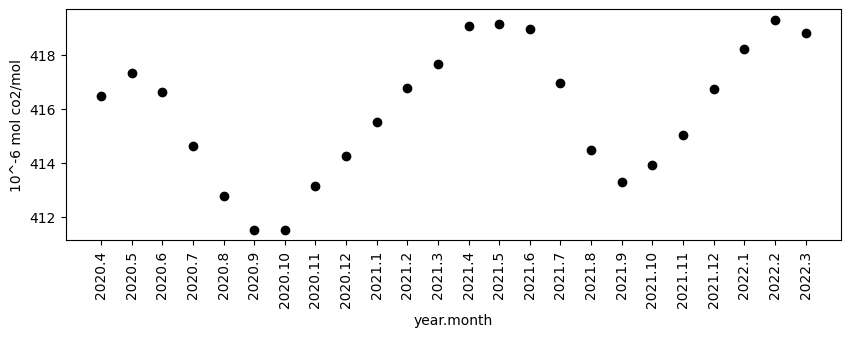
noaaco2 is a PyPI application that scrapes the latest dataset from NOAA via the Internet and displays a graph for a specified number of months.
The PyPI environment allows PyPI applications to run on Windows, MacOS, and Linux operating systems. As long as Python is installed on the system, you can use it without being aware of the operating system.
noaaco2 scrapes the latest csv file from the following NOAA site:
ftp://aftp.cmdl.noaa.gov/products/trends/co2/co2_mm_mlo.csv
# --------------------------------------------------------------------
# USE OF NOAA GML DATA
#
# These data are made freely available to the public and the
# scientific community in the belief that their wide dissemination
# will lead to greater understanding and new scientific insights.
...
# Scripps data downloaded from http://scrippsco2.ucsd.edu/data/atmospheric_co2
# Monthly values are corrected to center of month based on average seasonal
# cycle. Missing days can be asymmetric which would produce a high or low bias.
# Missing months have been interpolated	 for NOAA data indicated by negative stdev
# and uncertainty. We have no information for SIO data about Ndays	 stdv	 unc
# so that they are also indicated by negative numbers
# Monthly values are corrected to center of month based on average seasonal,,,,,,,
# cycle. Missing days can be asymmetric which would produce a high or low bias.,,,,,,,
# Missing months have been interpolated, for NOAA data indicated by negative stdev,,,,,,
# and uncertainty. We have no information for SIO data about Ndays, stdv, unc,,,,,
# so that they are also indicated by negative numbers,,,,,,,
year,month,decimal date,average,interpolated,trend,ndays,
1958,3,1958.2027,315.7,314.43,-1,-9.99,-0.99
1958,4,1958.2877,317.45,315.16,-1,-9.99,-0.99
1958,5,1958.3699,317.51,314.71,-1,-9.99,-0.99
...
noaaco2 can generate a graph with specified months and save it in result.csv and noaaco2.png.
In order to run noaaco2 application, Python must be installed on your system.
How to install Python and noaaco2
Follow the Python installation steps for Windows, WSL on Windows, MacOS, and Linux operating systems.
1. Download a right installation file from miniconda site:
https://docs.conda.io/en/latest/miniconda.html

2. X-server installation may be needed.
For Windows 11 or 10,WSL on Windows 11 or 10, MacOS, X-server must be installed.
X-server for Windows and WSL on Windows, install VcXsrv Windows X Server.
You can download it from the following site:
https://sourceforge.net/projects/vcxsrv/
For MacOS, you must install XQuartz via Homebrew or brew command.
For Linux operating systems, X-server is ready so that you don't need to install it.

3. PyPI libraries and applications can be installed by the pip installation command.
($) sign indicates the prompt from your system in the terminal. Open the terminal.
And enter the following command to install noaaco2 application.
$ pip install noaaco2
Since noaaco2 uses PyPI libraries such as numpy, pandas and matplotlib, you must install them.
$ pip install numpy pandas matplotlib
noaaco2 uses bash commands such as wget command so that you must install it.
$ sudo apt install wget
How to run noaaco2
noaaco2 takes a single parameter for specifying the number of months. Without the number of months, noaaco2 shows a graph with all months in the dataset.
$ noaaco2 <number-of-months>
or
$ noaaco2
For example, 24 months, run the following command.
$ noaaco2 24
1 maintainer

Metadata
1 maintainer
Release files for noaaco2 0.0.4
For a detailed explanation of source distributions (sdists) and built distributions (wheels), please see the package formats documentation.
Source distribution (sdist)
| File | Size | Uploaded | Provenance | |
|---|---|---|---|---|
| noaaco2-0.0.4.tar.gz | 3.7 kB | Without provenance | Details |
Built distribution (wheel)
| File | Interpreter | ABI | Platform | Reset |
|---|---|---|---|---|
| noaaco2-0.0.4-py3-none-any.whl | Python 3 | none | any | Details |
Total release size: 7.5 kB
Release files / noaaco2-0.0.4.tar.gz
| Download URL | noaaco2-0.0.4.tar.gz |
|---|---|
| Size | 3.7 kB |
| Tags | Source |
|
SHA-256 checksum How to use checksums |
848185fab136303c32a4a5130dec713faa71a8bae4a61c6aab2775424a915534
|
|
BLAKE2b-256 checksum How to use checksums |
9ff13cc8fcb6680c70d6d4dfe18223e023ff4dae4ff408dbf5d5f411fc5b41f8
|
| Upload date | |
|
Uploaded using Trusted Publishing? What is trusted publishing? |
No |
| Uploaded via |
twine/5.0.0 CPython/3.8.12
|
Release files / noaaco2-0.0.4-py3-none-any.whl
| Download URL | noaaco2-0.0.4-py3-none-any.whl |
|---|---|
| Size | 3.8 kB |
| Tags | Python 3 |
|
SHA-256 checksum How to use checksums |
e8c3348d7b451e3ebe21d258a9e06b441d856916c38d8de4bf7eb1c11e7f104d
|
|
BLAKE2b-256 checksum How to use checksums |
e68096db88229ece36d5e27addf6f36481dc04decc6ee15cc77a0a2250b61c9b
|
| Upload date | |
|
Uploaded using Trusted Publishing? What is trusted publishing? |
No |
| Uploaded via |
twine/5.0.0 CPython/3.8.12
|
Security for noaaco2 0.0.4
Provenance
Provenance describes where a file came from. On PyPI, provenance is shared via attestations, which provide a verifiable record of the build or publishing details. View details, limitations and caveats.
No provenance found
None of the files in this release were uploaded with provenance metadata.
A note on package security
PyPI is a repository for distributing packages, not a service for auditing them. While third-party security researchers and our staff do their best to detect and remove malicious packages, PyPI cannot guarantee the quality, security or suitability of any given package.
To learn more about protecting yourself from malicious actors, visit our package security documentation.














