



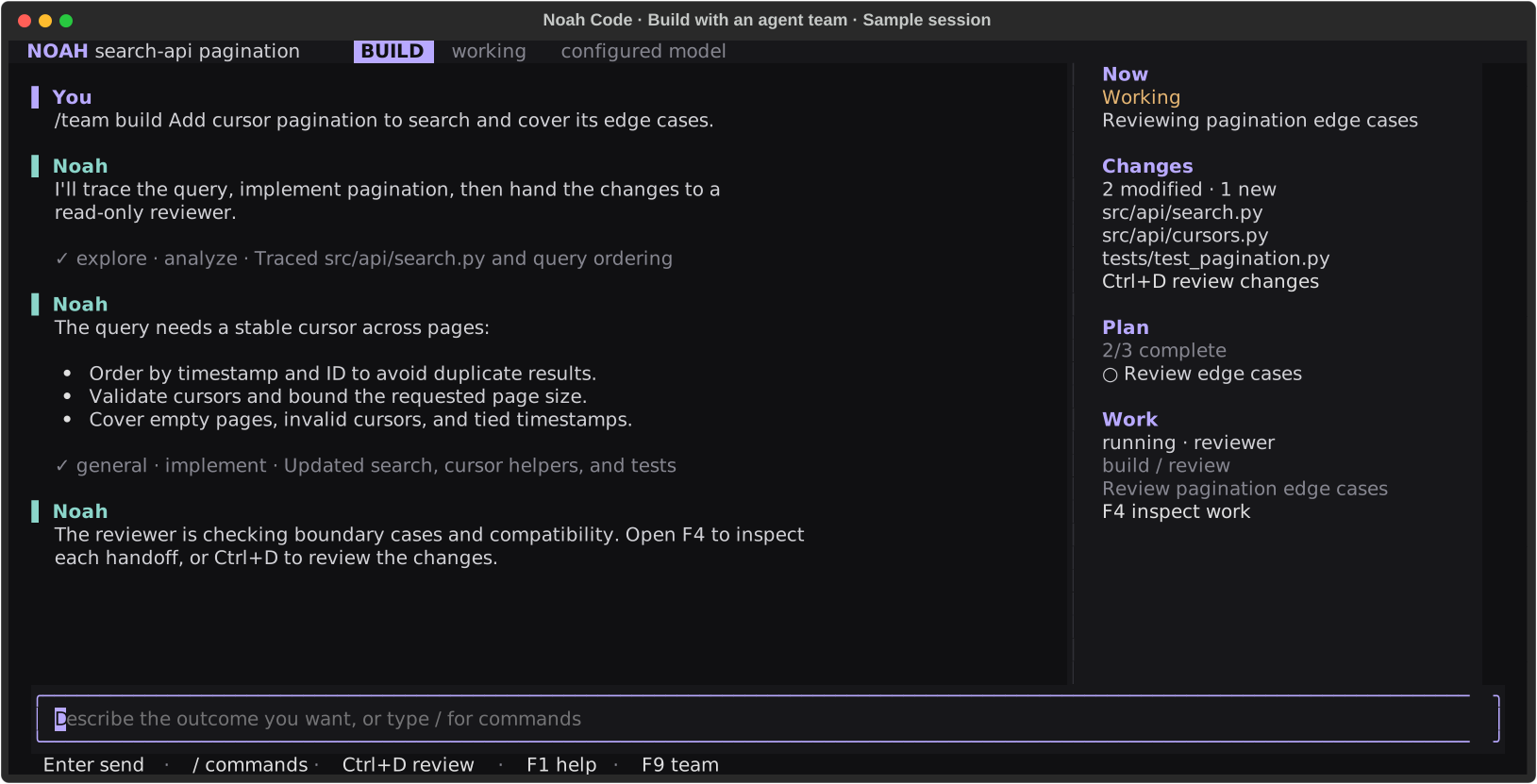
The real Textual interface with deterministic sample data: a build team hands pagination changes to a read-only reviewer.
Noah keeps the conversation central while the sidebar tracks the current action, changed files, active plan, and agent handoffs. Tool execution stays visible, completed work compacts into readable records, and every session remains scoped to its repository.
Built on the NVIDIA OO Agents (NOOA) runtime.
Install
Install Noah Code and its managed Python runtime with one command:
curl -LsSf https://raw.githubusercontent.com/skundu42/noah-code/main/install.sh | sh
Open a new terminal, move into a repository, and start Noah:
cd your-project
noah .
Noah is compatible with macOS on Apple Silicon and Intel, plus Linux on arm64 and x86_64.
On the first launch, choose Normal, Auto, or YOLO permissions, then a provider, model, and reasoning level. Choose Codex / ChatGPT account to sign in through your browser, or enter a provider API key. Keys are stored in Noah's private auth file with owner-only permissions; they are never written to project configuration or session history.
Why Noah
- Repository-aware exploration. Search with ripgrep, inspect Git history and diffs, navigate symbols through language servers, and use an mtime-cached repository map.
- Controlled edits. Apply anchored replacements or atomic multi-file patches with exact preimages, concurrent-change detection, immediate diagnostics, and rollback.
- Visible execution. Stream bounded shell output while commands run, keep servers and watchers
as managed background jobs, and revisit activity details with
F2. - Crash-safe work. Durable file intents roll back interrupted workspace-tool writes, Git checkpoints protect shell-driven changes, and interrupted model runs resume after restart.
- Persistent sessions. Resume repository-scoped conversations, steering, todos, model choices, budgets, background-job logs, and compacted context without losing full tool results.
- Token-efficient by construction. Lean tool-output bounds with disk-backed recall, condensed
subagent results, isolated low-token helper calls, cache-stable request prefixes (volatile status
arrives as appended events), route-aware cache telemetry, selective memory distillation, and
pointer-eviction compaction with a practical context ceiling — measured live with
/tokens. - Explicit control. Switch between implementation-focused build mode and read-only
plan mode, with ordered
allow,ask, anddenypermission rules. - Extensible workflows. Add slash commands, opt-in skills, MCP servers, or markdown subagents;
attach
@filesand images when the task needs more context. - Coordinated agent teams. Launch a build, review, or investigation workflow from
F9or/team. Specialists hand off findings between phases, and the live work ledger shows progress. Teams share session budgets and approvals; read-only work can run concurrently while edits use one serialized mutation lane. - Long-running by design. Provider retries and configurable fallback models handle transient
failures, while workspace leases, bounded artifacts, durable process ownership, and
/healthkeep unattended sessions observable.
Noah follows repository instructions from AGENTS.md, CLAUDE.md, and
.noah-code/instructions.md.
Quick start
Describe the outcome you want rather than prescribing every edit:
Find the cause of the failing parser tests, implement the smallest safe fix, and run the
focused test file.
For work that benefits from several perspectives, give a team one clear objective:
/team build Add pagination to the search endpoint and cover its edge cases
/team review Find regressions in the current changes
/team investigate Trace why login fails after a session expires
Build teams analyze, implement, then review. Review and investigation teams stay read-only,
including in plan mode. Press F9 to choose a workflow and edit its objective before sending;
use F4 to inspect live team progress. In the console, /team lists the workflows.
Useful launch modes:
First-time interactive setup asks you to choose a permission mode, with Normal selected by default. Your choice is saved for future launches:
- Normal (recommended): Ask before commands that need approval; keep protective blocks enabled.
- Auto: Approve routine actions automatically; block interpreters and keep risky-action approvals.
- YOLO: Skip permission checks and approval prompts; use only in isolated, trusted workspaces.
This choice is separate from the AI model and build/plan mode. Use --permissions normal,
--permissions auto, or --permissions yolo to override it for one launch.
# Open another workspace
noah /path/to/repository

# Inspect and plan without editing
noah --mode plan .

# Run one task and exit
noah run "Explain how authentication is wired" .

# Emit one structured result on stdout (progress goes to stderr)
noah run --json "Fix the failing unit test" .

# Use Normal permissions even if you previously saved YOLO
noah --permissions normal .

# Auto-approve routine actions; interpreter commands remain blocked
noah --auto .

# Resume previous work
noah --continue .
noah --session SESSION_ID .

# Use the line-oriented interface
noah --console .
run --json reports status (completed, needs_input, failed, or cancelled),
exit_code, explanation, session_id, run_id, session usage, and recorded checks.
Check status when automating: a request for input keeps the existing exit code 0,
but its status is needs_input. Check results are separate from task completion;
an empty list means no checks were recorded. Errors keep nonzero exit codes and
Ctrl+C returns 130. Delegated agents also retain needs_input in the work ledger.
Check the installation and resolved configuration with:
noah --version
noah doctor .
noah config show .
noah update --check
The package also installs noah-code and nc as equivalent entry points. Because nc commonly
means netcat, noah or noah-code is recommended.
Inside the TUI
The interface keeps frequent actions within reach:
- Readable commands. Aligned descriptions, muted argument hints, and a subtle selection row make slash commands easier to scan. Use arrows, Enter, Tab, or the mouse.
- Compact approvals. See the command and session scope together; expand the reason and rule
with
D. Long targets scroll, and approval buttons stay visible in small terminals. - Inspectable teams. Use
F9to launch a workflow andF4to search assignments, filter work needing attention, and read agent results.
Type / to search the full command and configuration reference. The most common controls are:
| Control | Action |
|---|---|
Enter |
Send the current prompt or accept a selected suggestion |
Shift+Enter / Ctrl+J |
Insert a newline |
Alt+Enter |
Expand or collapse the composer |
Alt+Z |
Restore a displaced draft |
| Click / arrows in the prompt | Position the editing cursor |
Ctrl+A / Ctrl+X / Ctrl+V |
Select all / cut / paste prompt text |
Ctrl+Z / Ctrl+Y |
Undo / redo prompt edits |
Ctrl+Home / Ctrl+End |
Jump to the beginning / end of the prompt; Shift selects |
Drag, then Cmd+C / Ctrl+Shift+C |
Select and copy TUI text |
Ctrl+Shift+C with no selection |
Copy the latest Noah reply |
Ctrl+G |
Open the searchable skills picker |
Ctrl+P |
Search and run slash commands |
Ctrl+L |
Open the model picker |
Ctrl+R |
Search and recall a prior prompt |
Ctrl+T |
Expand or collapse live tool output |
Alt+E |
Open the reasoning-effort picker |
Alt+Up |
Recall the newest queued prompt for editing |
Ctrl+] |
Return to live transcript output |
Tab / Shift+Tab |
Navigate focus; Tab completes suggestions |
Enter or click a command |
Run the selected slash command or open its picker; required arguments stay editable |
Ctrl+B |
Switch between build and plan mode |
Ctrl+D |
Review changes while working or idle |
Ctrl+C |
Stop the current run and pause queued follow-ups |
F2 |
Open execution activity |
F3 |
Open paginated conversation history |
F4 |
Open the live agent, terminal, and job ledger |
F5 |
Edit, reorder, resume, or discard queued follow-ups |
F8 |
Show or hide the sidebar |
F9 |
Choose a build, review, or investigation team workflow |
Shift+F7 |
Focus or leave the scrollable context rail |
/model |
Configure a provider or switch the session model |
/theme |
Choose Atom One Dark, Noah Ocean, Graphite, or High Contrast |
/diff |
Review staged and unstaged changes |
/undo / /redo |
Traverse the persistent edit journal |
/checkpoints |
List rolling Git worktree checkpoints |
/health |
Inspect durable run, job, inbox, event, and artifact state |
/tokens |
Inspect tokens, cache usage, prefix stability, model wait, and tool output |
/efficiency |
Switch between fast, balanced, and deep budgets |
/team WORKFLOW OBJECTIVE |
Run a coordinated team, or queue it while another turn is active |
On wide terminals, the side rail prioritizes the active operation, delegated agents, named terminals, Git branch and change counts, session, model usage, update state, and plan. Git status is refreshed in the background at turn boundaries, so the animated working state stays responsive. The main pane remains centered on the large Noah wordmark until the first prompt, then becomes the conversation and execution timeline. The composer footer keeps contextual keys and compact token, cache, and cost telemetry visible at every terminal width where they fit.
See the command menu and compact approval dialog
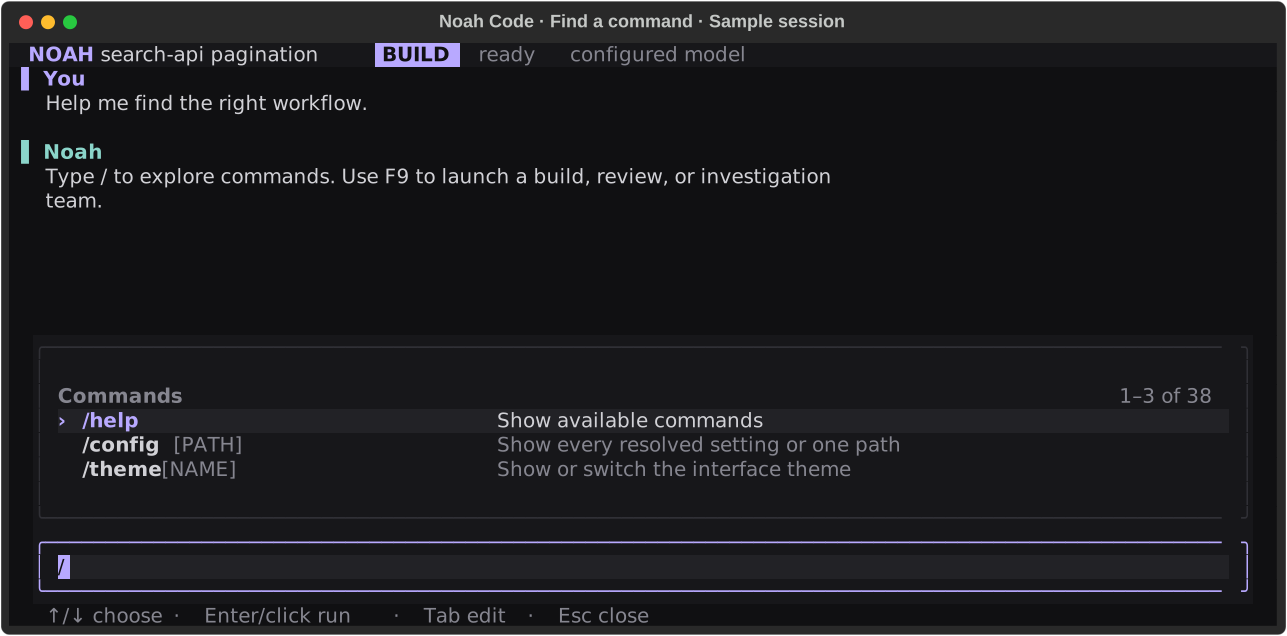
The real command menu, captured with deterministic sample conversation data.
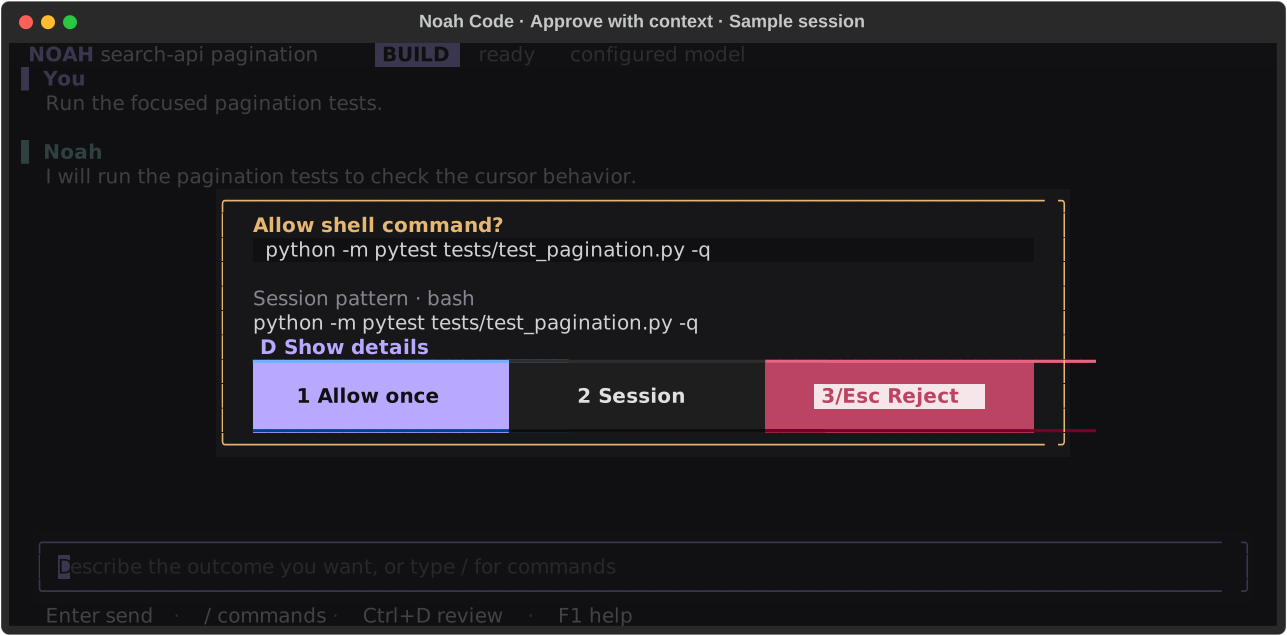
The real approval dialog with a sample request. Screenshots illustrate UI behavior, not a live provider run or test result.
Sessions and crash recovery
Start a new session with noah ., resume the latest repository session with
noah --continue ., or reopen an exact session with noah --session SESSION_ID .. Inside the TUI,
use Ctrl+O, /sessions, or /continue.
Noah stores conversational history and host runtime state separately. If the process stops during an active run, the next launch restores pending steering, usage and budget counters, durable job logs, and the original request. Incomplete workspace-tool writes are rolled back, verified orphan process groups are cleaned up, and non-interactive runs continue automatically. A request that was waiting for user input remains paused for the next user message.
By default, only one Noah process may own a checkout at a time. Use /worktree create when
independent agents need to work concurrently. See
Reliability and long-running sessions for the recovery model, provider retry
controls, quotas, and operational limits.
Child agents also retain their own conversation snapshots and task IDs. Noah can start,
inspect, cancel, wait for, and follow up with a child independently. Background writers use
an optional Git worktree created from committed HEAD; local uncommitted changes stay in
the parent checkout. See persistent child tasks.
Models and providers
Noah supports OpenAI, Anthropic, OpenRouter, NVIDIA, and custom OpenAI-compatible providers. It also works with vLLM, LM Studio, Ollama, Azure OpenAI, Bedrock, Gemini, Groq, Mistral, xAI, DeepSeek, Together AI, and Perplexity.
You can also connect your Codex / ChatGPT account directly in /model, without an API key.
Install the Codex CLI (0.153.4 or newer), then select that
option or run noah providers login codex. On a headless machine, add --device-code.
Noah uses the official Codex app server and a separate Codex-managed login store; account usage
counts toward your Codex limits. See account setup.
The guided /model flow is the easiest way to configure a provider. Environment variables and
the CLI remain available for scripts and headless environments:
export OPENAI_API_KEY="..."  # or ANTHROPIC_API_KEY / OPENROUTER_API_KEY
noah providers list
noah providers add openai --model MODEL_NAME
noah .
Setup offers a searchable model picker, live model discovery for compatible endpoints, and manual model entry. Catalog entries whose account access has not been checked are labeled. Supported completion clients show incremental generation in a temporary terminal preview; the parsed answer is saved when generation completes. Responses clients retain their existing completed-response behavior.
/model MODEL changes only the current session and remembers that choice when resumed. Use
/model --global MODEL to set the default for future sessions in every repository.
For compatible reasoning models, choose default, none, minimal, low, medium, high, or
xhigh. default omits the provider parameter:
noah --model openai/MODEL --reasoning-effort high .
See the provider configuration guide for
gateway-specific setup. Provider request deadlines, exponential retry, and ordered fallback models
are configured under [reliability.retries].
Integrations
noah serve exposes authenticated loopback HTTP and resumable event streams; set
NOAH_CODE_SERVER_TOKEN to a random token of at least 32 characters before starting it.
noah acp exposes the same agent host through ACP v1 for compatible editors. See
service and ACP for endpoints and supported capabilities.
noah browser setup configures the pinned Playwright MCP browser preset. It uses an isolated
browser profile and Noah's tool permissions; Node.js and a supported browser are required.
See browser tools. Trusted user configuration can also run
lifecycle hooks for session, turn, and worktree events.
Updates
Noah checks PyPI for new versions at most once every 24 hours. New TUI sessions show a temporary
banner when an update is available, with F6 opening its details. Installation
remains explicit by default:
noah update --check
noah update
Documentation
- Interactive interface and sessions
- Configuration, modes, permissions, and updates
- Reliability and long-running sessions
- Generated-code security
- Custom commands, skills, MCP, and tracing
- Persistent child tasks
- HTTP service and ACP
- Browser tools
- Lifecycle hooks
- Matched agent evaluation
- Recorded comparison results
- OpenCode v2 comparison and remaining gaps
- Development, CI, and releases
- Release notes
Development
uv sync --extra dev --extra mcp --extra tracing
uv run ruff check src tests
uv run pytest tests
uv build
Regenerate the README screenshots from deterministic sample data with
uv run python scripts/capture_readme.py. This renders the real Textual widgets without making
provider calls or changing a workspace.
See the development guide for platform checks and the release process.
License
Apache-2.0. NOOA remains separately licensed by its upstream project.
Credits
Built on NVIDIA OO Agents (NOOA). Thanks to the NVIDIA NeMo team and NOOA contributors for the agent runtime that powers Noah Code.
1 maintainer

Release files for noah-code 1.0.0
For a detailed explanation of source distributions (sdists) and built distributions (wheels), please see the package formats documentation.
Source distribution (sdist)
| File | Size | Uploaded | |
|---|---|---|---|
| noah_code-1.0.0.tar.gz | 714.8 kB | Details |
Built distribution (wheel)
| File | Interpreter | ABI | Platform | Reset |
|---|---|---|---|---|
| noah_code-1.0.0-py3-none-any.whl | Python 3 | none | any | Details |
Total release size: 1.1 MB
Release files / noah_code-1.0.0.tar.gz
| Download URL | noah_code-1.0.0.tar.gz |
|---|---|
| Size | 714.8 kB |
| Tags | Source |
|
SHA-256 checksum How to use checksums |
0ad47568bef65196652ba8050f76fdf06daf927da9fd4f710b48f52d0d903d8e
|
|
BLAKE2b-256 checksum How to use checksums |
59c13ecba7d6414c9a5693c0451a33dd188584e84e41d91fc57add07a7c5a418
|
| Upload date | |
|
Uploaded using Trusted Publishing? What is trusted publishing? |
Yes |
| Uploaded via |
twine/7.0.0 CPython/3.13.14
|
Provenance
Provenance describes where a file came from. On PyPI, provenance is shared via attestations, which provide a verifiable record of the build or publishing details. View details, limitations and caveats.


PyPI Publish Attestation
PyPI verified that this artifact, at this checksum, originated from the publisher listed below.
Signed by GitHub Actions, verified by PyPI on Sep 26, 2026.
Transparency logRelease files / noah_code-1.0.0-py3-none-any.whl
| Download URL | noah_code-1.0.0-py3-none-any.whl |
|---|---|
| Size | 354.1 kB |
| Tags | Python 3 |
|
SHA-256 checksum How to use checksums |
5fe241465051ba8c1af549eff839c4a86c5c2495d52d048a179d9ddfa8220be8
|
|
BLAKE2b-256 checksum How to use checksums |
aeac1cf5827772f40e9fe8891178301cacff44980070b42defe13859b5cfb5f1
|
| Upload date | |
|
Uploaded using Trusted Publishing? What is trusted publishing? |
Yes |
| Uploaded via |
twine/7.0.0 CPython/3.13.14
|
Provenance
Provenance describes where a file came from. On PyPI, provenance is shared via attestations, which provide a verifiable record of the build or publishing details. View details, limitations and caveats.
PyPI Publish Attestation
PyPI verified that this artifact, at this checksum, originated from the publisher listed below.
Signed by GitHub Actions, verified by PyPI on Sep 26, 2026.
Transparency log













