
Nocek
Identify bats from ultrasonic recordings, in your browser.
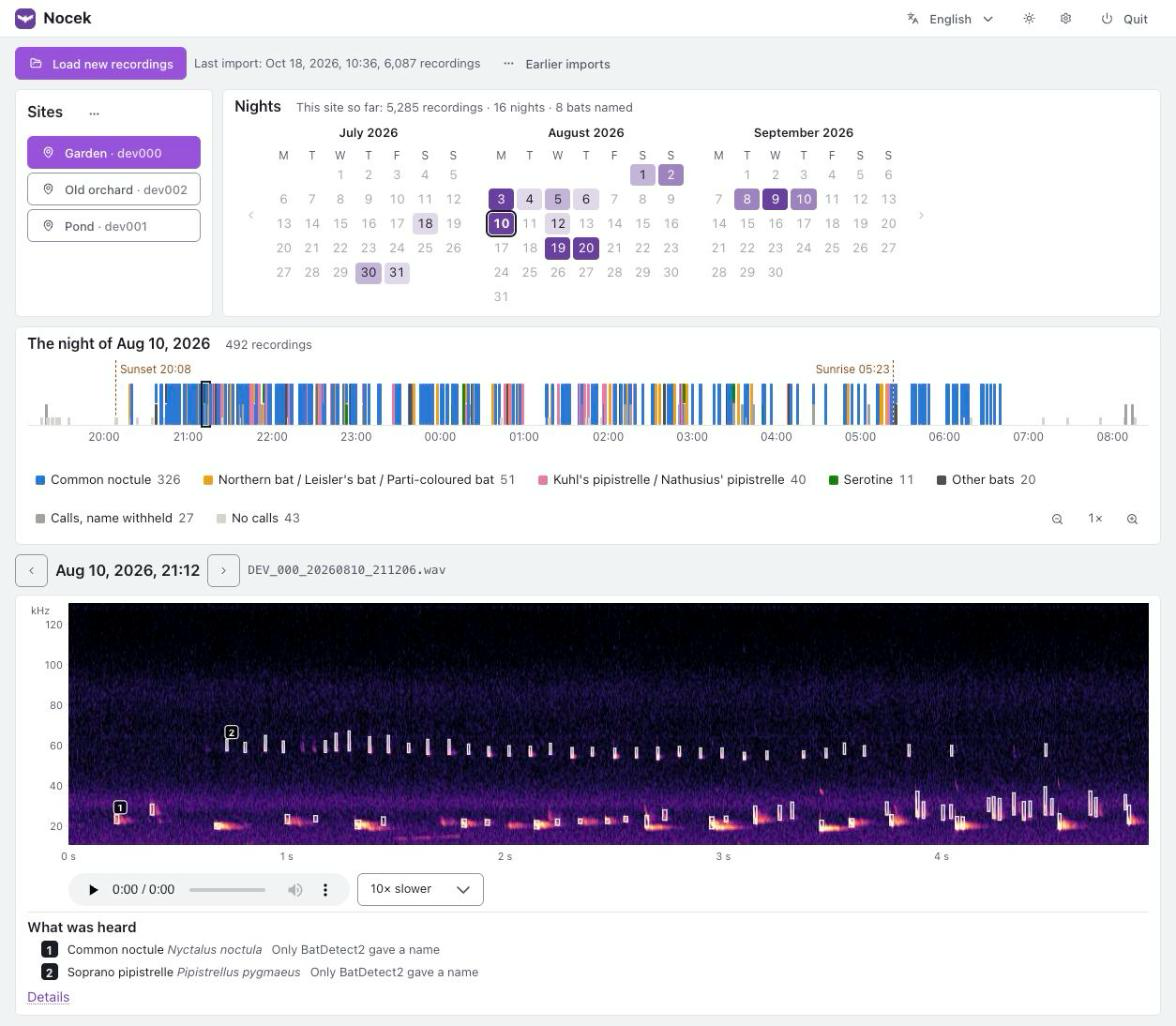
Bring in the recordings from your recorder's card, and Nocek copies the new ones, finds the echolocation calls, names the bats and shows you what has been flying past, night by night. It runs on your own computer and your recordings never leave it.
Status: an early version, in use by its authors. Expect rough edges, and please report them.
What you need
- A computer with one of:
- macOS 12 or newer on Apple Silicon (M1 or later)
- Windows 10 or 11, 64-bit
- Linux, x86-64 or ARM64
- About 1.5 GB of disk space for Nocek itself, most of it PyTorch, and room for your recordings.
- A pippyg recorder. It is the only recorder Nocek reads for now.
- An internet connection to install Nocek, and once more on its first start, to download one of its models (about 52 MB).
Install
On macOS or Linux, open a terminal and paste:
curl -LsSf https://raw.githubusercontent.com/kazek/nocek/main/install.sh | sh
On Windows, open PowerShell and paste:
irm https://raw.githubusercontent.com/kazek/nocek/main/install.ps1 | iex
or paste this into the Start menu's search box, or the Run box (Win+R):
powershell -ExecutionPolicy ByPass -c "irm https://raw.githubusercontent.com/kazek/nocek/main/install.ps1 | iex"
That is all. The script installs uv, which brings the Python Nocek needs (so you do not need Python already), then Nocek itself with the build of PyTorch that suits your computer, puts Nocek in your system's menu (Applications on macOS, the Start menu on Windows, the applications menu on Linux), and starts it. The first time it downloads about 1 GB.
Installing by hand
If you would rather see each step, or already use uv or pipx:
uv tool install --torch-backend auto nocek
nocek shortcut
--torch-backend auto picks the build of PyTorch that suits your computer: with
an NVIDIA graphics card, one that uses it; without one, the much smaller build for
the processor alone. uv still calls the option experimental; should it ever fail,
leave it out. With pipx, pipx install nocek works too. If the terminal does not
find nocek, run uv tool update-shell and open a new terminal.
First start
Start Nocek from its shortcut, or with nocek in a terminal. It opens in your
browser at http://127.0.0.1:6475. Starting it again while it runs just opens
the page once more.
The first time, it asks for two things:
- A library: one folder where Nocek keeps the recordings it copies and what
it found in them. It offers
Documents/Nocek. A library can be backed up or moved as a whole, as one folder. - The models: one of the three ways Nocek tells bats apart needs about 52 MB of files, downloaded once.
To stop Nocek, use Quit in the page's top right corner.
Using Nocek
Load new recordings. Choose the folder with the recorder's files: the
memory card, a copy of it, or one of its bats_dev000-style folders; the
folders inside are searched too. Nothing on the card is changed, and recordings
already in the library are skipped, so the same card can be loaded again
safely. Recordings made in the recorder's bird mode are left out.
Sites. A pippyg can be set to a number, which also names its files
(DEV_000_…). Nocek takes each number to stand for a place, a site. The first
time a number turns up, Nocek asks which site it stands for and suggests a new
one named after it, such as dev000, placed where the recorder's GPS put it;
after that, its recordings go there by themselves. In the ⋯ menu by the
sites you can rename sites, move a number to another site, and say which bats
are expected at each.
Nights. The calendar shades each night by how many of its recordings named a bat. Pick a night to see it.
The night. One bar from sunset to sunrise, with a mark for every recording: coloured by the bat, as tall as what it holds (a named bat, calls with the name withheld, or no calls). Point at a mark to see what it is, click it to open it. The legend counts each kind; point at an entry, or click it, to pick out its marks. On a busy night, zoom in with the magnifiers (or Ctrl and the scroll wheel, or a pinch on a trackpad) and drag the bar sideways.
The recording. Its spectrogram, with each animal's calls boxed and numbered; drag across it to look closer. Playback is slowed (10 times by default) so that the calls fall where you can hear them. Under it, what was heard; Details shows how each method saw it. The arrow keys step through the night, the space bar plays and pauses.
How a bat gets its name. BatDetect2 names the animals in a recording. Two other methods check it: a field key that measures the calls, and BattyBirdNET. When both of them agree on something else, the name is withheld. So are names of bats not expected at the site, while bats marked rare need strong evidence. Bats that cannot be told apart by their calls are named as a group, such as Pipistrellus kuhlii / P. nathusii.
The language, the light or dark theme, and the settings are in the top right corner. Nocek speaks English, Polish and German.
Update
Run the install command again, or uv tool upgrade nocek. Your library and
settings are kept. If Nocek was running, quit it and start it again.
Uninstall
nocek shortcut --remove
uv tool uninstall nocek
This leaves your library, and the files below, in place; delete them yourself if you want them gone.
Where Nocek keeps its files
| macOS | Windows | Linux | |
|---|---|---|---|
| Library | ~/Documents/Nocek, unless you chose another folder |
Documents\Nocek, unless you chose another folder |
~/Documents/Nocek, unless you chose another folder |
| Settings | ~/Library/Application Support/Nocek |
%LOCALAPPDATA%\Nocek |
~/.config/Nocek |
| Models | ~/Library/Application Support/Nocek/models |
%LOCALAPPDATA%\Nocek\models |
~/.local/share/Nocek/models |
| Log | ~/Library/Logs/Nocek/nocek.log |
%LOCALAPPDATA%\Nocek\Logs\nocek.log |
~/.local/state/Nocek/log/nocek.log |
The log is the file to send along when reporting a problem.
Privacy
Nocek works on your computer only. It goes online for one thing: to download BattyBirdNET's model files, once. Your recordings, and what Nocek finds in them, stay where you put them.
Licence
Nocek may be used for non-commercial purposes only, under the PolyForm Noncommercial License 1.0.0: by individuals, for research, teaching and conservation, and by charities and public bodies. For any other use, please ask.
Nocek uses the work of others, under their own licences:
- BatDetect2, Mac Aodha, O. et al. (2022): CC BY-NC 4.0, non-commercial.
- BattyBirdNET, Zinck, R.D. (2023), built on BirdNET by Kahl, S. et al.: CC BY-NC-SA 4.0, non-commercial. Downloaded by Nocek, not part of it.
- Web Awesome: MIT. Included in
src/nocek/web/static/vendor/webawesome. - Lucide icons: ISC. Included in
src/nocek/web/static/vendor/lucide.
Development
Requires Python 3.11 or newer.
git clone https://github.com/kazek/nocek
cd nocek
python3 -m venv .venv
.venv/bin/pip install -e ".[dev]"

.venv/bin/pytest
.venv/bin/ruff check .
.venv/bin/ruff format --check .
.venv/bin/mypy
On Windows, use .venv\Scripts\ instead of .venv/bin/. The interface is plain
JavaScript modules with no build step: change a file under
src/nocek/web/static and reload the page. See
docs/roadmap.md for how Nocek came about.
1 maintainer

Metadata
1 maintainer
Release files for nocek 0.1.2
For a detailed explanation of source distributions (sdists) and built distributions (wheels), please see the package formats documentation.
Source distribution (sdist)
| File | Size | Uploaded | Provenance | Actions |
|---|---|---|---|---|
| nocek-0.1.2.tar.gz | 650.0 kB | With provenance | Details for nocek-0.1.2.tar.gz |
Built distribution (wheel)
| File | Interpreter | ABI | Platform | Actions Reset |
|---|---|---|---|---|
| nocek-0.1.2-py3-none-any.whl | Python 3 | none | any | Details for nocek-0.1.2-py3-none-any.whl |
Total release size: 1.6 MB
Release files / nocek-0.1.2.tar.gz
| Download URL | nocek-0.1.2.tar.gz |
|---|---|
| Size | 650.0 kB |
| Tags | Source |
|
SHA-256 checksum How to use checksums |
dfeccbd137eaa94b1d6bb5d8d4de512cf35f03a0d4863947913401bd69472d39
|
|
BLAKE2b-256 checksum How to use checksums |
0aecfa6b834c6ed2fa6a6ed772bc1e6c4552aecf9af9f3a4ae2a2bdd312898e3
|
| Upload date | |
|
Uploaded using Trusted Publishing? What is trusted publishing? |
Yes |
| Uploaded via |
twine/7.0.0 CPython/3.13.14
|
Provenance
Provenance describes where a file came from. On PyPI, provenance is shared via attestations, which provide a verifiable record of the build or publishing details. View details, limitations and caveats.


PyPI Publish Attestation
PyPI verified that this artifact, at this checksum, originated from the publisher listed below.
Signed by GitHub Actions, verified by PyPI on Oct 18, 2026.
Transparency logRelease files / nocek-0.1.2-py3-none-any.whl
| Download URL | nocek-0.1.2-py3-none-any.whl |
|---|---|
| Size | 936.6 kB |
| Tags | Python 3 |
|
SHA-256 checksum How to use checksums |
bf5ddefb97bb7a1538d56d6bc0a20072f3c5a2436a242f9108b869108b780b06
|
|
BLAKE2b-256 checksum How to use checksums |
22e279e24e4e233538111a5e547003950c544a34d003b5a6f860bbcd6f21a8ee
|
| Upload date | |
|
Uploaded using Trusted Publishing? What is trusted publishing? |
Yes |
| Uploaded via |
twine/7.0.0 CPython/3.13.14
|
Provenance
Provenance describes where a file came from. On PyPI, provenance is shared via attestations, which provide a verifiable record of the build or publishing details. View details, limitations and caveats.
PyPI Publish Attestation
PyPI verified that this artifact, at this checksum, originated from the publisher listed below.
Signed by GitHub Actions, verified by PyPI on Oct 18, 2026.
Transparency logSecurity for nocek 0.1.2
Provenance
Provenance describes where a file came from. On PyPI, provenance is shared via attestations, which provide a verifiable record of the build or publishing details. View details, limitations and caveats.
Full provenance
All 2 files in this release have been uploaded with provenance metadata.
Attestation for nocek-0.1.2.tar.gz
PyPI Publish Attestation
PyPI verified that this artifact, at this checksum, originated from the publisher listed below.
Signed by GitHub Actions, verified by PyPI on Oct 18, 2026.
Transparency logA note on package security
PyPI is a repository for distributing packages, not a service for auditing them. While third-party security researchers and our staff do their best to detect and remove malicious packages, PyPI cannot guarantee the quality, security or suitability of any given package.
To learn more about protecting yourself from malicious actors, visit our package security documentation.














