
nockmark
Annotated code fragments for LaTeX, drawn with TikZ: lines of code with solid or dashed boxes around spans, notes in a right-hand column with arrows, notes set under a box, headings and dotted dividers. Made for Nock, which has no layout of its own, but any monospaced code works. pdfLaTeX, XeLaTeX and LuaLaTeX.
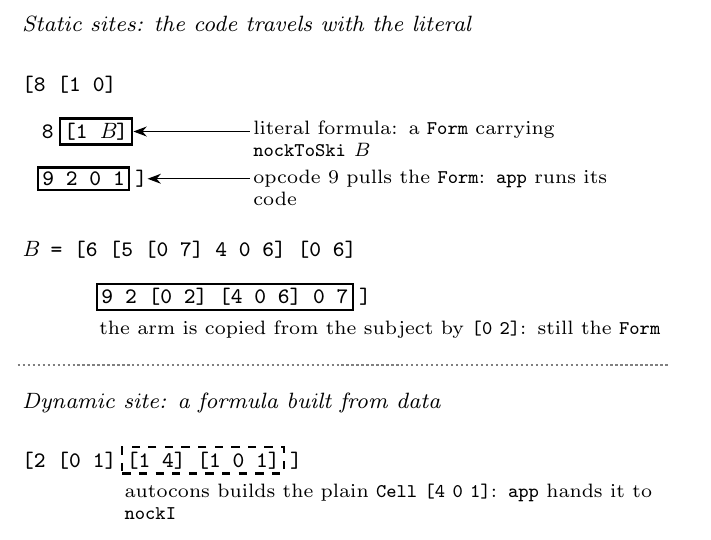
\usepackage{nockmark}
...
\begin{nockmark}
  \nkheading{Static sites}
  \nkline{\nk{[8 [1 0]}}
  \nkline[1]{\nk{8 }\nkstatic{s1}{[1 \nkmeta{B}]}}
  \nknote{s1}{literal formula: a \texttt{Form} carrying its code}
  \nkrule
  \nkheading{Dynamic site}
  \nkline{\nk{[2 [0 1] }\nkdynamic{d1}{[1 4] [1 0 1]}\nk{]}}
  \nknotebelow{d1}{autocons builds a plain cell}
\end{nockmark}
Extracted from Figure 1 of Nock in SKI (Davis 2027). The manual is
doc/nockmark.tex.
LaTeX
Copy or symlink tex/nockmark.sty next to your document, or install it into
your TeX tree with l3build install.
Sphinx, MyST and Jupyter Book
pip install nockmark
Add nockmark to extensions in conf.py, or to sphinx.extra_extensions in a
Jupyter Book's _config.yml. Then, in a Markdown page or a notebook's Markdown
cell:
```{nockmark}
:language: nock
:caption: Count-up decrement.
%% heading Static sites
[8 [1 0]
  8 {{[1 <B>]|s1}}
  {{9 2 0 1|s2}}]
%% note s1 a literal formula: the battery *B*
%% note s2 pull arm 2 of the core and run it
%% rule
%% heading Dynamic site
[2 [0 1] {{~[1 4] [1 0 1]|d1}}]
%% below d1 autocons builds a plain cell, interpreted at run time
```
Code lines are kept verbatim. {{code|name}} is a solid box, {{~code|name}} a
dashed one (the name is optional when no note refers to it); <B> is a
metavariable (:meta: off to disable). Lines starting %% are layout:
heading, rule, skip, note <box> <text> (right column, with an arrow) and
below <box> <text> (under the box). Note text takes `code`, *emphasis*
and **strong**. Highlighting uses any lexer the project registers, so a Nock or
Hoon lexer added with app.add_lexer is picked up.
The same block builds to the LaTeX environment in a PDF build; the Python
package ships nockmark.sty and adds it to the LaTeX output. In the browser the
notes move under their lines on narrow screens. Directives render when the site
is built; a notebook opened live in Jupyter shows the Markdown source.
1 maintainer

Metadata
1 maintainer
Release files for nockmark 0.1.0
For a detailed explanation of source distributions (sdists) and built distributions (wheels), please see the package formats documentation.
Source distribution (sdist)
| File | Size | Uploaded | Provenance | Actions |
|---|---|---|---|---|
| nockmark-0.1.0.tar.gz | 12.6 kB | Without provenance | Details for nockmark-0.1.0.tar.gz |
Built distribution (wheel)
| File | Interpreter | ABI | Platform | Actions Reset |
|---|---|---|---|---|
| nockmark-0.1.0-py3-none-any.whl | Python 3 | none | any | Details for nockmark-0.1.0-py3-none-any.whl |
Total release size: 23.9 kB
Release files / nockmark-0.1.0.tar.gz
| Download URL | nockmark-0.1.0.tar.gz |
|---|---|
| Size | 12.6 kB |
| Tags | Source |
|
SHA-256 checksum How to use checksums |
ab1df164ccb657a7111b7644cfadc35a269f0777fecba565e14320ac6c94212c
|
|
BLAKE2b-256 checksum How to use checksums |
e532bc14fc1b31e1e308b74af1d02a0f01a4df3e2e6d9b1dd0253ac5d008e0ac
|
| Upload date | |
|
Uploaded using Trusted Publishing? What is trusted publishing? |
No |
| Uploaded via |
twine/7.0.0 CPython/3.12.7
|
Release files / nockmark-0.1.0-py3-none-any.whl
| Download URL | nockmark-0.1.0-py3-none-any.whl |
|---|---|
| Size | 11.3 kB |
| Tags | Python 3 |
|
SHA-256 checksum How to use checksums |
f8a1fb2c6374848033c15a7ebd68886865b8a82953f73edda10049465bf5c048
|
|
BLAKE2b-256 checksum How to use checksums |
ddb9656af8eafb338247bb29c0c0fc7616d098e5b9fc8fa21213eaa32051e026
|
| Upload date | |
|
Uploaded using Trusted Publishing? What is trusted publishing? |
No |
| Uploaded via |
twine/7.0.0 CPython/3.12.7
|
Security for nockmark 0.1.0
Provenance
Provenance describes where a file came from. On PyPI, provenance is shared via attestations, which provide a verifiable record of the build or publishing details. View details, limitations and caveats.
No provenance found
None of the files in this release were uploaded with provenance metadata.
A note on package security
PyPI is a repository for distributing packages, not a service for auditing them. While third-party security researchers and our staff do their best to detect and remove malicious packages, PyPI cannot guarantee the quality, security or suitability of any given package.
To learn more about protecting yourself from malicious actors, visit our package security documentation.













