

Nodeloom
aka ComfyUI Lite




ComfyUI's node editor for models behind APIs. Build workflows that chain text, image, video and voice models (OpenAI, Google Gemini, OpenRouter, fal.ai, Replicate, BytePlus ModelArk and anything that speaks the OpenAI API) on the canvas you know from ComfyUI, without local inference: no torch, no CUDA, no model downloads, no GPU. It installs in seconds and runs on a laptop or a small server.
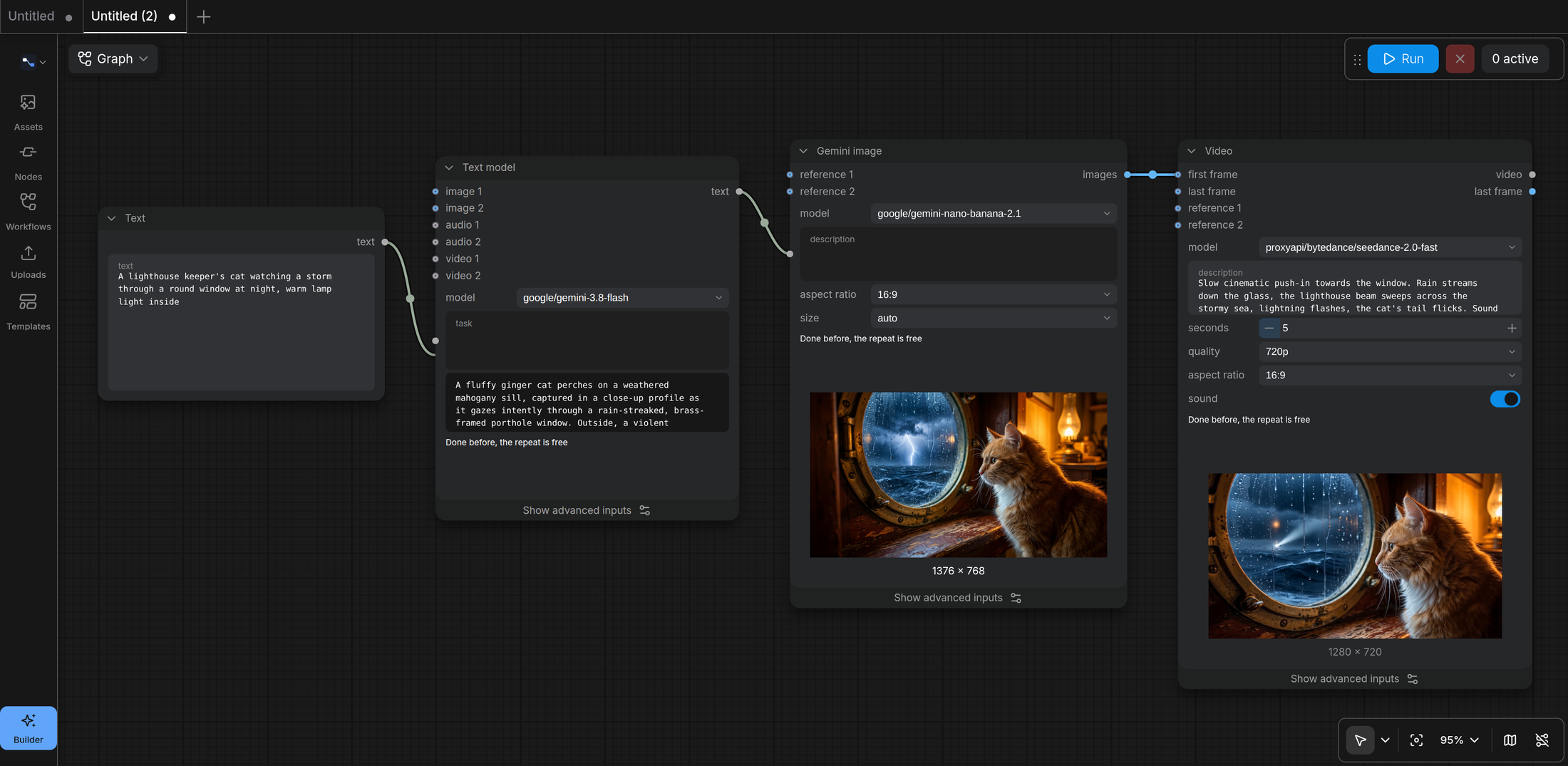
An idea → Gemini writes the prompt → Nano Banana draws it → Seedance animates it. This is the second run of the graph: every result is reused, nothing is paid twice.
Think of it as "ComfyUI Lite". It is an independent project, not affiliated with Comfy Org. The editor in the browser is the official ComfyUI frontend (ComfyUI_frontend, the comfyui-frontend-package wheel, unchanged); the backend is a new, small server that speaks the part of ComfyUI's protocol the frontend uses.
Why
ComfyUI is a great editor, but it comes with a local inference stack. If all you need is to wire up hosted models (an LLM writes the prompt, an image model draws it, a video model animates it) you still install gigabytes of torch, and its API nodes only work through Comfy's own cloud account. This project keeps the editor and replaces everything behind it:
- Your providers, your keys. Configure OpenAI, Google's Gemini API, OpenRouter, fal.ai, Replicate, ModelArk, a local Ollama or LM Studio, or your own gateway. Model lists come from each provider's
GET /models; every fal.ai or Replicate model you list becomes a node of its own, built from the model's API schema (Flux, Kling, Veo, Wan, Hailuo, ElevenLabs, Whisper and thousands more). - Parallel by default. Independent branches of a graph run at the same time (two videos from two frames generate together).
- Paid results are never paid twice. Every generation is cached by its inputs: run the graph again and only what changed is regenerated. Change the prompt of the last node and the upstream picture is reused for free.
- Robust queue. Runs wait in a database (SQLite, or PostgreSQL for several processes). A restart in the middle of a 5-minute video generation does not lose it: the run resumes and follows the same upstream task.
- Costs. After a run, the editor tells you what it cost, per node (from the provider's usage and the model's price).
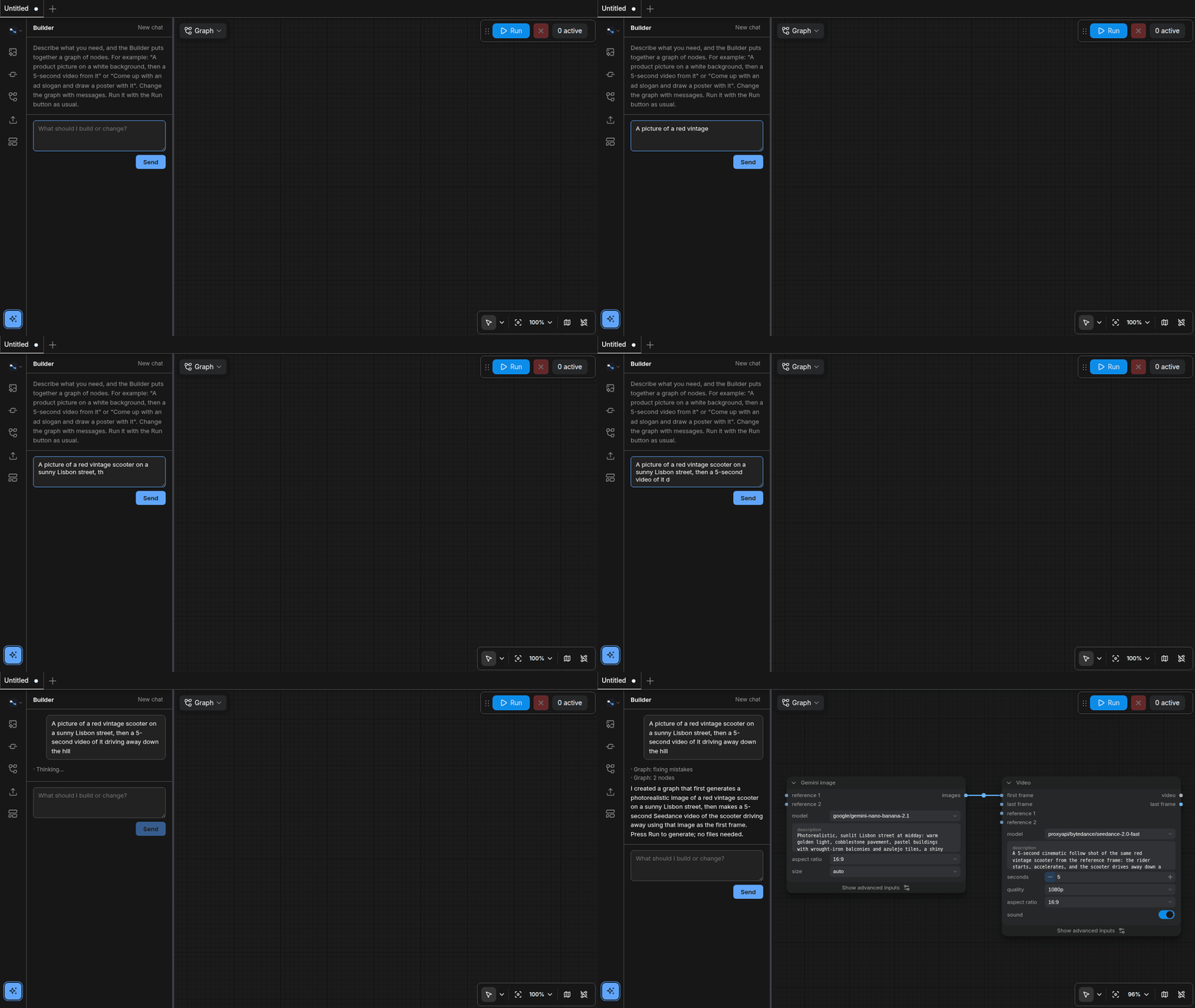
- The Builder. A side panel where you describe what you want ("a product shot on white, then a 5-second video of it") and an LLM builds the graph for you. Nothing runs until you press Run.
- English and Russian UI, including the nodes.
Quick start
Requires Python 3.12+ and, for the video tools, ffmpeg on the PATH.
pip install nodeloom                # or, without installing: uvx nodeloom --open
export OPENAI_API_KEY=sk-...        # and/or GEMINI_API_KEY, OPENROUTER_API_KEY, FAL_KEY, REPLICATE_API_TOKEN, ARK_API_KEY
nodeloom --open                     # http://127.0.0.1:8188
The latest code: pip install git+https://github.com/ShacoTustra/nodeloom.
Or with Docker:
git clone https://github.com/ShacoTustra/nodeloom && cd nodeloom
docker build -t nodeloom .
docker run -p 8188:8188 -e OPENAI_API_KEY=sk-... -v nodeloom:/data nodeloom
The database and your files live in your user data directory (~/.local/share/nodeloom on Linux, ~/Library/Application Support/nodeloom on macOS, %LOCALAPPDATA%\nodeloom on Windows), or wherever --data-dir / DATA_DIR points.
Providers
The common ones need only an environment variable:
| Variable | Provider | Nodes |
|---|---|---|
OPENAI_API_KEY (OPENAI_BASE_URL) |
OpenAI | Text model, GPT Image |
GEMINI_API_KEY (or GOOGLE_API_KEY) |
Google's Gemini API (a key from Google AI Studio) | Text model (Gemini, Gemma), Gemini image (Nano Banana), Gemini video (Omni Flash) |
OPENROUTER_API_KEY |
OpenRouter: hundreds of chat models and dozens of video models, with prices | Text model, Video (Veo, Kling, Seedance, Wan, Hailuo...) |
FAL_KEY |
fal.ai | a node per model: Flux Dev, Flux Pro Kontext, Nano Banana (+ Edit), Qwen Image, Kling 2.1, Veo 3 Fast, Veo 3 Image to Video, Hailuo 02, Wan 2.2, ElevenLabs TTS |
REPLICATE_API_TOKEN |
Replicate | a node per model: Flux Schnell, Flux 2 Pro, Flux Kontext Pro, Nano Banana Pro, Seedream 4, Ideogram v3 Turbo, Recraft v3, Kling 2.5 Turbo Pro, Hailuo 02, Veo 3 Fast, Wan 2.5 I2V, Speech 02 Turbo |
ARK_API_KEY (ARK_BASE_URL) |
BytePlus ModelArk (Volcengine Ark with its own base URL) | Text model, Seedream image, Seedance video, Seedance character |
Anything else goes into config.toml (in the working directory or the data directory, or --config path). See config.example.toml:
[providers.local]
type = "openai"                       # the OpenAI API: Ollama, LM Studio, vLLM, Groq, DeepSeek, Together...
base_url = "http://localhost:11434/v1"
models = ["llama3.2", "qwen2.5vl"]    # optional: otherwise GET /models

[providers.local.extra_models."qwen2.5vl"]
inputs = ["image"]                    # what a chat model takes besides text

[providers.openai.extra_models."gpt-image-1"]
price = { input = 5.0, image_input = 10.0, output = 40.0 }   # US$ per million tokens, for the cost shown

[providers.fal]
type = "fal"
api_key_env = "FAL_KEY"
[providers.fal.endpoints."fal-ai/flux/dev"]                  # any model of fal.ai/models, by its endpoint id
price = { request = 0.025 }
[providers.fal.endpoints."fal-ai/kling-video/v2.1/master/image-to-video"]
title = "Kling 2.1 Master"

[providers.replicate]
type = "replicate"
api_key_env = "REPLICATE_API_TOKEN"
[providers.replicate.endpoints."black-forest-labs/flux-schnell"]   # any model of replicate.com, owner/name
price = { image = 0.003 }
[providers.replicate.endpoints."openai/whisper"]                   # a community model: its latest version,
price = { second = 0.000975 }                                       # or "owner/name:<version>" to keep one

[providers.google.extra_models."gemini-3.1-flash-image"]
price = { input = 1.5, output = 30.0 }   # Google prices pictures and video by their output tokens
A gateway that passes Google's own API on (generateContent) works as a google provider with its base_url; Gemini video needs Google's Interactions API, which gateways may not have. A router with OpenRouter's video API (POST /videos, GET /videos/models) adds its video models to the Video node.
In the nodes a model is <provider>/<model>, so the same graph can mix providers. A node whose models no provider has is not offered (and a template that needs it is not listed).
A fal.ai endpoint or a Replicate model becomes a node under Generate / fal / or Generate / Replicate / : its settings are widgets (the common ones in front, the rest under "Show advanced inputs"), its image, video and audio inputs are links, its results are outputs. Its schema is fetched once and kept in the data directory. Replicate's schemas say of a file output only that it is a link: the node guesses whether it is a picture, a video or a sound from the model's settings and description, and kind = "video" (or image, audio) on the model sets it when the guess is wrong.
Neither fal.ai nor Replicate reports a price in its answers, and Google reports tokens only: give the models you use a price to see what a run costs (request per call, image per picture, second per second of run time, input / output per million tokens).
Nodes
| Category | Nodes |
|---|---|
| Input | Text, Image, Video file, Audio file |
| Generate | Text model: any provider's chat model; images, sound and video as inputs where the model takes them. Video: any video model of a router's video API (OpenRouter, ProxyAPI): text, first/last frame, references |
| Generate / OpenAI | GPT Image: generation, or editing with up to 16 reference images |
| Generate / Google | Gemini image (Nano Banana: up to 14 references, sizes up to 4K), Gemini video (Omni Flash: text, first/last frame, references, or a video of yours edited or extended; with sound) |
| Generate / ByteDance | Seedream image (up to 10 references, series of images), Seedance video (text, first/last frame, references, sound), Seedance character (ready faces for video) |
| Generate / fal / …, Generate / Replicate / … | one node per fal.ai or Replicate model you configure: images, video, speech, transcription, LLMs |
| Video | Frame from video (first or last: continue a clip), Join videos |
| Text | Join text, Show (text, images, video, sound) |
Images, video and sound travel between nodes as files; a generating node shows its result on the canvas, and every result lands in the editor's assets panel.
Agents (MCP)
Nodeloom is also an MCP server: Claude Code, Cursor, Claude Desktop or any MCP client can build and run graphs with the same nodes and models as the editor. An agent reads the catalog, checks and runs a graph, follows the run, uploads input files, puts a graph on your canvas in a new tab or reads the one you have open. Runs made by an agent appear in the editor's queue and results, and reuse earlier results like any other run.
With Nodeloom running:
claude mcp add --transport http nodeloom http://127.0.0.1:8188/mcp
A client that starts a command instead (Claude Desktop, Cursor and others) uses nodeloom mcp, which forwards to the running server (--url for another address):
{ "mcpServers": { "nodeloom": { "command": "nodeloom", "args": ["mcp"] } } }
| Tool | |
|---|---|
list_nodes |
the nodes, their settings and links, the models you have (what each video model can do) |
check_graph |
the errors a run would stop at, for free |
run_graph |
run a graph and wait for it; texts, files as links, pictures as previews, the cost |
get_run, list_runs, cancel_run |
follow, list and stop runs (a video takes minutes) |
upload_file |
a picture, a video or a sound for the file nodes, as base64 or from a public URL |
open_in_editor, get_editor_graph |
put a graph on the canvas in a new tab, read the graph you have open |
A graph is the Builder's list of nodes: {"id": "2", "type": "LoomGeminiImage", "values": {"aspect_ratio": "16:9"}, "links": {"prompt": "1.0"}}.
Security
There is one local user and no sign-in, as in ComfyUI. The server listens on 127.0.0.1 by default and accepts only requests whose Host is a local name (ALLOWED_HOSTS), so a web page cannot reach it through DNS rebinding; requests that change anything must come from the editor's own pages. The MCP endpoint is guarded the same way (local host names, no requests from other sites): anything on your machine that can reach the editor can reach it. To use it over a network, put it behind a reverse proxy with authentication, start it with --host 0.0.0.0 and add your host name to ALLOWED_HOSTS. Your provider keys stay on the server.
Settings
| Setting | Default | |
|---|---|---|
DATA_DIR |
user data directory | database and files |
DATABASE_URL |
SQLite in DATA_DIR |
postgresql+asyncpg://... with pip install nodeloom[postgres] |
REDIS_URL |
none | events across several processes |
MEDIA_DIR / MEDIA_S3_* |
DATA_DIR/media |
files on disk or in S3-compatible storage (nodeloom[s3]) |
STORAGE_LIMIT_MB |
0 (no limit) | room for a user's files |
ALLOWED_HOSTS |
localhost,127.0.0.1,::1 |
* behind your own proxy |
LANGUAGE |
the browser's | en or ru (also switchable in the editor's menu) |
AGENT_MODEL |
the first chat model | the Builder's model, <provider>/<model> with function calling |
RUNS_PER_USER, QUEUE_PER_USER, RUNS_PER_PROCESS, GENERATIONS_PER_PROCESS |
2, 20, 200, 100 | concurrency |
Development
uv sync
uv run pytest          # providers are mocked; the video tests need ffmpeg
uv run nodeloom
How it works inside: docs/architecture.md.
Status
Alpha. Working: the editor, the queue, caching and resuming, the nodes above, fal.ai and Replicate models, Google's Gemini API, the Builder, costs, managing uploads. The provider calls are tested against recorded API shapes; a report of a real run that fails is very welcome. Next: several users, ModelArk's own character library.
License
GPL-3.0, like the ComfyUI frontend it serves. "ComfyUI" is a name of Comfy Org, used here only to say what this works with.
1 maintainer

Metadata
1 maintainer
Release files for nodeloom 0.2.0
For a detailed explanation of source distributions (sdists) and built distributions (wheels), please see the package formats documentation.
Source distribution (sdist)
| File | Size | Uploaded | Provenance | Actions |
|---|---|---|---|---|
| nodeloom-0.2.0.tar.gz | 332.4 kB | With provenance | Details for nodeloom-0.2.0.tar.gz |
Built distribution (wheel)
| File | Interpreter | ABI | Platform | Actions Reset |
|---|---|---|---|---|
| nodeloom-0.2.0-py3-none-any.whl | Python 3 | none | any | Details for nodeloom-0.2.0-py3-none-any.whl |
Total release size: 683.4 kB
Release files / nodeloom-0.2.0.tar.gz
| Download URL | nodeloom-0.2.0.tar.gz |
|---|---|
| Size | 332.4 kB |
| Tags | Source |
|
SHA-256 checksum How to use checksums |
27e0eb7a3954b8dfebae958143222f3d2ab1bc6d2c06e72959b908064417ee2a
|
|
BLAKE2b-256 checksum How to use checksums |
705c1a763db2ad0f04b5a25c9389d4651e7fe8adf326ff7ff2f00821ebaced79
|
| Upload date | |
|
Uploaded using Trusted Publishing? What is trusted publishing? |
Yes |
| Uploaded via |
twine/7.0.0 CPython/3.13.16
|
Provenance
Provenance describes where a file came from. On PyPI, provenance is shared via attestations, which provide a verifiable record of the build or publishing details. View details, limitations and caveats.


PyPI Publish Attestation
PyPI verified that this artifact, at this checksum, originated from the publisher listed below.
Signed by GitHub Actions, verified by PyPI on Nov 2, 2026.
Transparency logRelease files / nodeloom-0.2.0-py3-none-any.whl
| Download URL | nodeloom-0.2.0-py3-none-any.whl |
|---|---|
| Size | 351.0 kB |
| Tags | Python 3 |
|
SHA-256 checksum How to use checksums |
2be498310e9f9930f6825c9cff506dcf944bad34244969da1eb136e399ba79ff
|
|
BLAKE2b-256 checksum How to use checksums |
de246d76e434eb2ce09cd68a5d7f2326a5daf4d81a24e4d08f06fc07fca01335
|
| Upload date | |
|
Uploaded using Trusted Publishing? What is trusted publishing? |
Yes |
| Uploaded via |
twine/7.0.0 CPython/3.13.16
|
Provenance
Provenance describes where a file came from. On PyPI, provenance is shared via attestations, which provide a verifiable record of the build or publishing details. View details, limitations and caveats.
PyPI Publish Attestation
PyPI verified that this artifact, at this checksum, originated from the publisher listed below.
Signed by GitHub Actions, verified by PyPI on Nov 2, 2026.
Transparency logSecurity for nodeloom 0.2.0
Provenance
Provenance describes where a file came from. On PyPI, provenance is shared via attestations, which provide a verifiable record of the build or publishing details. View details, limitations and caveats.
Full provenance
All 2 files in this release have been uploaded with provenance metadata.
Attestation for nodeloom-0.2.0.tar.gz
PyPI Publish Attestation
PyPI verified that this artifact, at this checksum, originated from the publisher listed below.
Signed by GitHub Actions, verified by PyPI on Nov 2, 2026.
Transparency logA note on package security
PyPI is a repository for distributing packages, not a service for auditing them. While third-party security researchers and our staff do their best to detect and remove malicious packages, PyPI cannot guarantee the quality, security or suitability of any given package.
To learn more about protecting yourself from malicious actors, visit our package security documentation.














