
Foundation AI-Enhanced Scientific Workflow

Project description
[!IMPORTANT] This package is actively in development, and breaking changes may occur.

🤖 Foundation AI-Enhanced Scientific Workflow
Foundation AI holds enormous potential for scientific research, especially in analyzing unstructured data, automating complex reasoning tasks, and simplifying human-computer interactions. However, integrating foundation AI models like LLMs and VLMs into scientific workflows poses challenges: handling diverse data types beyond text and images, managing model inaccuracies (hallucinations), and adapting general-purpose models to highly specialized scientific contexts.
nodeology addresses these challenges by combining the strengths of foundation AI with traditional scientific methods and expert oversight. Built on langgraph's state machine framework, it simplifies creating robust, AI-driven workflows through an intuitive, accessible interface. Originally developed at Argonne National Lab, the framework enables researchers—especially those without extensive programming experience—to quickly design and deploy full-stack AI workflows simply using prompt templates and existing functions as reusable nodes.
Key features include:
- Easy creation of AI-integrated workflows without complex syntax
- Flexible and composable node architecture for various tasks
- Seamless human-in-the-loop interactions for expert oversight
- Portable workflow templates for collaboration and reproducibility
- Quickly spin up simple chatbots for immediate AI interaction
- Built-in tracing and telemetry for workflow monitoring and optimization
🚀 Getting Started
Install the package
To use the latest development version:
pip install git+https://github.com/xyin-anl/Nodeology.git
To use the latest release version:
pip install nodeology
Access foundation models
Nodeology supports various cloud-based/local foundation models via LiteLLM, see provider list. Most of cloud-based models usage requires setting up API key. For example:
# For OpenAI models
export OPENAI_API_KEY='your-api-key'

# For Anthropic models
export ANTHROPIC_API_KEY='your-api-key'

# For Gemini models
export GEMINI_API_KEY='your-api-key'

# For Together AI hosted open weight models
export TOGETHER_API_KEY='your-api-key'
💡 Tip: The field of foundation models is evolving rapidly with new and improved models emerging frequently. As of February 2025, we recommend the following models based on their strengths:
- gpt-4o: Excellent for broad general knowledge, writing tasks, and conversational interactions
- o3-mini: Good balance of math, coding, and reasoning capabilities at a lower price point
- anthropic/claude-3.7: Strong performance in general knowledge, math, science, and coding with well-constrained outputs
- gemini/gemini-2.0-flash: Effective for general knowledge tasks with a large context window for processing substantial information
- together_ai/deepseek-ai/DeepSeek-R1: Exceptional reasoning, math, science, and coding capabilities with transparent thinking processes
For Argonne Users: if you are within Argonne network, you will have access to OpenAI's models through Argonne's ARGO inference service and ALCF's open weights model inference service for free. Please check this link to see how to use them
Langfuse Tracing (Optional)
Nodeology supports Langfuse for observability and tracing of LLM/VLM calls. To use Langfuse:
- Set up a Langfuse account and get your API keys
- Configure Langfuse with your keys:
# Set environment variables
export LANGFUSE_PUBLIC_KEY='your-public-key'
export LANGFUSE_SECRET_KEY='your-secret-key'
export LANGFUSE_HOST='https://cloud.langfuse.com'  # Or your self-hosted URL
Or configure programmatically:
from nodeology.client import configure_langfuse

configure_langfuse(
    public_key='your-public-key',
    secret_key='your-secret-key',
    host='https://cloud.langfuse.com'  # Optional
)
Chainlit Interface (Optional)
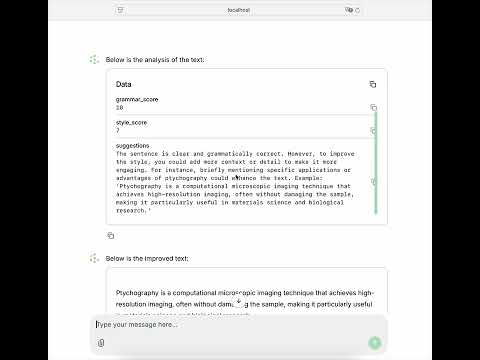
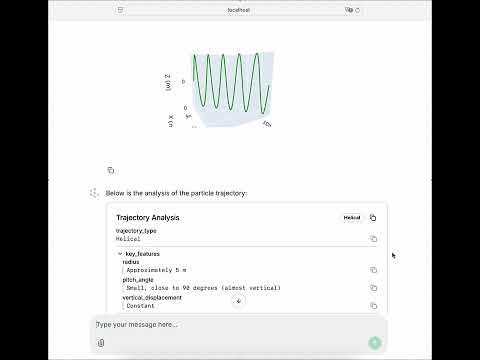
Nodeology supports Chainlit for creating chat-based user interfaces. To use this feature, simply set ui=True when running your workflow:
# Create your workflow
workflow = MyWorkflow()

# Run with UI enabled
workflow.run(ui=True)
This will automatically launch a Chainlit server with a chat interface for interacting with your workflow. The interface preserves your workflow's state and configuration, allowing users to interact with it through a user-friendly chat interface.
When the Chainlit server starts, you can access the interface through your web browser at http://localhost:8000 by default.
🧪 Illustrating Examples
Writing Improvement
Trajectory Analysis
🔬 Scientific Applications
👥 Contributing & Collaboration
We welcome comments, feedbacks, bugs report, code contributions and research collaborations. Please refer to CONTRIBUTING.md
If you find nodeology useful and may inspire your research, please use the Cite this repository function
Release history Release notifications | RSS feed


Download files
Download the file for your platform. If you're not sure which to choose, learn more about installing packages.
Source Distribution
Built Distribution
Filter files by name, interpreter, ABI, and platform.
If you're not sure about the file name format, learn more about wheel file names.
Copy a direct link to the current filters
File details
Details for the file nodeology-0.0.3.tar.gz.
File metadata
- Download URL: nodeology-0.0.3.tar.gz
- Upload date:
- Size: 633.5 kB
- Tags: Source
- Uploaded using Trusted Publishing? No
- Uploaded via: twine/6.0.1 CPython/3.11.10
File hashes
| Algorithm | Hash digest | |
|---|---|---|
| SHA256 |
0bab295f17e2b4a5577705b60db71a3cac448f75cb8bd029273295eea8f0ab72
|
|
| MD5 |
71a7fd16eb3fedb435007fb6a39e301d
|
|
| BLAKE2b-256 |
47b94d83278b23d54c993b06bb4fe1e8a4945ae9c694b5e05ec03ca854e41883
|
File details
Details for the file nodeology-0.0.3-py3-none-any.whl.
File metadata
- Download URL: nodeology-0.0.3-py3-none-any.whl
- Upload date:
- Size: 163.5 kB
- Tags: Python 3
- Uploaded using Trusted Publishing? No
- Uploaded via: twine/6.0.1 CPython/3.11.10
File hashes
| Algorithm | Hash digest | |
|---|---|---|
| SHA256 |
0d1f50f399dd9e576e4bcc1c83399f9dc8a64b478ff64b7c6cc9b4ecba462a3d
|
|
| MD5 |
4c921735ef072f4358014b0541226996
|
|
| BLAKE2b-256 |
2e61f0c15a686322cbccd498183e5fbd7aa759a5979ee6dcc65aa2f76fc352b7
|






