
This release is a pre-release and may not be stable for production use.

Noetrail





Noetrail is a local-first Markdown knowledge vault for people and AI agents. Capture notes, link related entries, and retrieve stored knowledge through a Python CLI or a bounded Model Context Protocol (MCP) server. Markdown files remain the source of truth and can be read without Noetrail.
Status: 0.10.0a3 is a public alpha, available on
PyPI,
GitHub, and
TestPyPI.
Python 3.11 or newer is required. The Python runtime has no third-party
package dependencies. CLI and MCP interfaces may change during the alpha;
see versioning and compatibility.
AI-developed, maintainer-directed. The code, tests, and documentation were written by AI coding agents under one human maintainer's direction. The maintainer is responsible for what ships. Automated checks support review; they do not prove correctness. Development process.
Get started
With uv installed, run the published alpha without a source checkout:
uvx --from 'noetrail==0.10.0a3' noetrail quickstart
quickstart creates ~/noetrail/data and ~/noetrail/config, adds three
sample entries, and prints an MCP configuration with absolute data and configuration paths. Use
--path to choose another instance directory. Repeating the command does not
duplicate the samples.
For a virtual environment, TestPyPI, or a server installation, see Installation and lifecycle. To try the source checkout with disposable data:
git clone https://github.com/patsch1/noetrail
cd noetrail
python3 -m venv .venv
.venv/bin/python -m pip install .
DEMO_ROOT="$(mktemp -d)"
.venv/bin/noetrail quickstart --path "$DEMO_ROOT"
.venv/bin/noetrail \
  --data-root "$DEMO_ROOT/data" \
  --config-root "$DEMO_ROOT/config" \
  doctor
The five-minute quickstart walks through capture, search, custom types, and imports. Follow it with synthetic data before using personal notes.
Connect an AI client
Noetrail exposes a stdio MCP server. quickstart prints the absolute data and
configuration paths. For the uvx method above, clients that accept a
mcpServers configuration can launch the server through uvx:
{
  "mcpServers": {
    "noetrail": {
      "command": "uvx",
      "args": [
        "--from", "noetrail==0.10.0a3", "noetrail-mcp",
        "--data-root", "/absolute/data", "--config-root", "/absolute/config"
      ]
    }
  }
}
Replace the example roots with the paths printed by quickstart. If your
client cannot resolve uvx, use its absolute path (command -v uvx). For a
virtual-environment installation, use that environment's absolute
noetrail-mcp path with the generated arguments. Configuration locations and
protocol versions depend on the host; see Connecting an MCP client.
A connected agent can capture a note, find related entries, save an article to a reading queue, or retrieve an attached image. The vault server exposes typed operations instead of a generic shell or filesystem API. Bookmark metadata is fetched through a separate server with no vault access.
What you can store and do
- Structured knowledge: notes, thoughts, memories, people, projects, media, places, products, recipes, bookmarks, and experiences such as visits or tastings. Entries have stable IDs, typed relations, tags, and timestamps.
- Capture and review: an inbox for unreviewed entries, revision checks for updates, private image attachments, and whole-entry trash and restore.
- Retrieval: literal and BM25 search, grounded alternative names, bounded multi-entry retrieval, and saved filtered views. An optional derived index can be rebuilt from the Markdown files.
- Custom types: declarative schema packs define attributes and validation without executable hooks. See Schema packs and Saved views.
- Imports: preview and import plain Markdown, Obsidian, or Basic Memory exports with provenance and duplicate handling. See Importing notes.
- Optional reranking: externally supplied vectors can rerank lexical candidates. Noetrail ships no embedding model or provider connection. See Embeddings.
Recorded example
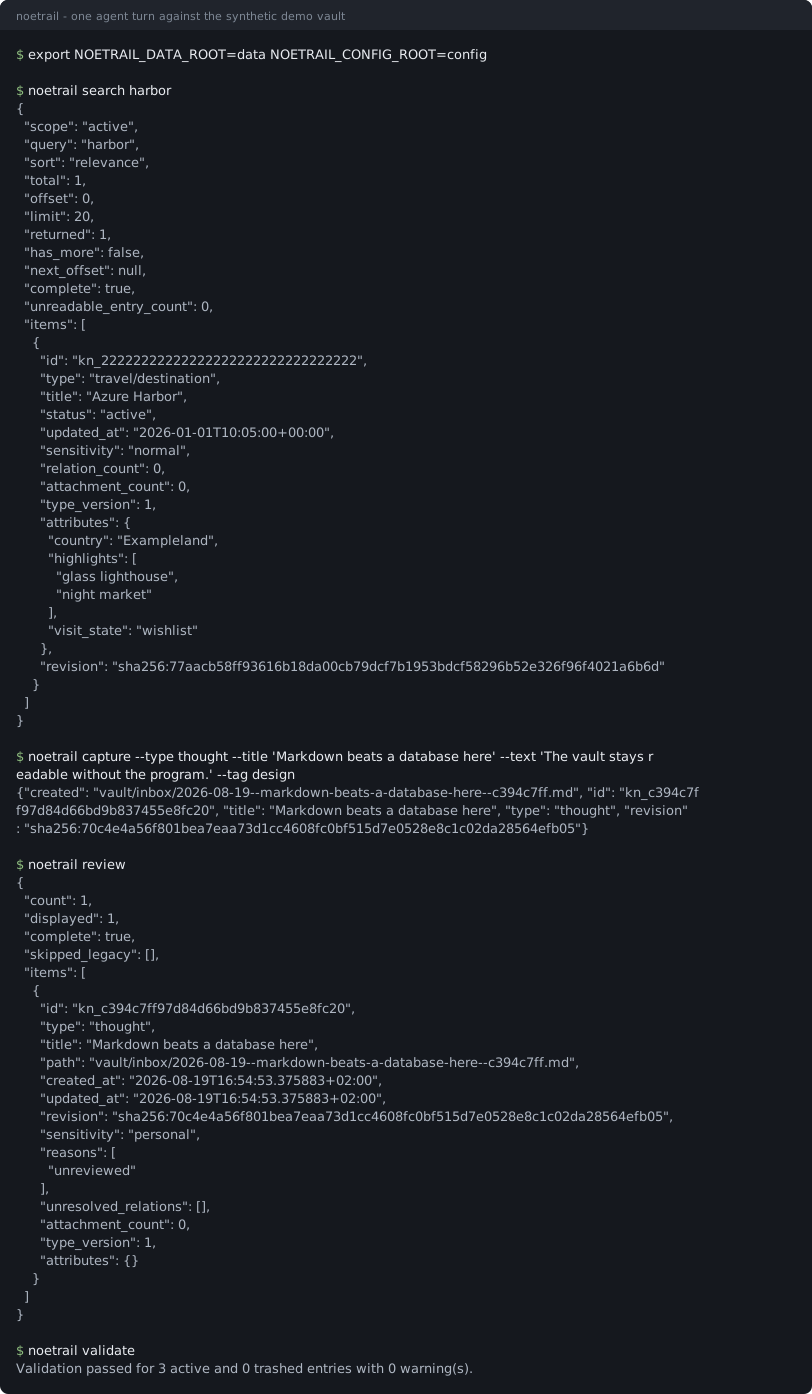
The recording runs demo/session.sh against a disposable
synthetic vault: search, capture, review, and validation. The test suite
checks the transcript against the program's output.
Data, privacy, and limits
Personal entries, attachments, imports, and trash belong in the private data root and its backups. Program files, schemas, skills, and synthetic examples belong in source control. Instance configuration and local schema packs can live separately from both. See Layout and Privacy boundaries.
An AI client connected to the vault can read its entries. A cloud-backed client may send retrieved content to its model provider; local storage alone does not prevent that. Sensitivity labels are metadata, not access controls. Choose a client and provider you trust with the connected vault.
Search is primarily lexical. Empty hybrid searches can offer labelled
word-form and title/alias typo candidates. retrieve can combine the original
query with up to three wordings or translations in one bounded read; the
agent supplies those variants. A paraphrase or translation may still miss,
and an empty result is not proof that a fact is absent. Vector
reranking does not add entries outside the lexical candidates. See
Limits and scaling and Retrieval evaluation.
Back up the complete data and configuration roots before upgrades. On-disk migrations require an explicit preview and apply; restoring a backup is the rollback path after migration. See Backup and restore.
Architecture and deployment
flowchart LR
    U["User"] --> C["CLI"]
    U --> A["AI client"]
    A --> M["Noetrail MCP"]
    M --> C
    C --> V[("Private Markdown vault")]
    P["Declarative schema packs"] --> C
    W["Isolated bookmark fetcher"] -->|"allowlisted metadata"| A
The CLI implements vault rules; MCP mutations invoke that same implementation. Program resources, instance configuration, and data can use separate paths:
/opt/noetrail/          program and built-ins
/etc/noetrail/          instance configuration and local schema packs
/srv/noetrail-data/     vault, trash, imports, locks, attachments
Run Noetrail locally or install it on a shared host. The optional ZeroClaw deployment adds a constrained knowledge agent and an isolated web-fetch process; it is one integration, not a requirement. The security guide describes that deployment's controls.
Development and verification
Install the development tools described in Contributing. Without a local maintainer vault, run the six contributor gates listed there. With that vault configured:
make check
make release-check
Changes pass lint, type checking, synthetic tests, coverage, secret scanning,
and the Git/private-data boundary check. make check also validates a local
maintainer vault; it requires one. make release-check tests an unpacked source
distribution and a freshly installed wheel, including synthetic migration and
restore acceptance. CodeQL runs alongside CI on public changes.
Noetrail 0.10.0a3 is available on PyPI, GitHub and TestPyPI. Release artifacts
include checksums, build provenance, and a CycloneDX bill of materials.
The source repository is public. Package uploads require maintainer
authorization and the protected PyPI environment review. See
Release process and current release notes.
Documentation and project
- Five-minute quickstart · Installation · Connecting an MCP client
- Architecture · Layout · Privacy · Backup and restore
- Schema packs · Saved views · Importing notes · Search limits
- Roadmap · Decision log · Architecture decision records
- Contributing · AGENTS.md · Development process
- Support · Security policy · Code of conduct
Noetrail is licensed under the Apache License 2.0. Personal vault content is separate data and is not relicensed by this repository.
1 maintainer

Metadata
1 maintainer
Release files for noetrail 0.10.0a3
For a detailed explanation of source distributions (sdists) and built distributions (wheels), please see the package formats documentation.
Source distribution (sdist)
| File | Size | Uploaded | |
|---|---|---|---|
| noetrail-0.10.0a3.tar.gz | 544.8 kB | Details |
Built distribution (wheel)
| File | Interpreter | ABI | Platform | Reset |
|---|---|---|---|---|
| noetrail-0.10.0a3-py3-none-any.whl | Python 3 | none | any | Details |
Total release size: 767.3 kB
Release files / noetrail-0.10.0a3.tar.gz
| Download URL | noetrail-0.10.0a3.tar.gz |
|---|---|
| Size | 544.8 kB |
| Tags | Source |
|
SHA-256 checksum How to use checksums |
ff8a6c7e9cc0650936b2afea862324d33b8813c3251d69a13fdd8ec912462d6e
|
|
BLAKE2b-256 checksum How to use checksums |
cdad51f0c5bf13336dc56753cdde238976b0ca3853177ee64e838560efd2ce60
|
| Upload date | |
|
Uploaded using Trusted Publishing? What is trusted publishing? |
Yes |
| Uploaded via |
twine/7.0.0 CPython/3.13.14
|
Provenance
Provenance describes where a file came from. On PyPI, provenance is shared via attestations, which provide a verifiable record of the build or publishing details. View details, limitations and caveats.


PyPI Publish Attestation
PyPI verified that this artifact, at this checksum, originated from the publisher listed below.
Signed by GitHub Actions, verified by PyPI on Oct 8, 2026.
Transparency logRelease files / noetrail-0.10.0a3-py3-none-any.whl
| Download URL | noetrail-0.10.0a3-py3-none-any.whl |
|---|---|
| Size | 222.6 kB |
| Tags | Python 3 |
|
SHA-256 checksum How to use checksums |
69a99f738557f195c5d9b8ad810bfc50767b7bbefbc933f96ec00350138ffa63
|
|
BLAKE2b-256 checksum How to use checksums |
b378d07779bbe3721526025c9a7ba59da5dc7574cd79e6ab7c040b29bf2fb4d8
|
| Upload date | |
|
Uploaded using Trusted Publishing? What is trusted publishing? |
Yes |
| Uploaded via |
twine/7.0.0 CPython/3.13.14
|
Provenance
Provenance describes where a file came from. On PyPI, provenance is shared via attestations, which provide a verifiable record of the build or publishing details. View details, limitations and caveats.
PyPI Publish Attestation
PyPI verified that this artifact, at this checksum, originated from the publisher listed below.
Signed by GitHub Actions, verified by PyPI on Oct 8, 2026.
Transparency log













