
This release is a pre-release and may not be stable for production use.

Noetrail





Noetrail is a local-first, agent-friendly knowledge vault. Notes remain readable Markdown files; AI agents use a narrow CLI or MCP interface to capture, search, relate, review, and safely update them.
Built by AI agents. Noetrail is vibe-coded. Its code, tests, and documentation were written by AI coding agents directed by one human maintainer, who reviews the result and is accountable for what ships. Six CI gates stand in for a person typing every line. How this project was built says what that does and does not mean — worth reading before you point this at your private notes.
Private by design: source control contains the program, schemas, skills, synthetic examples, and documentation. A real
vault/,trash/,imports/raw/, andimports/work/belong on private storage and in its authorized backups, never in Git.
Noetrail currently supports:
- thoughts, notes, memories, people, projects, media, places, products, and recipes;
- reusable experiences such as tastings, visits, meals, and cooking events;
- reading queues and enriched bookmarks with personal notes kept separate from fetched metadata;
- private, content-addressed image attachments;
- search that runs a literal substring match and an Okapi BM25 ranking together and returns the union, over an optional derived index that is verified against the files before every use and can be deleted at any time;
- a vector sidecar interface for an embedding provider you run yourself, with no model, no dependency, and no network call added to Noetrail;
- stable IDs, typed relations, optimistic revisions, and a shared vault lock;
- searchable aliases for explicitly grounded alternative names;
- an inbox/review workflow and reversible trash;
- declarative saved views for recurring filtered lists;
- declarative, non-executable schema packs for user-defined types;
- idempotent local Markdown imports with retained provenance;
- a dependency-free Python CLI, a narrow Noetrail MCP server, and an isolated SSRF-hardened bookmark metadata fetcher;
- host-neutral agent workflows plus an optional hardened ZeroClaw overlay.
One agent turn
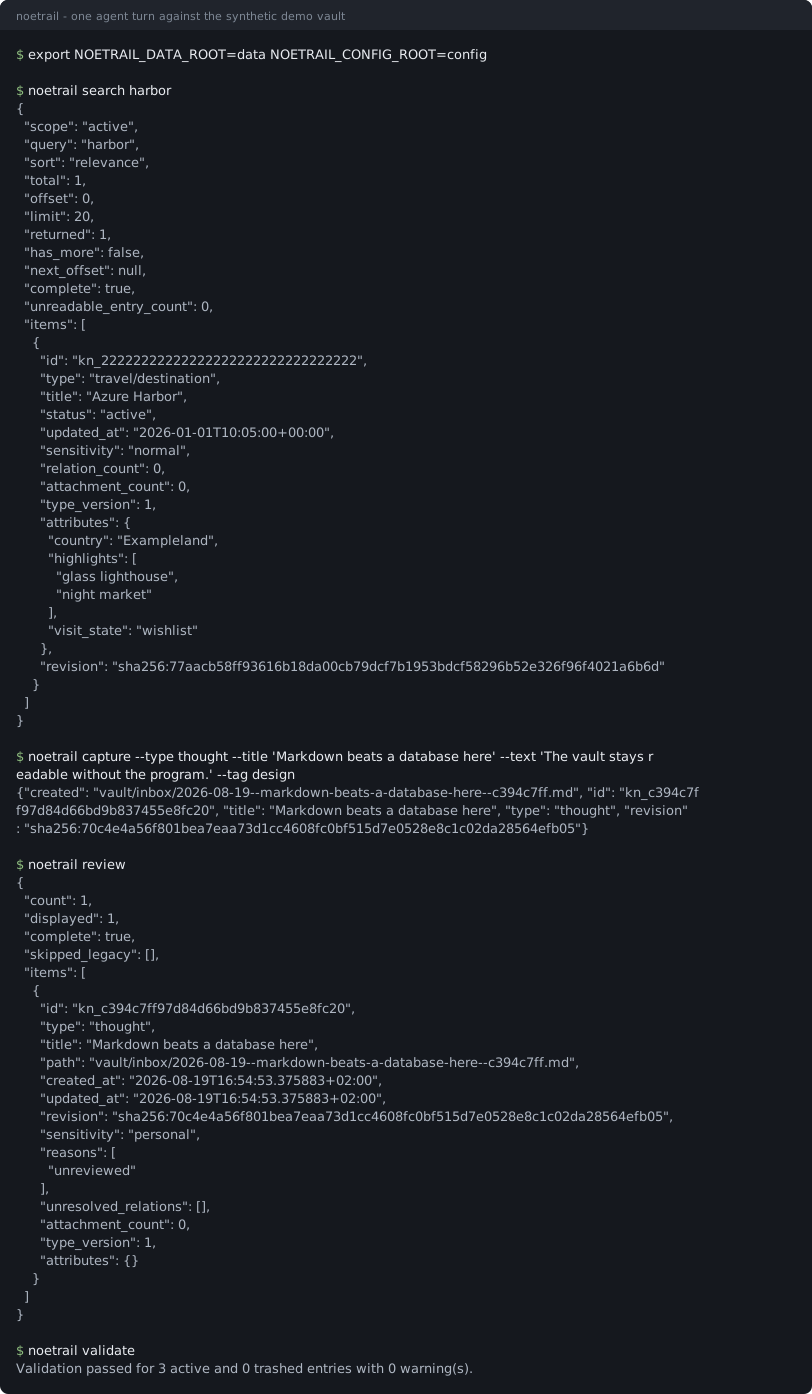
This is a recording, not an illustration. demo/session.sh
runs those four commands against a disposable copy of the synthetic demo vault;
tools/render_terminal_svg.py executes the script and draws whatever came
back. The plain-text transcript is
docs/assets/demo.txt, and the test suite re-runs the
session and fails if the recording no longer matches the program's output.
Start with one command
noetrail quickstart creates an instance, writes a few sample entries, and
prints the exact MCP server block your client wants. Nothing else to decide.
From the first package-index release — no checkout, no virtual environment:
uvx noetrail quickstart # or: pipx run noetrail quickstart
That line is not live yet: 0.10.0a1 has not been uploaded, and this project
does not ship a badge or a link for a package that does not exist. What works
today is a checkout. Python 3.11 or newer, no third-party dependencies:
git clone https://github.com/patsch1/noetrail
cd noetrail
python3 -m venv .venv
.venv/bin/python -m pip install .
Then the same single command:
DEMO_ROOT="$(mktemp -d)"

.venv/bin/noetrail quickstart --path "$DEMO_ROOT"
It prints the two roots it created, the sample entries it wrote, and the
client configuration below. Run search, review, or inventory against it
straight away:
.venv/bin/noetrail \
  --data-root "$DEMO_ROOT/data" \
  --config-root "$DEMO_ROOT/config" \
  doctor
The longer walkthrough adds a custom schema pack and two imports: Five-minute quickstart.
Connecting an agent
Noetrail's primary agent boundary is a stdio MCP server, and quickstart
prints this block filled in with your own absolute paths. Any MCP-capable
client takes it:
{
  "mcpServers": {
    "noetrail": {
      "command": "noetrail-mcp",
      "args": ["--data-root", "/absolute/data", "--config-root", "/absolute/config"]
    }
  }
}
See Connecting an MCP client for the tool surface, concurrency rules, and attachment handling.
Agent-facing examples
A connected agent can turn ordinary requests into validated operations:
- “Remember this thought and leave it in my review inbox.”
- “Save this article as unread.”
- “Which drinks are still on my wishlist?”
- “I visited this bar yesterday, rated it four stars, and attached two photos.”
- “Show unresolved relationships and bookmarks without a personal note.”
The agent never needs a generic shell or arbitrary filesystem access. It uses
typed operations such as inventory, capture, search, retrieve,
run_view, update, add_attachment, trash, and restore. Search returns compact, stably
ordered pages with an explicit total and continuation offset, so an agent can
answer large-list questions without silently truncating them or flooding its
model context.
Architecture
flowchart LR
    U["User"] --> A["AI agent or CLI"]
    A --> M["Noetrail MCP"]
    M --> C["Validated core"]
    C --> V[("Private Markdown vault")]
    V --> B[("Versioned backups")]
    P["Declarative schema packs"] --> C
    W["Isolated bookmark fetcher"] -->|"allowlisted metadata"| A
Markdown is the source of truth. The core owns IDs, timestamps, revisions, locking, lifecycle, attachments, provenance, trash, and migrations. Schema packs define typed attributes and static body structure without Python, shell, network calls, or executable hooks.
Program resources, instance configuration, and personal data can be mounted separately:
/opt/noetrail/          installed read-only program and built-ins
/etc/noetrail/          instance configuration and local schema packs
/srv/noetrail-data/     private vault, trash, imports, locks, attachments
The older combined --root layout remains a compatibility surface for
existing deployments.
Declarative custom types
Local schema packs live below <config-root>/packs/. For example, the
synthetic demo defines travel/destination with required country, an enum
visit state, and searchable highlights. The same registry drives CLI
validation, search filters, generated JSON Schema, and MCP input schemas.
See Declarative schema packs and the synthetic demo pack.
Recurring filtered lists can be named in a data-only views.yaml; see
Declarative saved views. Pack authors can scaffold an inert
candidate with noetrail schema init and validate it before installation with
noetrail schema validate-pack.
Bringing an existing vault
Copy the vault below <data-root>/imports/raw/, preview the plan, then apply
it explicitly. Three importers exist:
noetrail --data-root /srv/noetrail-data --config-root /etc/noetrail \
  import obsidian --source my-obsidian-vault

noetrail --data-root /srv/noetrail-data --config-root /etc/noetrail \
  import obsidian --source my-obsidian-vault --apply
import markdown— plain UTF-8 Markdown files, no link or tag handling.import obsidian— wikilinks become typed relations, embedded images become content-addressed attachments, frontmatter and inline#tagsbecome entry tags, and.obsidian/, canvas files, Dataview blocks, and Templater syntax are reported rather than silently swallowed.import basic-memory— frontmatter,## Observations, and typed## Relationslines.
All three are dry-run by default, derive stable entry IDs, record a content hash so an unchanged repeat creates nothing, and roll back completely if a write fails. What could not be converted is listed in the report. See Importing notes.
Ways to run it
Noetrail is one Python package with no runtime dependencies, so how it runs is your choice rather than a prerequisite:
- On your machine.
noetrail quickstart, then point a desktop MCP client at the printed configuration. This is the default and needs nothing else. - On a server you already have. Install the wheel into a virtual environment, keep data, instance configuration, and program on separate paths, and back up the data root. See Installation and lifecycle.
- In a hardened container with a chat channel. One supported option, not a requirement. The knowledge agent gets only selected narrow MCP tools and no shell, generic filesystem, web, Kubernetes, secret, or backup access; untrusted web pages are processed by a separate fetcher without a vault mount. See ZeroClaw setup and ZeroClaw security.
Development and release checks
make check
make release-check
make check runs the synthetic test suite, validates the local development
vault when present, scans for common secrets, and verifies the Git/private-data
boundary. make release-check builds the source distribution and runs the
suite inside the unpacked archive, then builds a wheel, installs it in a clean
virtual environment, migrates a synthetic schema-8 vault to schema 12, validates
it, restores the pre-migration backup, and validates that rollback boundary.
Noetrail 0.10.0a1 is the first planned public alpha. The release workflow
builds the wheel and source distribution, rebuilds them and compares, attaches
a build-provenance attestation and a CycloneDX bill of materials, and uploads
to PyPI through Trusted Publishing from a protected environment. The source
repository is public. Making the PyPI project exist is still a separate human
decision. See
Release process, versioning, and
current release notes.
Documentation
- Five-minute quickstart
- Architecture
- Connecting an MCP client
- Installation and lifecycle
- Application, configuration, and data layout
- Declarative schema packs
- Importing notes
- Limits and scaling — measured search, index, and retrieval numbers
- Embeddings — the vector sidecar interface, and why no provider ships with it
- Privacy boundaries
- Backup and restore
- Release process
- Architecture decision records
- How this project was built
- The Noetrail mark — which logo file to use where, and why the shape is what it is
Project
- How this project was built — written by AI agents, and what that means for a reader
- Roadmap — what comes after
0.10, and what is deliberately out of scope - Contributing and AGENTS.md — the six gates a change has to pass, for humans and for agents
- Code of conduct
- Security policy — private reporting, response times, and how release artifacts can be verified
- Support — what this project does and does not support
- Decision log — the retrospective record of how the project got here
Noetrail is licensed under the Apache License 2.0. Personal vault content is separate data and is not relicensed by this repository.
1 maintainer

Metadata
1 maintainer
Release files for noetrail 0.10.0a1
For a detailed explanation of source distributions (sdists) and built distributions (wheels), please see the package formats documentation.
Source distribution (sdist)
| File | Size | Uploaded | |
|---|---|---|---|
| noetrail-0.10.0a1.tar.gz | 530.2 kB | Details |
Built distribution (wheel)
| File | Interpreter | ABI | Platform | Reset |
|---|---|---|---|---|
| noetrail-0.10.0a1-py3-none-any.whl | Python 3 | none | any | Details |
Total release size: 751.7 kB
Release files / noetrail-0.10.0a1.tar.gz
| Download URL | noetrail-0.10.0a1.tar.gz |
|---|---|
| Size | 530.2 kB |
| Tags | Source |
|
SHA-256 checksum How to use checksums |
630cb100ed8e1ed8a6ef39bf2310a3acee7be210d382779b5035076aefb886d4
|
|
BLAKE2b-256 checksum How to use checksums |
7f6e35545c90a9e8447788e221a3e66c912c64bde4e34fd8c5ffbb6a563d1a7b
|
| Upload date | |
|
Uploaded using Trusted Publishing? What is trusted publishing? |
Yes |
| Uploaded via |
twine/7.0.0 CPython/3.13.14
|
Provenance
Provenance describes where a file came from. On PyPI, provenance is shared via attestations, which provide a verifiable record of the build or publishing details. View details, limitations and caveats.


PyPI Publish Attestation
PyPI verified that this artifact, at this checksum, originated from the publisher listed below.
Signed by GitHub Actions, verified by PyPI on Oct 7, 2026.
Transparency logRelease files / noetrail-0.10.0a1-py3-none-any.whl
| Download URL | noetrail-0.10.0a1-py3-none-any.whl |
|---|---|
| Size | 221.5 kB |
| Tags | Python 3 |
|
SHA-256 checksum How to use checksums |
b6cad156b03fa5a5f705ba7eaa302029ef20b70e19cd877547728940fec54207
|
|
BLAKE2b-256 checksum How to use checksums |
ce397b3251d46989a9b9c711036f541df1e262fbb7070f7b80f2909b3230dd0c
|
| Upload date | |
|
Uploaded using Trusted Publishing? What is trusted publishing? |
Yes |
| Uploaded via |
twine/7.0.0 CPython/3.13.14
|
Provenance
Provenance describes where a file came from. On PyPI, provenance is shared via attestations, which provide a verifiable record of the build or publishing details. View details, limitations and caveats.
PyPI Publish Attestation
PyPI verified that this artifact, at this checksum, originated from the publisher listed below.
Signed by GitHub Actions, verified by PyPI on Oct 7, 2026.
Transparency log













