
NoLlama
NoLlama is a powerful terminal-based interface for interacting with multiple LLM providers directly from your terminal. Powered by LiteLLM, NoLlama provides a unified interface for chatting with models from 8 major providers: Google Gemini, Vertex AI, Anthropic Claude, OpenAI, Groq, DeepSeek, OpenRouter, and Ollama.
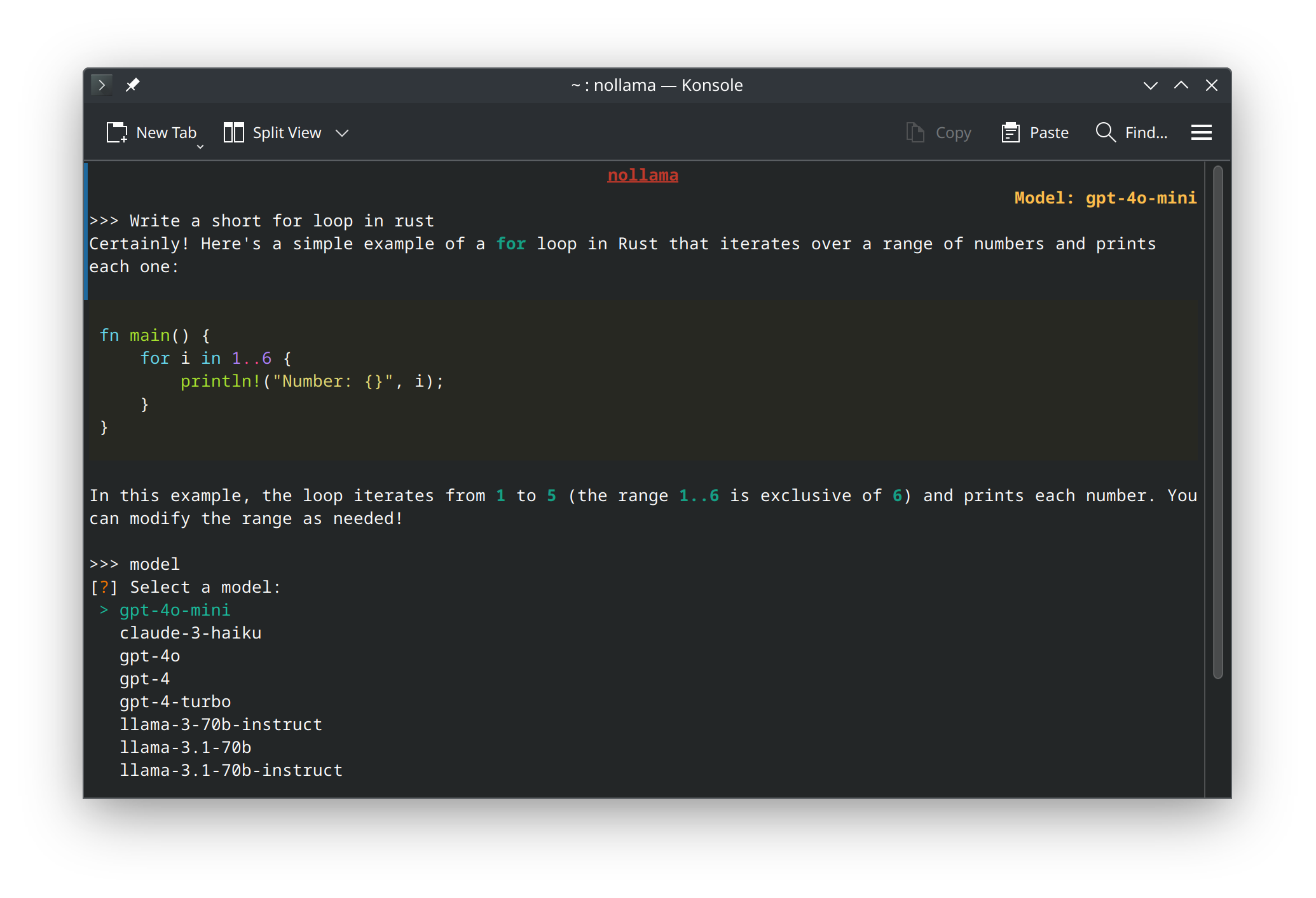
Inspired by Ollama, NoLlama offers a neat terminal interface for powerful language models with features like dynamic model discovery, vim-style searchable model selection, colorful markdown rendering, multi-turn conversations, and efficient memory usage.
Features
- 🌐 8 Major LLM Providers: Access models from Google Gemini, Vertex AI, Anthropic Claude, OpenAI, Groq, DeepSeek, OpenRouter, and Ollama via LiteLLM
- 🔍 Dynamic Model Discovery: Automatically fetches latest available models from each provider - no hardcoded lists!
- ⚡ Smart Model Search: Type to search with auto-completion, or use vim-style
/search- navigate hundreds of models with ease - 💬 Multi-turn Conversations: Maintain context between prompts for coherent conversations
- 🎨 Neat Terminal UI: Clean and intuitive interface with colorful markdown rendering
- ⚡ Live Streaming Responses: Watch responses appear in real-time as they're generated
- 🎯 Easy Provider/Model Switching: Type
providerormodelto switch anytime during chat - 🧹 Clear Chat History: Type
clearto reset conversation while keeping the interface - 💾 Low Memory Usage: Efficient memory management compared to browser-based interfaces
- 🔧 Flexible Configuration: Use
.envfile or~/.nollamafor API key management - 🚪 Exit Commands: Type
q,quit, orexitto leave, or use Ctrl+C / Ctrl+D
Installation
Install from PyPI (Recommended)
pip install nollama
Or Install from Source
git clone https://github.com/spignelon/nollama.git
cd nollama
pip install -e .
Configuration
NoLlama supports two configuration methods:
Option 1: .env File (For Development/Git Clone)
If you're developing or cloned the repository, create a .env file in your project directory:
Linux/macOS:
# Create .env in your working directory
touch .env
nano .env  # or use your preferred editor
Windows (PowerShell):
# Create .env in your working directory
New-Item .env -ItemType File
notepad .env
Windows (Command Prompt):
echo. > .env
notepad .env
Option 2: ~/.nollama File (For Pip Install)
If you installed via pip install nollama, create a .nollama file in your home directory:
Linux/macOS:
touch ~/.nollama
nano ~/.nollama
Windows (PowerShell):
New-Item $env:USERPROFILE\.nollama -ItemType File
notepad $env:USERPROFILE\.nollama
Configuration Template
Copy and paste this complete configuration template into your .env or ~/.nollama file:
## ============================================================================
## NOLLAMA CONFIGURATION
## ============================================================================
## This file contains all configuration options for nollama.
## Uncomment and fill in the API keys for providers you want to use.
## ============================================================================

## ----------------------------------------------------------------------------
## API KEYS - Google Gemini (Google AI Studio)
## ----------------------------------------------------------------------------
## Get your key from: https://makersuite.google.com/app/apikey
GEMINI_API_KEY=your_gemini_api_key_here

## ----------------------------------------------------------------------------
## API KEYS - Google Vertex AI
## ----------------------------------------------------------------------------
## For Vertex AI, you need to set up Google Cloud authentication
# VERTEX_PROJECT=your_gcp_project_id
# VERTEX_LOCATION=us-central1
# GOOGLE_APPLICATION_CREDENTIALS=/path/to/service-account-key.json

## ----------------------------------------------------------------------------
## API KEYS - Groq
## ----------------------------------------------------------------------------
## Get your key from: https://console.groq.com/keys
GROQ_API_KEY=your_groq_api_key_here

## ----------------------------------------------------------------------------
## API KEYS - Ollama
## ----------------------------------------------------------------------------
## Ollama runs locally, just specify the base URL
OLLAMA_API_BASE=http://localhost:11434

## ----------------------------------------------------------------------------
## API KEYS - Anthropic (Claude)
## ----------------------------------------------------------------------------
## Get your key from: https://console.anthropic.com/
# ANTHROPIC_API_KEY=your_anthropic_api_key_here

## ----------------------------------------------------------------------------
## API KEYS - DeepSeek
## ----------------------------------------------------------------------------
## Get your key from: https://platform.deepseek.com/
# DEEPSEEK_API_KEY=your_deepseek_api_key_here

## ----------------------------------------------------------------------------
## API KEYS - OpenAI
## ----------------------------------------------------------------------------
## Get your key from: https://platform.openai.com/api-keys
# OPENAI_API_KEY=your_openai_api_key_here

## ----------------------------------------------------------------------------
## API KEYS - OpenRouter
## ----------------------------------------------------------------------------
## Get your key from: https://openrouter.ai/keys
OPENROUTER_API_KEY=your_openrouter_api_key_here
OPENROUTER_API_BASE=https://openrouter.ai/api/v1
# OR_SITE_URL=https://yoursite.com  ## Optional: for OpenRouter rankings
# OR_APP_NAME=nollama  ## Optional: for OpenRouter rankings

## ----------------------------------------------------------------------------
## ADVANCED SETTINGS (Optional)
## ----------------------------------------------------------------------------
## Maximum conversation pairs to keep in multi-turn context
## One pair = user message + AI response
## Set to 0 or leave empty for unlimited context (default)
## Example: MAX_MULTITURN_PAIRS=5 keeps only the last 5 conversation pairs
# MAX_MULTITURN_PAIRS=5

## Maximum tokens for completion
# MAX_TOKENS=4096

## Temperature (0.0 to 2.0)
# TEMPERATURE=0.7

## Top-p sampling
# TOP_P=1.0
Quick Start Examples
For Google Gemini (Free tier available):
GEMINI_API_KEY=your_api_key_from_makersuite
For Groq (Free tier with fast inference):
GROQ_API_KEY=your_groq_api_key
For OpenRouter (Access to models from multiple providers):
OPENROUTER_API_KEY=your_openrouter_api_key
Run NoLlama
nollama
Usage
First Time Setup
- Select a Provider: Choose from 8 available providers (Gemini, Groq, Anthropic, OpenAI, etc.)
- Select a Model: Models are fetched dynamically from the provider
- See a preview of available models
- Type to search with auto-completion suggestions as you type
- Or use vim-style search: type
/model-nameto filter - Navigate with arrow keys and press Enter to select
- Start Chatting: Type your questions and enjoy rich markdown responses!
Commands During Chat
provider- Switch to a different provider (keeps conversation history)model- Switch to a different model within the same providerclear- Clear conversation history (keeps interface and help text)q,quit,exit- Exit the application- Ctrl+C or Ctrl+D - Quick exit
Model Selection Tips
With potentially hundreds of models available:
- Browse: Scroll through the initial preview (first 20 models shown)
- Type to Search: Start typing a model name and get auto-completion suggestions
- Vim-Style Search: Type
/followed by keywords (e.g.,/gpt-4,/claude,/llama) - Refine: If multiple matches, you'll be prompted to narrow down
- Select: Use arrow keys to navigate, Enter to confirm
Example Workflow
# Start nollama
$ nollama

# Select provider: Groq
# Search for model: /llama-3.3
# Start chatting!
>>> What is the capital of France?

# Switch provider mid-conversation
>>> provider
# Select: OpenRouter
# Continue conversation with new provider
Roadmap
- Multi-provider support via LiteLLM
- Dynamic model discovery from provider APIs
- Smart searchable model selection with auto-completion
- Context window (multi-turn conversations)
- Configurable context window size
- Support for Groq
- Support for OpenRouter
- Support for Ollama API
- Support for Anthropic Claude
- Support for OpenAI
- Support for DeepSeek
- Support for Vertex AI
- Web interface
- Custom API endpoints
- Conversation export/import
- System prompt customization
- Multi-modal support (images, etc.)
Contribution
Contributions are welcome! If you have suggestions for new features or improvements, feel free to open an issue or submit a pull request.
Disclaimer
NoLlama is not affiliated with Ollama. It is an independent project inspired by the concept of providing a neat terminal interface for interacting with language models.
License
This project is licensed under the GPL-3.0 License.

1 maintainer

Metadata
1 maintainer
Release files for nollama 0.5
For a detailed explanation of source distributions (sdists) and built distributions (wheels), please see the package formats documentation.
Source distribution (sdist)
| File | Size | Uploaded | Provenance | |
|---|---|---|---|---|
| nollama-0.5.tar.gz | 27.0 kB | Without provenance | Details |
Built distribution (wheel)
| File | Interpreter | ABI | Platform | Reset |
|---|---|---|---|---|
| nollama-0.5-py3-none-any.whl | Python 3 | none | any | Details |
Total release size: 50.2 kB
Release files / nollama-0.5.tar.gz
| Download URL | nollama-0.5.tar.gz |
|---|---|
| Size | 27.0 kB |
| Tags | Source |
|
SHA-256 checksum How to use checksums |
be0a3a7d9f3da1bf431d639ef474fd1f65c8d7fb7920f8dc3878a48158d2c665
|
|
BLAKE2b-256 checksum How to use checksums |
3504e0ed87265588f555aef0971a0b590dffc24df5eab12f4e04f8fd445e0b99
|
| Upload date | |
|
Uploaded using Trusted Publishing? What is trusted publishing? |
No |
| Uploaded via |
twine/6.2.0 CPython/3.13.11
|
Release files / nollama-0.5-py3-none-any.whl
| Download URL | nollama-0.5-py3-none-any.whl |
|---|---|
| Size | 23.2 kB |
| Tags | Python 3 |
|
SHA-256 checksum How to use checksums |
bccc8e6b74eea316dc01b9f7e2dc6af11b542c5ae32d9cee3f120b0b2b3de503
|
|
BLAKE2b-256 checksum How to use checksums |
618ed474d566460b37459bb6d60fe2563d704cc98d3d57041fc48435ddaa0f01
|
| Upload date | |
|
Uploaded using Trusted Publishing? What is trusted publishing? |
No |
| Uploaded via |
twine/6.2.0 CPython/3.13.11
|
Security for nollama 0.5
Provenance
Provenance describes where a file came from. On PyPI, provenance is shared via attestations, which provide a verifiable record of the build or publishing details. View details, limitations and caveats.
No provenance found
None of the files in this release were uploaded with provenance metadata.
A note on package security
PyPI is a repository for distributing packages, not a service for auditing them. While third-party security researchers and our staff do their best to detect and remove malicious packages, PyPI cannot guarantee the quality, security or suitability of any given package.
To learn more about protecting yourself from malicious actors, visit our package security documentation.














