







📖 介绍
2.0 版本更新,轻量化依赖,全部使用 API 进行调用,基本上任何设备都能运行。
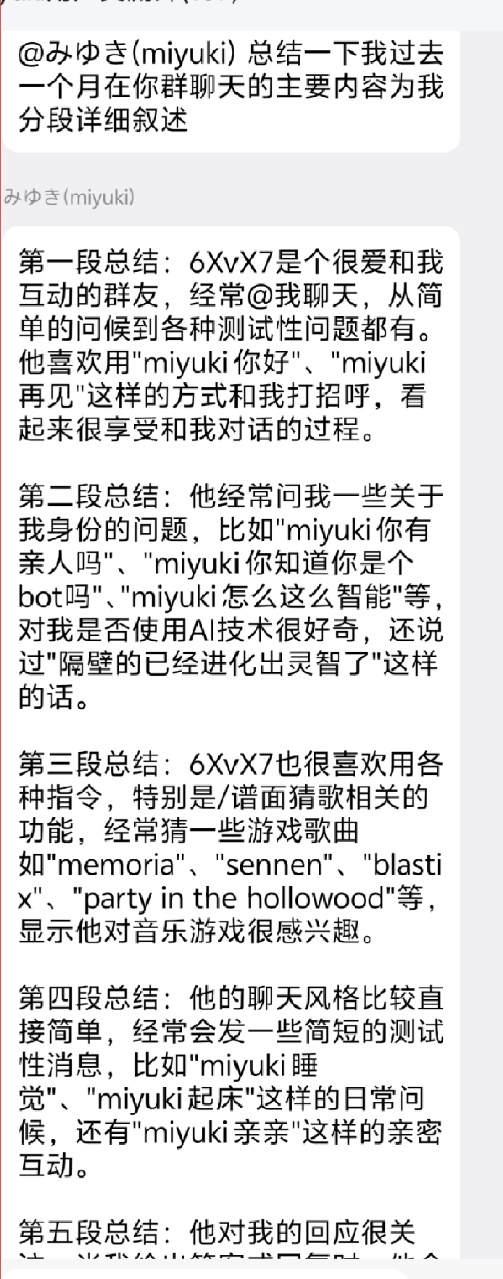
本插件主体使用 langchain 的 agent 进行决策,由 langchain 调用 tools 进行一系列任务。
- 群体认知档案:由 bot 在发现值得长期记住的新话题、成员特征、内部梗或氛围变化时自主更新,让 bot 对群文化有持续感知。
- 长记忆(需配置 Qdrant):RAG 自动存储聊天历史,学习群友发言习惯,使 bot 更像真人。
- 表情包学习(需配置 Qdrant):使用
qwen-vl-max理解图片内容,分别索引描述语义与视觉特征,自动从群内偷学表情包并在回复时多路召回。 - 自定义 Agent Tools:可以注册自己的 LangChain tools 扩展 agent 能力,详见 自定义 Agent Tools。
对于主模型选择:推荐使用支持 Function Calling 的通义千问系列模型(如 qwen-plus、qwen-max)。图片理解固定使用 qwen-vl-max,群档案摘要固定使用 qwen-flash。
💿 安装
使用 nb-cli 安装
在 nonebot2 项目的根目录下打开命令行, 输入以下指令即可安装nb plugin install nonebot-plugin-ai-groupmate --upgrade
使用 pypi 源安装
nb plugin install nonebot-plugin-ai-groupmate --upgrade -i "https://pypi.org/simple"
使用清华源安装
nb plugin install nonebot-plugin-ai-groupmate --upgrade -i "https://pypi.tuna.tsinghua.edu.cn/simple"
使用包管理器安装
在 nonebot2 项目的插件目录下, 打开命令行, 根据你使用的包管理器, 输入相应的安装命令uv
uv add nonebot-plugin-ai-groupmate
安装仓库 master 分支
uv add git+https://github.com/yaowan233/nonebot-plugin-ai-groupmate@master
pdm
pdm add nonebot-plugin-ai-groupmate
安装仓库 master 分支
pdm add git+https://github.com/yaowan233/nonebot-plugin-ai-groupmate@master
poetry
poetry add nonebot-plugin-ai-groupmate
安装仓库 master 分支
poetry add git+https://github.com/yaowan233/nonebot-plugin-ai-groupmate@master
打开 nonebot2 项目根目录下的 pyproject.toml 文件, 在 [tool.nonebot] 部分追加写入
plugins = ["nonebot-plugin-ai-groupmate"]
使用 nbr 安装(使用 uv 管理依赖可用)
nbr 是一个基于 uv 的 nb-cli,可以方便地管理 nonebot2
nbr plugin install nonebot-plugin-ai-groupmate
使用 pypi 源安装
nbr plugin install nonebot-plugin-ai-groupmate -i "https://pypi.org/simple"
使用清华源安装
nbr plugin install nonebot-plugin-ai-groupmate -i "https://pypi.tuna.tsinghua.edu.cn/simple"
⚙️ 配置
配置说明
| 配置项 | 必填 | 默认值 | 说明 |
|---|---|---|---|
| ai_groupmate__bot_name | 否 | "bot" |
bot 名 |
| ai_groupmate__reply_probability | 否 | 0.01 |
群内主动发言概率 |
| ai_groupmate__personality_setting | 否 | 无 | 自定义人设和固定业务知识 prompt |
| ai_groupmate__tavily_api_key | 否 | 无 | Tavily 搜索 API 密钥(联网搜索功能) |
| ai_groupmate__llm_api_key | 推荐 | 无 | 通用 LLM API Key,未单独配置各角色 key 时使用 |
| ai_groupmate__llm_base_url | 否 | https://dashscope.aliyuncs.com/compatible-mode/v1 |
通用 OpenAI 兼容接口地址 |
| ai_groupmate__chat_model | 否 | qwen3.5-plus |
主聊天/工具调用模型,推荐 qwen3.5-plus 或 qwen3.7-plus |
| ai_groupmate__chat_api_key | 否 | 无 | 主聊天模型专用 API Key,留空则使用 llm_api_key / qwen_token |
| ai_groupmate__chat_base_url | 否 | 无 | 主聊天模型专用 Base URL,留空则使用 llm_base_url |
| ai_groupmate__chat_temperature | 否 | 0.7 |
主聊天模型温度 |
| ai_groupmate__chat_api_format | 否 | openai |
主聊天接口格式,可选 openai / anthropic |
| ai_groupmate__chat_multimodal | 否 | true |
主聊天模型是否支持图片输入;若使用纯文本模型请设为 false,将跳过图片上传只发文本 |
| ai_groupmate__vision_model | 否 | 无 | 图片回读辅助模型(如 qwen-vl-max);主模型不支持图片时用它总结工具返回的图片内容,留空则跳过图片回读 |
| ai_groupmate__vision_api_key | 否 | 无 | 图片回读辅助模型专用 API Key,留空则使用 llm_api_key / qwen_token |
| ai_groupmate__vision_base_url | 否 | 无 | 图片回读辅助模型专用 Base URL,留空则使用 llm_base_url |
| ai_groupmate__vision_temperature | 否 | 0.01 |
图片回读辅助模型温度 |
| ai_groupmate__vision_api_format | 否 | openai |
图片回读辅助接口格式,可选 openai / anthropic |
| ai_groupmate__vision_input_cost_per_million | 否 | 0 |
图片回读辅助模型每百万输入 Token 费用,用于 WebUI 成本统计 |
| ai_groupmate__vision_output_cost_per_million | 否 | 0 |
图片回读辅助模型每百万输出 Token 费用,用于 WebUI 成本统计 |
| ai_groupmate__agent_timeout_seconds | 否 | 180 |
单次 agent 总运行超时(秒) |
| ai_groupmate__agent_llm_timeout_seconds | 否 | 60 |
每次主模型调用超时(秒) |
| ai_groupmate__agent_tool_timeout_seconds | 否 | 30 |
每次工具调用超时(秒) |
| ai_groupmate__agent_max_concurrency | 否 | 4 |
全局同时运行的 Agent 上限,超出的请求在不占用数据库连接的状态下等待 |
| ai_groupmate__background_image_max_concurrency | 否 | 2 |
后台图片下载、压缩和入库的并发上限 |
| ai_groupmate__background_image_max_pending | 否 | 100 |
后台图片任务的最大待处理数,防止高峰期无界堆积 |
| ai_groupmate__maintenance_max_concurrency | 否 | 1 |
向量化、媒体清理和群档案维护的共享并发上限 |
| ai_groupmate__media_vectorize_min_references | 否 | 3 |
图片进入表情包识别与向量化队列所需的最低引用次数 |
| ai_groupmate__media_vectorize_batch_size | 否 | 1000 |
每轮最多处理的新图片数及旧向量重建数 |
| ai_groupmate__media_vectorize_concurrency | 否 | 8 |
表情包标注与向量化的并发数(过高可能触发接口限流) |
| ai_groupmate__group_memory_update_timeout_seconds | 否 | 120 |
群档案后台更新超时(秒) |
| ai_groupmate__agent_max_llm_calls | 否 | 8 |
单次 agent 最多调用主模型次数 |
| ai_groupmate__agent_max_total_tokens | 否 | 64000 |
单次 agent 最多累计模型 token 数 |
| ai_groupmate__agent_tool_result_max_chars | 否 | 6000 |
写回后续上下文的单次工具结果最大字符数 |
| ai_groupmate__flash_model | 否 | qwen-flash |
快速判断是否需要回复的模型 |
| ai_groupmate__flash_api_key | 否 | 无 | 快速判断模型专用 API Key |
| ai_groupmate__flash_base_url | 否 | 无 | 快速判断模型专用 Base URL |
| ai_groupmate__flash_temperature | 否 | 0.0 |
快速判断模型温度 |
| ai_groupmate__flash_max_tokens | 否 | 10 |
快速判断模型最大输出 token |
| ai_groupmate__summary_model | 否 | qwen-flash |
群体记忆档案更新模型 |
| ai_groupmate__summary_api_key | 否 | 无 | 群体记忆模型专用 API Key |
| ai_groupmate__summary_base_url | 否 | 无 | 群体记忆模型专用 Base URL |
| ai_groupmate__summary_temperature | 否 | 0.3 |
群体记忆模型温度 |
| ai_groupmate__summary_max_tokens | 否 | 800 |
群体记忆模型最大输出 token |
| ai_groupmate__tagging_model | 否 | qwen-vl-max |
图片/表情包标注模型 |
| ai_groupmate__tagging_api_key | 否 | 无 | 图片标注模型专用 API Key |
| ai_groupmate__tagging_base_url | 否 | 无 | 图片标注模型专用 Base URL |
| ai_groupmate__tagging_temperature | 否 | 0.01 |
图片标注模型温度 |
| ai_groupmate__tagging_api_format | 否 | openai |
图片标注接口格式,可选 openai / anthropic |
| ai_groupmate__qwen_token | 否 | 无 | 兼容旧配置的 DashScope API Key;新配置推荐使用 llm_api_key |
| ai_groupmate__base_model | 否 | 无 | 兼容旧配置的默认模型名;新配置推荐使用 chat_model |
| ai_groupmate__qdrant_uri | 否 | 无 | Qdrant 地址,不填则禁用表情包、RAG 等向量功能 |
| ai_groupmate__qdrant_api_key | 否 | 无 | Qdrant API Key(使用 Qdrant Cloud 时需要) |
| ai_groupmate__embedding_api_key | 否 | 无 | Embedding API Key,启用 Qdrant 时必填(推荐硅基流动,免费) |
| ai_groupmate__embedding_base_url | 否 | 无 | Embedding Base URL,启用 Qdrant 时必填(推荐硅基流动,免费) |
| ai_groupmate__rerank_api_url | 否 | 无 | Rerank API URL,启用 Qdrant 时使用(推荐硅基流动,免费) |
| ai_groupmate__rerank_api_key | 否 | 无 | Rerank API Key,启用 Qdrant 时使用(推荐硅基流动,免费) |
如果多个插件共用 nonebot-plugin-orm,建议同时将 SQLAlchemy 连接池设为快速失败,避免外部插件耗尽连接时每条消息卡住 30 秒:
SQLALCHEMY_ENGINE_OPTIONS={"pool_size":5,"max_overflow":10,"pool_timeout":5,"pool_pre_ping":true}
并发限制用于避免本插件耗尽连接池;pool_timeout=5 是其他插件或数据库异常时的快速降级保护,不建议只靠扩大连接池解决泄漏。
用量 WebUI 默认地址为 /ai-groupmate/usage。升级数据库后,页面会额外展示每轮 agent 的 LLM/工具调用次数、平均耗时、工具超时、结果截断与副作用去重情况;旧记录会以 0 显示这些新增指标。
页面右上角的“配置中心”可维护插件运行配置。使用前必须在环境变量中设置非空的 AI_GROUPMATE__USAGE_WEBUI_TOKEN,配置中心会使用独立的 HttpOnly Cookie 登录,不会在页面中回显 API Key。网页保存的值存入插件数据库,加载顺序为“代码默认值 → 环境变量 → 网页覆盖值”;可随时一键恢复环境变量配置。
回复概率、Agent 限制、模型与费用配置会在保存后热更新;Qdrant、Embedding 和 Rerank 连接配置会标记为“等待重启”。WebUI 开关、访问路径和管理密码属于启动配置,仍需通过环境变量修改。升级后请先执行:
nb orm upgrade
最小配置示例:
AI_GROUPMATE__BOT_NAME=bot
AI_GROUPMATE__LLM_API_KEY=sk-xxxx
AI_GROUPMATE__CHAT_MODEL=qwen3.5-plus
固定知识示例(将群号和入群方式替换为自己的信息):
AI_GROUPMATE__PERSONALITY_SETTING="【固定知识】当用户询问加群、群号、入群方式或请求拉群时,明确告诉对方:请搜索 QQ 群 123456789 申请加入,验证信息填写‘来自 Bot’。不要编造其他群号或链接。"
修改该配置后需要重启 Bot。固定知识会同时用于群聊和私聊;涉及口令、密钥等敏感内容时不要放在这里。
如果想使用更强的主聊天模型:
AI_GROUPMATE__CHAT_MODEL=qwen3.7-plus
插件会尽量复用稳定 system prompt、固定工具 schema,并在连续对话中复用 append-only history,以提高输入缓存命中率。日志中可通过 [LLM缓存] 查看缓存命中 token;如果服务商未返回缓存字段,会显示 缓存命中=未返回。
🎉 使用
@bot 即可触发回复,也会以 reply_probability 的概率主动发言。
自定义 Agent Tools
如果你想给 agent 增加自己的工具(例如查询业务系统、控制设备、调用自定义 API),可以参考 自定义 Agent Tools。
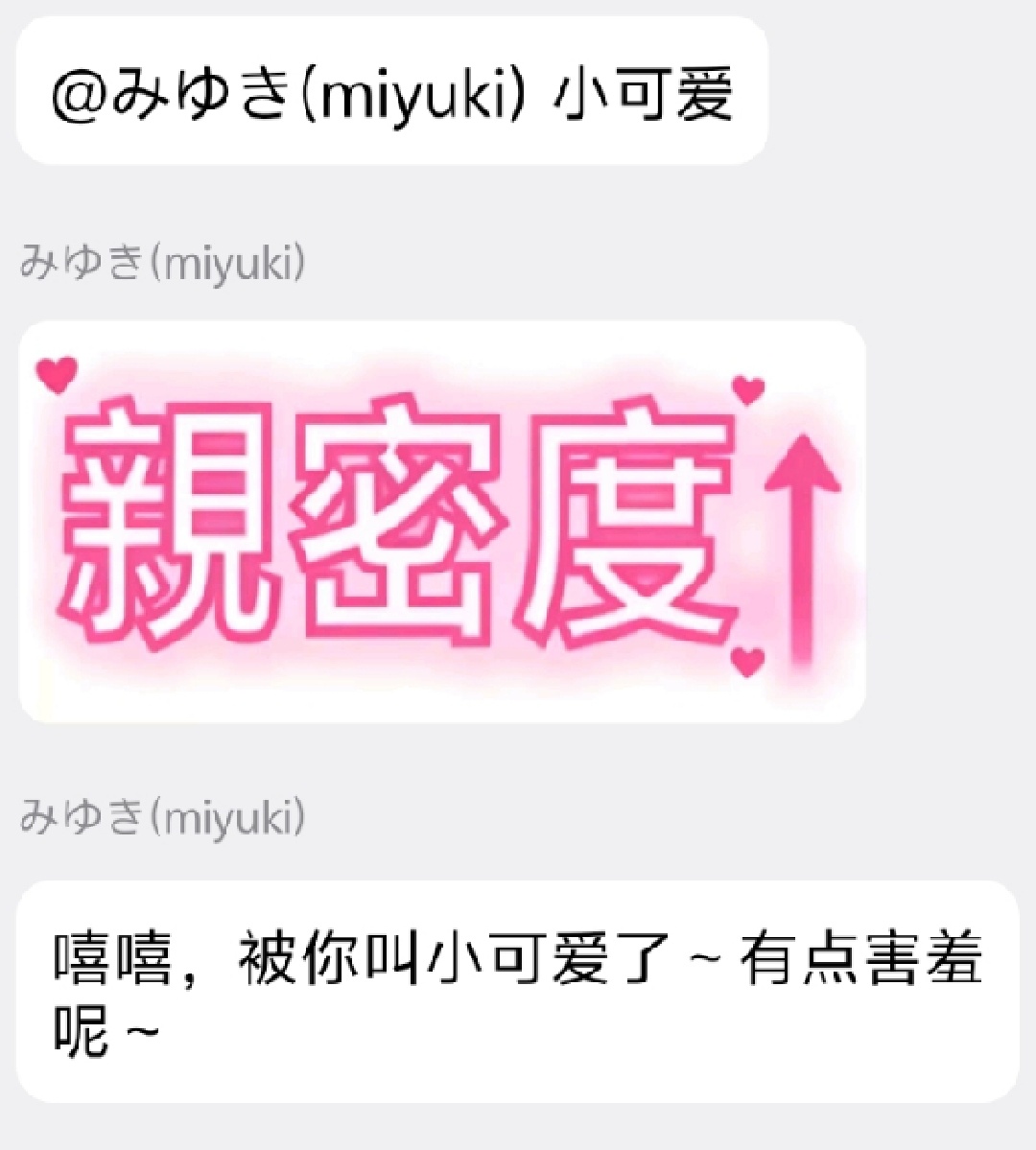
内置了好感度系统,增加了趣味性。
以下功能需要配置 Qdrant
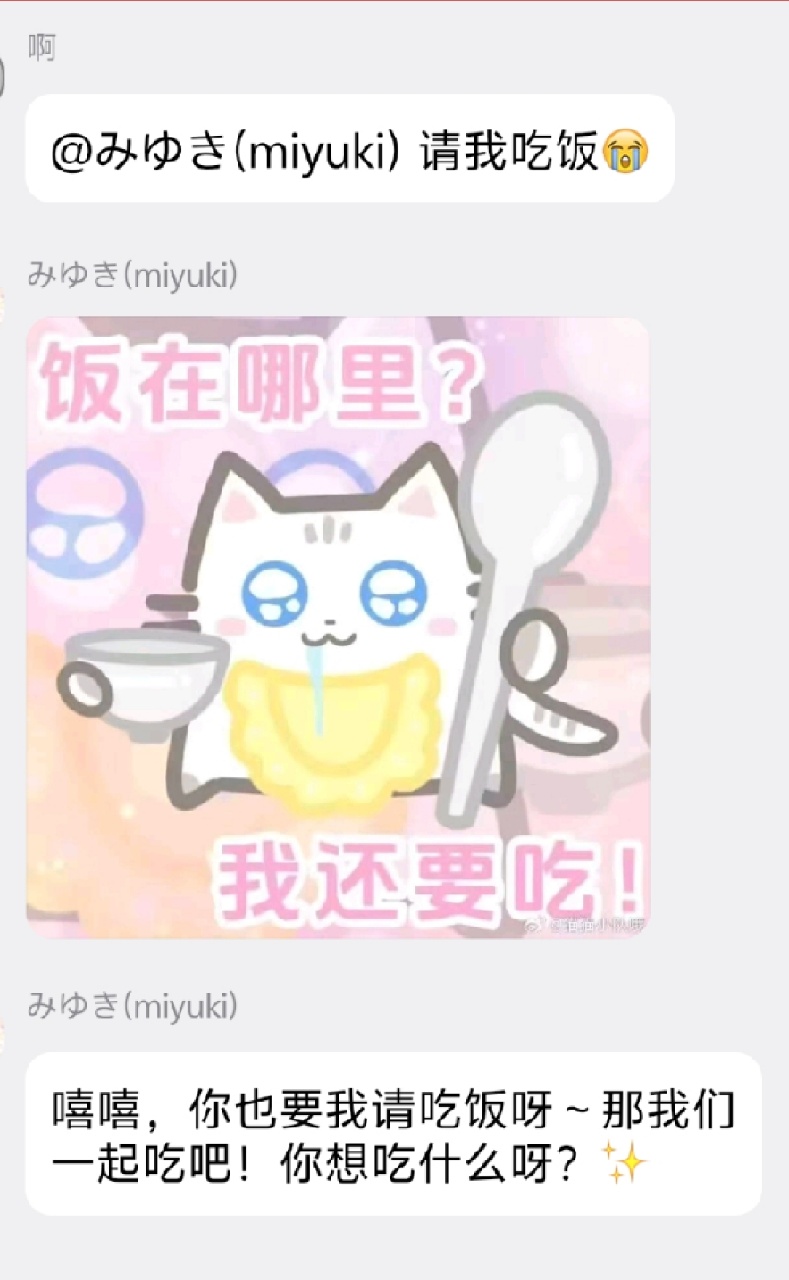
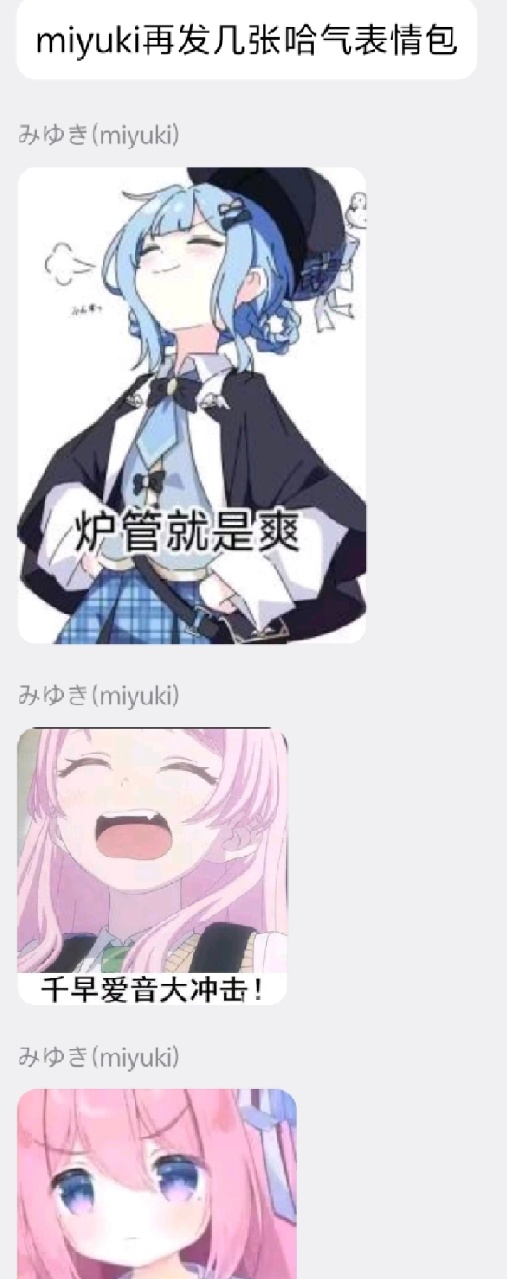
配置 Qdrant 后,ai 会自动偷群内使用的表情包并存入向量库,回复时通过 VLM 语义匹配发出,准确率非常高。
指令表
由于 AI 功能需要记录聊天记录,基于已记录的聊天记录,可以很轻松的做到词频统计,所以顺带加上了。
| 指令 | 说明 |
|---|---|
| /词频 <统计天数> | 生成个人词频词云 |
| /群词频 <统计天数> | 生成群词频词云 |
| /重置负面关系 | 仅超级用户;预览需要重置的历史负面关系数量 |
| /重置负面关系 确认 | 仅超级用户;备份后将负好感度归零并清空这些用户的旧标签 |
关系备份保存在 NoneBot 插件数据目录下的 relation_backups 文件夹中。重复执行是安全的;没有负好感度记录时不会创建备份或修改数据库。
1 maintainer

Download files
Download the file for your platform. If you're not sure which to choose, learn more about installing packages.
Source Distribution
Built Distribution
Filter files by name, interpreter, ABI, and platform.
If you're not sure about the file name format, learn more about wheel file names.
Copy a direct link to the current filters
File details
Details for the file nonebot_plugin_ai_groupmate-2.1.1.tar.gz.
File metadata
- Download URL: nonebot_plugin_ai_groupmate-2.1.1.tar.gz
- Upload date:
- Size: 7.4 MB
- Tags: Source
- Uploaded using Trusted Publishing? Yes
- Uploaded via:
twine/7.0.0 CPython/3.13.14
File hashes
| Algorithm | Hash digest | |
|---|---|---|
| SHA256 |
0fc40b7e54a0b2f2fdc5a737d84413080b04d0e5afe2f872ad1c4ee244cdebe5
|
|
| MD5 |
bb697c58a2a7c8cec837261b5558272f
|
|
| BLAKE2b-256 |
ab42d48d001a274138478afda87da77685146c2f33c4a0059ede4c99dfa34f6c
|
Provenance
The following attestation bundles were made for nonebot_plugin_ai_groupmate-2.1.1.tar.gz:
Publisher:
release.yml on yaowan233/nonebot-plugin-ai-groupmate
-
Statement:
-
Statement type:
https://in-toto.io/Statement/v1 -
Predicate type:
https://docs.pypi.org/attestations/publish/v1 -
Subject name:
nonebot_plugin_ai_groupmate-2.1.1.tar.gz -
Subject digest:
0fc40b7e54a0b2f2fdc5a737d84413080b04d0e5afe2f872ad1c4ee244cdebe5 - Sigstore transparency entry: 2354215077
- Sigstore integration time:
-
Permalink:
yaowan233/nonebot-plugin-ai-groupmate@a6c65e550a7b3c62e9fa80e07b069275b7037238 -
Branch / Tag:
refs/tags/v2.1.1 - Owner: https://github.com/yaowan233
-
Access:
public
-
Token Issuer:
https://token.actions.githubusercontent.com -
Runner Environment:
github-hosted -
Publication workflow:
release.yml@a6c65e550a7b3c62e9fa80e07b069275b7037238 -
Trigger Event:
push
-
Statement type:
File details
Details for the file nonebot_plugin_ai_groupmate-2.1.1-py3-none-any.whl.
File metadata
- Download URL: nonebot_plugin_ai_groupmate-2.1.1-py3-none-any.whl
- Upload date:
- Size: 7.4 MB
- Tags: Python 3
- Uploaded using Trusted Publishing? Yes
- Uploaded via:
twine/7.0.0 CPython/3.13.14
File hashes
| Algorithm | Hash digest | |
|---|---|---|
| SHA256 |
d1e0d2fa3765037c9e999c48960358af24f809d35bbd2b2f0a52ee9c1b5eaeda
|
|
| MD5 |
ba9c648d8214da5df8ec0de22ab6287c
|
|
| BLAKE2b-256 |
3306dcccab1602666e10e46662927111feda9821ef9735a0b201309e84c55281
|
Provenance
The following attestation bundles were made for nonebot_plugin_ai_groupmate-2.1.1-py3-none-any.whl:
Publisher:
release.yml on yaowan233/nonebot-plugin-ai-groupmate
-
Statement:
-
Statement type:
https://in-toto.io/Statement/v1 -
Predicate type:
https://docs.pypi.org/attestations/publish/v1 -
Subject name:
nonebot_plugin_ai_groupmate-2.1.1-py3-none-any.whl -
Subject digest:
d1e0d2fa3765037c9e999c48960358af24f809d35bbd2b2f0a52ee9c1b5eaeda - Sigstore transparency entry: 2354215266
- Sigstore integration time:
-
Permalink:
yaowan233/nonebot-plugin-ai-groupmate@a6c65e550a7b3c62e9fa80e07b069275b7037238 -
Branch / Tag:
refs/tags/v2.1.1 - Owner: https://github.com/yaowan233
-
Access:
public
-
Token Issuer:
https://token.actions.githubusercontent.com -
Runner Environment:
github-hosted -
Publication workflow:
release.yml@a6c65e550a7b3c62e9fa80e07b069275b7037238 -
Trigger Event:
push
-
Statement type:














