
基于nonebot2的bing-chat软件

Project description

nonebot-plugin-bing-chat
✨ 一个可以使用新版Bing进行聊天的插件 ✨




📖 介绍
一个可以使用新版Bing进行聊天的插件
QQ群:366731501
能否给孩子一个star🌟吗
目前仅支持onebot v11
5月份孩子有重要的考试,暂时随缘更新
如果你有更多需求,请发布issue让我知道
💿 安装与更新
使用 nb-cli 安装与更新
在 nonebot2 项目的根目录下打开命令行, 输入以下指令即可安装nb plugin install nonebot-plugin-bing-chat --upgrade
使用包管理器安装与更新
在 nonebot2 项目的插件目录下, 打开命令行, 根据你使用的包管理器, 输入相应的安装命令pip install nonebot-plugin-bing-chat --upgrade
打开 nonebot2 项目根目录下的 pyproject.toml 文件, 在 [tool.nonebot] 部分追加写入
plugins = ["nonebot_plugin_bing_chat"]
⚙️ 配置
在 nonebot2 项目的data/BingChat文件中添加cookies.json(必须)
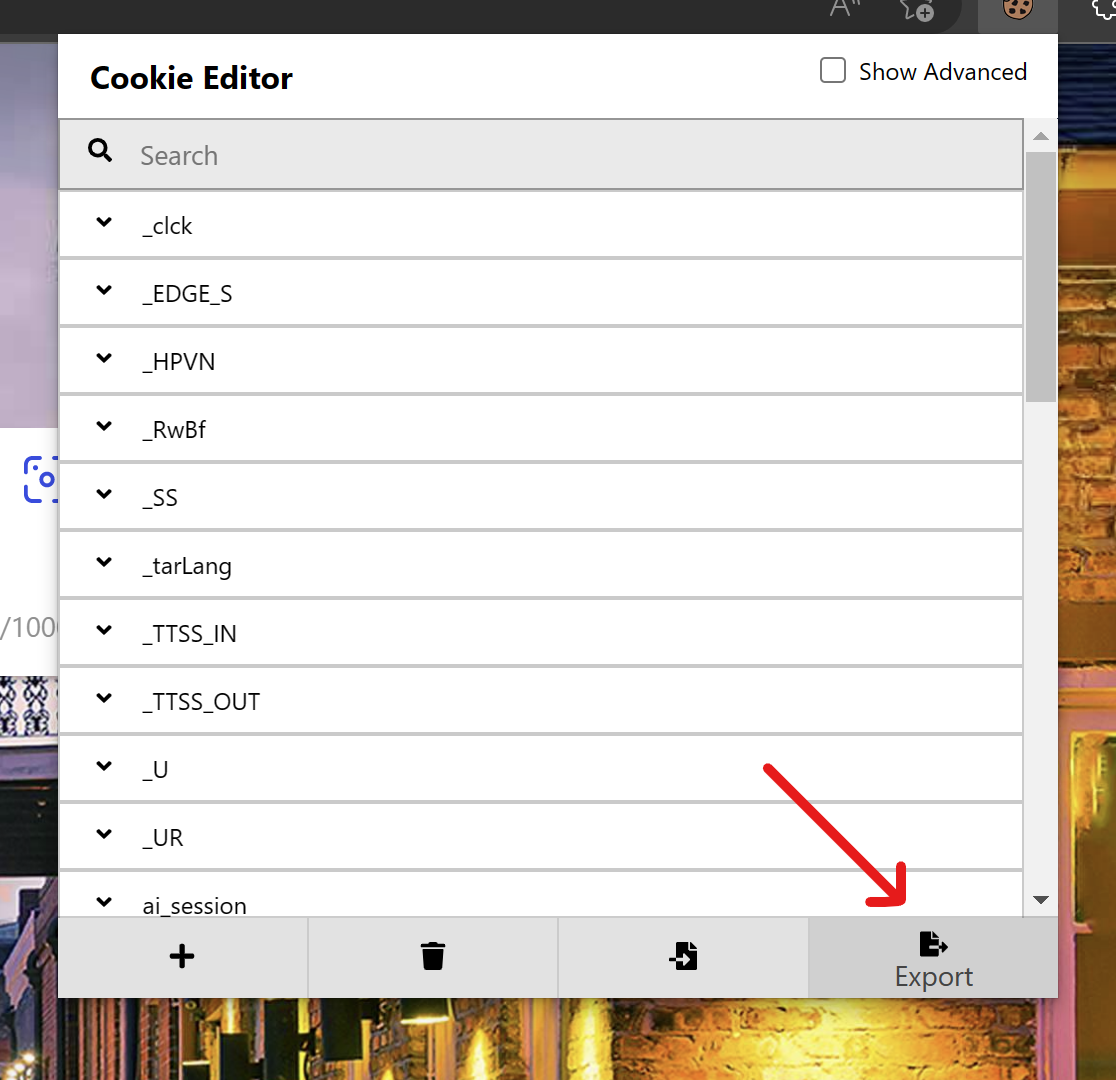
- 在浏览器安装
cookie-editor的插件- Chrome/Edge(需要魔法)
- Firefox
- 打开
www.bing.com/chat(需要魔法) - 打开
cookie-editor插件 - 点击右下角的
Export按钮(这会把cookie保存到你的剪切板上) - 把你复制道德内容放到
cookies.json文件里
在 nonebot2 项目的.env文件中添加下表中的配置(都为可选项)
对默认的命令进行修改
| 配置项 | 类型 | 默认值 | 说明 |
|---|---|---|---|
| bingchat_command_start | str/list[str] | 与command_start相同 | 命令前缀 |
| bingchat_command_chat | str/list[str] | ["chat"] | 对话命令 |
| bingchat_command_new_chat | str/list[str] | ["chat-new", "刷新对话"] | 新建对话命令 |
| bingchat_command_history_chat | str/list[str] | ["chat-history"] | 返回历史对话命令 |
| bingchat_block | bool | False | 是否block |
| bingchat_priority | int | 1 | 指令的优先级 |
| bingchat_command_to_me | bool | False | 所有命令是否需要@bot |
| bingchat_share_chat | bool | False | 他人是否可以用过回复bot而进行对话 |
对行为进行配置
| 配置项 | 类型 | 默认值 | 说明 |
|---|---|---|---|
| bingchat_conversation_style | Literal['creative', 'balanced', 'precise'] | "balanced" | 对话样式 |
| bingchat_show_is_waiting | bool | False | 是否显示“正在请求” |
| bingchat_auto_refresh_conversation | bool | True | 到达命令上线后是否自动刷新 |
| bingchat_log | bool | False | 是否记录日志 |
对特定群聊进行屏蔽
| 配置项 | 类型 | 默认值 | 说明 |
|---|---|---|---|
| bingchat_group_filter_mode | "whitelist"/"blacklist" | "blacklist" | 对群聊屏蔽的模式 |
| bingchat_group_filter_blacklist | list[int] | [] | 黑名单列表 |
| bingchat_group_filter_whitelist | list[int] | [] | 白名单列表 |
🎉 使用
指令表
以下为指令可以在配置文件中更改
| 指令 | 权限 | 需要@ | 范围 | 说明 |
|---|---|---|---|---|
| chat | 所有人 | 否 | 私聊/群聊 | 与Bing进行对话 |
| chat-new | 所有人 | 否 | 私聊/群聊 | 新建一个对话 |
| chat-history | 所有人 | 否 | 私聊/群聊 | 返回历史对话 |
你可以回复bot的消息从而直接继续对话,而不用输入对话指令
📄 ToDo
准备添加的功能请查看issue
🌸 致谢
- @A-kirami 项目使用了README模板
- @acheong08 项目使用了与Bing通讯的接口 EdgeGPT
Release history Release notifications | RSS feed


Download files
Download the file for your platform. If you're not sure which to choose, learn more about installing packages.
Source Distribution
Built Distribution
Filter files by name, interpreter, ABI, and platform.
If you're not sure about the file name format, learn more about wheel file names.
Copy a direct link to the current filters
File details
Details for the file nonebot-plugin-bing-chat-0.6.1.tar.gz.
File metadata
- Download URL: nonebot-plugin-bing-chat-0.6.1.tar.gz
- Upload date:
- Size: 24.3 kB
- Tags: Source
- Uploaded using Trusted Publishing? No
- Uploaded via: twine/4.0.1 CPython/3.11.2
File hashes
| Algorithm | Hash digest | |
|---|---|---|
| SHA256 |
42d71a9e084c8336e2fc8c3dfc17a4e490361eddfd35e7c0f3274004e37b1835
|
|
| MD5 |
c22368cea5744e00847422d3a95c6880
|
|
| BLAKE2b-256 |
2a166654d44cc37385a4413b86c375523348f6df55f79ef701bc889c377b7d70
|
File details
Details for the file nonebot_plugin_bing_chat-0.6.1-py3-none-any.whl.
File metadata
- Download URL: nonebot_plugin_bing_chat-0.6.1-py3-none-any.whl
- Upload date:
- Size: 24.4 kB
- Tags: Python 3
- Uploaded using Trusted Publishing? No
- Uploaded via: twine/4.0.1 CPython/3.11.2
File hashes
| Algorithm | Hash digest | |
|---|---|---|
| SHA256 |
f58d91b7fa1e8ab862729224a3cf70c6d3579be27e18a254e54782cfb3a4517b
|
|
| MD5 |
29bce7cce6d41daeb619ecfceff32533
|
|
| BLAKE2b-256 |
10a68091e11b2bc04359fcb93889e1b9347cdfc65a7f33060840024ceded81e0
|






