
文本转图片工具,基于 nonebot_plugin_htmlkit 预制了方便扩展的渲染模板

Project description


nonebot-plugin-cardimg
✨ 基于 nonebot_plugin_htmlkit 渲染的文本转图片模板插件 ✨





📖 介绍
nonebot-plugin-cardimg 是一个基于 nonebot_plugin_htmlkit 的模板化图片渲染插件,为 NoneBot2 插件开发者提供简单易用的文本图片生成功能。
核心特性
- 多种预设模板:提供 7 种精美模板,覆盖常见使用场景
- 昼夜模式:部分模板支持自动/手动切换昼夜主题
- 随机配色:部分模板支持随机颜色主题
- 灵活配置:支持全局配置和模板特定参数
- 资源缓存:内置文件和资源缓存机制,提升性能
- 易于扩展:基于抽象基类,方便添加自定义模板
可用模板
| 模板名称 | 描述 | 特性 |
|---|---|---|
minote |
小米便签风格 | 背景图+边框+四角装饰 |
simple |
简约风格 | 纯色背景,支持昼夜模式 |
ncm_zhusha |
网易云朱砂样式 | 红色背景+白色标题框 |
ncm_card |
网易云热评卡片 | 音乐评论卡片样式 |
bili |
哔哩哔哩壁纸 | 支持昼夜模式 |
help |
帮助文档 | 支持随机颜色主题和昼夜模式 |
table |
表格展示 | 支持随机颜色主题和昼夜模式 |
🖼️ 演示效果
点击展开查看各模板渲染效果
小米便签 (minote)
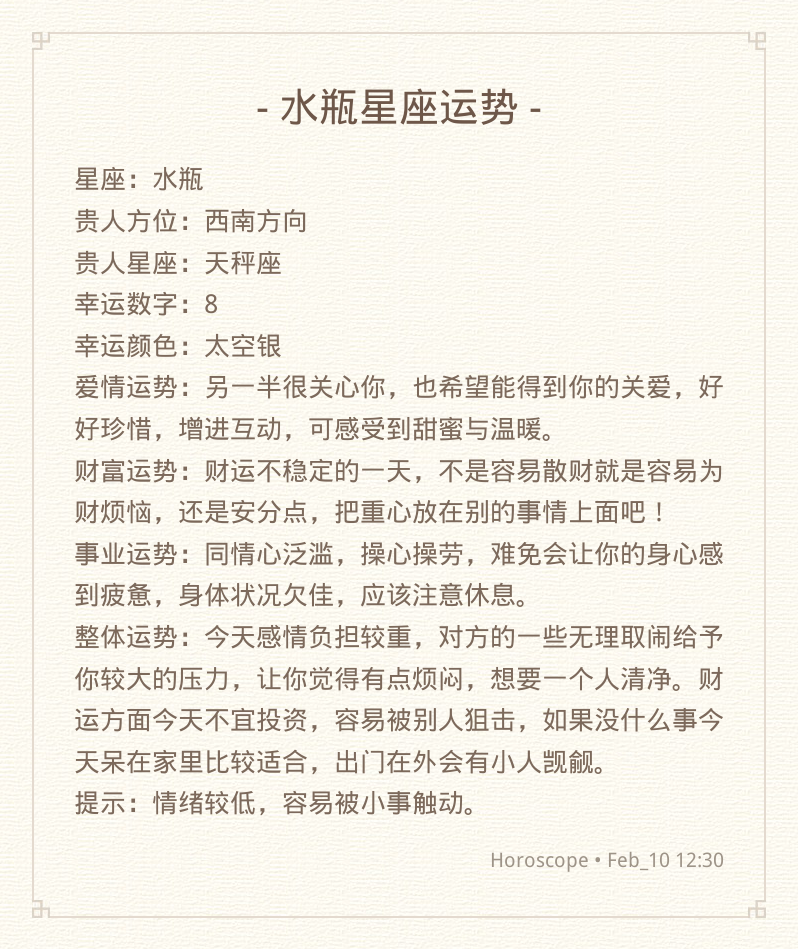
简约风格 (simple)
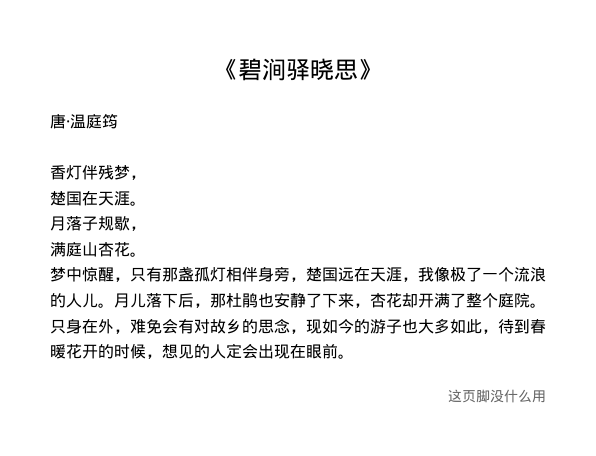
网易云朱砂 (ncm_zhusha)

网易云热评卡片 (ncm_card)

哔哩哔哩壁纸 (bili)

帮助文档 (help)
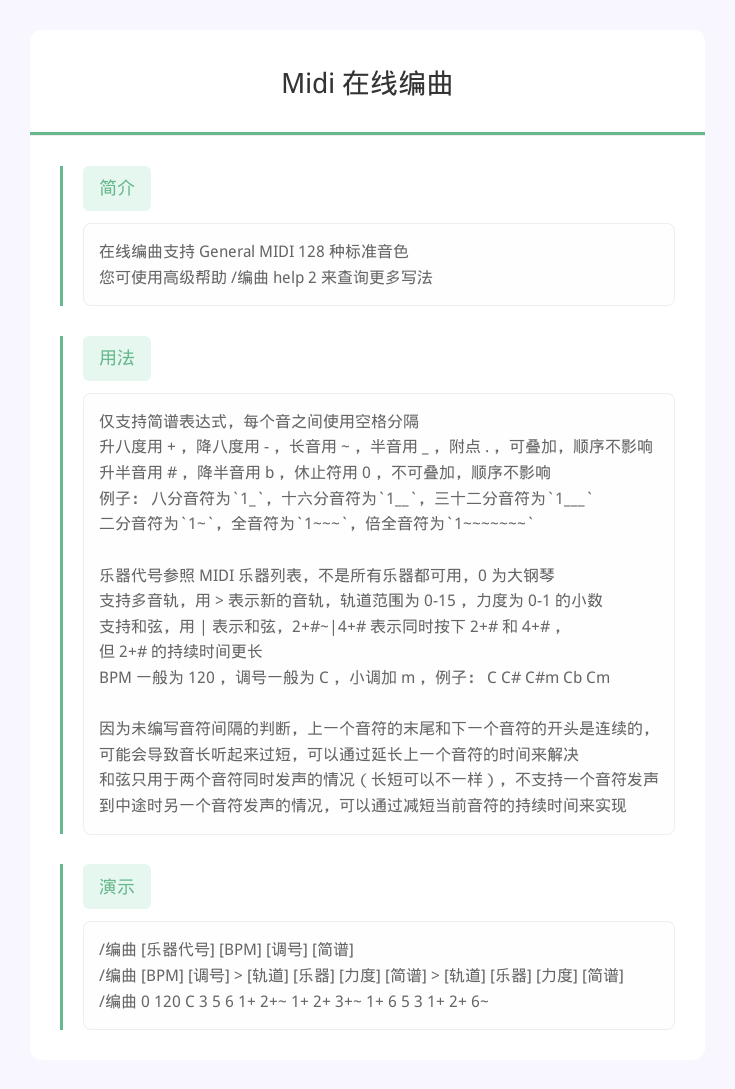
表格展示 (table)

安装
以下提到的方法 任选其一 即可
[推荐] 使用 nb-cli 安装
在 nonebot2 项目的根目录下打开命令行, 输入以下指令即可安装
nb plugin install nonebot-plugin-cardimg
使用包管理器安装
在 nonebot2 项目的插件目录下, 打开命令行, 根据你使用的包管理器, 输入相应的安装命令
pip
pip install nonebot-plugin-cardimg
pdm
pdm add nonebot-plugin-cardimg
poetry
poetry add nonebot-plugin-cardimg
conda
conda install nonebot-plugin-cardimg
打开 nonebot2 项目根目录下的 pyproject.toml 文件, 在 [tool.nonebot] 部分的 plugins 项里追加写入
[tool.nonebot]
plugins = [
    # ...
    "nonebot_plugin_cardimg"
]
⚙️ 配置
在 nonebot2 项目的 .env 文件中添加下表中的配置
| 配置项 | 必填 | 默认值 | 说明 |
|---|---|---|---|
cardimg_use_global_config |
否 | False |
是否使用全局配置作为兜底 |
cardimg_image_format |
否 | png |
全局图片格式:png 或 jpeg |
cardimg_jpeg_quality |
否 | 85 |
全局 JPEG 质量:1-100 |
🎉 使用
基础用法
from nonebot import require
require("nonebot_plugin_cardimg")
from nonebot_plugin_cardimg import render

# 渲染小米便签模板
img_bytes = await render(
    'minote',
    title='标题',
    content='这是正文内容',
    footer='页脚'
)

# 渲染简约模板(自动昼夜模式)
img_bytes = await render(
    'simple',
    title='简约标题',
    content='简约内容'
)

# 渲染帮助文档
img_bytes = await render(
    'help',
    title='帮助文档',
    items={
        '命令1': '这是命令1的说明',
        '命令2': '这是命令2的说明'
    },
    footer='更多帮助请访问...'
)

# 渲染表格
img_bytes = await render(
    'table',
    title='排行榜',
    tip='数据更新时间:2026-02-10',
    columns=['排名', '用户', '分数'],
    data=[
        ['1', '用户A', '100'],
        ['2', '用户B', '95'],
        ['3', '用户C', '90']
    ]
)
高级用法
指定渲染参数
img_bytes = await render(
    'simple',
    title='标题',
    content='内容',
    htmlkit_params={
        'max_width': 800,
        'image_format': 'jpeg',
        'jpeg_quality': 90
    }
)
手动控制昼夜模式
# 强制使用夜间模式
img_bytes = await render(
    'simple',
    title='标题',
    content='内容',
    night_mode=True
)

# 强制使用白天模式
img_bytes = await render(
    'simple',
    title='标题',
    content='内容',
    night_mode=False
)
获取可用模板列表
from nonebot_plugin_cardimg import list_templates

templates = list_templates()
print(templates)  # ['minote', 'simple', 'ncm_zhusha', 'ncm_card', 'bili', 'help', 'table']
接口方法参考
render(template, title="", content="", footer="", htmlkit_params=None, **kwargs)
渲染模板为图片
参数:
template(str): 模板名称title(str, optional): 标题content(str, optional): 正文内容footer(str, optional): 页脚htmlkit_params(dict, optional): htmlkit 渲染参数**kwargs: 模板特定参数
其中:template 是必填项,其他参数根据不同模板需求填写;htmlkit_params 是 htmlkit 插件的渲染方法参数,可用来自定义调整渲染尺寸、格式等内容。
返回:
bytes: 图片字节数据
模板特定参数:
simple/bili/help/table:night_mode(bool, optional) - 是否使用夜间模式help:items(dict) - 帮助项字典table:columns(list) - 表头列表,data(list[list]) - 表格数据,tip(str) - 提示文本
📝 开发
添加自定义模板
from pathlib import Path
from nonebot_plugin_cardimg import BaseTemplate


class MyTemplate(BaseTemplate):
    def __init__(self):
        super().__init__("my_template", Path(__file__).parent / "templates")

    async def render(self, **kwargs) -> bytes:
        options = kwargs.pop("_render_options", self.get_render_options())
        templates = {
            "title": kwargs.get("title", ""),
            "content": kwargs.get("content", ""),
        }
        return await self.to_pic_template("template.html", templates=templates, **options)
📞 联系
- 由于技术力和时间有限,本插件可能存在问题和不足,字体自定义以及图片压缩相关问题未能很好解决,欢迎优化或指正(๑˃̵ᴗ˂̵)₊♡
- 由于技术力和时间有限,本项目的描述和代码排版由AI辅助完成,如有意外的错漏混淆欢迎反馈和指正(๑˃̵ᴗ˂̵)₊♡♡
- 如有问题或建议,欢迎提交 Issue 或 Pull Request。
💡 鸣谢
- nonebot-plugin-htmlkit - HTML 转图片核心库
- nonebot-plugin-txt2img - 模板样式参考
- nonebot-plugin-zxui - 模板样式参考
- nonebot-plugin-template - 插件模板
📝 更新日志
v0.1.1 (2026-02-10)
- 初始版本发布(仅在 Docker 环境下测试通过,暂未解决默认字体替换问题)


Download files
Download the file for your platform. If you're not sure which to choose, learn more about installing packages.
Source Distribution
Built Distribution
Filter files by name, interpreter, ABI, and platform.
If you're not sure about the file name format, learn more about wheel file names.
Copy a direct link to the current filters
File details
Details for the file nonebot_plugin_cardimg-0.1.1.tar.gz.
File metadata
- Download URL: nonebot_plugin_cardimg-0.1.1.tar.gz
- Upload date:
- Size: 2.0 MB
- Tags: Source
- Uploaded using Trusted Publishing? No
- Uploaded via: twine/6.2.0 CPython/3.10.11
File hashes
| Algorithm | Hash digest | |
|---|---|---|
| SHA256 |
f9d4a7dced8877b6ee810e2e710cf92d1d2ac876b6572253496c16bf5405d283
|
|
| MD5 |
00d800d964b072cac65c89b1be1e3889
|
|
| BLAKE2b-256 |
88ff4f8eb4c66d4750e9f130c14b5f88d02b01c1c607ccf2967132951f40934d
|
File details
Details for the file nonebot_plugin_cardimg-0.1.1-py3-none-any.whl.
File metadata
- Download URL: nonebot_plugin_cardimg-0.1.1-py3-none-any.whl
- Upload date:
- Size: 364.7 kB
- Tags: Python 3
- Uploaded using Trusted Publishing? No
- Uploaded via: twine/6.2.0 CPython/3.10.11
File hashes
| Algorithm | Hash digest | |
|---|---|---|
| SHA256 |
41005c634162ba2112c2c60c4e9f3981674597ea37fb2668347e42951a44c292
|
|
| MD5 |
deaa5ca78e21092d479c2a35a8e63a80
|
|
| BLAKE2b-256 |
ebca55e7b227e9fbee9b19224678afe2fe4eb95c6c0bc597e1ff2758608aafff
|






