
nonebot-plugin-mc-whitelist-controller

Project description


nonebot-plugin-mc-whitelist-controller




✨一个控制管理Minecraft服务器白名单的机器人插件✨
📖 介绍
这是一个控制管理Minecraft服务器白名单的机器人插件,将mc服务器中的玩家id与QQ号绑定,实现对服务器内所有玩家的追根溯源,支持正版服务器和离线服务器。本插件可以在QQ中将玩家id注册入服务器白名单,同时会生成一个包含每个玩家id与其绑定的QQ号信息的json文件,供服务器管理员参看。
在使用前,请务必仔细阅读README.md中的“使用前配置”与“Bot配置”内容,以免出现问题。让这个Bot达到应有的效果,需要你对你的mc服务器进行一些配置,并且给Bot填写一些必填的首选项。
🔨 依赖
- Python >= 3.9
需要安装以下依赖库:
-
httpx >= 0.22.0
-
nonebot-plugin-localstore >= 0.7.4
💿 安装
使用pip安装
在nonebot2项目插件目录下,打开命令行,输入以下安装命令pip install nonebot-plugin-mc-whitelist-controller
使用git clone安装
可以将本项目克隆到你已经建立好的Nonebot机器人的目录内,并在project.toml中配置好本插件的安装目录git clone https://github.com/leaf2006/nonebot-plugin-mc-whitelist-controller.git
⚠️使用前配置
这部分内容很重要,跟Bot配置一样重要!因为在一般情况下,mc服务器的白名单在更新后是不会立刻生效的,在什么都不做的情况下,需要你在服务器中输入/whitelist reload指令才会使更改后的白名单生效。这里就需要做一些操作让服务器自动重载白名单
- 给服务器添加定时/计划任务,定期执行
/whitelist reload指令(最简单,推荐)
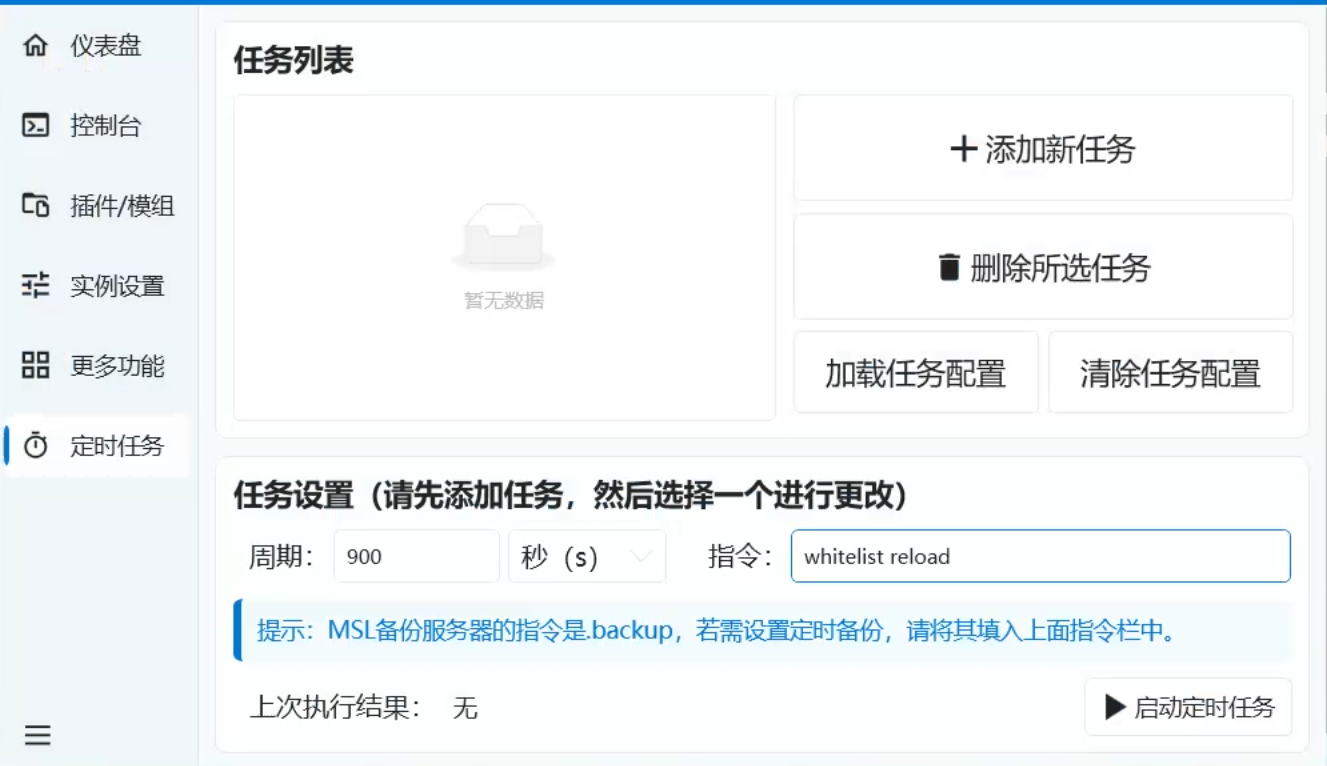
很多人会选择使用服务器控制面板或租用面板服,大部分的面板或面板服都支持添加定时/计划任务。可以添加一个任务,每900秒(15分钟)执行一次/whitelist reload指令,实现定时自动重载白名单的功能。
- 给服务器添加智能重载白名单mod(最智能,还在试验)
我同时为该插件编写了一个基于Fabric的mod:Minecraft Whitelist Watcher ,这个专为Fabric服务端的mod可以实现实时监视白名单,白名单文件内容发生变动时会自动为服务器重载白名单。但这个mod仍在开发,目前支持的mc版本较少,本人正在尽快更新使其支持更多版本。
⚙️ Bot配置
在配置之前,我建议您在实装完插件后先nb run一下Bot,然后再关掉
本插件使用nonebot-plugin-localstore插件存储配置文件,本插件配置文件名为config.json,一般来说,本插件的配置文件会位于:
- Windows:
C:\Users\<username>\AppData\Roaming\nonebot2\nonebot_plugin_mc_whitelist_controller - Linux:
~/.config/nonebot2/nonebot_plugin_mc_whitelist_controller
如果还是不清楚在哪里,可以在Bot根目录执行nb localstore命令查看。
如果您按照上述步骤,在配置前已经运行过一次Bot了的话,本插件会自动在上述目录里创建config.json文件,并已在文件内创建了模板,您可以前往上述目录,打开该文件填写相关配置项了。如果上述目录内没有该文件,您可以手动创建config.json文件,并按照一下要求配置:
| 配置项 | 必填 | 默认值 | 说明 |
|---|---|---|---|
| whitelist_path | 是 | 无 | 服务器whitelist.json的绝对路径 |
| profile_path | 否 | 无 | 存放玩家id和QQ号的文件的绝对路径(若不存在该文件会自动创建),如果未填该配置会自动依据localstore在默认的目录内创建一个profile.json |
| server_status | 否 | offile | 填写服务器状态(正版/离线服务器):online/offline |
| administrator_id | 否 | [ ] | 本插件管理员账户QQ号,可以查看玩家信息,可设置多个管理员 |
- 配置文件json模板
// config.json

{
	"whitelist_path": "",
	"profile_path": "profile.json",
	"server_status": "offline",
	"administrator_id": []
}
- whitelist_path配置示例:
// config.json
// 本示例中给出的地址为虚构地址,仅供演示
"whitelist_path": "C:\\Users\\Minecraft\\whitelist.json"
[!IMPORTANT] 填写该配置项,以及下面的profile_path配置项时,请务必不要使用
\分隔,改用\\或/,防止出错
- profile_path配置示例:
// config.json
// 本示例中给出的地址为虚构地址,仅供演示
"PROFILE_PATH": "C:\\Users\\Minecraft\\profile.json"
此处profile_path可以是绝对路径内的任意路径,但是在路径最后必须包括文件名,即使这个文件还未被创建。在本插件如果不配置该配置项,则会根据localstore在以下位置默认创建一个profile.json:
Windows:C:\Users\<username>\AppData\Local\nonebot2\nonebot_plugin_mc_whitelist_controller
Linux:~/.local/share/nonebot2/nonebot_plugin_mc_whitelist_controller
- administrator_id配置实例:
// config.json
// 本示例中给出QQ号为虚构QQ号,仅供演示
"administrator_id": [1111111111,2222222222]
🎉 使用
指令表
| 指令 | 权限 | 需要@ | 范围 | 说明 |
|---|---|---|---|---|
| /注册 或 /register + [玩家id] | 群员 | 否 | 群聊 | 向服务器白名单注册玩家信息 |
| /注销 或 /unregister + [玩家id] | 群员 | 否 | 群聊 | 注销已注册的玩家信息 |
| /指令列表 | 群员 | 否 | 群聊 | 查看指令列表 |
| /玩家列表 | 注册管理员 | 是 | 私聊或群聊@ | 查看玩家信息,仅已在配置文件中注册过的管理员可用 |
[!IMPORTANT] 在首次使用本插件前,或切换过server_status参数后,请务必手动清除whitelist.json中除"[]"号外的所有内容,防止出现错误
效果
场景:当你向机器人注册玩家id:
example:
🤵:/注册 leaf2006
🤖:成功注册玩家leaf2006到白名单!
此时whitelist.json会自动添加以下语句:
[
    // whitelist.json
    ...
    {
        "uuid": "dbc89c79-8236-36b0-b2cf-7dd0b9989b27",
        "name": "leaf2006"
    }
]
此时profile.json会自动添加以下语句,包括注册者的玩家id与QQ号:
[
    ...
    // nonebot_plugin_mc_whitelist_controller/data/profile.json
    {
        "name": "leaf2006",
        "qq": "此处代表该人的QQ号"
    }
]
随后,在该白名单之外的玩家便无法进入服务器了,您也可以实现对服务器内所有玩家的追根溯源
注:以上示例为离线服务器场景
旧版版本
下载或使用旧版版本请前往Pypi
Copyright © Leaf developer 2023-2026,遵循MIT开源协议


Download files
Download the file for your platform. If you're not sure which to choose, learn more about installing packages.
Source Distribution
Built Distribution
Filter files by name, interpreter, ABI, and platform.
If you're not sure about the file name format, learn more about wheel file names.
Copy a direct link to the current filters
File details
Details for the file nonebot_plugin_mc_whitelist_controller-1.0.5.tar.gz.
File metadata
- Download URL: nonebot_plugin_mc_whitelist_controller-1.0.5.tar.gz
- Upload date:
- Size: 16.2 kB
- Tags: Source
- Uploaded using Trusted Publishing? No
- Uploaded via: twine/6.2.0 CPython/3.12.4
File hashes
| Algorithm | Hash digest | |
|---|---|---|
| SHA256 |
2515c1c623954b5e8fe0a534682e9816a89c84e32b1157b655281c35df20fb39
|
|
| MD5 |
50091c501c94d873d17963a4049e6a6e
|
|
| BLAKE2b-256 |
10a2cd4bdd3cfce4ed222522697cf7ff62d7bb72d195d0daaa3b4ada34566b33
|
File details
Details for the file nonebot_plugin_mc_whitelist_controller-1.0.5-py3-none-any.whl.
File metadata
- Download URL: nonebot_plugin_mc_whitelist_controller-1.0.5-py3-none-any.whl
- Upload date:
- Size: 15.3 kB
- Tags: Python 3
- Uploaded using Trusted Publishing? No
- Uploaded via: twine/6.2.0 CPython/3.12.4
File hashes
| Algorithm | Hash digest | |
|---|---|---|
| SHA256 |
696af27fce01e72aae7e1a52ca5c14bd755eeb772c8a7094b9b2b4010e42cc7c
|
|
| MD5 |
73858ff9a05038f95bb8d9ff1ca69f7e
|
|
| BLAKE2b-256 |
55bc525c12c190d57ffac18df91d2e1fb59f115cd2f6b23bedf770f7fecb9752
|






