
Minecraft服务器状态查询的nonebot插件,支持IPv6/Minecraft server status query plugin for nonebot, IPv6 supported

Project description

nonebot-plugin-mccheck
✨ Minecraft 服务器查询插件 ✨




简体中文|English
📖 介绍
Minecraft服务器状态查询,支持IPv6
💿 安装
以下提到的方法任选 其一 即可
[推荐]使用 nb-cli 安装
在 Bot 的根目录下打开命令行, 输入以下指令即可安装nb plugin install nonebot-plugin-mccheck
使用包管理器安装
在 nonebot2 项目的插件目录下, 打开命令行, 根据你使用的包管理器, 输入相应的安装命令pip install nonebot-plugin-mccheck
# or
pdm add nonebot-plugin-mccheck
# or
poetry add nonebot-plugin-mccheck
# or
conda install nonebot-plugin-mccheck
打开 nonebot2 项目根目录下的 pyproject.toml 文件, 在 [tool.nonebot] 部分追加写入
plugin["nonebot_plugin_mccheck"]
📈 已实现的功能
- IPv6支持
- 支持全平台适配器
- 适配Unicode全字体与字形
- 渲染Motd样式
- 查询服务器昵称
- 查询服务器最大人数,当前人数和玩家列表
- 查询服务器motd
- 返回服务器地址及端口
- 返回服务器在线状态
- 查询服务器延迟
- 更精确的延迟
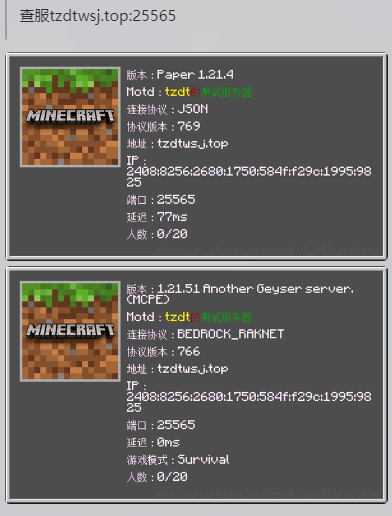
- 支持互通服务器双次查询
- 错误信息反馈
- 端口自动补全
- 智能判断IP地址是否正确
- 不依赖任何外部api
- 支持特殊端口查询(如
2,80,443等) - 查询服务器favicon
- 多语言
- SRV支持
- 完全彩色下划线/删除线
- 获取服务器协议号
📑 未来的功能
- 敬请期待
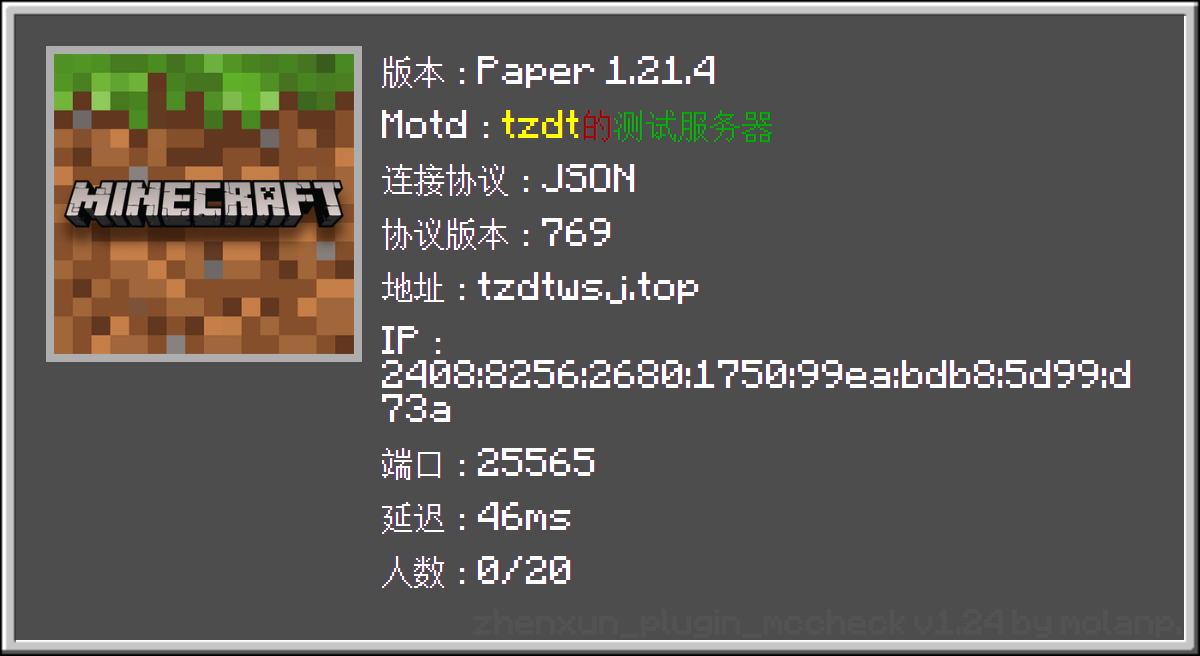
🖼️ 效果图
v0.1.45
🎈 特别说明
查询IPv6服务器
查服 [2001:db8:85a3::8a2e:370:7334]:25565 <-IPv6服务器地址及端口,端口和冒号可以不带
或
查服 2001:db8:85a3::8a2e:370:7334 <-IPv6服务器地址,插件会自动补全端口号
或
查服 2001:db8:85a3::8a2e:370:7334:25565 <-IPv6服务器地址及端口
或
查服 [2001:db8:85a3::8a2e:370:7334] <-IPv6服务器地址
⚙️ 配置
在 nonebot2 项目的.env文件中添加下表中的必填配置
| 配置项 | 必填 | 默认值 | 说明 |
|---|---|---|---|
MCC__LANGUAGE |
否 | zh-cn |
插件渲染图片所使用的语言 可用语言:[ zh-cn,zh-tw,en] |
MCC__TYPE |
否 | 0 |
插件发送的消息类型(0为HTML渲染图片, 1为文本) |
🎲 消息类型对比
| 类型 | 特殊样式 | Favicon | 完全彩色下划线/删除线 | 全Unicode字体支持 |
|---|---|---|---|---|
| 文本 | ❌ | ⭕ | ❌ | ⭕ |
| HTML | ⭕ | ⭕ | ⭕ | ⭕ |
🎉 使用
| 命令 | 参数 | 范围 | 说明 |
|---|---|---|---|
查服/mcheck |
ip:端口 或 ip |
私聊/群聊 | 查询服务器状态 |
设置语言/set_lang |
语言名称 | 私聊/群聊 | 设置插件渲染图片所使用的语言 |
当前语言/lang_now |
无 | 私聊/群聊 | 查看当前插件渲染图片所使用的语言 |
语言列表/lang_list |
无 | 私聊/群聊 | 查看插件支持的语言列表 |
Release history Release notifications | RSS feed


Download files
Download the file for your platform. If you're not sure which to choose, learn more about installing packages.
Source Distribution
Built Distribution
Filter files by name, interpreter, ABI, and platform.
If you're not sure about the file name format, learn more about wheel file names.
Copy a direct link to the current filters
File details
Details for the file nonebot_plugin_mccheck-0.2.4.tar.gz.
File metadata
- Download URL: nonebot_plugin_mccheck-0.2.4.tar.gz
- Upload date:
- Size: 3.0 MB
- Tags: Source
- Uploaded using Trusted Publishing? No
- Uploaded via: twine/6.2.0 CPython/3.9.25
File hashes
| Algorithm | Hash digest | |
|---|---|---|
| SHA256 |
592e66520bb29ee1838eafc64759856381c91a03a3656a4a976985e8e9c0339d
|
|
| MD5 |
3539f6256425a24c0898af9204b2ac55
|
|
| BLAKE2b-256 |
3e8cdc36f05b228d61812e6925aa74349d344a7968329325e96885c75894a0fe
|
File details
Details for the file nonebot_plugin_mccheck-0.2.4-py2.py3-none-any.whl.
File metadata
- Download URL: nonebot_plugin_mccheck-0.2.4-py2.py3-none-any.whl
- Upload date:
- Size: 3.2 MB
- Tags: Python 2, Python 3
- Uploaded using Trusted Publishing? No
- Uploaded via: twine/6.2.0 CPython/3.9.25
File hashes
| Algorithm | Hash digest | |
|---|---|---|
| SHA256 |
a582d068ecaa1606a37956222750fa119fe2cc29a9688368b70a6f78e4cd23dc
|
|
| MD5 |
d32f37026dc7ad5408ceee08d282f48d
|
|
| BLAKE2b-256 |
8f78b4d60ddc34f45d70f55d99f40eb3742a02f7e7c84d93edb461c5a6210d68
|






