


📖 介绍
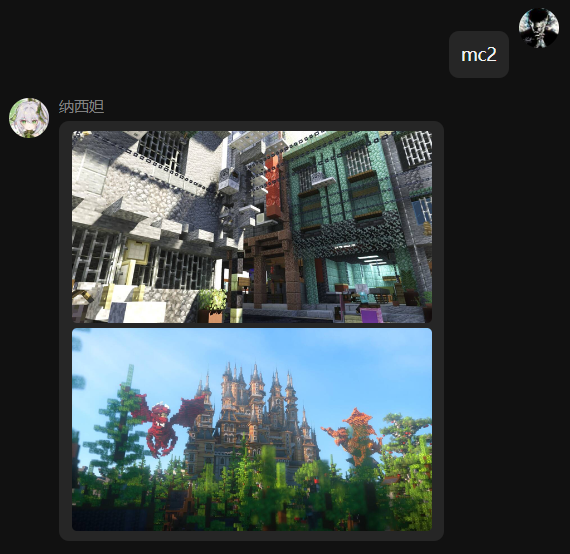
根据指令从爬好的数据库随机查询指定数量MC建筑图片链接下载并发送
图片来自推特图床,需要具备访问能力
💿 安装
使用 nb-cli 安装
在 nonebot2 项目的根目录下打开命令行, 输入以下指令即可安装nb plugin install nonebot-plugin-mcpic
使用包管理器安装
在 nonebot2 项目的插件目录下, 打开命令行, 根据你使用的包管理器, 输入相应的安装命令pip
pip install nonebot-plugin-mcpic
pdm
pdm add nonebot-plugin-mcpic
poetry
poetry add nonebot-plugin-mcpic
conda
conda install nonebot-plugin-mcpic
打开 nonebot2 项目根目录下的 pyproject.toml 文件, 在 [tool.nonebot] 部分追加写入
plugins = ["nonebot_plugin_mcpic"]
🎉 使用
指令表
mc|MC|建筑+图片数量
e.g: 建筑, mc20
效果图
1 maintainer

Metadata
1 maintainer
Release files for nonebot-plugin-mcpic 0.1.1
For a detailed explanation of source distributions (sdists) and built distributions (wheels), please see the package formats documentation.
Source distribution (sdist)
| File | Size | Uploaded | Provenance | |
|---|---|---|---|---|
| nonebot-plugin-mcpic-0.1.1.tar.gz | 4.1 kB | Without provenance | Details |
Built distribution (wheel)
| File | Interpreter | ABI | Platform | Reset |
|---|---|---|---|---|
| nonebot_plugin_mcpic-0.1.1-py3-none-any.whl | Python 3 | none | any | Details |
Total release size: 9.9 kB
Release files / nonebot-plugin-mcpic-0.1.1.tar.gz
| Download URL | nonebot-plugin-mcpic-0.1.1.tar.gz |
|---|---|
| Size | 4.1 kB |
| Tags | Source |
|
SHA-256 checksum How to use checksums |
390ec97178803930c7d400befec93be181c466b0168d9bb94e33aee053cfc602
|
|
BLAKE2b-256 checksum How to use checksums |
03ee6de16aede0b6633ca6f0a8a09b8377726633af14cdf18406bfdc5e91eab8
|
| Upload date | |
|
Uploaded using Trusted Publishing? What is trusted publishing? |
No |
| Uploaded via |
twine/4.0.2 CPython/3.11.7
|
Release files / nonebot_plugin_mcpic-0.1.1-py3-none-any.whl
| Download URL | nonebot_plugin_mcpic-0.1.1-py3-none-any.whl |
|---|---|
| Size | 5.9 kB |
| Tags | Python 3 |
|
SHA-256 checksum How to use checksums |
845fb0fedb748dbfecdf19e6638f8ca993c6a33f4d8e9b1530cdc5d6791fbd32
|
|
BLAKE2b-256 checksum How to use checksums |
c5088e9f384ff6824cc945cbce4eec9136c066315afc6224054b8dba00d4562d
|
| Upload date | |
|
Uploaded using Trusted Publishing? What is trusted publishing? |
No |
| Uploaded via |
twine/4.0.2 CPython/3.11.7
|
Security for nonebot-plugin-mcpic 0.1.1
Provenance
Provenance describes where a file came from. On PyPI, provenance is shared via attestations, which provide a verifiable record of the build or publishing details. View details, limitations and caveats.
No provenance found
None of the files in this release were uploaded with provenance metadata.
A note on package security
PyPI is a repository for distributing packages, not a service for auditing them. While third-party security researchers and our staff do their best to detect and remove malicious packages, PyPI cannot guarantee the quality, security or suitability of any given package.
To learn more about protecting yourself from malicious actors, visit our package security documentation.














