






安装 💿
使用 nb-cli 安装
在 nonebot2 项目的根目录下打开命令行, 输入以下指令即可安装nb plugin install nonebot-plugin-ncm
或者
python -m nb_cli plugin install nonebot-plugin-ncm
使用包管理器安装
在 nonebot2 项目的插件目录下, 打开命令行, 根据你使用的包管理器, 输入相应的安装命令pip
pip install nonebot-plugin-ncm
pdm
pdm add nonebot-plugin-ncm
poetry
poetry add nonebot-plugin-ncm
打开 nonebot2 项目根目录下的 pyproject.toml 文件, 在 [tool.nonebot] 部分追加写入
plugins = ["nonebot-plugin-ncm"]
如果希望使用`nonebot2 a16`及以下版本
pip install nonebot-plugin-ncm==1.1.0
快速使用 ▶️
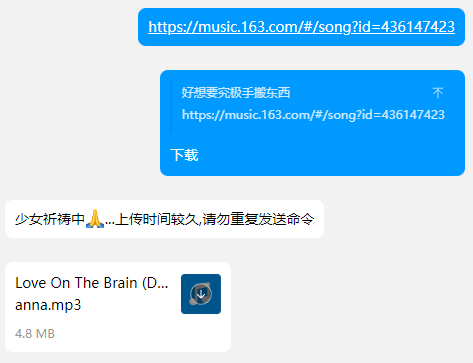
将链接或者卡片分享到聊天群或机器人,回复分享的消息并输入下载即可进行下载
分享之后是没有反应的,只有对需要解析的消息回复下载才会响应
默认下载状态为关闭,请在每个群内使用/ncm t开启,私聊则默认开启
注意说明 ⚠️
- 使用的网易云账号需要拥有黑胶VIP
- 默认下载最高音质的音乐,可以修改
ncm_bitrate项更改音乐品质 - 本程序实质为调用web接口下载音乐上传
命令列表 📃
| 命令 | 备注 |
|---|---|
| /ncm | 获取命令菜单 |
| /ncm t | 开启下载 |
| /ncm f | 关闭下载 |
| /ncm search t | 开启点歌 |
| /ncm search f | 关闭点歌 |
| /点歌 歌名 | 点歌 |
| /ncm private qq号 t | 开启该用户私聊下载 |
| /ncm private qq号 f | 关闭该用户私聊下载 |
- 命令开始符号会自动识别
COMMAND_START项
配置文件说明 ⚙️
| 配置项 | 必填 | 默认值 | 说明 |
|---|---|---|---|
| ncm_admin_level | 否 | 1 | 设置命令权限(1:仅限superusers和群主,2:在1的基础上+管理员,3:所有用户) |
| ncm_ctcode | 否 | 86 | 手机号区域码 |
| ncm_phone | 是 | 网易云绑定的手机号(留空则二维码登录) | |
| ncm_password | 是 | 网易云账号密码(留空则短信登录) | |
| ncm_bitrate | 否 | 320 | 下载码率(单位K) <=96: m4a, >=320:flac, 96< mp3 <320 |
# 这是示例
ncm_admin_level=1 # 设置命令权限(1:仅限superusers和群主,2:在1的基础上+管理员,3:所有用户)
ncm_ctcode=86 # 手机号区域码,默认86
ncm_phone=  # 手机登录,不填的话把这行删了
ncm_password=  # 密码,不填的话把这行删了
ncm_playlist_zip=False # 上传歌单时是否压缩
ncm_bitrate=320 # 下载码率(单位K) 96及以下为m4a,320及以上为flac,中间mp3
功能列表 📃
- 识别/下载 网易云单曲
- 链接
- 卡片
- 卡片转发
- 识别/下载 网易云歌单
- 链接
- 卡片
- 卡片转发
- 点歌(网易云)
- QQ音乐无损下载
鸣谢
1 maintainer

Metadata
1 maintainer
Release files for nonebot-plugin-ncm 1.6.18
For a detailed explanation of source distributions (sdists) and built distributions (wheels), please see the package formats documentation.
Source distribution (sdist)
| File | Size | Uploaded | Provenance | Actions |
|---|---|---|---|---|
| nonebot_plugin_ncm-1.6.18.tar.gz | 15.2 kB | Without provenance | Details for nonebot_plugin_ncm-1.6.18.tar.gz |
Built distribution (wheel)
| File | Interpreter | ABI | Platform | Actions Reset |
|---|---|---|---|---|
| nonebot_plugin_ncm-1.6.18-py3-none-any.whl | Python 3 | none | any | Details for nonebot_plugin_ncm-1.6.18-py3-none-any.whl |
Total release size: 30.6 kB
Release files / nonebot_plugin_ncm-1.6.18.tar.gz
| Download URL | nonebot_plugin_ncm-1.6.18.tar.gz |
|---|---|
| Size | 15.2 kB |
| Tags | Source |
|
SHA-256 checksum How to use checksums |
f95bc2f2502a2b46f73f29996c4d7ade707a42635b809e6d8c6e13c570522aee
|
|
BLAKE2b-256 checksum How to use checksums |
ba99a83d7013c57e1e92ac244903497f2eeb61f838cf49d6fb5379d9a3c4f3ea
|
| Upload date | |
|
Uploaded using Trusted Publishing? What is trusted publishing? |
No |
| Uploaded via |
twine/6.0.1 CPython/3.9.21
|
Release files / nonebot_plugin_ncm-1.6.18-py3-none-any.whl
| Download URL | nonebot_plugin_ncm-1.6.18-py3-none-any.whl |
|---|---|
| Size | 15.4 kB |
| Tags | Python 3 |
|
SHA-256 checksum How to use checksums |
be1dab80e8e80fada7cef6129616f4e8a476590bce7ab102a4dfbf3063091826
|
|
BLAKE2b-256 checksum How to use checksums |
80cb083a7585d61828acfdcf149df1d294fb36efec1870628fc7344020dcd41d
|
| Upload date | |
|
Uploaded using Trusted Publishing? What is trusted publishing? |
No |
| Uploaded via |
twine/6.0.1 CPython/3.9.21
|
Security for nonebot-plugin-ncm 1.6.18
Provenance
Provenance describes where a file came from. On PyPI, provenance is shared via attestations, which provide a verifiable record of the build or publishing details. View details, limitations and caveats.
No provenance found
None of the files in this release were uploaded with provenance metadata.
A note on package security
PyPI is a repository for distributing packages, not a service for auditing them. While third-party security researchers and our staff do their best to detect and remove malicious packages, PyPI cannot guarantee the quality, security or suitability of any given package.
To learn more about protecting yourself from malicious actors, visit our package security documentation.














