
nonebot-plugin-ocgbot-v2

Project description


nonebot-plugin-ocgbot-v2
✨ 提供游戏王相关服务 ✨





提供包括查卡、随机抽卡、猜卡等功能的插件
📖 介绍
本插件提供了游戏王相关的服务,包括但不限于查卡、随机一卡、猜卡、查卡价、查饼图、查卡运等
详细搭建方式请查看 ocgbot-BuildGuide(结合本文档食用),存在问题也可以查看文档下方Q&A
💿 安装
使用 nb-cli 安装
在 nonebot2 项目的根目录下打开命令行, 输入以下指令即可安装nb plugin install nonebot-plugin-ocgbot-v2
使用包管理器安装
在 nonebot2 项目的插件目录下, 打开命令行, 根据你使用的包管理器, 输入相应的安装命令pip
pip install nonebot-plugin-ocgbot-v2
pdm
pdm add nonebot-plugin-ocgbot-v2
poetry
poetry add nonebot-plugin-ocgbot-v2
conda
conda install nonebot-plugin-ocgbot-v2
打开 nonebot2 项目根目录下的 pyproject.toml 文件, 在 [tool.nonebot] 部分追加写入
plugins = ["nonebot_plugin_ocgbot_v2"]
⚙️ 配置
在项目的.env文件中添加下表中的必填配置
| 配置项 | 必填 | 默认值 | 说明 |
|---|---|---|---|
| STATIC_PATH | 否 | 插件目录 | static文件夹路径,用于存放静态文件 |
| USE_WEB_PIC | 否 | false | 是否自动下载图片(百鸽图源) |
| SUPERUSERS | 否 | 无 | 超管账号,为字符串数组 |
注:STATIC_PATH可以填写外部静态文件夹地址,该地址下可以包含cdb json pics font images decks 几个文件夹,如果存在此文件夹,插件会使用该文件夹作为对应静态文件的调用路径(几个文件夹的调用独立)
如在E:\YGOPro下存在pics文件夹,即可填写STATIC_PATH=E:\YGOPro,此时会使用该目录下的pics作为卡图调用路径。
但需要注意E:\YGOPro可能存在decks文件夹,需要将其改名,不然会被插件进行调用。
同样可以在指定的文件夹下创建cdb文件夹,放入对应cdb文件即可。
发送文本、称呼、猜卡难度等信息均可在 插件文件夹->libraries->globalMessage.py 下修改(绝对不是因为我懒得写成静态文件😋)
在项目的static文件夹中放入以下文件
| 文件名 | 必须 | 路径 | 说明 |
|---|---|---|---|
| cards.cdb | 是 | /cdb | ygo游戏文件夹下的cdb文件,拖入即可 |
| pics | 是 | /pics | ygo游戏文件夹下的pics文件夹,拖入同名文件夹即可(先行卡和自定义卡也一样) |
| daily_card.json | 是 | /json | 卡运信息,默认存在 |
| nickname.json | 是 | /json | 别名信息,默认存在 |
| pre-release.cdb | 否 | /cdb | ygo先行服的同名cdb文件 |
| extra_card.cdb | 否 | /cdb | 自定义卡牌文件,默认存在 |
注意:需在pics内放入卡图才能进行卡图查卡(可以指定路径)。插件运行时会自动下载卡运卡图
数据库库更新请自行更换cards.cdb以及添加pics内图片
🎉 使用
指令表
| 指令 | 权限 | 需要@ | 范围 | 说明 |
|---|---|---|---|---|
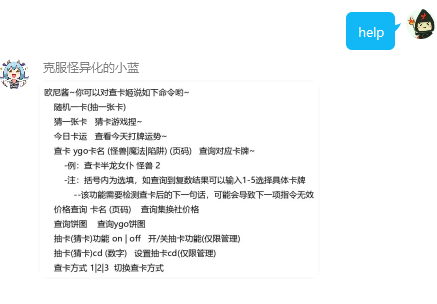
| help | 群员 | 否 | 群聊/私聊 | 查询功能清单 |
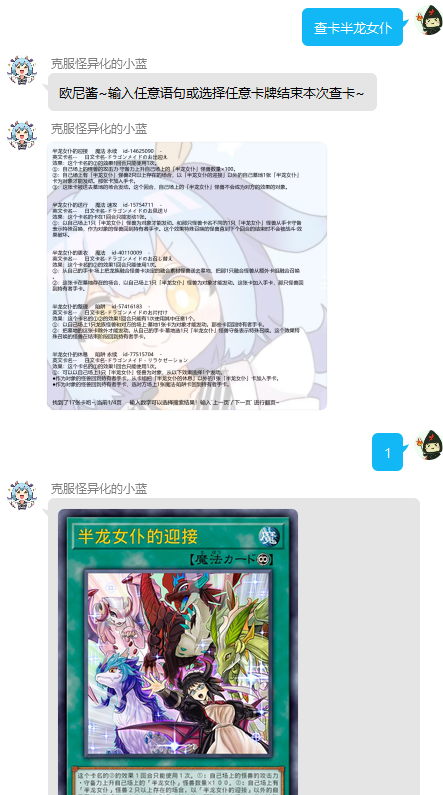
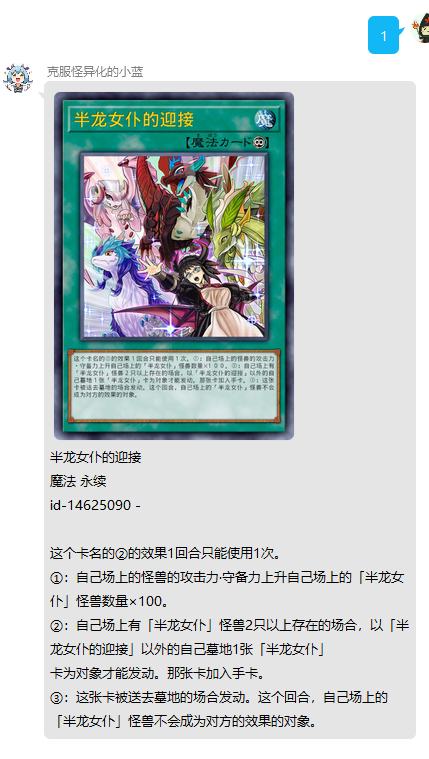
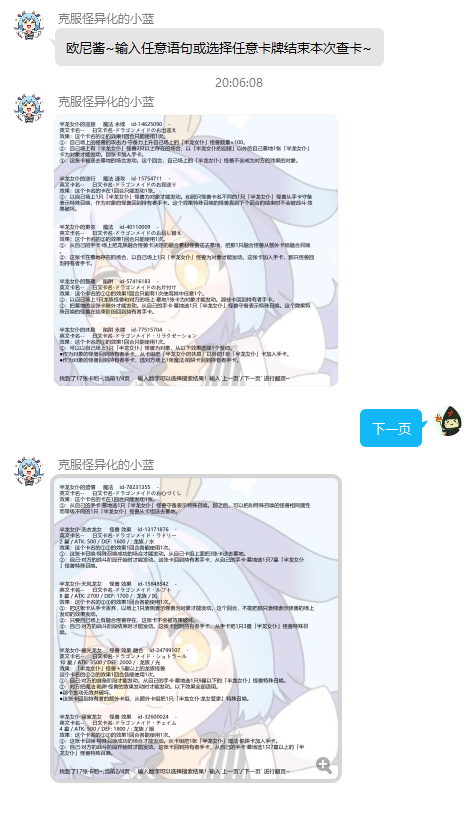
| 查卡 ygo卡名 (页码) | 群员 | 否 | 私聊/群聊 | 查询对应卡牌~ |
| 今日卡运 | 群员 | 否 | 群聊/私聊 | 查询今日运势 |
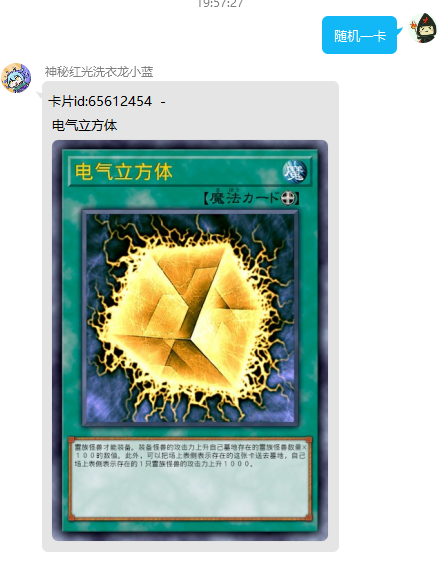
| 随机一卡(抽一张卡) | 群员 | 否 | 群聊/私聊 | 随机一卡 |
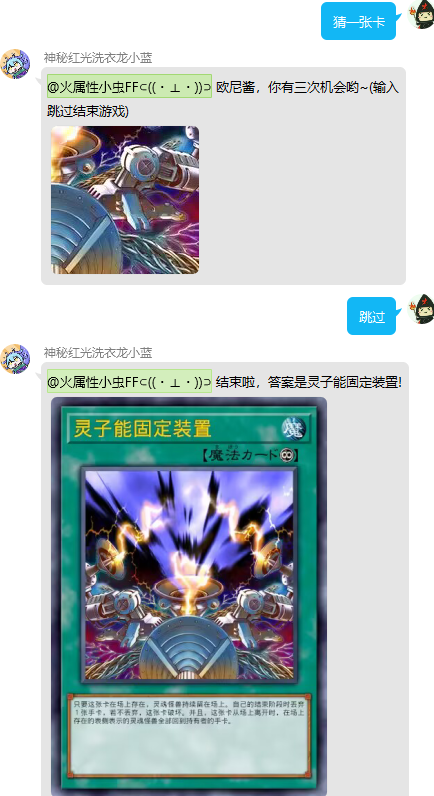
| 猜一张卡 | 群员 | 否 | 群聊 | 随机猜一张卡 |
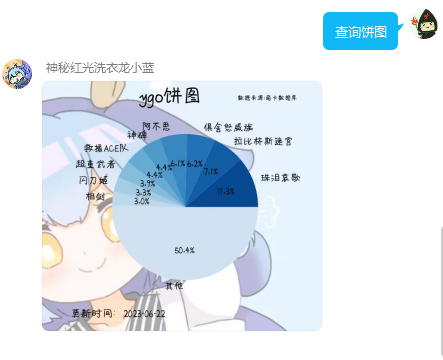
| 查询饼图 | 群员 | 否 | 群聊/私聊 | 从萌卡中查询卡组使用饼图 |
| 抽卡(猜卡)功能 on/off | 管理/群主/超管 | 否 | 群聊 | 开/关抽卡功能 |
| 抽卡(猜卡)cd (数字) | 管理/群主/超管 | 否 | 群聊 | 设置抽卡cd |
| 查卡方式 1/2/3 | 群员 | 否 | 群聊 | 设置查卡结果输出方式 |
| 更新禁卡表 | 超管 | 否 | 群聊/私聊 | 从官网更新最新禁卡表信息(确认数据库cdb文件为最新) |
效果图
帮助菜单
卡牌查询
直接查询
输入数字选择具体查询
翻页
查询卡运
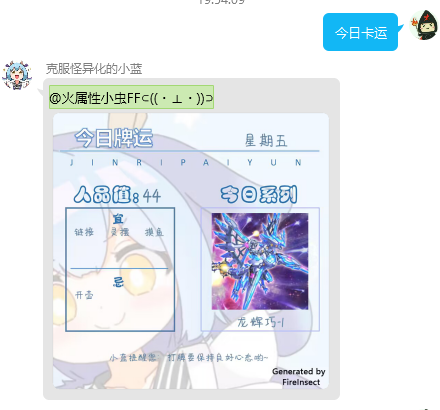
随机一卡
随机猜卡
查询ygo饼图
查卡方式
方式1
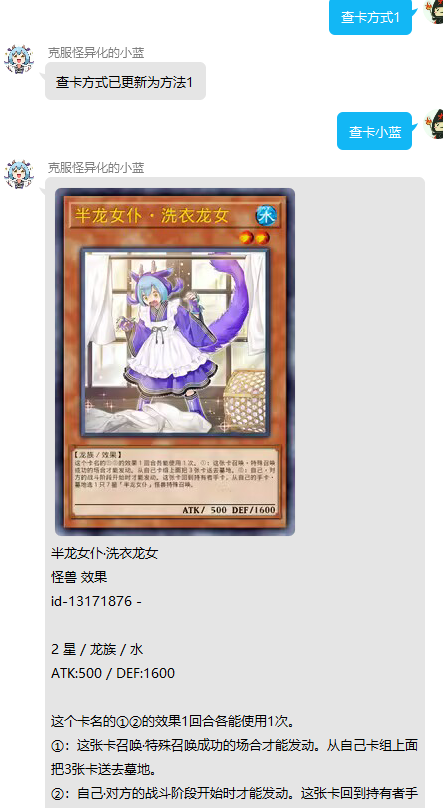
方式2
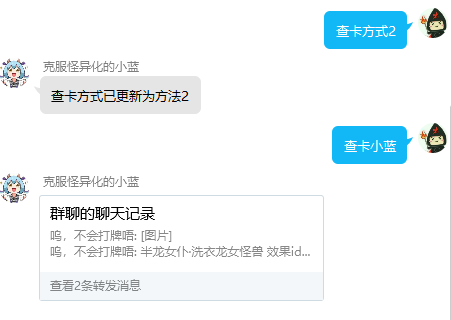
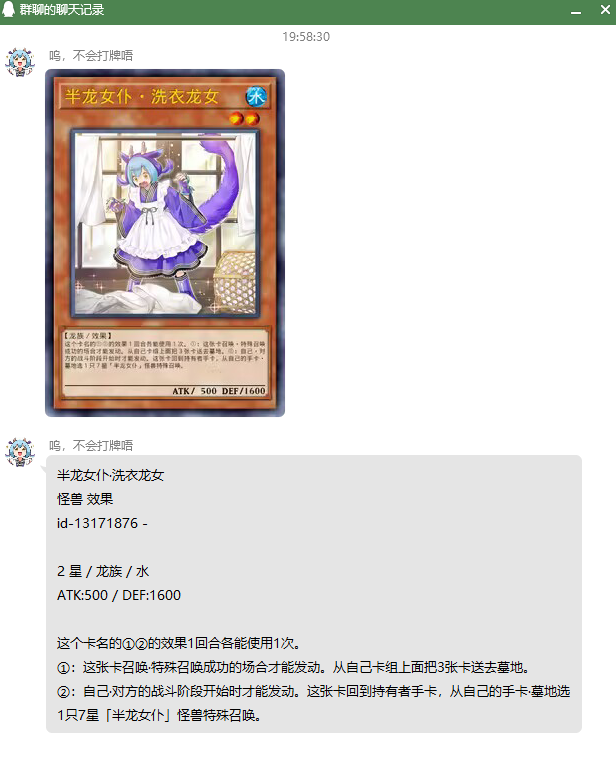
方式3
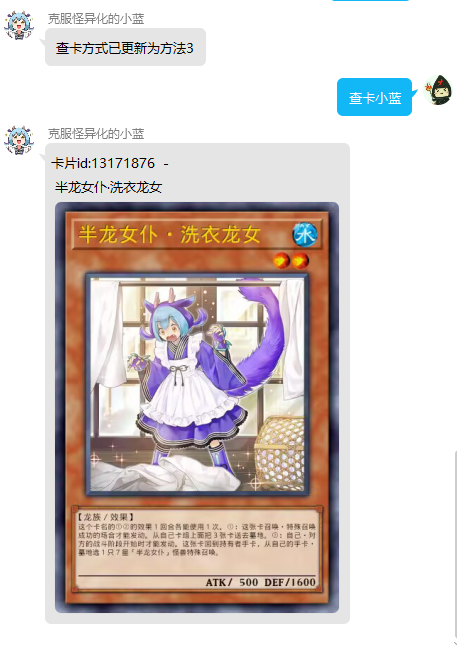
💰 赞助
请小虫买包卡?
点击展开收款码


火属性小虫
Release history Release notifications | RSS feed


Download files
Download the file for your platform. If you're not sure which to choose, learn more about installing packages.
Source Distribution
Built Distribution
Filter files by name, interpreter, ABI, and platform.
If you're not sure about the file name format, learn more about wheel file names.
Copy a direct link to the current filters
File details
Details for the file nonebot_plugin_ocgbot_v2-0.2.10.6.tar.gz.
File metadata
- Download URL: nonebot_plugin_ocgbot_v2-0.2.10.6.tar.gz
- Upload date:
- Size: 3.4 MB
- Tags: Source
- Uploaded using Trusted Publishing? Yes
- Uploaded via: twine/6.1.0 CPython/3.13.7
File hashes
| Algorithm | Hash digest | |
|---|---|---|
| SHA256 |
3e9385a6f75db6da3a0d1fc905e6828f6f3eb72865a2e1f4fa85d17448cde57f
|
|
| MD5 |
14f0ad0d7dc303521fd26c54350d31f4
|
|
| BLAKE2b-256 |
339ba592cab7e01488bb19ff36e76d7590863380b7aaa187ed9f5d81bfb7ec93
|
Provenance
The following attestation bundles were made for nonebot_plugin_ocgbot_v2-0.2.10.6.tar.gz:
Publisher:
pypi-publish.yml on fireinsect/nonebot-plugin-ocgbot-v2
-
Statement:
-
Statement type:
https://in-toto.io/Statement/v1 -
Predicate type:
https://docs.pypi.org/attestations/publish/v1 -
Subject name:
nonebot_plugin_ocgbot_v2-0.2.10.6.tar.gz -
Subject digest:
3e9385a6f75db6da3a0d1fc905e6828f6f3eb72865a2e1f4fa85d17448cde57f - Sigstore transparency entry: 898662771
- Sigstore integration time:
-
Permalink:
fireinsect/nonebot-plugin-ocgbot-v2@dbd8693620dfc8002a71c1ad3757eb2b0a583b83 -
Branch / Tag:
refs/tags/0.2.10.6 - Owner: https://github.com/fireinsect
-
Access:
public
-
Token Issuer:
https://token.actions.githubusercontent.com -
Runner Environment:
github-hosted -
Publication workflow:
pypi-publish.yml@dbd8693620dfc8002a71c1ad3757eb2b0a583b83 -
Trigger Event:
push
-
Statement type:
File details
Details for the file nonebot_plugin_ocgbot_v2-0.2.10.6-py3-none-any.whl.
File metadata
- Download URL: nonebot_plugin_ocgbot_v2-0.2.10.6-py3-none-any.whl
- Upload date:
- Size: 3.4 MB
- Tags: Python 3
- Uploaded using Trusted Publishing? Yes
- Uploaded via: twine/6.1.0 CPython/3.13.7
File hashes
| Algorithm | Hash digest | |
|---|---|---|
| SHA256 |
49cc87f7c61d7d12c0283cc9b4f43e3ae9dade5b0a70f20032dee30c3a4112e2
|
|
| MD5 |
fc13df9304cf0319e147016e3b3273a9
|
|
| BLAKE2b-256 |
2b3cfdc940db4378ea101084396c7ba6bc743f04adc9079e37edf7a8f75349a0
|
Provenance
The following attestation bundles were made for nonebot_plugin_ocgbot_v2-0.2.10.6-py3-none-any.whl:
Publisher:
pypi-publish.yml on fireinsect/nonebot-plugin-ocgbot-v2
-
Statement:
-
Statement type:
https://in-toto.io/Statement/v1 -
Predicate type:
https://docs.pypi.org/attestations/publish/v1 -
Subject name:
nonebot_plugin_ocgbot_v2-0.2.10.6-py3-none-any.whl -
Subject digest:
49cc87f7c61d7d12c0283cc9b4f43e3ae9dade5b0a70f20032dee30c3a4112e2 - Sigstore transparency entry: 898662819
- Sigstore integration time:
-
Permalink:
fireinsect/nonebot-plugin-ocgbot-v2@dbd8693620dfc8002a71c1ad3757eb2b0a583b83 -
Branch / Tag:
refs/tags/0.2.10.6 - Owner: https://github.com/fireinsect
-
Access:
public
-
Token Issuer:
https://token.actions.githubusercontent.com -
Runner Environment:
github-hosted -
Publication workflow:
pypi-publish.yml@dbd8693620dfc8002a71c1ad3757eb2b0a583b83 -
Trigger Event:
push
-
Statement type:






