


✨功能
- 自动挂载
/metrics路径,提供 Prometheus 监控数据 - 为其他插件提供统一的数据上报接口
- 新增:支持通过对话查询指标数据
- 新增:提供通用指标查询接口,支持任意已注册指标的查询
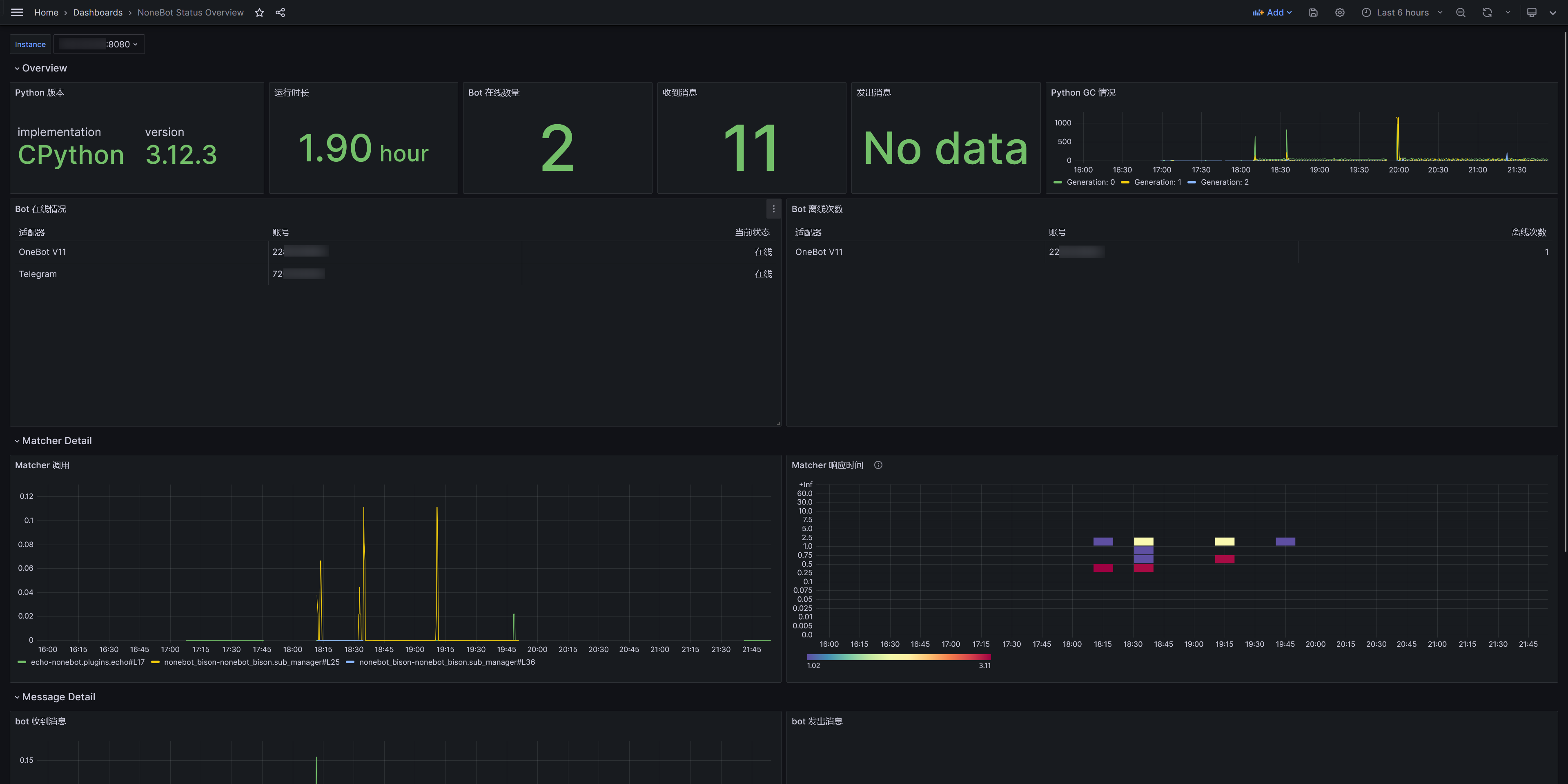
📊支持统计的指标
- Bot 在线状态
- Bot 掉线次数
- Bot 发送和接受消息次数
- Matcher 执行次数
- Matcher 执行耗时分布
♿官方提供 Grafana 面板
📦 安装
- 使用 nb-cli
nb plugin install nonebot-plugin-prometheus
- 使用 uv
uv add nonebot-plugin-prometheus
- 使用 poetry
poetry add nonebot-plugin-prometheus
- 使用 pip
pip install nonebot-plugin-prometheus
🔌接入方式
先在插件代码最前面声明依赖
from nonebot import require

require("nonebot_plugin_prometheus")
然后可以从插件导入相关指标对象使用,详情请参考 Prometheus Python Client 官方文档
from nonebot_plugin_prometheus import Gauge, Counter, Histogram, Summary

# Request counter
request_counter = Counter(
    "request_counter", "The number of requests"
)
request_counter.inc()
Tips
为了统计 matcher 运行时间,本插件会自动在
Matcher.state中插入_prometheus_start_time字段。
🔧配置
# 是否开启 Prometheus 插件
PROMETHEUS_ENABLE=true
# Prometheus 挂载地址
PROMETHEUS_METRICS_PATH=/metrics
Note
使用插件需要支持 ASGI 的驱动器,例如
fastapi
💬对话查询功能
本插件现在支持通过对话命令查询指标数据,方便在聊天中快速查看监控信息。
基础命令
# 查看系统概览
/metrics

# 查看机器人状态
/metrics status

# 查看消息统计
/metrics messages

# 查看匹配器统计
/metrics matchers

# 查看系统指标
/metrics system

# 查看运行时间
/metrics uptime

# 查看帮助
/metrics help
通用指标查询
新增:支持查询任意已注册的 Prometheus 指标:
# 查询特定指标
/metrics query nonebot_received_messages

# 带标签过滤的查询
/metrics query nonebot_received_messages{bot_id="123456"}

# 列出所有可用指标
/metrics list

# 搜索包含关键字的指标
/metrics search matcher
查询示例
# 查看接收消息总数
/metrics query nonebot_received_messages

# 查看特定机器人的消息统计
/metrics query nonebot_received_messages{bot_id="72075954", adapter_name="Telegram"}

# 查看匹配器执行情况
/metrics query nonebot_matcher_calls_total

# 搜索所有与匹配器相关的指标
/metrics search matcher
输出格式
查询结果会以格式化的方式显示,包含:
- 指标类型和描述
- 标签信息
- 指标值
- 适当的单位格式化(如 K、M、B 等)
🔧开发者接口
除了对话查询,本插件还提供了编程接口供其他插件使用:
from nonebot_plugin_prometheus.registry import (
    get_metrics,           # 获取所有指标
    get_metrics_by_name,   # 按名称获取指标
    get_metric_values,     # 获取指标值
    list_all_metrics,      # 列出所有指标
    search_metrics,        # 搜索指标
    parse_metric_filter,   # 解析查询字符串
)

# 示例:获取特定指标的值
values = get_metric_values("nonebot_received_messages", {"bot_id": "123456"})
for labels, value in values:
    print(f"Labels: {labels}, Value: {value}")
📝TODO
- 提供快速上手 docker compose 文件
相关仓库
1 maintainer

Metadata
1 maintainer
Release files for nonebot-plugin-prometheus 0.4.1
For a detailed explanation of source distributions (sdists) and built distributions (wheels), please see the package formats documentation.
Source distribution (sdist)
| File | Size | Uploaded | |
|---|---|---|---|
| nonebot_plugin_prometheus-0.4.1.tar.gz | 15.9 kB | Details |
Built distribution (wheel)
| File | Interpreter | ABI | Platform | Reset |
|---|---|---|---|---|
| nonebot_plugin_prometheus-0.4.1-py3-none-any.whl | Python 3 | none | any | Details |
Total release size: 36.4 kB
Release files / nonebot_plugin_prometheus-0.4.1.tar.gz
| Download URL | nonebot_plugin_prometheus-0.4.1.tar.gz |
|---|---|
| Size | 15.9 kB |
| Tags | Source |
|
SHA-256 checksum How to use checksums |
113a23f076d490ab75b7f9851bc1911de4fc6aaf79600f2f0e759ce7ef6666db
|
|
BLAKE2b-256 checksum How to use checksums |
1acb306c93f4ce36c083c17196aa84a51ad2f31e96ad0d0963a23842d71843f5
|
| Upload date | |
|
Uploaded using Trusted Publishing? What is trusted publishing? |
Yes |
| Uploaded via |
twine/6.1.0 CPython/3.13.7
|
Provenance
Provenance describes where a file came from. On PyPI, provenance is shared via attestations, which provide a verifiable record of the build or publishing details. View details, limitations and caveats.


PyPI Publish Attestation
PyPI verified that this artifact, at this checksum, originated from the publisher listed below.
Signed by GitHub Actions, verified by PyPI on Sep 10, 2025.
Transparency logRelease files / nonebot_plugin_prometheus-0.4.1-py3-none-any.whl
| Download URL | nonebot_plugin_prometheus-0.4.1-py3-none-any.whl |
|---|---|
| Size | 20.4 kB |
| Tags | Python 3 |
|
SHA-256 checksum How to use checksums |
c53797ac30cc22f8e54942990100678c823f90fc73051fef3c6c501a9409f029
|
|
BLAKE2b-256 checksum How to use checksums |
d678ee801769f82aff50213f2ea17cddff469348876b0dc40b841e1315c477f8
|
| Upload date | |
|
Uploaded using Trusted Publishing? What is trusted publishing? |
Yes |
| Uploaded via |
twine/6.1.0 CPython/3.13.7
|
Provenance
Provenance describes where a file came from. On PyPI, provenance is shared via attestations, which provide a verifiable record of the build or publishing details. View details, limitations and caveats.
PyPI Publish Attestation
PyPI verified that this artifact, at this checksum, originated from the publisher listed below.
Signed by GitHub Actions, verified by PyPI on Sep 10, 2025.
Transparency log













