



📖 介绍
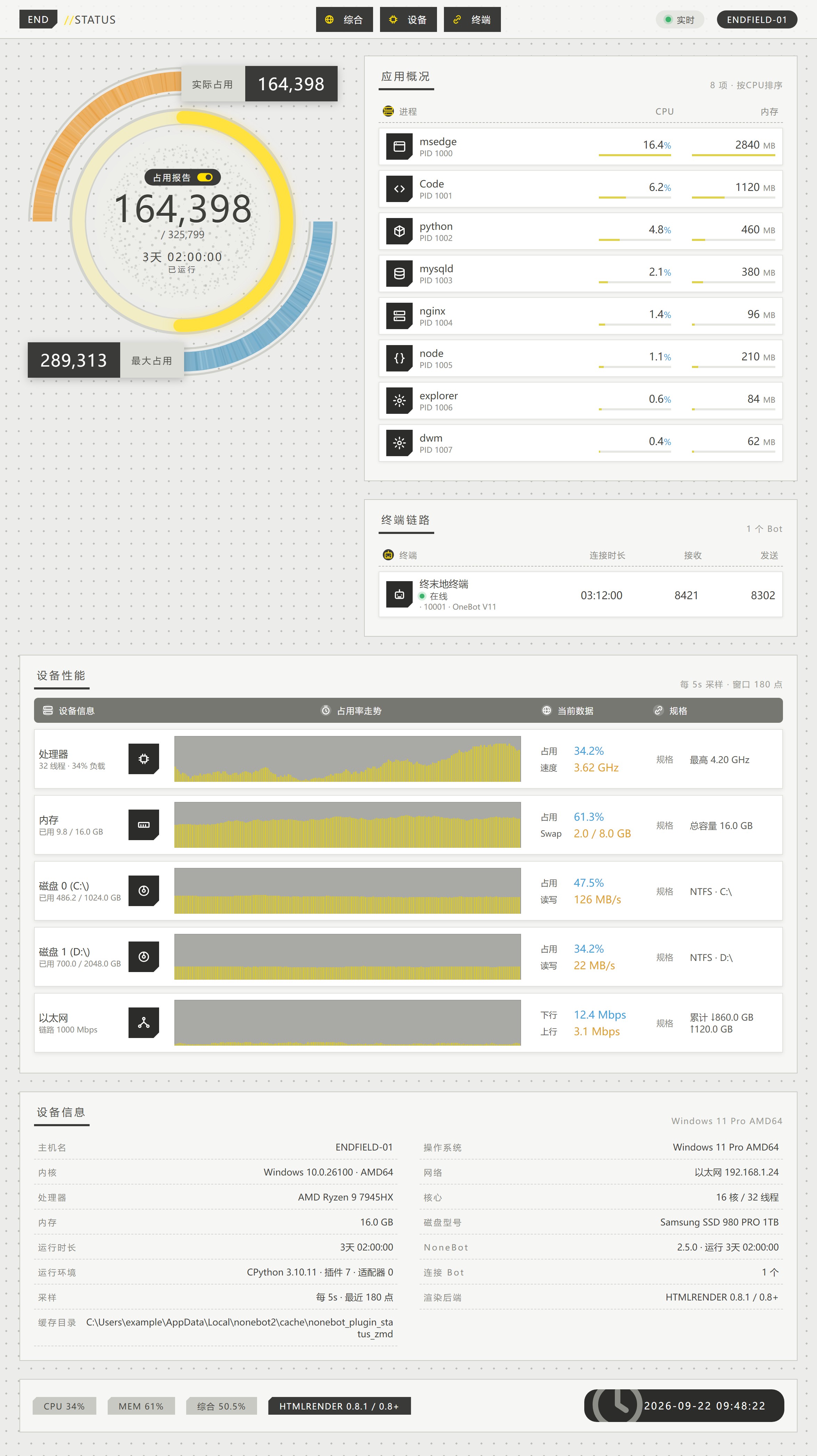
发一条 status,得到一张协议核心面板风格的设备状态图:圆形电量环 + 设备性能走势 + 应用概况 + 终端链路 + 设备信息表。
📷 效果图
点击展开
STZMD_LAYOUT=full —— 综合长图(默认)
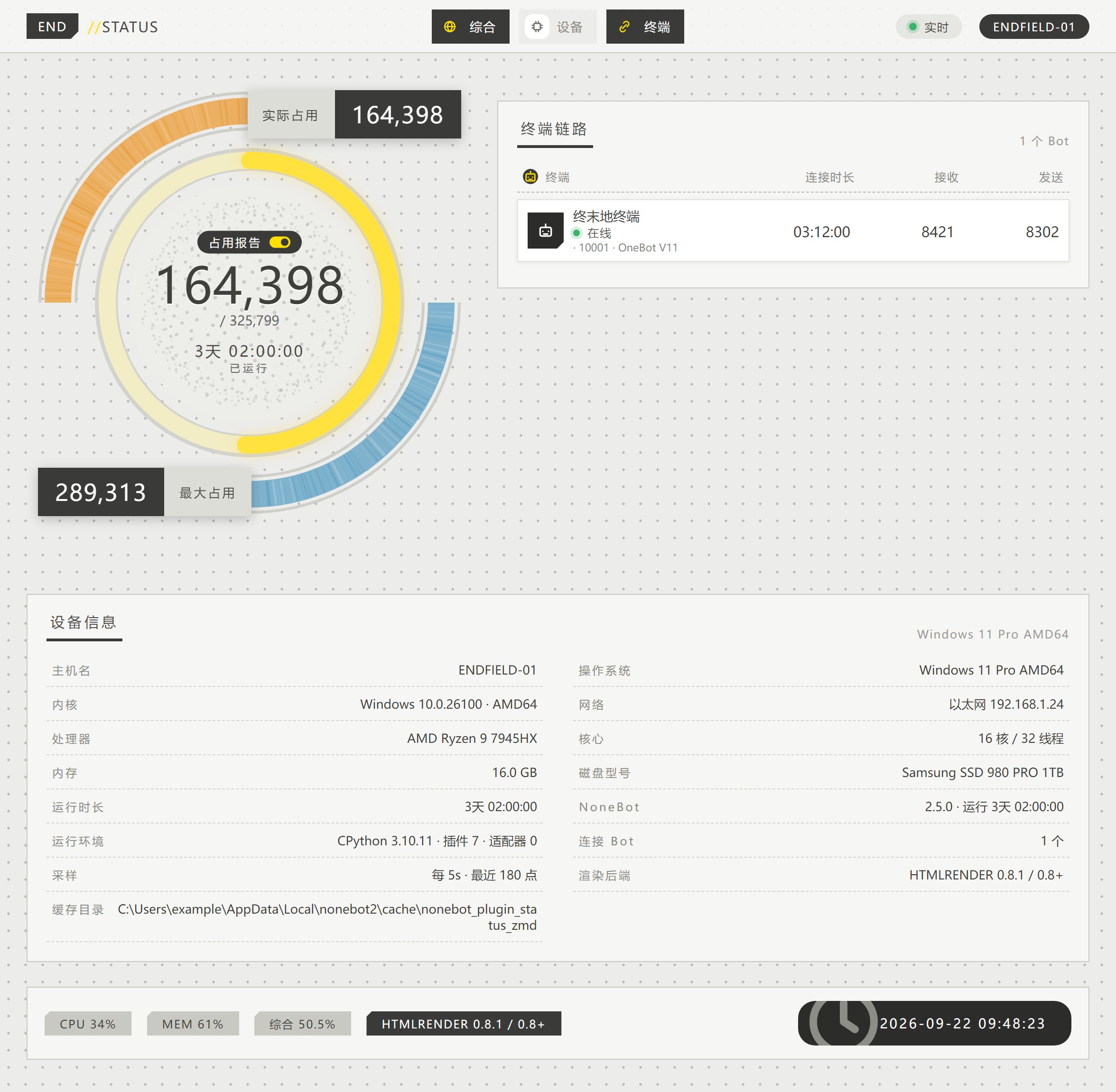
STZMD_LAYOUT=gauge —— 只出电量环
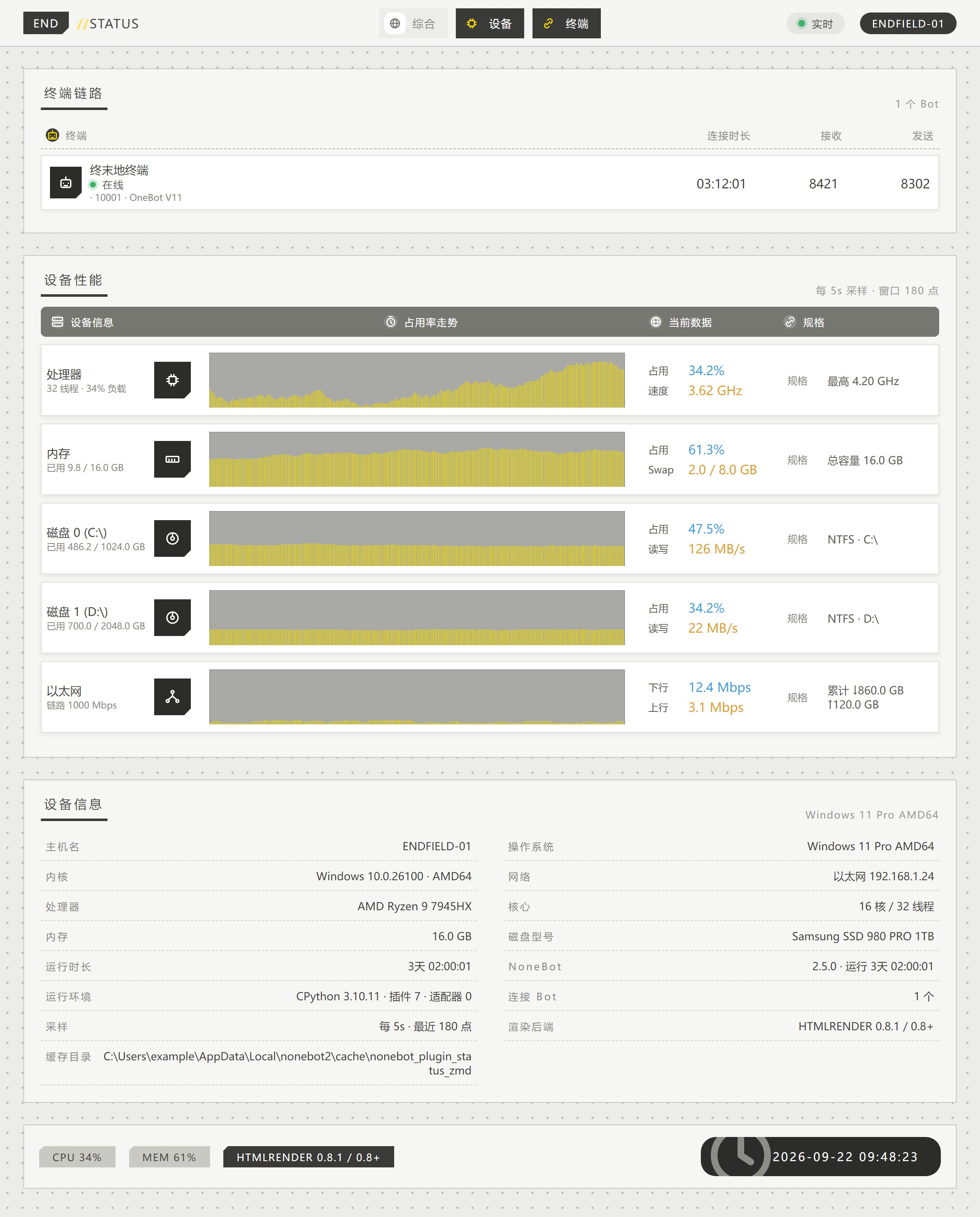
STZMD_LAYOUT=perf —— 只出设备性能
💿 安装
使用 nb-cli 安装
在 nonebot2 项目的根目录下打开命令行, 输入以下指令安装(暂未上架,请先使用包管理器安装)nb plugin install nonebot-plugin-status-zmd
使用包管理器安装
pip install nonebot-plugin-status-zmd
在 pyproject.toml 中添加:
[tool.nonebot]
plugins = ["nonebot_plugin_status_zmd"]
⚠️ 渲染后端
插件通过 nonebot-plugin-htmlrender 渲染页面,0.6 / 0.7 / 0.8+ 都支持,
但从 0.8 起它不再内置浏览器后端,需要额外两步:
# htmlrender >= 0.8:装 Playwright 后端(0.6 / 0.7 自带,跳过这步)
pip install "nonebot-plugin-htmlrender[playwright]>=0.8"
# 或装本插件提供的配套 extra(等价)
pip install "/path/to/nonebot-plugin-status-zmd[htmlrender8]"

# 任一版本都需要浏览器内核
playwright install chromium
# Debian/Ubuntu、容器、CI 建议带上系统依赖
playwright install --with-deps chromium
# htmlrender >= 0.8 还需要在 .env 里选 Provider(0.6 / 0.7 不用)
RENDER={"provider":"playwright","startup":"warmup"}
另外 htmlrender 0.7 起把浏览器目录搬到了 localstore 数据目录(首次启动的日志里会打印具体路径)。如果出图报
Executable doesn't exist,把PLAYWRIGHT_BROWSERS_PATH指到那个目录再装一次即可,例如:set "PLAYWRIGHT_BROWSERS_PATH=%LOCALAPPDATA%\nonebot2\nonebot_plugin_htmlrender" playwright install chromium
后端不可用时插件不会启动失败,而是打印一条带修复步骤的告警,并在指令触发时把同样的提示发给使用者。
🎉 使用
status
系统状态
指令名可用 STZMD_COMMAND 修改。默认仅 SUPERUSER可用。
NoneBot 默认只把
/开头的消息当命令,想直接发status触发,需要把空字符串加进COMMAND_START:COMMAND_START=["", "/"]
⚙️ 配置
在 .env 或 .env.prod 中添加;全部为可选项,可以开箱即用:
# --- 触发与权限 ---
STZMD_COMMAND=["status", "系统状态"]        # 触发指令,第一个为主指令,其余为别名
STZMD_ONLY_SUPERUSER=true                  # 是否仅 SUPERUSER 可用(状态图含主机名/IP/进程/磁盘,不建议公开)
STZMD_NEED_AT=false                        # 是否需要 @ 机器人才能触发
STZMD_REPLY_TARGET=true                    # 是否回复触发者那条消息

# --- 版式 ---
STZMD_LAYOUT=full                            # full=综合长图 / gauge=只出电量环 / perf=只出设备性能
STZMD_BLOCKS=["header", "gauge", "apps", "bots", "perf", "specs", "footer"]  # 板块开关,可选 header / gauge / apps / bots / perf / specs / footer
STZMD_DEVICES=["cpu", "mem", "disk", "net"]  # 设备性能区逐设备开关,可选 cpu / mem / disk / net,列表顺序即图上顺序
# STZMD_HOST_NAME=ENDFIELD-01                # 顶栏显示的主机名,默认用系统主机名

# --- 电量环 ---
STZMD_GAUGE_VALUE_MAX=325799               # 环中间大数字的分母(终末地游戏口径)
STZMD_GAUGE_CPU_WEIGHT=0.4                 # 综合占用里 CPU 的权重
STZMD_GAUGE_MEM_WEIGHT=0.6                 # 综合占用里内存的权重(综合占用 = CPU×权重 + 内存×权重)

# --- 渲染 ---
STZMD_PIC_FORMAT=jpeg                      # 出图格式:jpeg / png
STZMD_PIC_QUALITY=90                       # 出图质量(jpeg 有效)
STZMD_DEVICE_SCALE_FACTOR=2                # 出图缩放倍率,2 表示按 2 倍分辨率渲染(更清晰、体积更大)
STZMD_RENDER_TIMEOUT=30                    # 单张图渲染超时(秒)
# STZMD_FONT_FAMILY="Noto Sans CJK SC"     # CSS 字体栈覆盖,默认用系统字体
# STZMD_FONT_PATH=/xxx/xxx.ttc             # 指定字体文件并内联进图片(≤ 8MB),字形一致性最稳
# STZMD_EXTRA_CSS=/path/to/custom.css      # 追加自定义 CSS

# --- 采样 ---
STZMD_COLLECT_INTERVAL=5                   # 后台常驻采样间隔(秒)
STZMD_HISTORY_SIZE=180                     # 走势图保留的采样点数(窗口 = 间隔 × 点数,默认约 15 分钟)
STZMD_COLLECT_TIMEOUT=15                   # 单次采集的等待上限(秒),超时先继续、不拖住启动
STZMD_PROC_LEN=8                           # 应用概况里列出的进程数
STZMD_PROC_SORT_BY=cpu                     # 进程排序依据:cpu / mem
STZMD_IGNORE_PARTS=[]                      # 忽略的分区(正则),如 ["^/boot"]
STZMD_IGNORE_NETS=["^lo(op)?\\d*$|^(Loopback|本地连接)"]   # 忽略的网卡(正则)
STZMD_IGNORE_PROCS=["^System Idle Process$"]              # 忽略的进程(正则)
STZMD_PROC_CPU_MAX_100P=false              # 进程 CPU 是否按单核算(false = 折算成整机占比,与任务管理器口径一致)

# --- Bot 状态 ---
STZMD_COUNT_MESSAGE_SENT=true              # 是否统计发送消息数(按各适配器的发消息 API 名计数)
STZMD_SHOW_BOT_AVATAR=true                 # 是否拉取 Bot 头像
STZMD_DISCONNECT_RESET_COUNTER=true        # Bot 断开时是否清零收发计数
STZMD_REQ_TIMEOUT=10                       # 拉取头像 / Bot 信息的超时(秒)

# --- 全局 ---
# PROXY=http://127.0.0.1:7890              # 拉取 Bot 头像走的代理(NoneBot 全局配置,非本插件专属)
版式与板块的关系
STZMD_LAYOUT 决定整体容器结构,STZMD_BLOCKS 决定渲染哪些板块,只有两者都允许的
板块才会出现:
| 版式 | 允许的板块 |
|---|---|
full |
全部:顶栏 +(电量环 | 应用概况+终端链路)+ 设备性能 + 设备信息 + 底栏 |
gauge |
顶栏 + 电量环 + 终端链路 + 设备信息 + 底栏 |
perf |
顶栏 + 设备性能 + 终端链路 + 设备信息 + 底栏 |
各板块对应图上哪一块:
| 板块 | 内容 |
|---|---|
header |
顶栏:主机名、系统、采样间隔与历史窗口 |
gauge |
电量环:综合占用、CPU / 内存占比、运行时长 |
apps |
应用概况:进程的 CPU / 内存占用条(按 STZMD_PROC_SORT_BY 排序取前 STZMD_PROC_LEN 个) |
bots |
终端链路:Bot 列表与头像、连接时长、收发计数、NoneBot 版本与插件数 |
perf |
设备性能:走势柱 + 当前占用 + 速度 + 规格 |
specs |
设备信息表(底部) |
footer |
底栏:生成时间、渲染后端 |
设备性能区出哪几行
STZMD_DEVICES 控制设备性能区里出哪几行(可只留 ["cpu", "mem"] 做轻量监控,或 ["net"] 只看网络):
| 取值 | 对应行 |
|---|---|
cpu |
处理器(占用 / 频率 / 最高频率) |
mem |
内存(占用 / Swap / 总容量) |
disk |
每个分区一行(容量占用 / 读写 / 文件系统),受 STZMD_IGNORE_PARTS 过滤 |
net |
每张网卡一行(下行 / 上行 / 链路),受 STZMD_IGNORE_NETS 过滤 |
不含 GPU:显卡指标跨平台差异太大,本插件不采集。
启动期采集超时
宿主机的挂载点失联时(比如掉线的网络盘),采集可能阻塞很久。启动期(静态信息 + 基准 + 首采)共用一份 STZMD_COLLECT_TIMEOUT 总预算:超时不会中断采集,只是先放行——机器人照常启动,数据由下个采样周期补上;若出图时仍没有数据,会直接回一句「状态数据还没准备好」而不是卡住。
💡 鸣谢
QinAnze/zmd-manager
- UI视觉规范参考:电量环、配色、点阵底纹、走势柱、切角图标块
lgc-NB2Dev/nonebot-plugin-picstatus
- 采集器组织方式、渲染管线与「指令带图」的整体思路
kexue-z/nonebot-plugin-htmlrender
- HTML 渲染后端
nonebot/plugin-alconna
- 多平台指令解析与发送
📄 许可
MIT
1 maintainer

Release files for nonebot-plugin-status-zmd 0.1.0
For a detailed explanation of source distributions (sdists) and built distributions (wheels), please see the package formats documentation.
Source distribution (sdist)
| File | Size | Uploaded | |
|---|---|---|---|
| nonebot_plugin_status_zmd-0.1.0.tar.gz | 43.8 kB | Details |
Built distribution (wheel)
| File | Interpreter | ABI | Platform | Reset |
|---|---|---|---|---|
| nonebot_plugin_status_zmd-0.1.0-py3-none-any.whl | Python 3 | none | any | Details |
Total release size: 93.4 kB
Release files / nonebot_plugin_status_zmd-0.1.0.tar.gz
| Download URL | nonebot_plugin_status_zmd-0.1.0.tar.gz |
|---|---|
| Size | 43.8 kB |
| Tags | Source |
|
SHA-256 checksum How to use checksums |
9402253c67a4803e1faa64f72a1be260efd7988fbb8bf0e65d73bcde74fc36cb
|
|
BLAKE2b-256 checksum How to use checksums |
ce5cb4d9b753a758d066812ff9185b14fb620d3d6197f28d4082070decc38432
|
| Upload date | |
|
Uploaded using Trusted Publishing? What is trusted publishing? |
Yes |
| Uploaded via |
twine/7.0.0 CPython/3.13.14
|
Provenance
Provenance describes where a file came from. On PyPI, provenance is shared via attestations, which provide a verifiable record of the build or publishing details. View details, limitations and caveats.


PyPI Publish Attestation
PyPI verified that this artifact, at this checksum, originated from the publisher listed below.
Signed by GitHub Actions, verified by PyPI on Sep 22, 2026.
Transparency logRelease files / nonebot_plugin_status_zmd-0.1.0-py3-none-any.whl
| Download URL | nonebot_plugin_status_zmd-0.1.0-py3-none-any.whl |
|---|---|
| Size | 49.7 kB |
| Tags | Python 3 |
|
SHA-256 checksum How to use checksums |
eb055b876a05beb3fbdadcdc17ff4d730ce21063fcf75db7dfb79b870ec81c1a
|
|
BLAKE2b-256 checksum How to use checksums |
ad37f9109b345b5bb1bd73cea6e131647868712c84902b4b08c14a3e11b468d6
|
| Upload date | |
|
Uploaded using Trusted Publishing? What is trusted publishing? |
Yes |
| Uploaded via |
twine/7.0.0 CPython/3.13.14
|
Provenance
Provenance describes where a file came from. On PyPI, provenance is shared via attestations, which provide a verifiable record of the build or publishing details. View details, limitations and caveats.
PyPI Publish Attestation
PyPI verified that this artifact, at this checksum, originated from the publisher listed below.
Signed by GitHub Actions, verified by PyPI on Sep 22, 2026.
Transparency log












