




- 以发送消息的方式操作Bot所在环境的系统命令行
- 甚至可以通过此插件
rm整个服务器 - 限超级用户使用
💿 安装
nb-cli安装, 包管理器安装 二选一
使用 nb-cli 安装
在 nonebot2 项目的根目录下打开命令行, 输入以下指令即可安装
nb plugin install nonebot-plugin-system-command
使用包管理器安装
在 nonebot2 项目的插件目录下, 打开命令行,
根据你使用的包管理器, 输入相应的安装命令
pip
pip install nonebot-plugin-system-command
pdm
pdm add nonebot-plugin-system-command
poetry
poetry add nonebot-plugin-system-command
conda
conda install nonebot-plugin-system-command
打开 bot项目下的 pyproject.toml 文件,
在其 plugins 里加入 nonebot_plugin_system_command
plugins = ["nonebot_plugin_system_command"]
🎉 使用
-
可在 Bot项目的
.env*中自定义调用命令行的指令, 默认值为/sh和/cmd -
如果
.env*中COMMAND_START变量值为["/"]那么指令应该为//sh//cmd
SYS_CMD_SH="/sh"
SYS_CMD_CMD="/cmd"
指令表
| 指令 | 权限 | 需要@ | 范围 | 特性 | 说明 |
|---|---|---|---|---|---|
| /sh | 主人 | 否 | 私聊 | 群聊 | 异步管道 | Windows环境无法正常使用 |
| /cmd | 主人 | 否 | 私聊 | 群聊 | 同步管道 | 通用 |
语法
命令行语法与Bot运行环境相关, 与插件指令无关
bash运行即使用bash语法zsh运行即使用zsh语法powershell运行即使用powershell语法cmd运行即使用cmd语法
其他shell同理
⚠️ ATTENTION
- 当您使用本插件时, 我们默认您了解命令行的基本使用, 以及在
根环境运行命令的危险性; - 在使用本插件前请先确认没有其他插件与本插件的指令发生冲突, 如有, 请在Bot项目下的
.env*文件里自定义本插件的响应指令; - 如有因为此插件响应了不相干的消息, 导致设备遭到损坏, 将由使用者自己承担相关责任.
注: 此处的 根环境 是指以 root 或者 管理员(Administrator) 或者其他高权限运行的终端环境
示例
/sh echo "hello world"
/cmd echo "hello world"
效果图
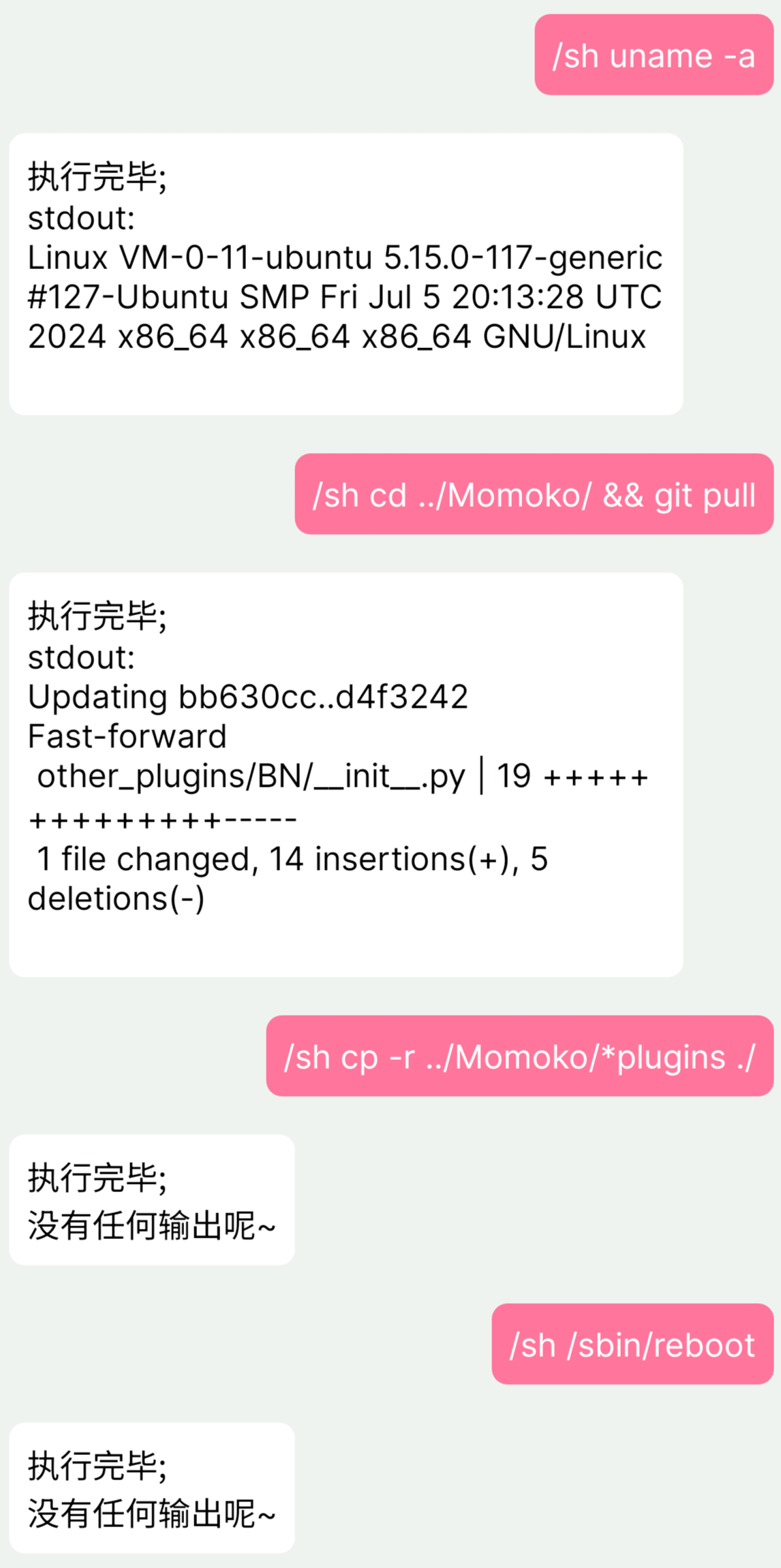
TODO
- 使用异步管道
- 命令行交互
⚠️ ATTENTION
Don't drink and root! 🍻
1 maintainer

Download files
Download the file for your platform. If you're not sure which to choose, learn more about installing packages.
Source Distribution
Built Distribution
Filter files by name, interpreter, ABI, and platform.
If you're not sure about the file name format, learn more about wheel file names.
Copy a direct link to the current filters
File details
Details for the file nonebot_plugin_system_command-0.1.5.tar.gz.
File metadata
- Download URL: nonebot_plugin_system_command-0.1.5.tar.gz
- Upload date:
- Size: 4.6 kB
- Tags: Source
- Uploaded using Trusted Publishing? No
- Uploaded via:
twine/5.1.1 CPython/3.12.7
File hashes
| Algorithm | Hash digest | |
|---|---|---|
| SHA256 |
e65ed950c2679872140c1cce67584731111ed197b1ae5e88773d617affb63080
|
|
| MD5 |
2bc42c57fe740a6d9c2e58d0928d26a0
|
|
| BLAKE2b-256 |
8f1343bfaf18b9f88a59fae127dfc0fd54615e3f45e94c8d6e5cfd1130041618
|
File details
Details for the file nonebot_plugin_system_command-0.1.5-py3-none-any.whl.
File metadata
- Download URL: nonebot_plugin_system_command-0.1.5-py3-none-any.whl
- Upload date:
- Size: 5.4 kB
- Tags: Python 3
- Uploaded using Trusted Publishing? No
- Uploaded via:
twine/5.1.1 CPython/3.12.7
File hashes
| Algorithm | Hash digest | |
|---|---|---|
| SHA256 |
354b85e92e1e8eccb53c0bd32a8528063093abfca9a48c156ff4e3f005e3caa6
|
|
| MD5 |
b1fa30db7e8ee45dc3e19111594c0452
|
|
| BLAKE2b-256 |
d840fe8d6ee3b4177a62ea4c77cd19b65fd44fcfabe3eeb517d90ca2288cb59c
|














