


📖 介绍
使发送的文本变得瑟瑟()
💿 安装
使用 nb-cli 安装
在 nonebot2 项目的根目录下打开命令行, 输入以下指令即可安装nb plugin install nonebot-plugin-yinyu
使用包管理器安装
在 nonebot2 项目的插件目录下, 打开命令行, 根据你使用的包管理器, 输入相应的安装命令pip
pip install nonebot-plugin-yinyu
⚙️ 配置
在 nonebot2 项目的.env文件中添加下表中的必填配置
| 配置项 | 必填 | 默认值 | 说明 |
|---|---|---|---|
| 配置项 | 否 | 无 | 无 |
🎉 使用
指令表
| 指令 | 权限 | 需要@ | 范围 | 说明 |
|---|---|---|---|---|
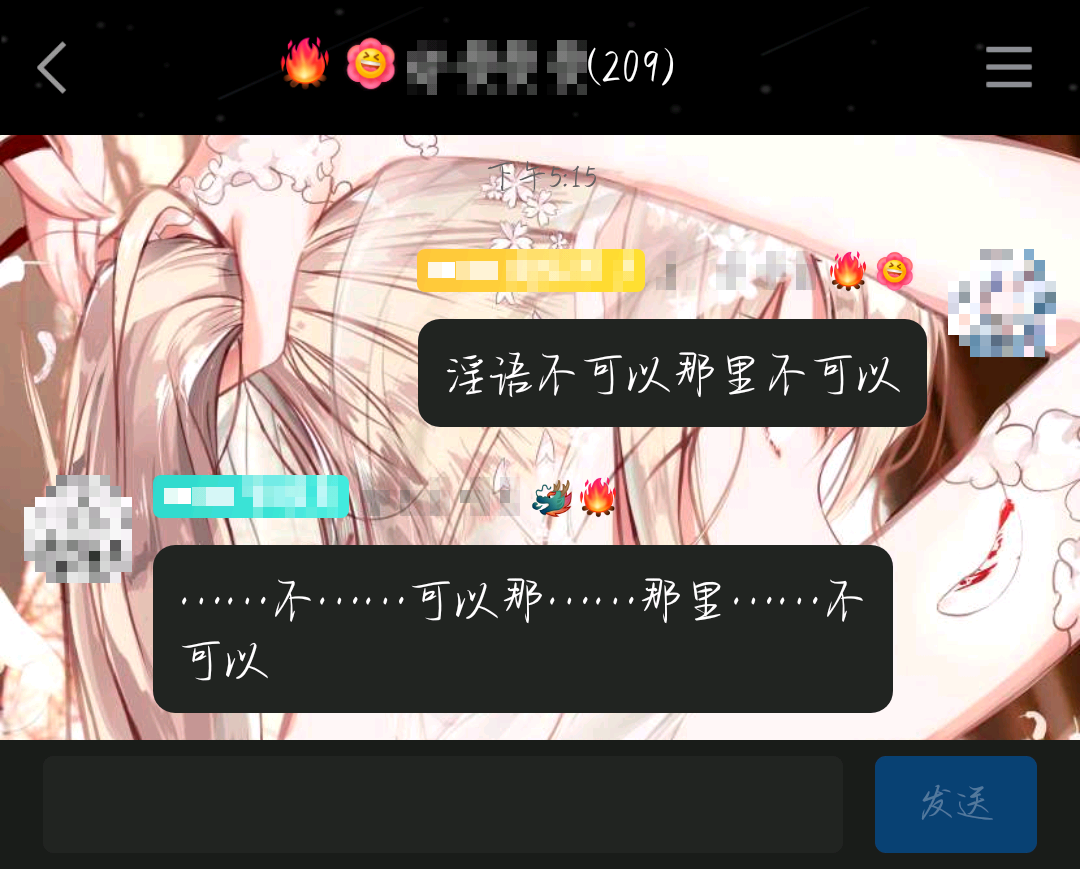
| 淫语 | 主人/群员 | 否 | 群聊 | 无 |
效果图
1 maintainer

Release files for nonebot-plugin-yinyu 0.0.6
For a detailed explanation of source distributions (sdists) and built distributions (wheels), please see the package formats documentation.
Source distribution (sdist)
| File | Size | Uploaded | |
|---|---|---|---|
| nonebot_plugin_yinyu-0.0.6.tar.gz | 2.8 kB | Details |
Built distribution (wheel)
| File | Interpreter | ABI | Platform | Reset |
|---|---|---|---|---|
| nonebot_plugin_yinyu-0.0.6-py3-none-any.whl | Python 3 | none | any | Details |
Total release size: 6.1 kB
Release files / nonebot_plugin_yinyu-0.0.6.tar.gz
| Download URL | nonebot_plugin_yinyu-0.0.6.tar.gz |
|---|---|
| Size | 2.8 kB |
| Tags | Source |
|
SHA-256 checksum How to use checksums |
8122063988d1bdf5e3dd6bf53f32be8d0af91465b1a2e3ac69f1ad62c177ea9a
|
|
BLAKE2b-256 checksum How to use checksums |
86e169faec780dee49899d9a2a1e974016b7e58bdb84651a0302e40d68ab4b01
|
| Upload date | |
|
Uploaded using Trusted Publishing? What is trusted publishing? |
No |
| Uploaded via |
twine/5.0.0 CPython/3.10.8
|
Release files / nonebot_plugin_yinyu-0.0.6-py3-none-any.whl
| Download URL | nonebot_plugin_yinyu-0.0.6-py3-none-any.whl |
|---|---|
| Size | 3.3 kB |
| Tags | Python 3 |
|
SHA-256 checksum How to use checksums |
3857189c0f0f5e8ebc32e64ff563a45be93a833a0755c1a650b258b74b776be0
|
|
BLAKE2b-256 checksum How to use checksums |
f4a39b23753a9ed764db1dea6008e38e5e7fe933995fa6f0991fd338ae24af9e
|
| Upload date | |
|
Uploaded using Trusted Publishing? What is trusted publishing? |
No |
| Uploaded via |
twine/5.0.0 CPython/3.10.8
|














