
NordVPN Switcher Pro




NordVPN Switcher Pro is a powerful Python library for automating NordVPN server connections on Windows. It is designed for developers and automation engineers who need reliable, criteria-based IP rotation for tasks like web scraping, data collection, and application testing.
The library provides a simple interface to a complex process:
- It uses a stable, current NordVPN API.
- It features a one-time interactive setup to configure your rotation rules.
- Once configured, your scripts can run headlessly without any user input.
- It intelligently caches used servers to avoid reconnecting to the same IP, with a state that persists across script restarts.
The core focus is providing robust control over the NordVPN client. It does not include unrelated functionality.
Key Features
- Interactive Setup: A guided command-line interface to create your connection settings.
- Criteria-Based Rotation: Connect to servers by Country, City, Region, a custom list of countries (inclusion or exclusion), a custom list of cities, or special groups (e.g., P2P, Double VPN).
- Smart Caching: Remembers recently used servers and avoids them for a configurable duration (default: 24 hours).
- Resilient: Gracefully handles connection failures and automatically falls back to the least-recently-used server if all fresh options are exhausted.
- Headless Operation: After the initial setup, it runs without any prompts, making it perfect for automated scripts and servers.
- Modular Design: Built with a clear separation between the core logic and the Windows controller, making it possible for the community to add support for Linux or macOS in the future.
Note on Platform Support Currently, NordVPN Switcher Pro officially supports Windows only, as it relies on the NordVPN for Windows command-line interface. The project is designed to be extensible, and contributions for a
LinuxVpnControllerorMacVpnControllerare welcome!
Installation
pip install nordvpn-switcher-pro
Quick Start
The easiest way to get started is to let the interactive setup guide you. The first time you run your script, a settings file (nordvpn_settings.json) will be created based on your answers.
Here is a basic example of rotating your IP address three times:
from nordvpn_switcher_pro import VpnSwitcher
import time

# 1. Initialize the switcher.
# If "nordvpn_settings.json" doesn't exist, it will launch an
# interactive setup in your terminal to create it.
switcher = VpnSwitcher()

try:
    # 2. Start the session.
    # This prepares the switcher, disconnects from any current VPN,
    # and fetches the initial server list.
    switcher.start_session()

    for i in range(3):
        # 3. Rotate to a new server based on your settings.
        print(f"\n--- Rotation attempt {i+1} ---")
        switcher.rotate()

        # Do some work, e.g. scraping.
        print("Waiting 15 seconds before the next rotation...")
        time.sleep(15)

finally:
    # 4. Terminate the session.
    # This disconnects from the VPN and saves the updated server cache.
    print("\nTerminating session.")
    switcher.terminate()
Tip: Save your progress in a finally block
NordVPN's CLI can on rare occasions fail or raise unexpected errors. To avoid losing your work (like scraped data), always wrap your long-running logic in try/finally and save your progress in the finally block.
Connection Settings Explained
During the interactive setup, you'll be asked to define your rotation strategy. This involves two choices: what to connect to, and how servers are selected.
Connection Scope (What to connect to)
| Scope | Description |
|---|---|
| Specific Country | Rotates through servers in one or more specified countries. If multiple countries are given, it will exhaust all servers in the first country before moving to the next. |
| Specific City | Rotates through servers in one or more specified cities. If multiple cities are given, it will exhaust all servers in the first city before moving to the next. Useful for finer geographic targeting within a country. |
| Specific Region | Connects to servers within a broad geographical region, like "The Americas" or "Europe". |
| Custom Region (Include) | Rotates only through servers in a custom list of countries you select. Ideal for targeting specific markets. |
| Custom Region (Exclude) | Rotates through servers in any country except for those in a custom list you provide. |
| Custom Region (City) | Rotates only through servers in a custom list of cities you select. Use this when you need a specific set of cities rather than whole countries. |
| Worldwide | Connects to any standard NordVPN server across the globe. |
| Special Server Group | Connects to a specific group like P2P, Double VPN, or Obfuscated. Since the app chooses the server, the switcher can be configured to retry if it gets a recently used IP. |
Server Selection Strategy (How to select)
- Best available (recommended for IP rotation): Uses NordVPN's algorithm to find a server with the best combination of low latency (distance from you) and low load. This is ideal for quickly getting a new, high-performance IP.
- Randomized by load (recommended for simple Geo rotation): Fetches all available servers for your chosen scope, groups them by load (0-20%, 20-30%, 30-40%, etc.), and picks a random server from the lowest-load bucket that is still unused. This provides greater server diversity than "Best available". Note that locations with many servers will naturally appear more frequently.
- Randomized by country/city (Advanced Geo rotation): During setup, you may be offered advanced geo-rotation strategies. These ensure that each new connection is in a different country or city than the last. This strategy prioritizes geographic diversity above all else, which may result in a smaller pool of available servers. Even when falling back to the cache, the switcher will still attempt to pick a server from a different location than the last one, ensuring the rotation pattern is maintained.
Visual Setup Examples
Here are a few GIFs demonstrating how to create different rotation strategies using the interactive setup.
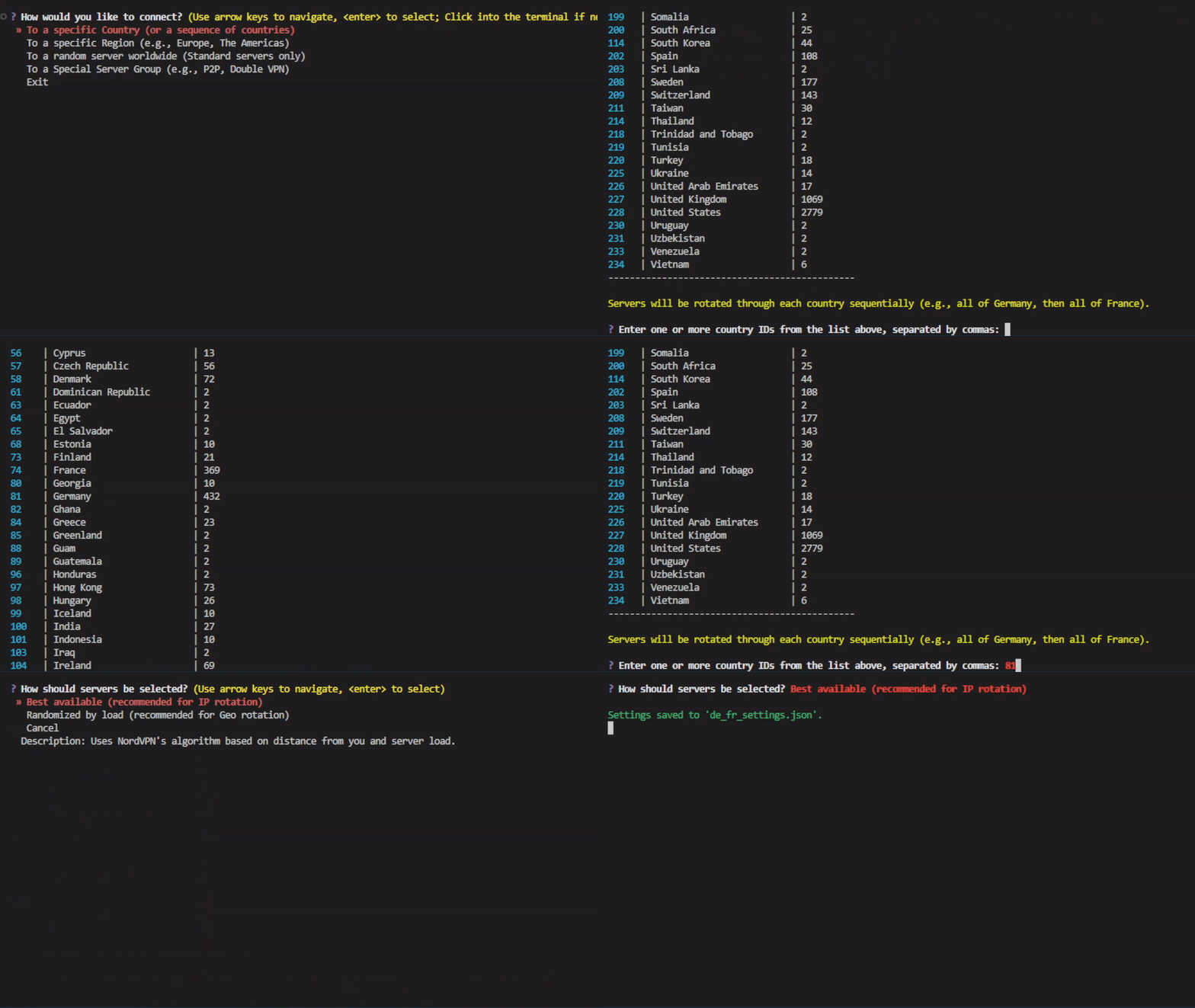
Example 1: Specific Countries (Germany & France)
Goal: Create a rotation that uses servers first from Germany, then from France, using the fastest available servers in each.
Configuration:
- Scope: Specific Country
- Countries: Germany, France
- Strategy: Best available
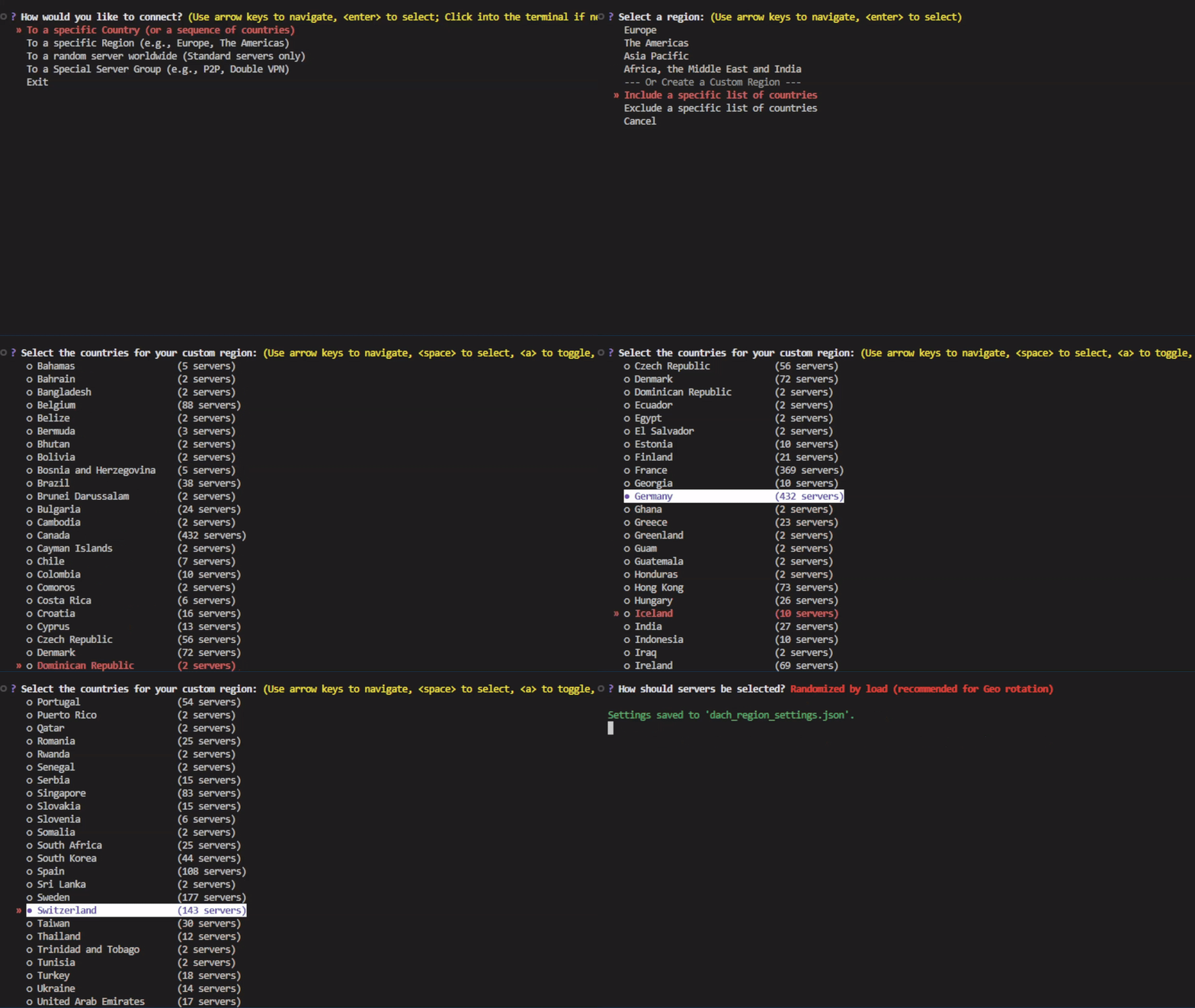
Example 2: Custom Region (DACH - Germany, Austria, Switzerland)
Goal: Create a rotation that targets the German-speaking "DACH" region for specific geo-targeting.
Configuration:
- Scope: Custom Region (Include)
- Countries: Germany, Austria, Switzerland
- Strategy: Randomized by load (for greater server diversity within the region)
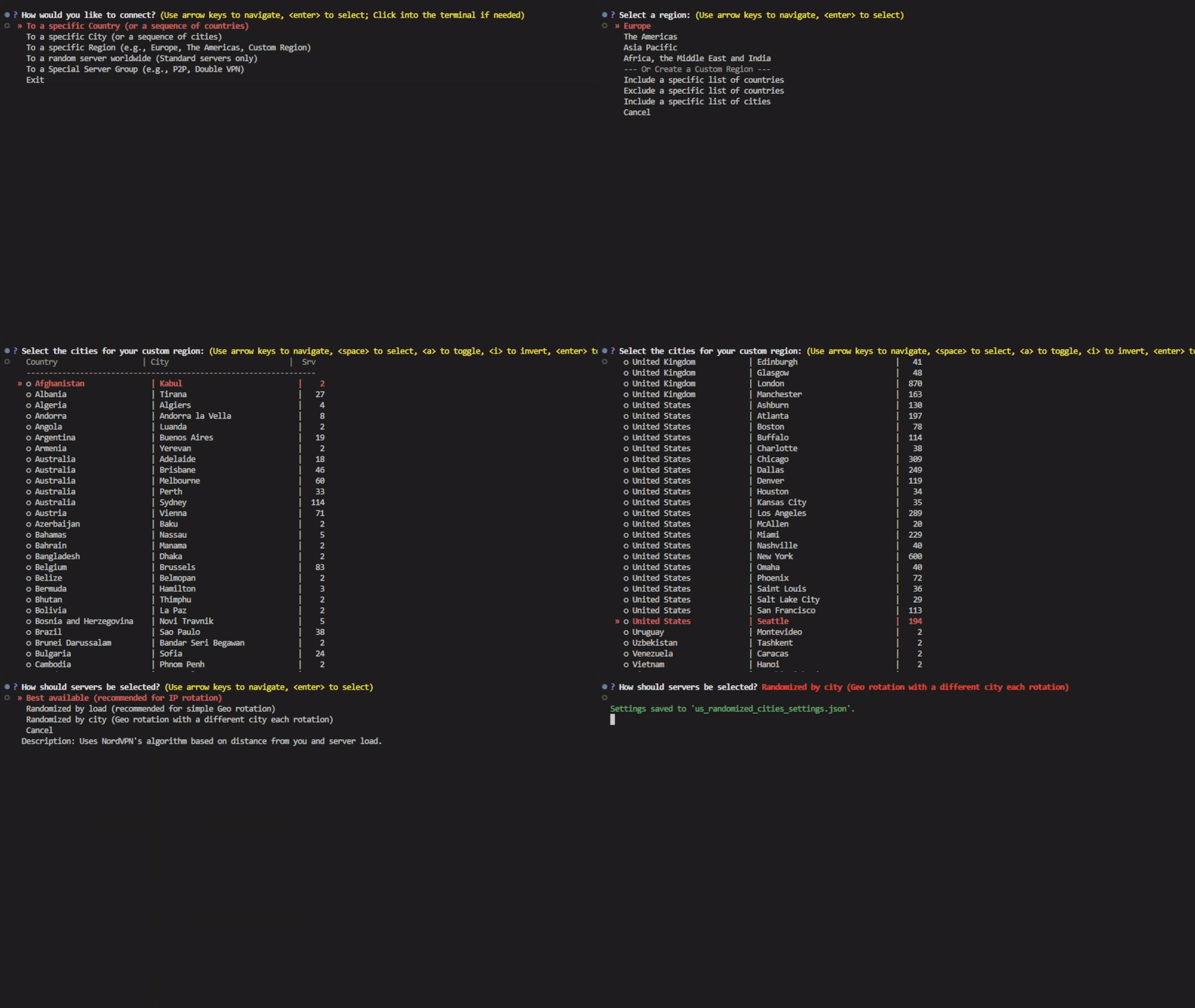
Example 3: Custom City Region (US Tech Hubs)
Goal: Rotate through servers in specific US cities, ensuring each rotation is in a different city.
Configuration:
- Scope: Custom Region (City)
- Cities: Seattle, San Francisco, New York
- Strategy: Randomized by city
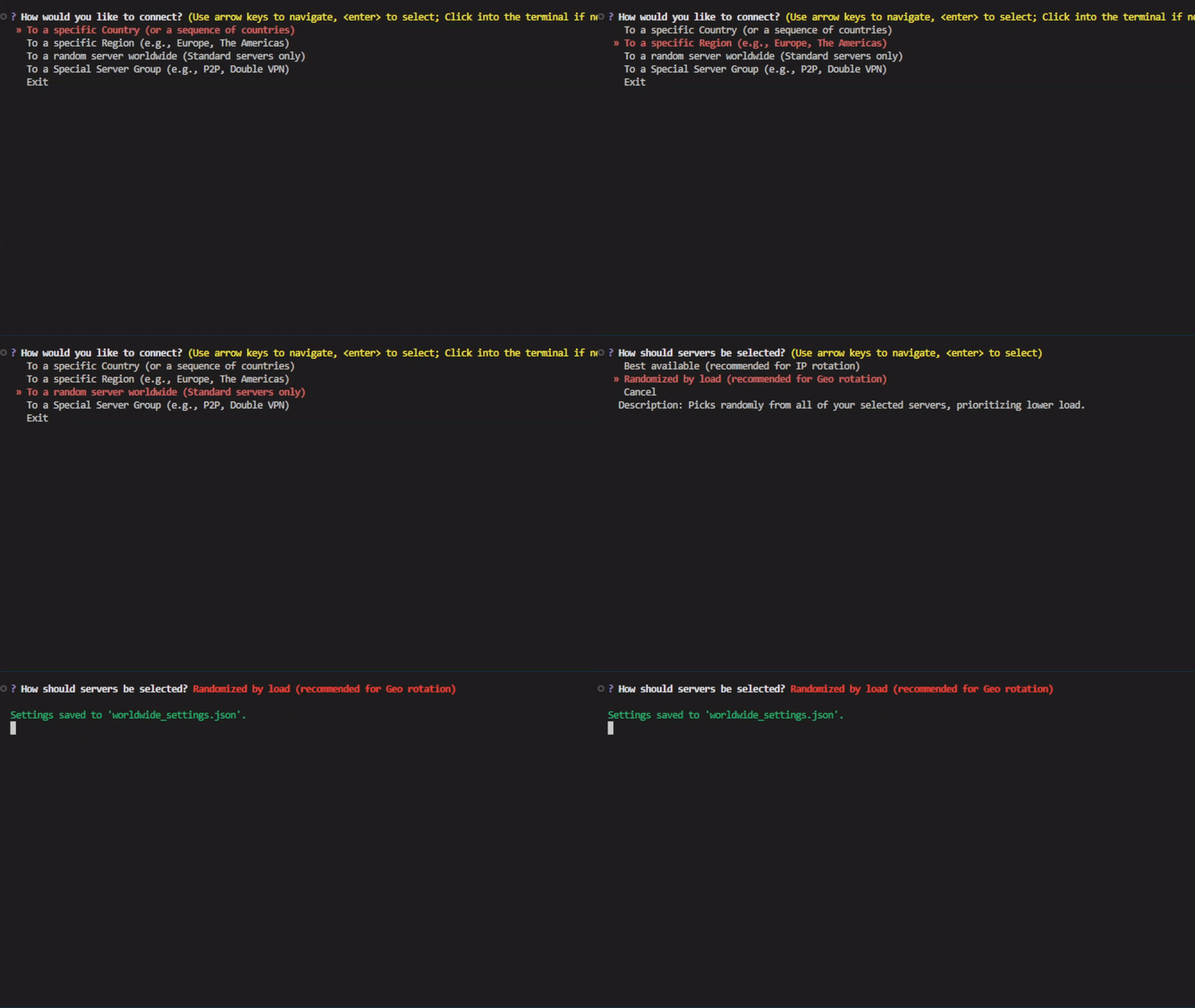
Example 4: Worldwide Random
Goal: Get a random IP address from any standard server in the world.
Configuration:
- Scope: Worldwide
- Strategy: Randomized by load
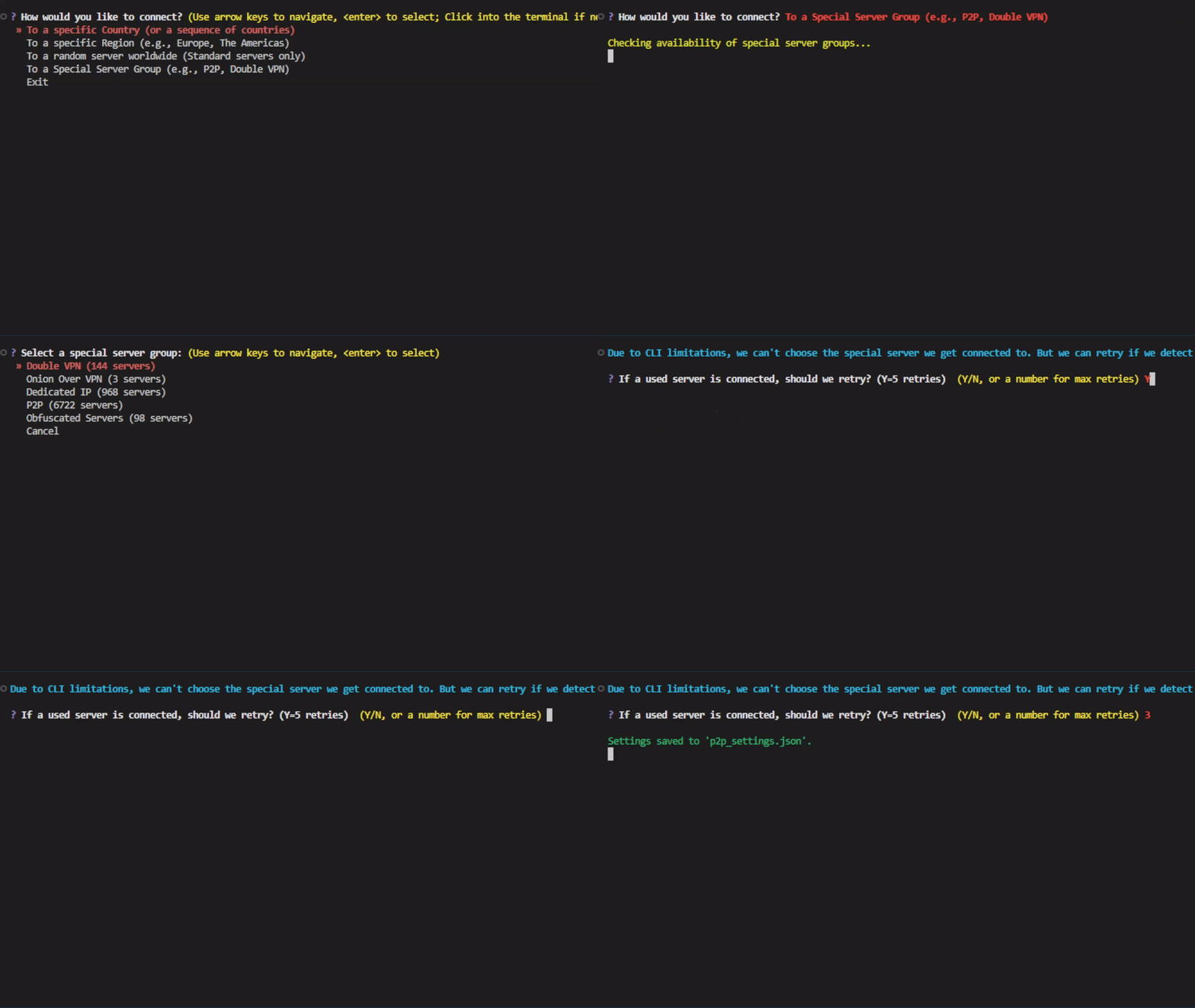
Example 5: Special P2P Group
Goal: Connect to NordVPN's optimized P2P server group.
Configuration:
- Scope: Special Server Group
- Group: P2P
Advanced Usage
Tip: Custom NordVPN Executable Path
If NordVPN is installed in a non-standard location, you can specify the path to the executable using the custom_exe_path argument:
switcher = VpnSwitcher(custom_exe_path="C:/Path/To/NordVPN.exe")
This is optional and only needed if auto-detection fails. The path will be saved to your nordvpn_settings.json file.
Tip: Customizing the Server Cache Duration
You can control how long a server is considered "recently used" with the cache_expiry_hours argument. The default is 24 hours.
# Servers will be available for reconnection after only 1 hour.
switcher = VpnSwitcher(cache_expiry_hours=1)

# Servers will be avoided for an entire week.
switcher = VpnSwitcher(cache_expiry_hours=168)
A shorter duration is useful for tasks that can tolerate reusing IPs, especially with a limited server pool. A longer duration is better if a service restricts access from the same IP over an extended period.
Tip: Forcing the Interactive Setup
To re-run the interactive setup and overwrite your existing nordvpn_settings.json, use the force_setup=True argument:
# This will ignore any existing settings file and launch the setup.
switcher = VpnSwitcher(force_setup=True)
Tip: Starting with a Fresh Server Cache
If you want to ignore the cache of previously used servers and start a session as if it were the first time, you can initialize the switcher with clear_server_cache=True:
# Clears the server cache from "nordvpn_settings.json" on startup
switcher = VpnSwitcher(clear_server_cache=True)
This is useful for testing or if you've exhausted all servers and want to start over.
Tip: Closing the NordVPN Application
By default, terminate() disconnects from the VPN but leaves the NordVPN application running. To close the app completely, use close_app=True:
switcher.terminate(close_app=True)
This is useful for freeing up system resources on automated servers, or simply for the convenience of not having to close the app manually.
Multiple Rotation Strategies
You can maintain multiple, independent rotation strategies by creating different VpnSwitcher instances, each with its own settings file. This is useful for complex workflows that require different geographic targets.
In this example, we'll simulate downloading region-locked videos from the US and Japan.
from nordvpn_switcher_pro import VpnSwitcher
import time

# A dummy function to represent our download logic
def download_video(video):
    print(f"-> Downloading '{video['title']}'...")
    time.sleep(5)

# 1. Define the content to download, each with a region attribute.
videos_to_download = [
    {'title': 'American Psycho (Unrated Cut)', 'region': 'us'},
    {'title': 'Neon Genesis Evangelion (Remastered)', 'region': 'jp'},
    {'title': 'The Matrix (Original 1999 Release)', 'region': 'us'},
]

# 2. Initialize a VPN switcher for each region
# This will create "us_settings.json" and "jp_settings.json" via interactive setup
us_switcher = VpnSwitcher(settings_path="us_settings.json")
jp_switcher = VpnSwitcher(settings_path="jp_settings.json")

# 3. Start sessions for both
us_switcher.start_session()
jp_switcher.start_session()

# 4. Process the videos, switching IPs as needed
for video in videos_to_download:
    region = video['region']

    try:
        if region == 'us':
            us_switcher.rotate()
            download_video(video)
        elif region == 'jp':
            jp_switcher.rotate()
            download_video(video)

    except Exception as e:
        print(f"!! Error downloading '{video['title']}': {e}")

# 5. Terminate sessions and save caches
us_switcher.terminate()
jp_switcher.terminate(close_app=True)  # Optionally close NordVPN entirely

print("\nAll tasks complete.")
Manual Rotation Control
If you have selected the Specific Country or Specific City scope, you have fine-grained control over when to switch locations.
-
rotate(next_location=True): This forces the switcher to advance to the next country or city in your configured sequence, even if you haven't used all the servers in the current location. -
rotate(prevent_auto_switch=True): This stops the switcher from automatically moving to the next location when the current one runs out of fresh servers. Instead, it will fall back to using cached (already used) servers from the current location. This gives you strict control to remain within a specific geographic boundary.
Note: These features only work if you have configured the switcher with the Specific Country or Specific City scope and provided more than one location during setup.
Example: Combining Manual Controls
Imagine your task requires you to connect to Luxembourg (which has few servers) and then to Belgium. You must complete 10 tasks in Luxembourg, even if it means reusing IPs, before moving on.
from nordvpn_switcher_pro import VpnSwitcher
import time

# Assume this switcher was configured with Luxembourg then Belgium.
switcher = VpnSwitcher(settings_path='lux_bel_settings.json')
switcher.start_session()

try:
    # --- Process Luxembourg Tasks ---
    print("--- Starting tasks in Luxembourg ---")
    for i in range(10):
        # Using prevent_auto_switch ensures we don't accidentally switch to Belgium
        # if Luxembourg's small server pool is exhausted early.
        switcher.rotate(prevent_auto_switch=True)
        print(f"Processing Luxembourg task {i+1}...")
        time.sleep(3)

    # --- Manually switch to Belgium for the next set of tasks ---
    print("\nFinished Luxembourg tasks. Forcing switch to next country...")
    switcher.rotate(next_location=True)

    # --- Process Belgium Tasks ---
    print("\n--- Starting tasks in Belgium ---")
    for i in range(5):
        if i > 0:
            # No special parameters needed here, normal rotation within Belgium.
            switcher.rotate()
        print(f"Processing Belgium task {i+1}...")
        time.sleep(3)

finally:
    switcher.terminate()
How It Works
The library is composed of a few key components:
VpnSwitcher: The main class that orchestrates the entire process.WindowsVpnController: A dedicated module that interacts with theNordVPN.execommand-line interface.NordVpnApiClient: A client that communicates with the public NordVPN API to fetch server lists and data.RotationSettings: A data class for saving and loading your configuration and server cache.
Disclaimer
This project is an unofficial tool and is not affiliated with, endorsed by, or sponsored by NordVPN or Tefincom S.A. It is a personal project intended for educational and research purposes. Use it at your own risk.
License
This project is licensed under the MIT License - see the LICENSE file for details.
1 maintainer

Metadata
1 maintainer
Release files for nordvpn-switcher-pro 2.0.1
For a detailed explanation of source distributions (sdists) and built distributions (wheels), please see the package formats documentation.
Source distribution (sdist)
| File | Size | Uploaded | |
|---|---|---|---|
| nordvpn_switcher_pro-2.0.1.tar.gz | 42.6 kB | Details |
Built distribution (wheel)
| File | Interpreter | ABI | Platform | Reset |
|---|---|---|---|---|
| nordvpn_switcher_pro-2.0.1-py3-none-any.whl | Python 3 | none | any | Details |
Total release size: 82.1 kB
Release files / nordvpn_switcher_pro-2.0.1.tar.gz
| Download URL | nordvpn_switcher_pro-2.0.1.tar.gz |
|---|---|
| Size | 42.6 kB |
| Tags | Source |
|
SHA-256 checksum How to use checksums |
277e207597256b71815ca0b9f4bc88d870140a807e5b824a0441695a524b9a1e
|
|
BLAKE2b-256 checksum How to use checksums |
dbd87cfd62b70715d01d9dababfa9c966984d8b902b40577127b4a40e35eeea9
|
| Upload date | |
|
Uploaded using Trusted Publishing? What is trusted publishing? |
No |
| Uploaded via |
twine/6.1.0 CPython/3.12.10
|
Release files / nordvpn_switcher_pro-2.0.1-py3-none-any.whl
| Download URL | nordvpn_switcher_pro-2.0.1-py3-none-any.whl |
|---|---|
| Size | 39.5 kB |
| Tags | Python 3 |
|
SHA-256 checksum How to use checksums |
129bfe07daf3d651cf3c1b1d5524df4c40afc2283abd414b974cde11974eaf15
|
|
BLAKE2b-256 checksum How to use checksums |
1308e9615561ccaecb1492b99d79ba642b6aff2226787c22b08891dd717b6451
|
| Upload date | |
|
Uploaded using Trusted Publishing? What is trusted publishing? |
No |
| Uploaded via |
twine/6.1.0 CPython/3.12.10
|














