
🛑 This project is archived 🛑
As of March 1, 2024, the NordVPN API endpoints utilized in this project have been discontinued, rendering this project non-functional. This decision was made by NordVPN as part of its ongoing efforts to enhance infrastructure and improve security measures. Show more...
NordVPN Tray
A cross-platform system tray application for interacting with Nord VPN.





Description
The official NordVPN clients for both Windows and Linux have well-known limitations. For instance, in Windows, to list
all servers of a specific country, you must use a search pattern like country_name #, while in Linux, it is not
possible at all. Furthermore, regardless of the platform, these clients do not provide essential information such as the
server's load and external IP, even if the user has the corresponding identification code.
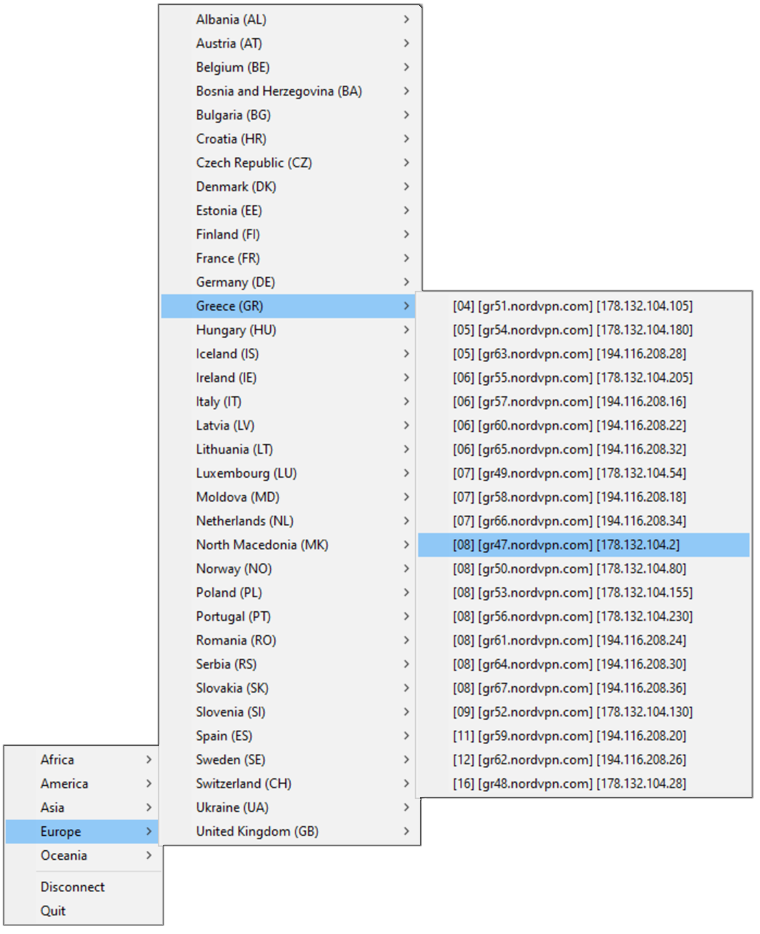
To overcome these limitations, the current project expands the functionality of the official clients by introducing a solution in the form of a cross-platform system tray application. By placing an icon in the system tray, users can easily access a menu displaying the complete list of available NordVPN servers. The servers are conveniently categorized by continents and countries, allowing for effortless navigation. Moreover, they are ordered by their load, enabling users to select the server with the lowest load for optimal performance.
Preview
Requirements
- The official NordVPN client (available here)
Installation
To install NordVPN Tray, run the following command:
pip install nordvpn-tray
Usage
To launch NordVPN Tray:
-
On Windows, double-click the
nordvpn-tray.exe(usually located in%LOCALAPPDATA%\Programs\Python\Python##\Scripts) or run thenordvpn-traycommand from the command prompt. -
On Linux, double-click the
nordvpn-tray(usually located in~/.local/bin) or run the./nordvpn-traycommand from the terminal.
Common Issues
"ValueError: Namespace AppIndicator3 not available" (Linux Only)
This error message indicates that the AppIndicator3 module, which the application uses to display tray icons on Linux,
is not available on your system.
To resolve this issue, you will need to install the libayatana-appindicator3-dev package, which provides the necessary
files and libraries for the AppIndicator3 module. To install the package, use the following command:
sudo apt-get install libayatana-appindicator3-dev
Disclaimer
All trademarks, logos and brand names are the property of their respective owners. All company and service names used in this repository are for identification purposes only. The use of NordVPN trademarks does not imply any endorsement, partnership, or sponsorship by Nordsec Ltd.
Contribution
Pull requests and issues are welcome.
License
This project is licensed under the GNU General Public License v3.0.
See the LICENSE file for details.
1 maintainer

Metadata
1 maintainer
Release files for nordvpn-tray 1.0.12
For a detailed explanation of source distributions (sdists) and built distributions (wheels), please see the package formats documentation.
Source distribution (sdist)
| File | Size | Uploaded | |
|---|---|---|---|
| nordvpn-tray-1.0.12.tar.gz | 54.4 kB | Details |
Built distribution (wheel)
| File | Interpreter | ABI | Platform | Reset |
|---|---|---|---|---|
| nordvpn_tray-1.0.12-py3-none-any.whl | Python 3 | none | any | Details |
Total release size: 106.0 kB
Release files / nordvpn-tray-1.0.12.tar.gz
| Download URL | nordvpn-tray-1.0.12.tar.gz |
|---|---|
| Size | 54.4 kB |
| Tags | Source |
|
SHA-256 checksum How to use checksums |
fd6f94fa82249f1d18ad686b416f800df9f2286d58ab7cdef4c4ebaa1d9f78a8
|
|
BLAKE2b-256 checksum How to use checksums |
22160fe81e276c1d0d265af786ec36ff1dd09b1c9db8b73e575aca6b63e562c5
|
| Upload date | |
|
Uploaded using Trusted Publishing? What is trusted publishing? |
No |
| Uploaded via |
twine/4.0.2 CPython/3.11.0
|
Release files / nordvpn_tray-1.0.12-py3-none-any.whl
| Download URL | nordvpn_tray-1.0.12-py3-none-any.whl |
|---|---|
| Size | 51.5 kB |
| Tags | Python 3 |
|
SHA-256 checksum How to use checksums |
7ac8a7feec8e72e57474aeee88fe3dede0b7007c0fe19485b9125ca45e51a35c
|
|
BLAKE2b-256 checksum How to use checksums |
96ca642e53fdd9b434dae595f6459eb65a407fc5cd37f3839078cdd3e63a11d5
|
| Upload date | |
|
Uploaded using Trusted Publishing? What is trusted publishing? |
No |
| Uploaded via |
twine/4.0.2 CPython/3.11.0
|














