
Nornir plugin to validate network state on a per-device basis
Verified details
These details have been verified by PyPIProject links
GitHub Statistics
Maintainers

Project description


Nornir Validate
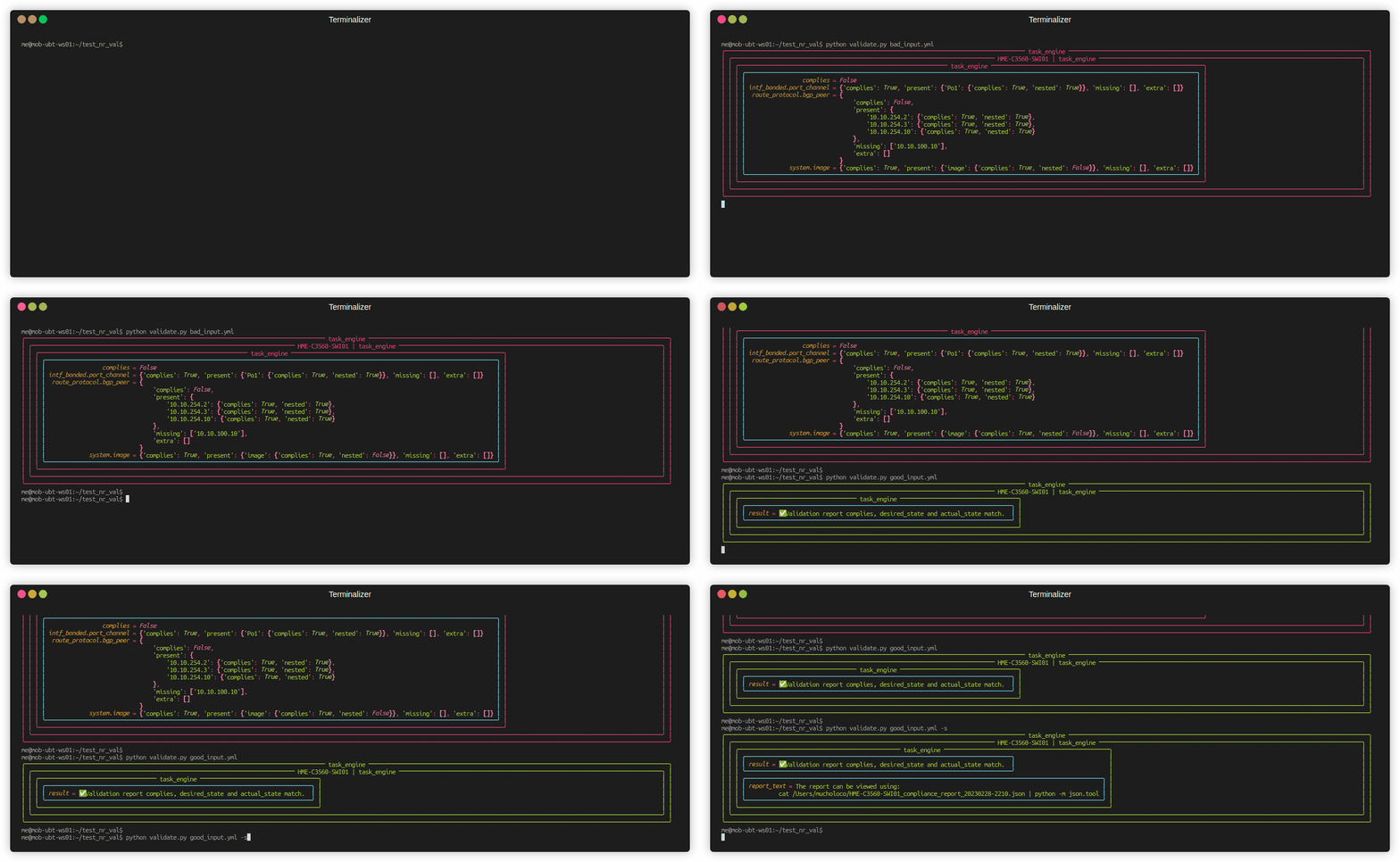
A Nornir plugin for validating network state (actual state) against YAML-based specifications (desired state). This project extends napalm-validate to perform command-based validation rather than relying solely on getters, providing greater flexibility in validating arbitrary command outputs. It leverages Nornir with nornir-netmiko to collect and format device data, then compares actual state against desired state to generate a compliance report.
For a complete list of supported validations, see the validation reference.
How It Works
- Validation File: The expected desired state specified in YAML format (can be automatically generated) is provided at runtime
- Desired State: The validation file is rendered by Jinja adding validation commands to the desired state and storing this as a Nornir host variable
- Data Collection: Nornir (netmiko plugin) executes commands against target devices parsing the outputs through
ntc-templatesto construct the actual state - Compliance Report: The desired state and actual state are fed into napalm_validate generating a compliance report of the differences
Installation
pip install nornir-validate
or
uv add nornir-validate
Usage
Below is just the bare minimum to get started, see the documentation for more detailed information.
Generating a Compliance Report
The compliance report is generated based on a YAML formatted validation file describing the desired state of the network. Comprehensive validation file examples for all supported operating systems and features can be found in the example_validation_files directory.
import yaml
from nornir import InitNornir
from nornir_validate import validate, print_val_result

nr = InitNornir(config_file="config.yml")

with open("input_val_data.yml") as tmp_data:
    input_data = yaml.load(tmp_data, Loader=yaml.Loader)

result = nr.run(task=validate, input_data=input_data)
print_val_result(result)
By default the full compliance report will be printed to the screen if the validation fails, add the save_report="" argument to also save it to file.
Auto-generation of Validation Files
Rather than defining validation files manually from scratch they can be automatically generated from a devices actual state based of an index of sub-features. If no index file is specified (omit the input_data= argument), validations will be generated for all enabled sub-features on the device.
from nornir import InitNornir
from nornir_validate import val_file_builder, print_build_result

nr = InitNornir(config_file="config.yml")

with open("CORE_index.yml") as tmp_data:
    input_idx = yaml.load(tmp_data, Loader=yaml.Loader)

result = nr.run(task=val_file_builder, input_data=input_idx)
print_build_result(result, nr)
Validations that have environment-specific elements (such as VRF route table) must be manually defined in the index file, if not it will only generate validations for the global elements (the global routing table).
Contributing
If you want to help add any validations to the project the Contribution Guidelines walk through the steps.
Project details
Verified details
These details have been verified by PyPIProject links
GitHub Statistics
Maintainers


Download files
Download the file for your platform. If you're not sure which to choose, learn more about installing packages.
Source Distribution
Built Distribution
Filter files by name, interpreter, ABI, and platform.
If you're not sure about the file name format, learn more about wheel file names.
Copy a direct link to the current filters
File details
Details for the file nornir_validate-0.2.2.tar.gz.
File metadata
- Download URL: nornir_validate-0.2.2.tar.gz
- Upload date:
- Size: 34.1 kB
- Tags: Source
- Uploaded using Trusted Publishing? Yes
- Uploaded via: twine/6.1.0 CPython/3.13.7
File hashes
| Algorithm | Hash digest | |
|---|---|---|
| SHA256 |
82314fd60587bd92cd1fd060b0c5d440025b738cbb6ce9073e6e8d66630a2e57
|
|
| MD5 |
992830f49868fb47fdcb7f5db5e73e3a
|
|
| BLAKE2b-256 |
2565f660f7f1b8e6b5ce01ea851c9adc74d98b810a162294c8a732bbb4e16292
|
Provenance
The following attestation bundles were made for nornir_validate-0.2.2.tar.gz:
Publisher:
publish.yml on sjhloco/nornir-validate
-
Statement:
-
Statement type:
https://in-toto.io/Statement/v1 -
Predicate type:
https://docs.pypi.org/attestations/publish/v1 -
Subject name:
nornir_validate-0.2.2.tar.gz -
Subject digest:
82314fd60587bd92cd1fd060b0c5d440025b738cbb6ce9073e6e8d66630a2e57 - Sigstore transparency entry: 747454623
- Sigstore integration time:
-
Permalink:
sjhloco/nornir-validate@6799393ac723b132f126fee61e3a391ab9631dcd -
Branch / Tag:
refs/tags/v0.2.2 - Owner: https://github.com/sjhloco
-
Access:
public
-
Token Issuer:
https://token.actions.githubusercontent.com -
Runner Environment:
github-hosted -
Publication workflow:
publish.yml@6799393ac723b132f126fee61e3a391ab9631dcd -
Trigger Event:
release
-
Statement type:
File details
Details for the file nornir_validate-0.2.2-py3-none-any.whl.
File metadata
- Download URL: nornir_validate-0.2.2-py3-none-any.whl
- Upload date:
- Size: 70.6 kB
- Tags: Python 3
- Uploaded using Trusted Publishing? Yes
- Uploaded via: twine/6.1.0 CPython/3.13.7
File hashes
| Algorithm | Hash digest | |
|---|---|---|
| SHA256 |
e4bc44bb9ac24ede7674497595c42dca977b1a2a3f1d340af943d99ad26f3493
|
|
| MD5 |
d514672cf078d6eb16d25d000c673bd6
|
|
| BLAKE2b-256 |
4f94669b48937f0301c750b9f8938f11cede1cd6b9a693f0258d967493adbb9b
|
Provenance
The following attestation bundles were made for nornir_validate-0.2.2-py3-none-any.whl:
Publisher:
publish.yml on sjhloco/nornir-validate
-
Statement:
-
Statement type:
https://in-toto.io/Statement/v1 -
Predicate type:
https://docs.pypi.org/attestations/publish/v1 -
Subject name:
nornir_validate-0.2.2-py3-none-any.whl -
Subject digest:
e4bc44bb9ac24ede7674497595c42dca977b1a2a3f1d340af943d99ad26f3493 - Sigstore transparency entry: 747454624
- Sigstore integration time:
-
Permalink:
sjhloco/nornir-validate@6799393ac723b132f126fee61e3a391ab9631dcd -
Branch / Tag:
refs/tags/v0.2.2 - Owner: https://github.com/sjhloco
-
Access:
public
-
Token Issuer:
https://token.actions.githubusercontent.com -
Runner Environment:
github-hosted -
Publication workflow:
publish.yml@6799393ac723b132f126fee61e3a391ab9631dcd -
Trigger Event:
release
-
Statement type:






