
nosleepy



Keep your system active with realistic typed input simulation — types random phrases into a hidden invisible window, never your active window.
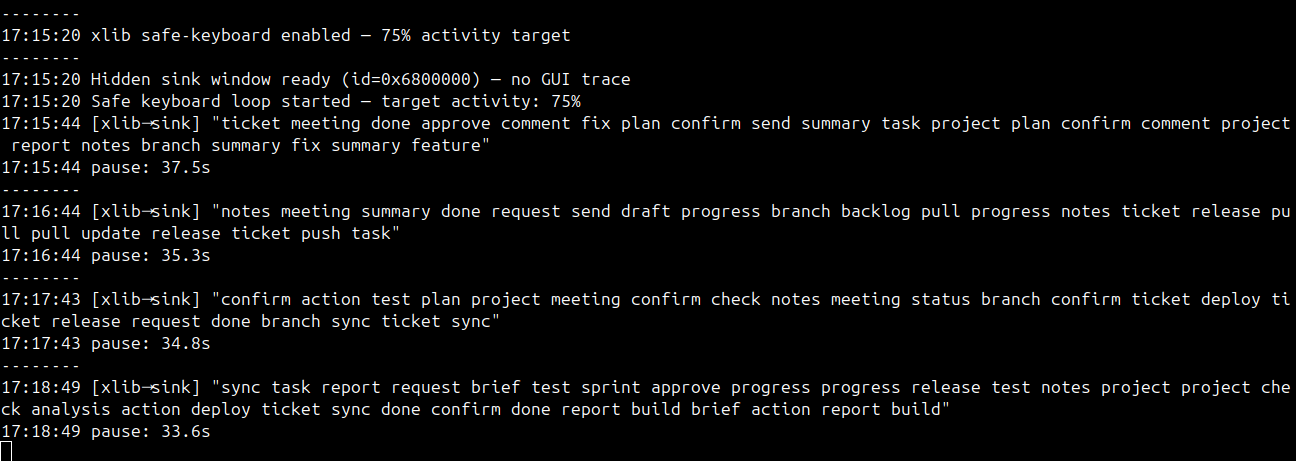
Quickstart
pip install nosleepy
nosleepy -m xlib --pause 37 --words 30
Install
pip install nosleepy

# or
pip3 install nosleepy
Via Snap
sudo snap install nosleepy
Run (recommended)
nosleepy -m xlib --pause 37 --words 30
Modes
| Mode | What it does |
|---|---|
xlib |
Types phrases into a hidden 1×1 invisible window — no GUI trace (recommended) |
xdotool |
Types phrases into a minimized sink xterm window |
mouse |
Moves mouse diagonally (default) |
keyboard |
Presses Shift key |
both |
Mouse + Shift |
scroll |
Scrolls mouse wheel |
All Options
-m MODE, --mode MODE            xlib (recommended), xdotool, mouse, keyboard, both, scroll
--pause SECONDS                 Fixed pause between typed phrases. e.g. --pause 37
--words MAX or MIN MAX          Words per phrase. e.g. --words 30 or --words 20 30. Default: 20 30
-s SECONDS, --seconds SECONDS   Idle wait seconds for mouse/keyboard modes. Default: 300
-p PIXELS, --pixels PIXELS      Pixels to move mouse. Default: 1
-c, --circular                  Move mouse in a circle
-r MIN MAX, --random MIN MAX    Random interval. e.g. -r 30 60
-a LEVEL, --activity LEVEL      Activity % for xlib/xdotool (50-95). Default: 75
--version                       Show version
-h, --help                      Show help
Examples
# Recommended
nosleepy -m xlib --pause 37 --words 30

# Shorter phrases
nosleepy -m xlib --pause 37 --words 15

# Faster cadence
nosleepy -m xlib --pause 20 --words 30

# Move mouse every 60 seconds
nosleepy -m mouse -s 60

# Run for 2 hours then stop
timeout 2h nosleepy -m xlib --pause 37 --words 30

# Stop anytime
Ctrl + C
FAQ
Does it work on Wayland?
No. Run on X11 or use XWayland.
Does it affect my active window?
No. xlib mode creates an invisible off-screen window. Keystrokes never reach your active app.
Any memory leak or leftover processes?
No. The hidden window lives only while the process runs. On exit everything is cleaned up automatically.
What is the difference between --pause and --activity?
--pause— fixed wait between phrases (recommended for human-like cadence)--activity— percentage of time spent typing (continuous rapid mode)
Run on startup
GNOME / KDE: Add to Startup Applications:
nosleepy -m xlib --pause 37 --words 30
Systemd:
[Unit]
Description=nosleepy

[Service]
ExecStart=nosleepy -m xlib --pause 37 --words 30
Restart=always

[Install]
WantedBy=default.target
systemctl --user enable --now nosleepy
Support
If nosleepy is useful to you, consider buying me a coffee!

Links
- PyPI: https://pypi.org/project/nosleepy/
- Snap:
sudo snap install nosleepy - GitHub: https://github.com/it-harsh/nosleepy
- Changelog: CHANGELOG.md
1 maintainer

Release files for nosleepy 2.0.0
For a detailed explanation of source distributions (sdists) and built distributions (wheels), please see the package formats documentation.
Source distribution (sdist)
| File | Size | Uploaded | |
|---|---|---|---|
| nosleepy-2.0.0.tar.gz | 7.7 kB | Details |
Built distribution (wheel)
| File | Interpreter | ABI | Platform | Reset |
|---|---|---|---|---|
| nosleepy-2.0.0-py3-none-any.whl | Python 3 | none | any | Details |
Total release size: 16.1 kB
Release files / nosleepy-2.0.0.tar.gz
| Download URL | nosleepy-2.0.0.tar.gz |
|---|---|
| Size | 7.7 kB |
| Tags | Source |
|
SHA-256 checksum How to use checksums |
49dbc945f8ec4eeace020c37a8d360cb14b17ce05ae1b1c288ab9bee34543217
|
|
BLAKE2b-256 checksum How to use checksums |
cc028a0479d375d3f39c5a6ff180ac6782a1d012774c4e269ff58fc7fc2c5fa2
|
| Upload date | |
|
Uploaded using Trusted Publishing? What is trusted publishing? |
No |
| Uploaded via |
twine/6.2.0 CPython/3.11.15
|
Release files / nosleepy-2.0.0-py3-none-any.whl
| Download URL | nosleepy-2.0.0-py3-none-any.whl |
|---|---|
| Size | 8.3 kB |
| Tags | Python 3 |
|
SHA-256 checksum How to use checksums |
24e7b1a99a83e6a5d58cf427aada65ce727d5b181cfb24f417077d54b750dca7
|
|
BLAKE2b-256 checksum How to use checksums |
0c41c93d3c22ce48c826eb82a72ff9d5c2b3e0e428e0e142b2eed1d59df966b9
|
| Upload date | |
|
Uploaded using Trusted Publishing? What is trusted publishing? |
No |
| Uploaded via |
twine/6.2.0 CPython/3.11.15
|













