
notebook-orchestration-and-execution-manager
Orchestrate Jupyter notebooks by passing parameters dynamically between them. This solution enables seamless execution, where the output of one notebook becomes the input for the next. Includes automated execution, parameter injection, logging, and output management for streamlined workflows.
Notebook Execution and Variable Extraction
This project provides a Python class and workflow to manage the execution of Jupyter notebooks with parameters, extract variables and their values from executed notebooks, and display the results in a structured format.
Features
- Execute Jupyter Notebooks: Run Jupyter notebooks with specified parameters using
papermill. - Dynamic Parameter Passing: Pass custom parameters to notebooks during execution.
- Variable Extraction: Extract variable data (name, operation, and value) from executed notebook cells.
- Logging: Track execution steps with detailed logs.
- Directory Management: Automatically manage output directories for processed notebooks.
Requirements
- Python 3.6+
- Libraries:
os,papermill,logging,ast,IPython
Install dependencies via pip:
pip install notebook-orchestration-and-execution-manager
Usage
1. Initialize the NotebookOrchestrationExecutionManager
Create an instance of NotebookOrchestrationExecutionManager, specifying the directory for processed notebooks.
from notebook_orchestration_execution_manager import NotebookOrchestrationExecutionManager

processor = NotebookOrchestrationExecutionManager(processed_directory="./processed_notebook")
1.1 Parameters Definition
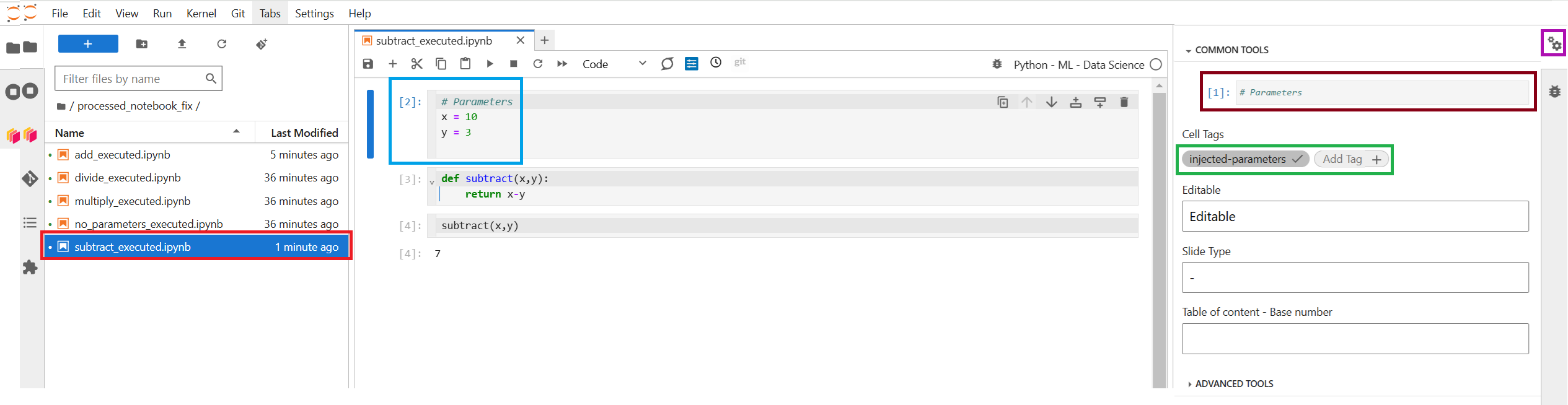
How to Configure a Cell in JupyterLab to Receive Parameters
-
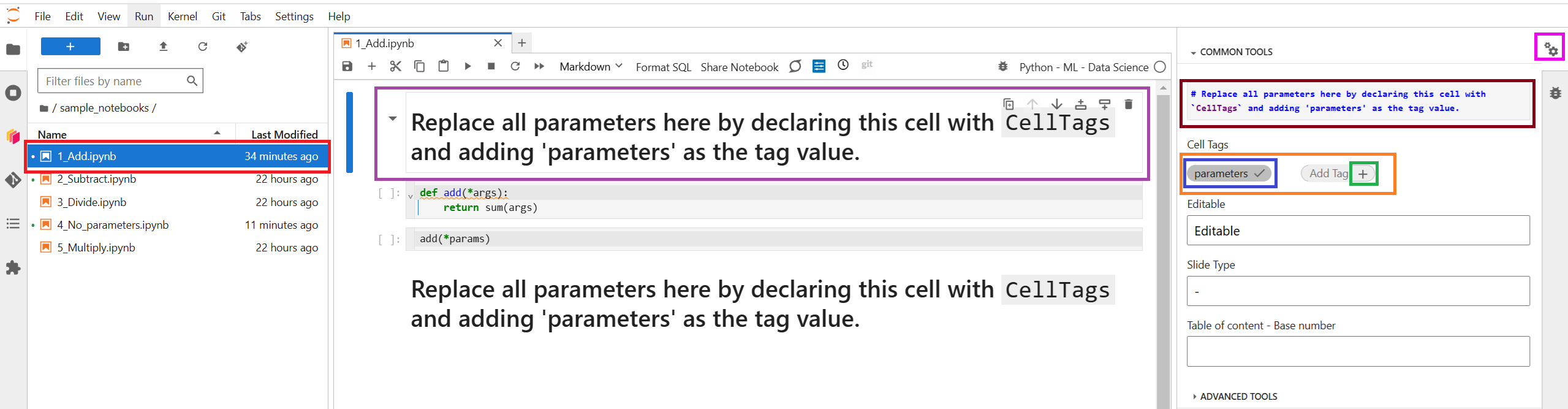
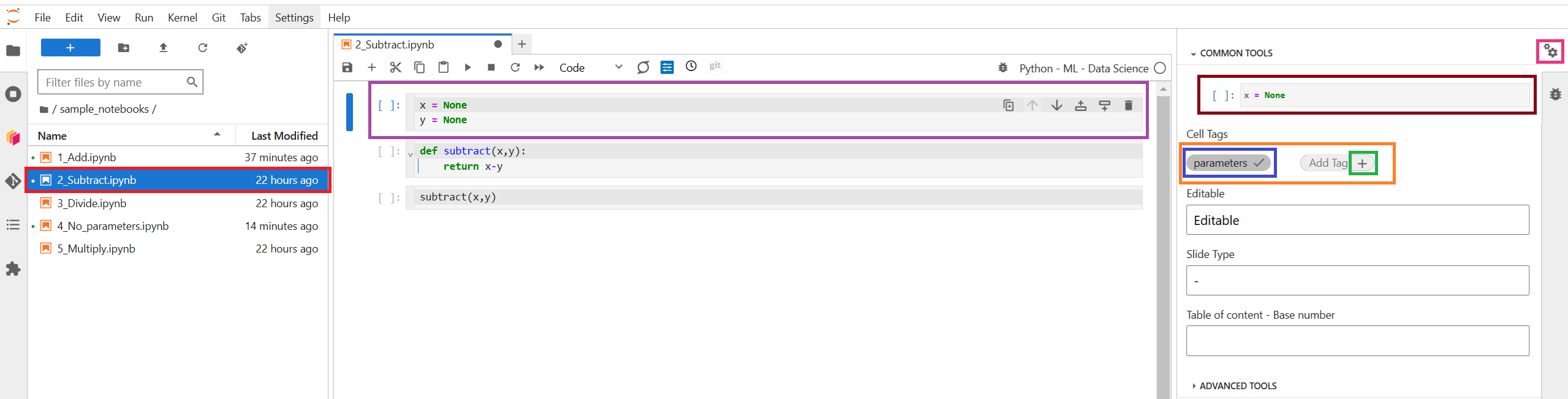
Select the cell you want to configure to receive parameters.
-
Click on the gear icon located on the right panel in JupyterLab. This will open the cell metadata editor.
-
Add a new tag:
- In the metadata editor, locate or create a field named
tags. - Add a new tag called
parameters.
- In the metadata editor, locate or create a field named
-
Save the changes and ensure the
parameterstag has been added correctly.
The recommended practice is to define parameters in the first cell of the notebook. This ensures a clear structure, makes them easy to locate, and provides a centralized configuration that can be used throughout the notebook's execution.
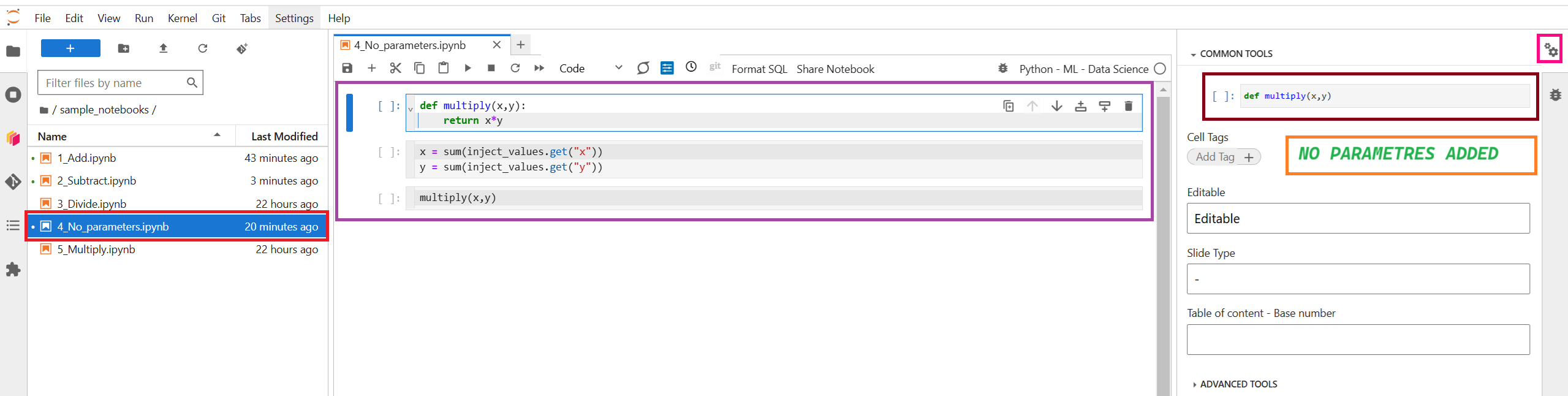
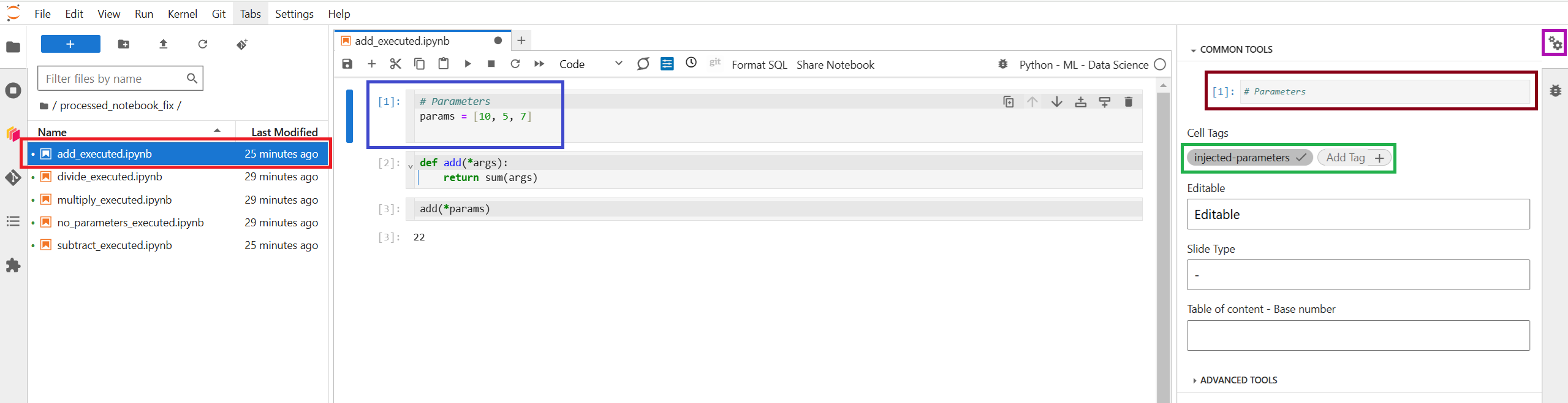
Parameters can be defined in a Markdown, Raw, or Code cell, or even without explicitly defining a cell for this purpose. Parameter injection will automatically take place above the first code cell in the notebook. This provides greater flexibility when working with parameterization tools like Papermill or automating notebook execution in configurable environments.
In Mardown Cell
In Code Cell
No Definition Cell
1.2 Parameters Injection

2. Define Notebooks and Parameters
Provide a list of notebooks with input paths, output paths, and parameter dictionaries.
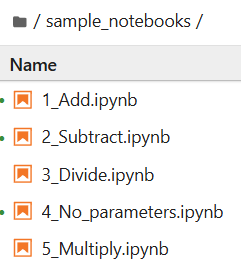
original_notebooks_path = './sample_notebooks'
processed_notebook_file_path = './processed_notebook'

notebooks_with_parameters = [
    (f"{original_notebooks_path}/1_Add.ipynb", f"{processed_notebook_file_path}/add_executed.ipynb", {"params": [10, 5, 7]}),
    (f"{original_notebooks_path}/2_Subtract.ipynb", f"{processed_notebook_file_path}/subtract_executed.ipynb", {"x": 10, "y": 3}),
    (f"{original_notebooks_path}/3_Divide.ipynb", f"{processed_notebook_file_path}/divide_executed.ipynb", {"x": 20, "y": 0}),
    (f"{original_notebooks_path}/4_No_parameters.ipynb", f"{processed_notebook_file_path}/no_parameters_executed.ipynb", {"inject_values": {"x": [2, 3], "y": [4, 5]}}),
    (f"{original_notebooks_path}/5_Multiply.ipynb", f"{processed_notebook_file_path}/multiply_executed.ipynb", {"inject_values": {"x": [2, 3], "y": [4, 5]}}),
]
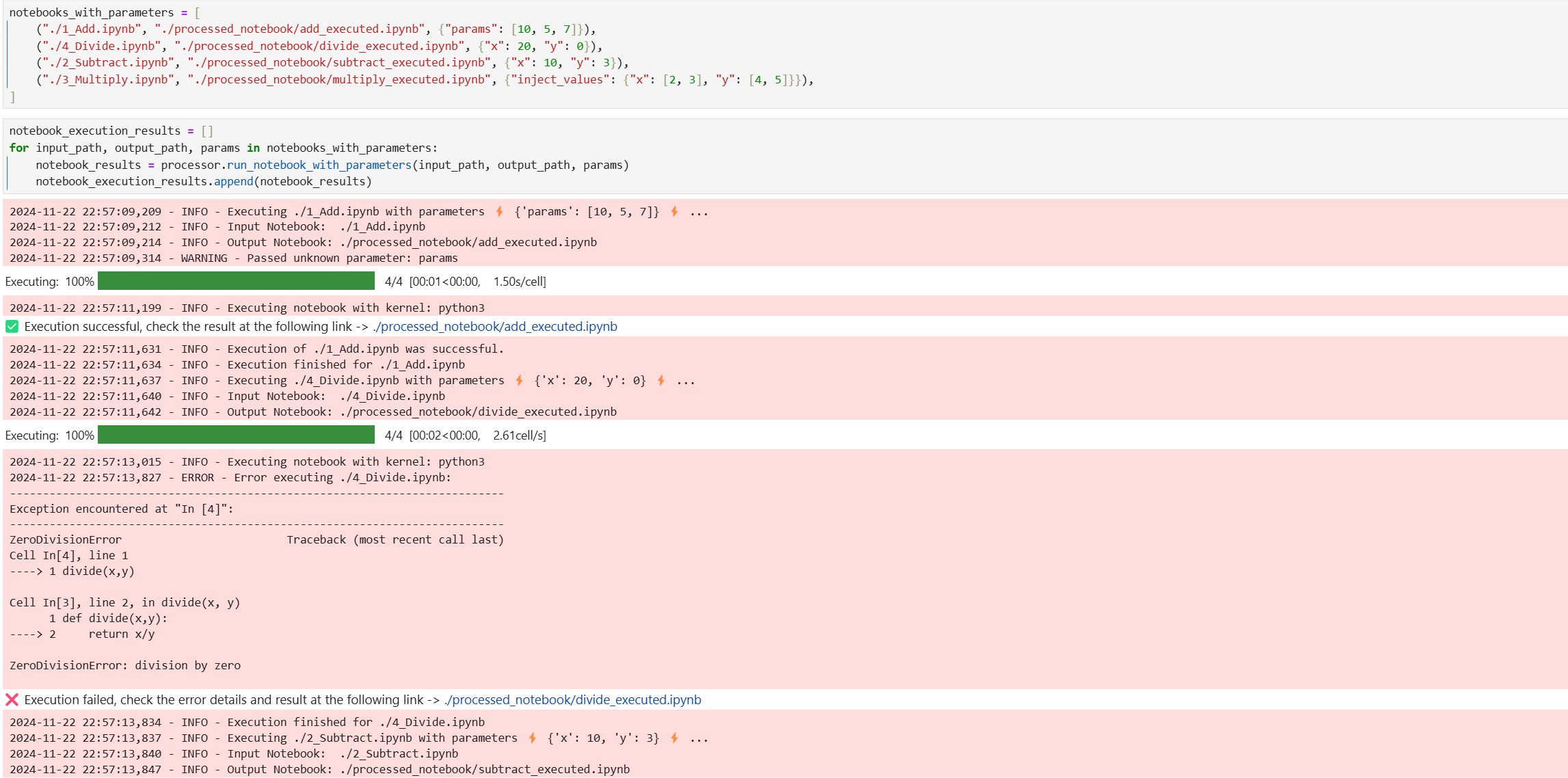
3. Execute Notebooks
Run each notebook with parameters and save the results.
notebook_execution_results = []
for input_path, output_path, params in notebooks_with_parameters:
    notebook_results = processor.run_notebook_with_parameters(input_path, output_path, params)
    notebook_execution_results.append(notebook_results)
4. Extract Variables from Notebooks
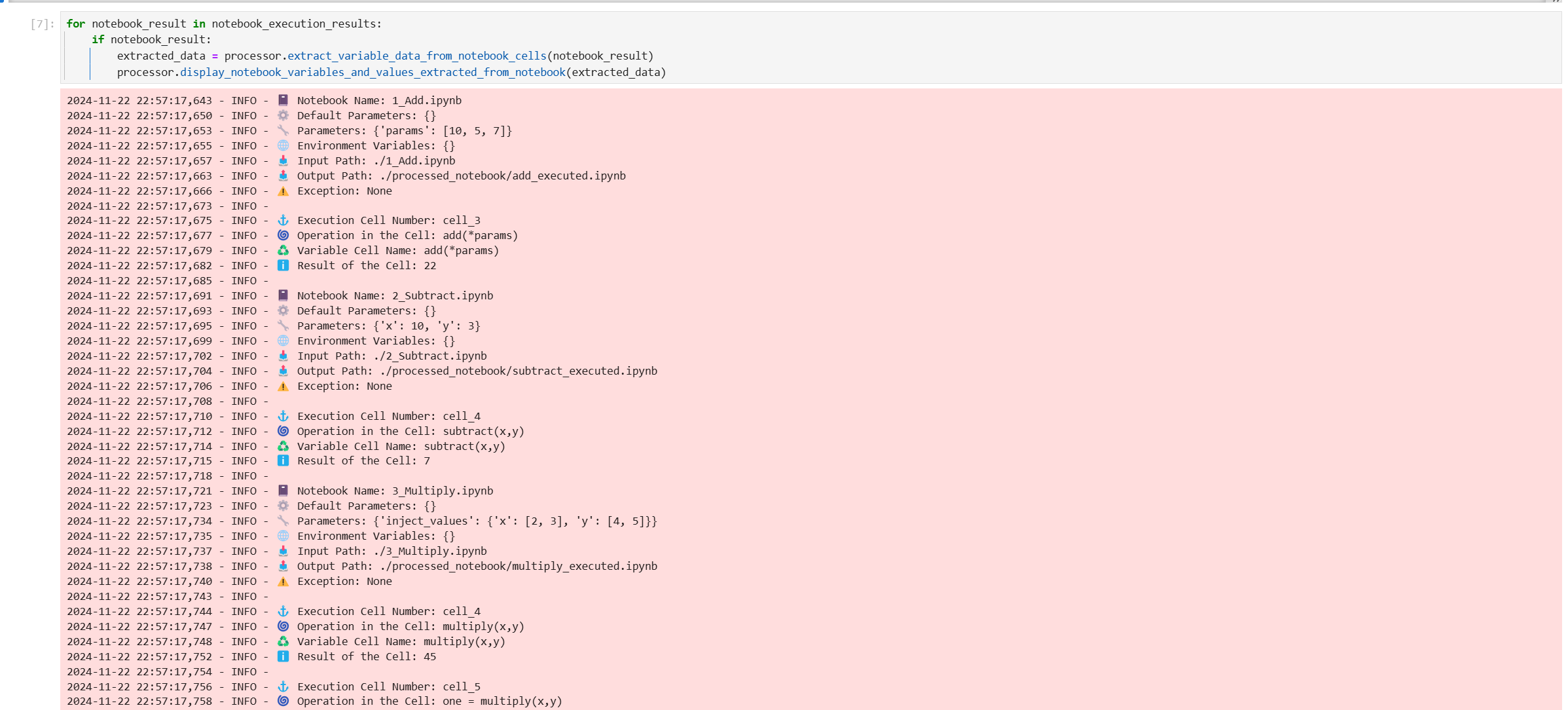
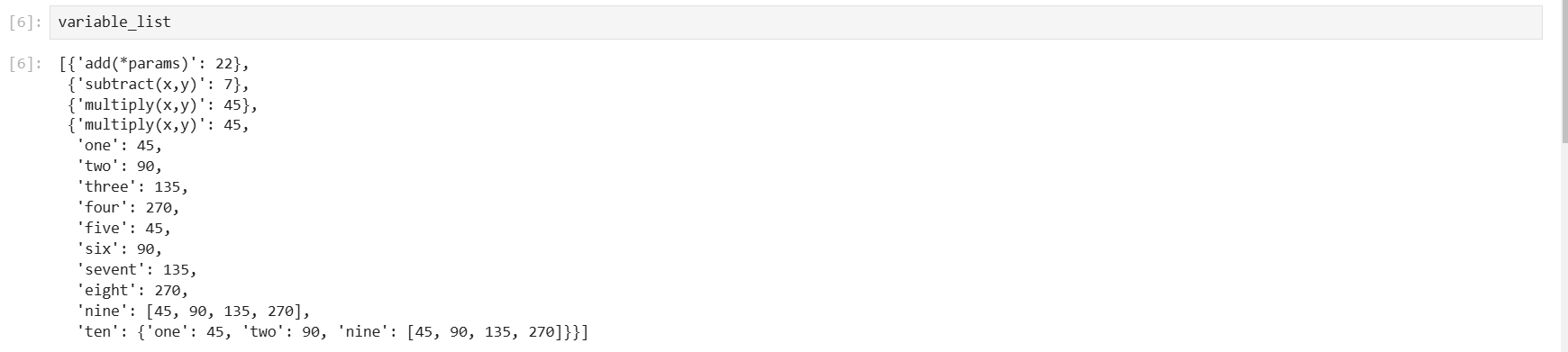
Extract variable data and display it in a structured format.
variable_list = []
for notebook_result in notebook_execution_results:
    if notebook_result:
        extracted_data = processor.extract_variable_data_from_notebook_cells(notebook_result)
        variable_list.append(processor.display_notebook_variables_and_values_extracted_from_notebook(extracted_data))
5. Retrieve the Variable Values from Every Notebook
variable_list
Code Breakdown
1. NotebookOrchestrationExecutionManager Class
Handles the execution of notebooks, directory creation, and variable extraction.
Methods
create_directory_if_not_exists(directory: str): Ensures the specified directory exists.run_notebook_with_parameters(notebook_input_path: str, notebook_output_path: str, params: dict): Executes a Jupyter notebook with parameters.extract_variable_data_from_notebook_cells(notebook_data: dict): Extracts variable data from notebook cells.display_notebook_variables_and_values_extracted_from_notebook(extracted_variables_data_from_notebook: dict): Displays extracted variable data in logs.
Example Workflow
Input Notebook
- File:
1_Add.ipynb - Parameters:
{"params": [10, 5, 7]}
Output
- File:
./processed_notebook/add_executed.ipynb - Logs: Execution details and extracted variables.
Logging
Logs include:
- Notebook execution status.
- Variable extraction details.
- Metadata from executed notebooks.
License
This project is licensed under the MIT License.
1 maintainer

Release files for notebook-orchestration-and-execution-manager 0.2.27.13.13
For a detailed explanation of source distributions (sdists) and built distributions (wheels), please see the package formats documentation.
Source distribution (sdist)
| File | Size | Uploaded | |
|---|---|---|---|
| notebook-orchestration-and-execution-manager-0.2.27.13.13.tar.gz | 7.8 kB | Details |
Built distribution (wheel)
| File | Interpreter | ABI | Platform | Reset |
|---|---|---|---|---|
| notebook_orchestration_and_execution_manager-0.2.27.13.13-py3-none-any.whl | Python 3 | none | any | Details |
Total release size: 16.3 kB
Release files / notebook-orchestration-and-execution-manager-0.2.27.13.13.tar.gz
| Download URL | notebook-orchestration-and-execution-manager-0.2.27.13.13.tar.gz |
|---|---|
| Size | 7.8 kB |
| Tags | Source |
|
SHA-256 checksum How to use checksums |
c1b3715e80c52ddf73c1e3da2d47e48ce426db4374fd239b1153b70ae23aad63
|
|
BLAKE2b-256 checksum How to use checksums |
48e2f789d31d7a6245b0142470a25a525faecdf0e8ff8d876b427f8bc2bb86b4
|
| Upload date | |
|
Uploaded using Trusted Publishing? What is trusted publishing? |
No |
| Uploaded via |
twine/5.1.1 CPython/3.9.20
|
Release files / notebook_orchestration_and_execution_manager-0.2.27.13.13-py3-none-any.whl
| Download URL | notebook_orchestration_and_execution_manager-0.2.27.13.13-py3-none-any.whl |
|---|---|
| Size | 8.5 kB |
| Tags | Python 3 |
|
SHA-256 checksum How to use checksums |
3b46b94b0769e83b9e5275327af7dc18e4fb29da674a9351cd7a39e38e81fead
|
|
BLAKE2b-256 checksum How to use checksums |
cf4353f94ec30eb1dab2401a78a0c27f77cbb81e1bbdb00aac083d79711a9812
|
| Upload date | |
|
Uploaded using Trusted Publishing? What is trusted publishing? |
No |
| Uploaded via |
twine/5.1.1 CPython/3.9.20
|














