
notelight





Private semantic search over your own files, for you and your AI agents. A Rust retrieval engine with a Python interface, a CLI, and an MCP server, with retrieval quality you can measure. How it works walks through the design end to end in a few minutes.
Status: 0.1.0, alpha. You can index a folder of notes, search it from the command line or from Claude, Cursor and other AI agents over MCP or in your browser, include PDF and DOCX files, and measure retrieval quality on public benchmarks (results). See the roadmap and the changelog.
Why
Tools that let you "chat with your files" usually need a server, an account, or an upload. notelight keeps everything on your machine:
- Hybrid retrieval. BM25 plus quantized embeddings, fused with Reciprocal
Rank Fusion, so both exact names and paraphrased questions work. Quote a
phrase (
"lock file") to put exact matches first. - Agent-ready. An MCP server lets Claude, Copilot or Cursor search your notes
and cite
path:line. - Measured.
notelight evalreports recall@10 and nDCG@10 on BEIR datasets for every quantization setting, not just anecdotes. - Private. No telemetry, and no network after a one-time model download.
Usage
Install it from PyPI (Python 3.10+), ideally into a virtual environment or
with pipx install notelight:
pip install notelight
There are prebuilt wheels for Linux (x86_64 and aarch64, glibc 2.28+),
Windows (x64) and macOS (Apple silicon and Intel), so you do not need Rust.
Two limits come from ONNX Runtime, which runs the embedding model: on Intel
Macs use Python 3.10 to 3.13, and Alpine and other musl-based Linux
distributions are not supported. On any other platform pip builds from the
source distribution, which needs Rust 1.88+ (and the
MSVC C++ build tools on Windows). To install
the latest unreleased code, use
pip install git+https://github.com/searope/notelight (also needs Rust), or
see Development.
Index a folder of Markdown and text files, then search it. This is a real
run over this repository's docs/ folder on a laptop CPU:
$ notelight index docs
Downloading onnx/model.onnx (133 MB, one time)...
Embedding 62 new chunks...
D:\Projects\notelight\docs: 5 files (5 added, 0 changed, 0 removed), 62 chunks, 62 embedded, generation 1, 4.9s

$ notelight search "what happens when two processes index at once" -k 2
 1. design-notes.md:153-161  Design notes > Milestone 2 decisions > One writer, enforced with a lock file
    ### One writer, enforced with a lock file The core assumes a single writer: `commit` sweeps up leftovers from earlier failed commits, which would be…
 2. learning/m1-rust-walkthrough.md:82-88  Milestone 1: Rust walkthrough > 5. Validate once, then index freely (`Bm25::validate`)
    ## 5. Validate once, then index freely (`Bm25::validate`) `from_bytes` checks every offset table, every term and every posting…
Run notelight index again after editing your notes. Only new or changed
chunks are embedded. On an unchanged folder the model is never loaded, so the
re-run takes about as long as starting the CLI (0.5 s for the folder above).
| Command | What it does |
|---|---|
notelight index <folder> |
create or update the index for a folder |
notelight search "<query>" [-k 10] [--json] [-f <folder>] |
hybrid search; quote exact phrases: '"lock file" windows'; on a terminal the matched words are highlighted and each snippet starts near the first match (NO_COLOR turns colour off); --json returns path, line range, heading path and text for scripts and agents |
notelight status [<folder>] [--json] |
list indexed folders, sizes, embedders and generations |
notelight mcp [-f <folder>]... |
run the MCP server over stdio for AI agents (below) |
notelight serve [-f <folder>]... [--port 8765] [--open] |
search in your browser on localhost; needs pip install "notelight[web]" (below) |
notelight eval [<dataset or folder>...] [--json] |
recall@10 and nDCG@10 of every retrieval method on BEIR datasets (below) |
notelight version |
versions and the data directory |
Options:
--embedder bge-small|hashing|none:bge-small(the default for a new index) is BAAI/bge-small-en-v1.5, pinned to one revision and verified by SHA-256.nonebuilds a keyword-only (BM25) index with no model. Without the flag, re-indexing keeps the embedder the index was built with, andsearchuses it automatically and refuses a different one.--offline: never download; fail if the model is not cached.- Files:
.md,.markdownand.txt, in UTF-8 or Windows-1252, plus.pdfand.docxwith the optional extras (below). Hidden folders (.git,.obsidian, ...),node_modules,target,buildand similar are skipped, as is anything matched by a.notelightignorefile (.gitignoresyntax) in the folder root. - Indexes are stored in your user data directory, never in the indexed folder.
Set
NOTELIGHT_HOMEto keep them elsewhere, orNOTELIGHT_MODEL_CACHEto share one model download.
From Python:
from notelight import OnnxEmbedder, Searcher, sync

embedder = OnnxEmbedder()
sync("~/notes", embedder)
for hit in Searcher("~/notes", embedder).search("release hotfixes", k=5):
    print(hit.location, hit.heading_path)
PDF and DOCX
PDF and DOCX support is optional, so the base install stays small:
pip install "notelight[pdf]"        # pypdf
pip install "notelight[docx]"       # python-docx
pip install "notelight[documents]"  # both
Without the extra, these files are listed as skipped with the reason
(install notelight[pdf]), and the next notelight index after installing
it picks them up. Encrypted (password-protected), scanned or image-only and
damaged PDFs are skipped with a reason; notelight does no OCR.
Citations work as for text files, with line numbers counted in the extracted
text, which read_context serves to agents. PDF hits also name their pages,
and DOCX headings (Heading 1-6) become heading paths:
 1. papers/report.pdf:41-52 (p. 3)
    Glaciers retreat as summers warm…
 2. trips/alps.docx:9-15  Mountains > Huts
    Refuge | 2800 m…
Use with Claude / Cursor
notelight mcp is a Model Context Protocol
server (built on the official Python SDK, over stdio). It gives an agent four
read-only tools:
| Tool | What it returns |
|---|---|
search(query, k=10, folder=None) |
hits with location (path:line_start-line_end), heading path, snippet and score; all indexed folders when folder is omitted |
read_context(location, context=5, folder=None) |
the cited lines plus context lines around them, read from disk (PDF and DOCX as extracted text, with PDF pages) |
list_sources() |
the indexed folders, with file and chunk counts |
index_status(folder=None) |
generation, chunks, embedder, size, and whether files changed since the last notelight index |
Index first (notelight index <folder>); the server only reads. It never
takes the indexer's lock, so you can re-index while it runs, and it picks up
the new generation on the next call. read_context only reads files that are
in the index: paths with .., files outside the folder, and hidden or
ignored files are refused. With no --folder, every indexed folder is
served; pass --folder (repeatable) to expose only some of them.
The configs below need the full path to the notelight executable, because
desktop apps do not see your shell's PATH or virtual environment. Find it
with (Get-Command notelight).Source in PowerShell or which notelight.
Claude Desktop: edit claude_desktop_config.json (Settings → Developer →
Edit Config; on Windows it is %APPDATA%\Claude\claude_desktop_config.json),
then restart Claude:
{
  "mcpServers": {
    "notelight": {
      "command": "C:\\Users\\you\\.venvs\\notelight\\Scripts\\notelight.exe",
      "args": ["mcp", "--folder", "C:\\Users\\you\\Notes"]
    }
  }
}
Claude Code: add a .mcp.json to your project root (shared with
everyone who opens the project), or run
claude mcp add notelight -- notelight mcp for yourself only:
{
  "mcpServers": {
    "notelight": {
      "type": "stdio",
      "command": "notelight",
      "args": ["mcp"]
    }
  }
}
Cursor: the same mcpServers block goes in .cursor/mcp.json (one
project) or ~/.cursor/mcp.json (all projects).
Then ask, for example: "Search my notes for how we release hotfixes and cite
the files." The agent calls search, reads around the best hits with
read_context, and answers with locations like runbooks/release.md:40-58.
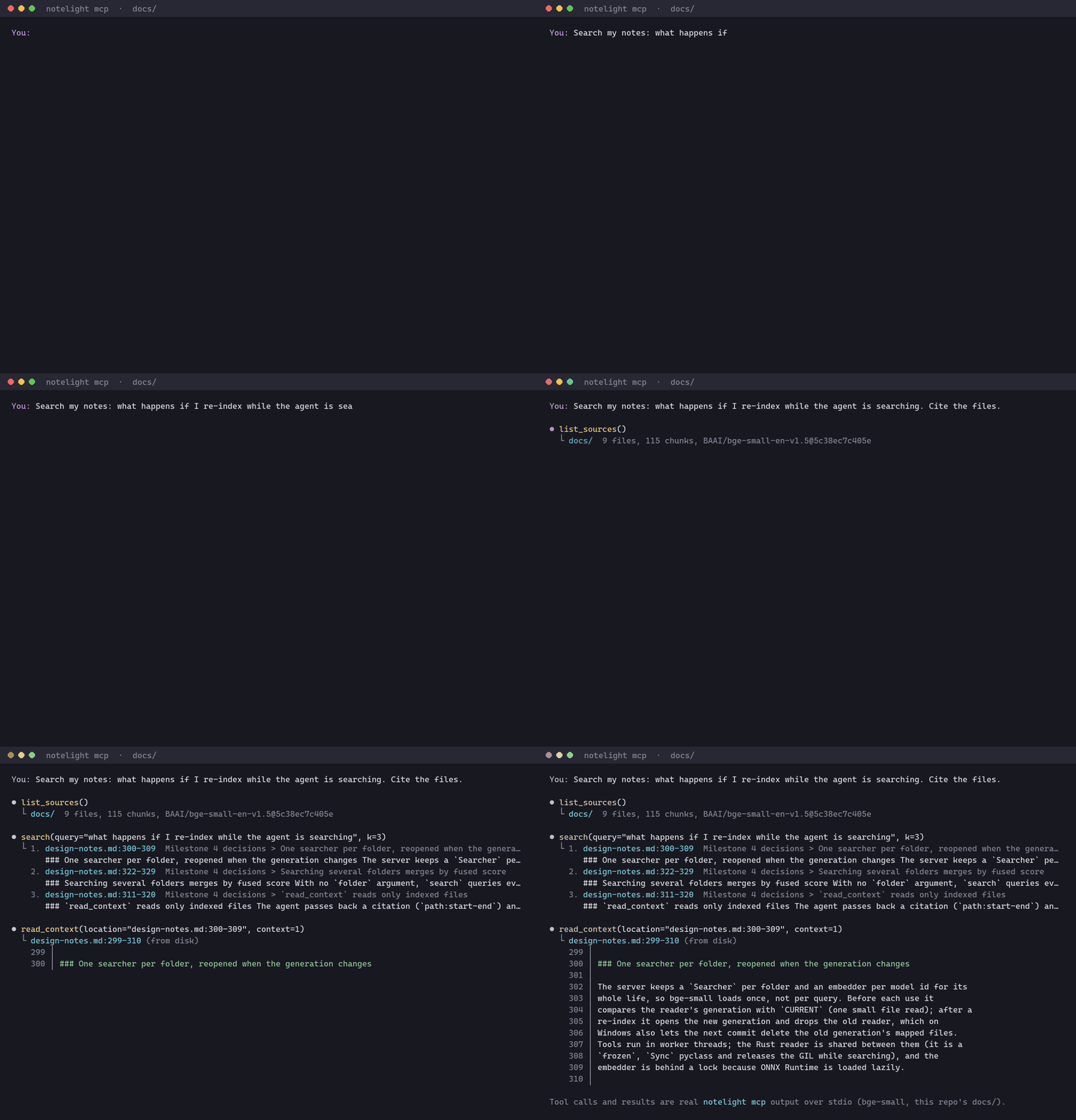
The tool calls and results in this GIF come from a real session: the
script indexes this repository's docs/ folder with bge-small, starts
notelight mcp over stdio, calls the tools, and draws exactly what comes
back. To regenerate it after changing search code (the model must be
cached):
pip install pillow
python scripts/make_demo_gif.py --query "what happens if I re-index while the agent is searching"
Web UI
notelight serve opens the same search in a browser, for people rather
than agents:
pip install "notelight[web]"
notelight serve --open             # http://127.0.0.1:8765, every indexed folder

Type to search (results update as you type), filter by folder, and click a
result, or move with the arrow keys or j/k and press Enter, to read the
lines around it. Each folder shows whether its index is up to date. The page
is one HTML file with plain JavaScript, no build step and no CDN, in light
and dark themes. It works at phone width too.
The server listens on 127.0.0.1 only, never changes an index, and reads only
files the index covers, through the same checks as the MCP server's
read_context. It refuses requests whose Host header is not a loopback
name, which blocks DNS-rebinding attacks from other web pages.
Architecture
            ┌────────────── notelight-core (Rust) ─────────────┐
            │ chunking · BM25 · ternary + int8 search · RRF    │
            │ memory-mapped, versioned index format            │
            └───────┬──────────────────────────────┬───────────┘
              PyO3 / maturin                 wasm-bindgen (v2)
                    │                              │
   notelight (Python package)              browser app (v2)
   embeddings via ONNX Runtime
   CLI · MCP server · eval harness · localhost UI
The core crate has no Python, ML or async dependencies. That keeps it small, easy to test, and portable to WebAssembly. Embeddings run in Python, where the ML tooling is.
Performance (Rust core)
Measured with cargo bench -p notelight-core on synthetic data, on one
thread of an Intel Core i9-10900K (Windows 11, default x86-64 target, so no
AVX). These are indicative numbers, not a tuned benchmark:
| Operation | Size | Time |
|---|---|---|
| Vector search, ternary candidates + int8 rescore (default; k=10, 200 candidates) | 100k × 384-dim | 1.5 ms |
| Same, binary candidates instead of ternary | 100k × 384-dim | 0.8 ms |
| Same, exhaustive int8 scan (reference) | 100k × 384-dim | 8.1 ms |
| BM25 query, 3 terms | 100k chunks | 0.16 ms |
| Markdown chunking | 1 MB document | 8.4 ms (≈116 MiB/s) |
The default two-stage search is about 5× faster than scanning every int8
vector, because the ternary pass compares 96 bytes per vector (sign bits and
mask) with popcount, and only 200 candidates are re-scored. Binary
candidates halve the scan but lose up to 0.01 nDCG@10 (below). The int8 dot product keeps 16 partial sums so
the compiler can use SIMD; see
the note on vectorizing it.
Retrieval quality
nDCG@10 on three BEIR test sets with
the default bge-small embedder, measured with notelight eval (one command,
datasets pinned by SHA-256; see docs/results.md for
recall@10, latency and the setup):
| Method | SciFact | NFCorpus | FiQA |
|---|---|---|---|
| Exact float32 search (reference) | 0.713 | 0.344 | 0.403 |
| int8, every vector | 0.711 | 0.342 | 0.403 |
| Binary codes alone | 0.626 | 0.279 | 0.294 |
| Binary candidates + int8 rescore | 0.703 | 0.341 | 0.399 |
| Ternary candidates + int8 rescore (default) | 0.711 | 0.342 | 0.403 |
| BM25 alone | 0.678 | 0.305 | 0.238 |
Hybrid: BM25 + vectors, RRF (notelight search) |
0.712 | 0.350 | 0.351 |
The default vector search, ternary candidates re-scored with int8, matches exhaustive int8 to three decimals and is within 0.002 of exact float32 search; binary candidates lose up to 0.01. Hybrid fusion helps where keywords are strong (NFCorpus) and hurts where they are weak (FiQA). Against a NumPy implementation of the same quantized searches, the Rust core returns identical top-10 lists; its two-stage searches are 7 to 19x faster (10 to 19x for the ternary default), while NumPy's multi-threaded BLAS still wins the exhaustive int8 scan by 1.3 to 1.7x (it was 5x before the int8 dot product was vectorized). Details and caveats are in docs/results.md.
notelight eval # downloads 23 MB of data once; FiQA takes ~40 min to embed on a CPU
Development
Requirements: Rust (stable) and Python 3.10+.
git clone https://github.com/searope/notelight
cd notelight
python -m venv .venv
# Windows: .venv\Scripts\activate   |   macOS/Linux: source .venv/bin/activate
pip install -e ".[dev,web]"    # builds the Rust extension via maturin; web: web UI + its tests
pytest                         # Python tests (no network; uses a fake embedder)
cargo test -p notelight-core   # Rust unit, integration and property tests
cargo bench -p notelight-core  # Rust benchmarks
notelight version
After changing Rust code, rebuild with maturin develop --release.
Roadmap
| # | Milestone | Status |
|---|---|---|
| 0 | Scaffold: Rust workspace, PyO3 bindings, CI on 3 OSes | ✅ |
| 1 | Rust core: chunking, BM25, quantized search, index format | ✅ |
| 2 | Python package: embedder, incremental indexer, CLI | ✅ |
| 3 | Evaluation: BEIR results table, Rust vs NumPy baseline | ✅ |
| 4 | MCP server for AI agents | ✅ |
| 5 | Web UI, PDF/DOCX, phrase ranking; tested wheels for 5 platforms | ✅ |
| First PyPI release (0.1.0) | ✅ | |
| v2 | Same core compiled to WebAssembly, in-browser app | 🚧 spike: search runs in the browser at native speed |
Documentation
- How notelight works: the whole pipeline, from a folder of notes to a cited result, with diagrams
- Design notes: why it is built this way
- Index format: the on-disk layout, byte by byte
- Results: retrieval quality and latency on BEIR, with the Rust-vs-NumPy comparison
- Rust walkthroughs for readers coming from C# or Python: milestone 0, milestone 1, milestone 2, milestone 3 (plus vectorizing the int8 dot product), milestone 4
License
Dual-licensed under MIT or Apache-2.0, at your option.
1 maintainer

Metadata
1 maintainer
Release files for notelight 0.1.1
For a detailed explanation of source distributions (sdists) and built distributions (wheels), please see the package formats documentation.
Source distribution (sdist)
| File | Size | Uploaded | |
|---|---|---|---|
| notelight-0.1.1.tar.gz | 135.0 kB | Details |
Built distributions (wheels)
| File | Reset | |||
|---|---|---|---|---|
| notelight-0.1.1-cp310-abi3-win_amd64.whl | CPython 3.10 | abi3 | Windows x86-64 | Details |
| notelight-0.1.1-cp310-abi3-manylinux_2_17_x86_64.manylinux2014_x86_64.whl | CPython 3.10 | abi3 | Linux glibc 2.17+ x86-64 | Details |
| notelight-0.1.1-cp310-abi3-manylinux_2_17_aarch64.manylinux2014_aarch64.whl | CPython 3.10 | abi3 | Linux glibc 2.17+ ARM64 | Details |
| notelight-0.1.1-cp310-abi3-macosx_11_0_arm64.whl | CPython 3.10 | abi3 | macOS 11.0+ ARM64 | Details |
| notelight-0.1.1-cp310-abi3-macosx_10_12_x86_64.whl | CPython 3.10 | abi3 | macOS 10.12+ x86-64 | Details |
Total release size: 2.9 MB
Release files / notelight-0.1.1.tar.gz
| Download URL | notelight-0.1.1.tar.gz |
|---|---|
| Size | 135.0 kB |
| Tags | Source |
|
SHA-256 checksum How to use checksums |
4f5c133c72111e1191f370f4f9d121c7ee83abbe1d3beb379621a3894fb1606f
|
|
BLAKE2b-256 checksum How to use checksums |
c5db65860bc1e345dffbc0139800001b9bc40d51f3aa65ab21bef67b98f81041
|
| Upload date | |
|
Uploaded using Trusted Publishing? What is trusted publishing? |
Yes |
| Uploaded via |
twine/7.0.0 CPython/3.13.14
|
Provenance
Provenance describes where a file came from. On PyPI, provenance is shared via attestations, which provide a verifiable record of the build or publishing details. View details, limitations and caveats.


PyPI Publish Attestation
PyPI verified that this artifact, at this checksum, originated from the publisher listed below.
Signed by GitHub Actions, verified by PyPI on Oct 16, 2026.
Transparency logRelease files / notelight-0.1.1-cp310-abi3-win_amd64.whl
| Download URL | notelight-0.1.1-cp310-abi3-win_amd64.whl |
|---|---|
| Size | 478.0 kB |
| Tags | CPython 3.10 Windows x86-64 abi3 |
|
SHA-256 checksum How to use checksums |
1c7fbbe092837b801819918725b15e2d846d1a440ea1abf7791b6174db89d8c8
|
|
BLAKE2b-256 checksum How to use checksums |
891138258cf58ed8085900cab2e80afa2a0308451929ecfd70c463a412628153
|
| Upload date | |
|
Uploaded using Trusted Publishing? What is trusted publishing? |
Yes |
| Uploaded via |
twine/7.0.0 CPython/3.13.14
|
Provenance
Provenance describes where a file came from. On PyPI, provenance is shared via attestations, which provide a verifiable record of the build or publishing details. View details, limitations and caveats.
PyPI Publish Attestation
PyPI verified that this artifact, at this checksum, originated from the publisher listed below.
Signed by GitHub Actions, verified by PyPI on Oct 16, 2026.
Transparency logRelease files / notelight-0.1.1-cp310-abi3-manylinux_2_17_x86_64.manylinux2014_x86_64.whl
| Download URL | notelight-0.1.1-cp310-abi3-manylinux_2_17_x86_64.manylinux2014_x86_64.whl |
|---|---|
| Size | 597.8 kB |
| Tags | CPython 3.10 Linux glibc 2.17+ x86-64 abi3 |
|
SHA-256 checksum How to use checksums |
7b60504eb894d859d22ad695c3d0242e1fd197fbc0dfe729908b22f822c40f26
|
|
BLAKE2b-256 checksum How to use checksums |
42d4fd31846378611f7bb98c08372aba70b03065032489238e812c07f05afd04
|
| Upload date | |
|
Uploaded using Trusted Publishing? What is trusted publishing? |
Yes |
| Uploaded via |
twine/7.0.0 CPython/3.13.14
|
Provenance
Provenance describes where a file came from. On PyPI, provenance is shared via attestations, which provide a verifiable record of the build or publishing details. View details, limitations and caveats.
PyPI Publish Attestation
PyPI verified that this artifact, at this checksum, originated from the publisher listed below.
Signed by GitHub Actions, verified by PyPI on Oct 16, 2026.
Transparency logRelease files / notelight-0.1.1-cp310-abi3-manylinux_2_17_aarch64.manylinux2014_aarch64.whl
| Download URL | notelight-0.1.1-cp310-abi3-manylinux_2_17_aarch64.manylinux2014_aarch64.whl |
|---|---|
| Size | 585.3 kB |
| Tags | CPython 3.10 Linux glibc 2.17+ ARM64 abi3 |
|
SHA-256 checksum How to use checksums |
697ab47d2cd570f188585fa9be229ce14ce29ebf562105536451b50c4a64be48
|
|
BLAKE2b-256 checksum How to use checksums |
202c6e4da8e42bd347037b5f23084e7cf5d2b2844d422d0c4e573e51e50d28ba
|
| Upload date | |
|
Uploaded using Trusted Publishing? What is trusted publishing? |
Yes |
| Uploaded via |
twine/7.0.0 CPython/3.13.14
|
Provenance
Provenance describes where a file came from. On PyPI, provenance is shared via attestations, which provide a verifiable record of the build or publishing details. View details, limitations and caveats.
PyPI Publish Attestation
PyPI verified that this artifact, at this checksum, originated from the publisher listed below.
Signed by GitHub Actions, verified by PyPI on Oct 16, 2026.
Transparency logRelease files / notelight-0.1.1-cp310-abi3-macosx_11_0_arm64.whl
| Download URL | notelight-0.1.1-cp310-abi3-macosx_11_0_arm64.whl |
|---|---|
| Size | 550.3 kB |
| Tags | CPython 3.10 abi3 macOS 11.0+ ARM64 |
|
SHA-256 checksum How to use checksums |
77139068db7c5f55038fe3ed670064716be708d6c480c4865a368caf3e531321
|
|
BLAKE2b-256 checksum How to use checksums |
490cfa4f8df1b71ab27fbd2c18c76e2d2e255055b194f4cdc5a4860b1102688e
|
| Upload date | |
|
Uploaded using Trusted Publishing? What is trusted publishing? |
Yes |
| Uploaded via |
twine/7.0.0 CPython/3.13.14
|
Provenance
Provenance describes where a file came from. On PyPI, provenance is shared via attestations, which provide a verifiable record of the build or publishing details. View details, limitations and caveats.
PyPI Publish Attestation
PyPI verified that this artifact, at this checksum, originated from the publisher listed below.
Signed by GitHub Actions, verified by PyPI on Oct 16, 2026.
Transparency logRelease files / notelight-0.1.1-cp310-abi3-macosx_10_12_x86_64.whl
| Download URL | notelight-0.1.1-cp310-abi3-macosx_10_12_x86_64.whl |
|---|---|
| Size | 563.0 kB |
| Tags | CPython 3.10 abi3 macOS 10.12+ x86-64 |
|
SHA-256 checksum How to use checksums |
58ad10b49433bc9b5d85b4662c6b9537b8ae841df68fb9b31b4a3b38846b09fa
|
|
BLAKE2b-256 checksum How to use checksums |
0db11692d0f30a5101c73584762544c55ff436e90cba9d619cb44e7fe37feb0d
|
| Upload date | |
|
Uploaded using Trusted Publishing? What is trusted publishing? |
Yes |
| Uploaded via |
twine/7.0.0 CPython/3.13.14
|
Provenance
Provenance describes where a file came from. On PyPI, provenance is shared via attestations, which provide a verifiable record of the build or publishing details. View details, limitations and caveats.
PyPI Publish Attestation
PyPI verified that this artifact, at this checksum, originated from the publisher listed below.
Signed by GitHub Actions, verified by PyPI on Oct 16, 2026.
Transparency log













