
NotiDeck
One platform. Every notification.
Send an event once. Route it to the right channels. Track every delivery attempt.
NotiDeck is a self-hosted notification hub for application events, database alerts, and operational messages. Manage your sources, channels, templates, and delivery queue from a web console, with your data stored in your own database.
Get started · Documentation · GitHub · Report an issue
The current stable release is 0.1.0. Review the deployment guidance before exposing a production installation.
Quick start
You need Python 3.11 or newer. The installed package includes the web console; Node.js is only needed when building from source. SQLite is the simplest way to try it.
1. Install in a virtual environment
python -m venv .venv
Activate it on macOS/Linux with source .venv/bin/activate, or in Windows PowerShell
with .venv\Scripts\Activate.ps1. Then install and start NotiDeck:
python -m pip install --upgrade pip
python -m pip install notideck
notideck serve
2. Complete browser setup
Open http://127.0.0.1:8000. The terminal prints the location of your private
bootstrap.token file. Copy its contents into the setup wizard, choose your database,
and create your administrator account. Keep this token private; it is different from a source API key.
3. Start delivery processing
In a second terminal, activate the same virtual environment and run:
notideck worker
Leave both processes running: the server receives events and serves the console; the worker sends queued notifications.
What you can do
- Connect your applications: submit events using source API keys or signed webhooks.
- Choose who gets notified: route by severity, environment, tags, or event metadata.
- Make alerts readable: use templates for database errors, replication lag, backups, and more.
- Keep track of delivery: inspect attempts, retries, failures, and queued notifications.
- Stay in control: pause dispatch, retry failed jobs, and cancel pending jobs from the console.
How it works
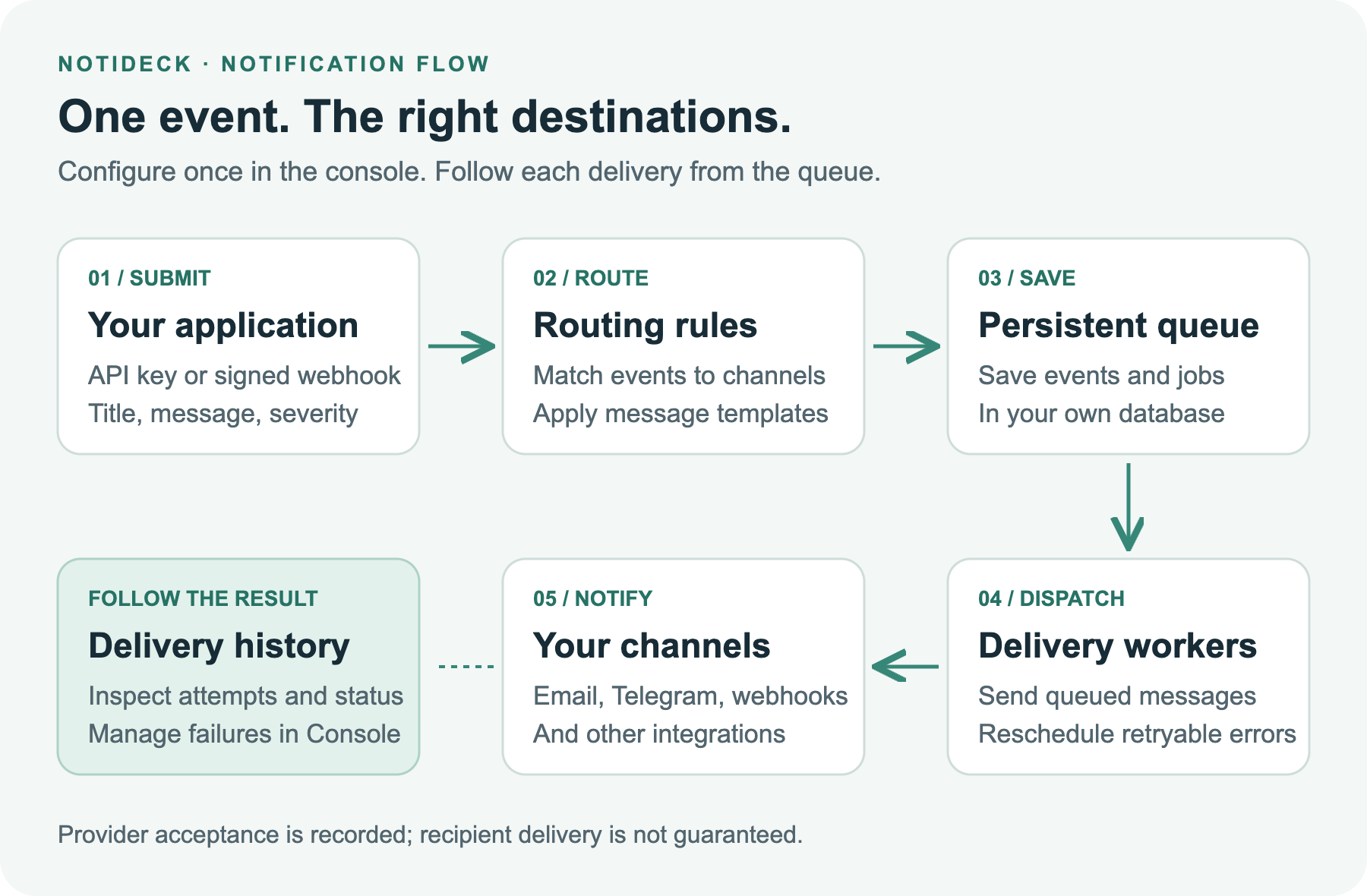
- Your application submits an event with a title, message, severity, and optional metadata.
- NotiDeck matches your routing rules and saves the notification and delivery jobs.
- A worker sends each delivery and records the result. Retryable failures are rescheduled.
Send your first notification
In the console:
- Add a Channel, configure its credentials, and use Test to check delivery.
- Add a Routing rule targeting that channel. For this example, match
environment equals productionandseverity gte ERROR. - Add a Source and create its API key. Copy the key when it is displayed.
- Submit an event and open Notifications to inspect the result.
Example for macOS/Linux:
export NOTIDECK_API_KEY='replace-with-your-source-api-key'

curl -X POST http://127.0.0.1:8000/api/v1/notifications \
  -H "Authorization: Bearer $NOTIDECK_API_KEY" \
  -H 'Content-Type: application/json' \
  -d '{
    "environment": "production",
    "severity": "ERROR",
    "title": "Database replication lag",
    "message": "Replication lag exceeded 120 seconds.",
    "idempotency_key": "replication-alert-001"
  }'
A 202 response means the event was saved. A delivery marked SENT means the provider
accepted it; it does not confirm that the recipient read or received it. Delivery is
at least once, so a crash after provider acceptance can cause a duplicate send.
Channels and databases
| Channel | Verification so far |
|---|---|
| Email (SMTP), Telegram | Live delivery confirmed during user testing |
| HTTP webhook | Real HTTP delivery covered by automated smoke tests |
| Slack, Discord, WhatsApp templates, Twilio SMS, Signal bridge | Adapters included; live account testing still needed |
See channel setup for provider requirements and configuration.
| Database | Installation |
|---|---|
| SQLite | Included; use one worker thread and local storage |
| PostgreSQL | python -m pip install "notideck[postgres]" |
| MySQL | python -m pip install "notideck[mysql]" |
| Oracle | Experimental; see the support boundaries |
PostgreSQL setup includes a TLS/SSL switch. Leave it unchecked for a server that does not use TLS. When enabled, certificate and hostname verification is the default.
Prefer Docker?
Docker Compose runs the server and worker with a shared persistent data volume.
git clone https://github.com/simtiaz019/NotiDeck.git
cd NotiDeck
docker compose up --build -d web
docker compose exec web cat /data/bootstrap.token
Open http://127.0.0.1:8000, enter the bootstrap token, and finish setup. Then start the worker:
docker compose up --build -d worker
The web port is bound to localhost. Keep the data volume and encryption key backed up;
docker compose down -v deletes the volume. See the
deployment guide
for PostgreSQL, HTTPS, supervision, and backups.
Uninstall
Stop the server and worker, activate the same virtual environment, and run:
python -m pip uninstall notideck
This removes the Python package but deliberately keeps your database, configuration,
encryption key, and notification history. Run notideck doctor before uninstalling to
record the configuration directory. See the
installation guide
for complete data removal and Docker uninstall commands.
A console for everyday operations
View recent events, find failed deliveries, manage channels and routing rules, and inspect the queue without writing SQL.
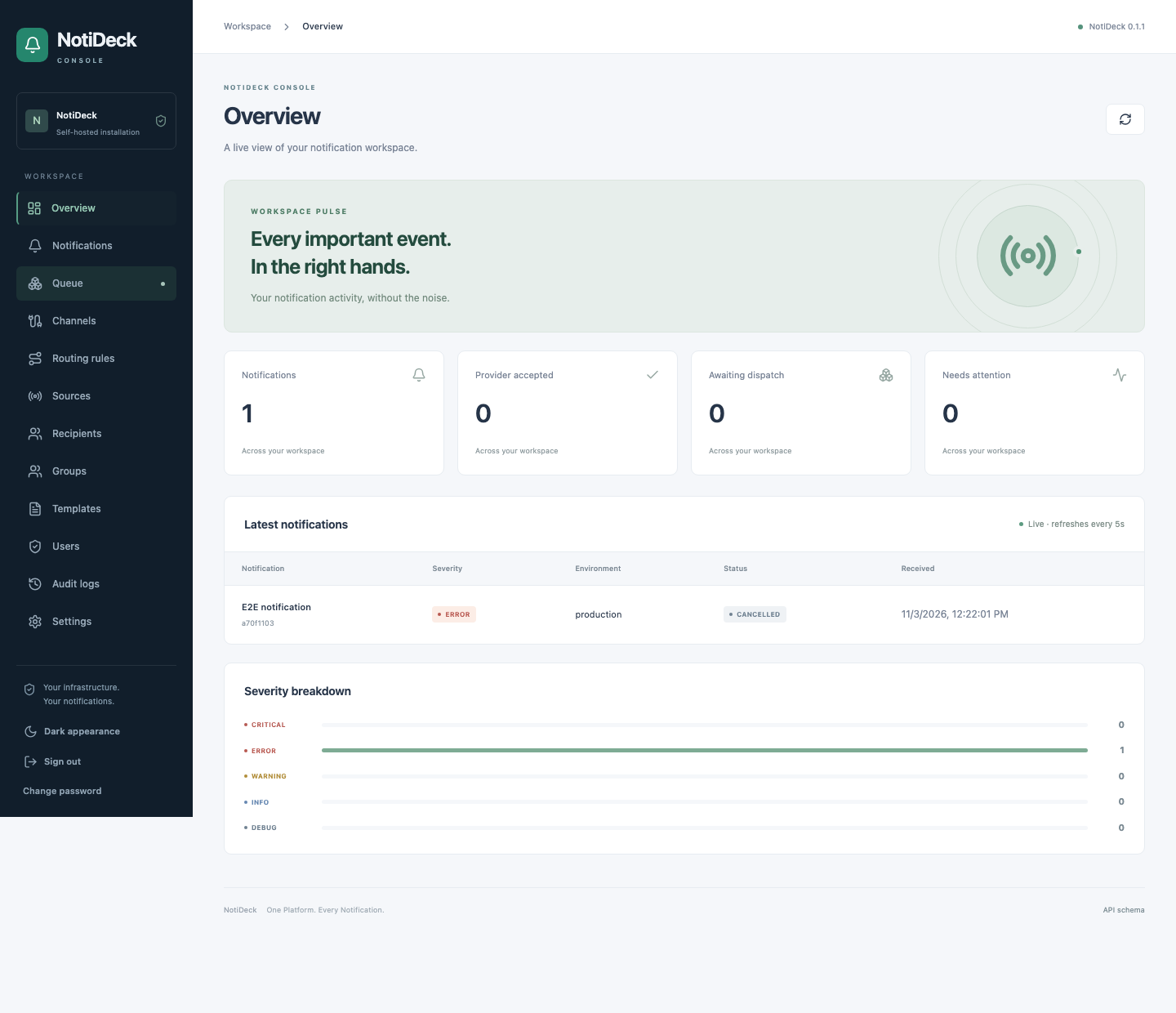
Console screenshot uses synthetic demonstration data.
Learn more
| I want to… | Guide |
|---|---|
| Install or configure NotiDeck | Installation · Configuration |
| Integrate an application | API · Routing |
| Customize messages | Notification templates |
| Deploy safely | Deployment · Security |
| Understand current scope | Support boundaries · Changelog |
| Contribute or build a provider | Development · Provider plugins |
NotiDeck is licensed under Apache-2.0.
1 maintainer

Metadata
1 maintainer
Release files for notideck 0.1.0
For a detailed explanation of source distributions (sdists) and built distributions (wheels), please see the package formats documentation.
Source distribution (sdist)
| File | Size | Uploaded | Provenance | Actions |
|---|---|---|---|---|
| notideck-0.1.0.tar.gz | 1.0 MB | With provenance | Details for notideck-0.1.0.tar.gz |
Built distribution (wheel)
| File | Interpreter | ABI | Platform | Actions Reset |
|---|---|---|---|---|
| notideck-0.1.0-py3-none-any.whl | Python 3 | none | any | Details for notideck-0.1.0-py3-none-any.whl |
Total release size: 1.7 MB
Release files / notideck-0.1.0.tar.gz
| Download URL | notideck-0.1.0.tar.gz |
|---|---|
| Size | 1.0 MB |
| Tags | Source |
|
SHA-256 checksum How to use checksums |
961f395d3fb3e865dd3e0873e6148c45341368728c0e0a841d9338c17196db04
|
|
BLAKE2b-256 checksum How to use checksums |
9256b869d0cdd6d9639b0dcd01706807d180101d100c9db033cc2c669adddf79
|
| Upload date | |
|
Uploaded using Trusted Publishing? What is trusted publishing? |
Yes |
| Uploaded via |
twine/7.0.0 CPython/3.13.16
|
Provenance
Provenance describes where a file came from. On PyPI, provenance is shared via attestations, which provide a verifiable record of the build or publishing details. View details, limitations and caveats.


PyPI Publish Attestation
PyPI verified that this artifact, at this checksum, originated from the publisher listed below.
Signed by GitHub Actions, verified by PyPI on Nov 3, 2026.
Transparency logRelease files / notideck-0.1.0-py3-none-any.whl
| Download URL | notideck-0.1.0-py3-none-any.whl |
|---|---|
| Size | 634.3 kB |
| Tags | Python 3 |
|
SHA-256 checksum How to use checksums |
1dd97837ac8c7f334bbbc61f3353accde46a2ede64d8bfd3575abbe9147ca6ee
|
|
BLAKE2b-256 checksum How to use checksums |
4403a8859f4d1a86524463dbd27700b53c57c006362f879ac4ba2c52bdeaf254
|
| Upload date | |
|
Uploaded using Trusted Publishing? What is trusted publishing? |
Yes |
| Uploaded via |
twine/7.0.0 CPython/3.13.16
|
Provenance
Provenance describes where a file came from. On PyPI, provenance is shared via attestations, which provide a verifiable record of the build or publishing details. View details, limitations and caveats.
PyPI Publish Attestation
PyPI verified that this artifact, at this checksum, originated from the publisher listed below.
Signed by GitHub Actions, verified by PyPI on Nov 3, 2026.
Transparency logSecurity for notideck 0.1.0
Provenance
Provenance describes where a file came from. On PyPI, provenance is shared via attestations, which provide a verifiable record of the build or publishing details. View details, limitations and caveats.
Full provenance
All 2 files in this release have been uploaded with provenance metadata.
Attestation for notideck-0.1.0.tar.gz
PyPI Publish Attestation
PyPI verified that this artifact, at this checksum, originated from the publisher listed below.
Signed by GitHub Actions, verified by PyPI on Nov 3, 2026.
Transparency logA note on package security
PyPI is a repository for distributing packages, not a service for auditing them. While third-party security researchers and our staff do their best to detect and remove malicious packages, PyPI cannot guarantee the quality, security or suitability of any given package.
To learn more about protecting yourself from malicious actors, visit our package security documentation.














