
notion-api








Disclaimer: This is an unofficial package and has no affiliation with Notion.so
A wrapper for Notion's API, aiming to simplify the dynamic nature of interacting with Notion.
README contains examples of the main functionality, including: creating Pages/Databases/Blocks, adding/removing/editing properties, retrieving property values, and database queries.
Some more in-depth walkthroughs can be be found in examples/.
This package is not complete - new features will continue to be added, and current features may change.
| Links: Notion API Updates |
| API Reference |
| Notion API Changelog |
| Notion.so Releases |
Setup & Install
You'll need an integration token to interact with the Notion API. If you don't have this setup already, you can find an integration token after you create an integration on the integration settings page.
To learn how to create an integration, see the getting started guide. For more information about integration capabilities, see the Integration capabilities in the API Reference.
Download the package from PyPi by running the command below.
$ pip install -U notion-api
Usage
To authenticate api calls, set your integration token as an environment variable named NOTION_TOKEN.
import notion

homepage = notion.Page('773b08ff38b44521b44b115827e850f2')
parent_db = notion.Database(homepage.parent_id)
The client will also look for the environment variable TZ to set the default timezone. If not found, it attempts to find the default timezone, or UTC.
Each object requires their respective ID. This will be 32 character long string from the URL, in the following pattern: 8-4-4-4-12 (each number is the length of characters between the hyphens).
Example database ID:

v= parameter is for the current view of the database. This will not work and will raise an error.
Creating Pages & Databases
Create objects by passing an existing Page/Database instance to the create classmethods.
Note: The Notion API does not allow pages/databases to be created to the parent workspace.
new_database = notion.Database.create(
    parent_instance=testpage,
    database_title="Example Database",
    title_column="page", # This is the column containing page names. Defaults to "title".
    is_inline=True, # can also toggle inline with setters.
    description="Database description can go here.",
)

# Adding a page to the database created above.
new_page = notion.Page.create(new_database, page_title="A new database row")
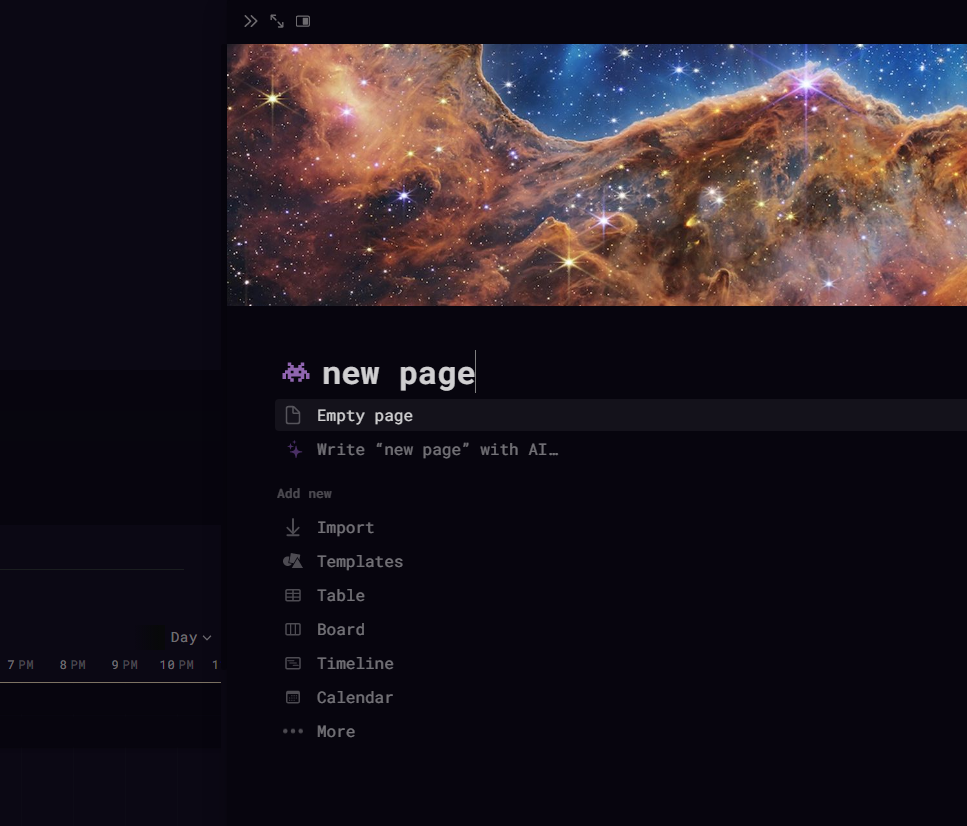
Both Page's and Database's have setters for title/icon/cover.
homepage.title = "new page"
homepage.cover = "https://www.notion.so/images/page-cover/webb1.jpg"
homepage.icon = "https://www.notion.so/icons/alien-pixel_purple.svg"
Creating Blocks
Blocks are also created using classmethods. They require a parent instance of either Page or Block to append the new block too.
The newly created block is returned as an instance of Block, which can be used as the parent instance to another nested block.
By default, blocks are appended to the bottom of the parent block.
To append the block somewhere else other than the bottom of the parent block, use the after parameter, and set its value to the ID of the block that the new block should be appended after.
The block_id used in the after paramater must still be a child to the parent instance.
from notion import properties as prop

original_synced_block = notion.Block.original_synced_block(homepage)

# Adding content to the synced block
notion.Block.paragraph(original_synced_block, [prop.RichText("This is a synced block.")])

# Referencing the synced block in a new page.
notion.Block.duplicate_synced_block(new_page, original_synced_block.id)
There are 5 extensions to the Block class, with functions specific to their block type;
CodeBlockTableBlockEquationBlockRichTextBlockToDoBlock
You can see usage for them in examples/block_extensions.md.
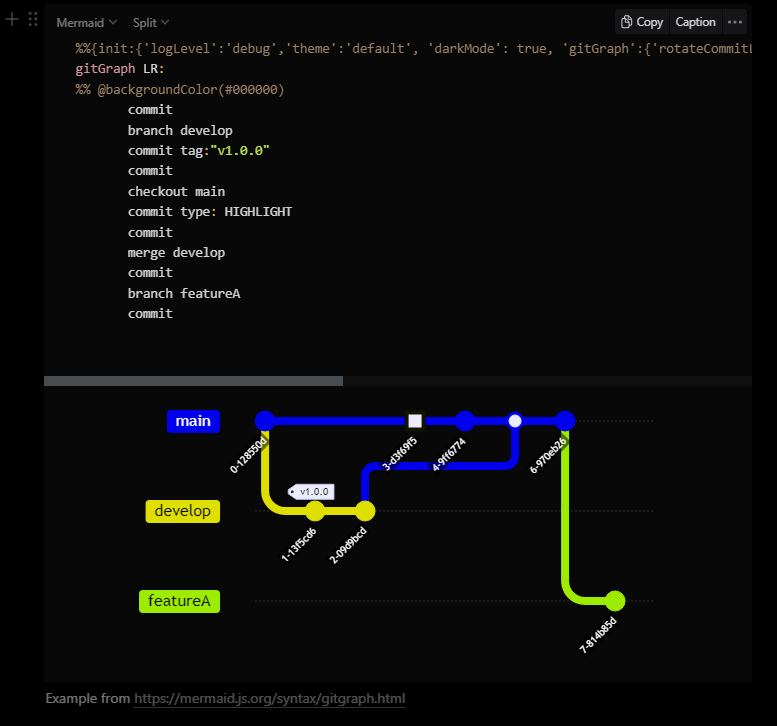
Below is an example using CodeBlock.
code_block = notion.CodeBlock("84c5721d8a954667902a757f0033f9e0")

git_graph = r"""
%%{init:{'theme':'default', 'gitGraph':{'rotateCommitLabel':true}, 'themeVariables': {'commitLabelColor':'#ffffff','commitLabelBackground':'#000000', 'tagLabelFontSize': '10px'}}}%%
gitGraph LR:
%% @backgroundColor(#000000)
       commit
       branch develop
       commit tag:"v1.0.0"
       commit
       checkout main
       commit type: HIGHLIGHT
       commit
       merge develop
       commit
       branch featureA
       commit
"""

code_block.language = prop.CodeBlockLang.mermaid
code_block.code = git_graph
code_block.caption = "Example from https://mermaid.js.org/syntax/gitgraph.html"
Retrieve Page property values & Database property objects.
Indexing a page will search for page property values, and indexing a Database will search for property objects. A list of all objects/values can be retrieved for both using the following commands:
retrieve()method for a Page, with the optionalfilter_propertiesparameter.retrieveattribute for a Database.
homepage['dependencies']
# {
#     "id": "WYYq",
#     "type": "relation",
#     "relation": [
#         {
#             "id": "7bcbc8e6-e237-434b-bd0d-6b56e044200b"
#         }
#     ],
#     "has_more": false
# }

parent_db['dependencies']
# {
#     "id": "WYYq",
#     "name": "dependencies",
#     "type": "relation",
#     "relation": {
#         "database_id": "f5984a7e-2257-4ab0-9d0a-23ea12324031",
#         "type": "dual_property",
#         "dual_property": {
#             "synced_property_name": "blocked",
#             "synced_property_id": "wx%7DQ"
#         }
#     }
# }
See usage of retrieving values from a page in examples/retrieving-property-items.md
Below is a brief example to retrieve the dependencies property above from homepage.
from notion import propertyitems

related_id: list[str] = propertyitems.relation(homepage.dependencies)
>>> related_id
["7bcbc8e6-e237-434b-bd0d-6b56e044200b"]
Add, Set, & Delete: Page property values | Database property objects
The first argument for all database property methods is the name of the property,
If a property of that name does not exist, then a new property will be created.
If a property of that name already exists, but it's a different type than the method used - then the API will overwrite this and change the property object to the new type.
The original parameters will be saved if you decide to switch back (i.e. if you change a formula column to a select column, upon changing it back to a formula column, the original formula expression will still be there).
new_database.formula_column("page_id", expression="id()")

new_database.delete_property("url")

new_database.multiselect_column(
    "New Options Column",
    options=[
        prop.Option("Option A", prop.PropertyColor.red),
        prop.Option("Option B", prop.PropertyColor.green),
        prop.Option("Option C", prop.PropertyColor.blue),
    ],
)

# if an option does not already exist, a new one will be created with a random color.
# this is not true for `status` column types, which can only be edited via UI.
new_page.set_multiselect("options", ["option-a", "option-b"])
Example Function
Append blocks in a page to mention a user/date, using notion.Workspace().
def inline_mention(page: notion.Page, message: str, user_name: str) -> None:
    mentionblock = notion.Block.paragraph(
        page,
        [
            prop.Mention.user(
                notion.Workspace().retrieve_user(user_name=user_name),
                annotations=prop.Annotations(
                    code=True, bold=True, color=prop.BlockColor.purple
                ),
            ),
            prop.RichText(" - "),
            prop.Mention.date(
                datetime.now().astimezone(page.tz).isoformat(),
                annotations=prop.Annotations(
                    code=True,
                    bold=True,
                    italic=True,
                    underline=True,
                    color=prop.BlockColor.gray,
                ),
            ),
            prop.RichText(":"),
        ]
    )
    # The `mentionblock` object created in the previous line is passed to the class method `notion.Block.paragraph`.
    # This will create a new paragraph block as a child of `mentionblock`.
    notion.Block.paragraph(mentionblock, [prop.RichText(message)])
    notion.Block.divider(page)
homepage = notion.Page("0b9eccfa890e4c3390175ee10c664a35")
inline_mention(page=homepage, message="example", user_name="AYVI")

Database Queries
A single notion.query.PropertyFilter is equivalent to filtering one property type in Notion.
To build nested filters, use notion.query.CompoundFilter and group property filters chained together by _and(...) / _or(...).
The database method query() will return the raw response from the API.
The method query_pages() will extract the page ID for each object in the array of results, and return a list of notion.Page objects.
import os
from datetime import datetime, timedelta
from pytz import timezone

from notion import query

TZ = timezone(os.getenv("TZ", "UTC"))

TODAY = datetime.combine(datetime.today(), datetime.min.time()).astimezone(TZ)
TOMORROW = TODAY + timedelta(1)

query_filter = query.CompoundFilter()._and(
    query.PropertyFilter.date("date", "created_time", "on_or_after", TODAY.isoformat()),
    query.PropertyFilter.date("date", "created_time", "before", TOMORROW.isoformat()),
    query.CompoundFilter()._or(
        query.PropertyFilter.text("name", "title", "contains", "your page title"),
        query.PropertyFilter.text("name", "title", "contains", "your other page title")
    ),
)

query_sort = query.SortFilter(
    [
        query.PropertyValueSort.ascending("your property name"),
        query.EntryTimestampSort.created_time_descending(),
    ]
)

# Returns a list of mappings.
result = new_database.query(
    filter=query_filter,
    sort=query_sort,
    filter_property_values=["name", "options"],
)

# Returns a list of notion.Page objects.
result = new_database.query_pages(
    filter=query_filter,
    sort=query_sort,
    filter_property_values=["name", "options"],
)
Exceptions & Validating Responses
Errors in Notion requests return an object with the keys: 'object', 'status', 'code', and 'message'. Exceptions are raised by matching the error code and returning the message. For example:
homepage._patch_properties(payload={"an_incorrect_key":"value"})
# Example error object for line above..
# {
#   "object": "error",
#   "status": 400,
#   "code": "validation_error",
#   "message": "body failed validation: body.an_incorrect_key should be not present, instead was `\"value\"`."
# }
Traceback (most recent call last):
File "c:\path\to\file\_.py", line 6, in <module>
    homepage._patch_properties(payload={"an_incorrect_key":"value"})
File "c:\...\notion\exceptions\validate.py", line 48, in validate_response
    raise NotionValidationError(message)
notion.exceptions.errors.NotionValidationError: body failed validation: body.an_incorrect_key should be not present, instead was `"value"`.
Error 400: The request body does not match the schema for the expected parameters.
Possible errors are:
NotionConflictErrorNotionDatabaseConnectionUnavailableNotionGatewayTimeoutNotionInvalidGrantNotionInternalServerErrorNotionInvalidJsonNotionInvalidRequestNotionInvalidRequestUrlNotionMissingVersionNotionObjectNotFoundNotionRateLimitedNotionRestrictedResourceNotionServiceUnavailableNotionUnauthorizedNotionValidationError
1 maintainer

Metadata
1 maintainer
Release files for notion-api 0.7.4
For a detailed explanation of source distributions (sdists) and built distributions (wheels), please see the package formats documentation.
Source distribution (sdist)
| File | Size | Uploaded | |
|---|---|---|---|
| notion_api-0.7.4.tar.gz | 54.8 kB | Details |
Built distribution (wheel)
| File | Interpreter | ABI | Platform | Reset |
|---|---|---|---|---|
| notion_api-0.7.4-py3-none-any.whl | Python 3 | none | any | Details |
Total release size: 148.2 kB
Release files / notion_api-0.7.4.tar.gz
| Download URL | notion_api-0.7.4.tar.gz |
|---|---|
| Size | 54.8 kB |
| Tags | Source |
|
SHA-256 checksum How to use checksums |
78692d6b9e71673f256bf0b6b66deeb4bb67bed9fc48a881ef0ee55da3b3a7c4
|
|
BLAKE2b-256 checksum How to use checksums |
b981268cf3197fbd2975598c704c766ef5fd1b567f80216618d128ebdfb3e8a3
|
| Upload date | |
|
Uploaded using Trusted Publishing? What is trusted publishing? |
No |
| Uploaded via |
twine/5.0.0 CPython/3.11.8
|
Release files / notion_api-0.7.4-py3-none-any.whl
| Download URL | notion_api-0.7.4-py3-none-any.whl |
|---|---|
| Size | 93.4 kB |
| Tags | Python 3 |
|
SHA-256 checksum How to use checksums |
5f43372d50acb44562cce6ccb33ba9e9858818263019246ba45ce7f0306346cb
|
|
BLAKE2b-256 checksum How to use checksums |
fc9db6be8247f9ec14a44b0e56bae96251a4d2fb6af7a95c59c06b13406104dd
|
| Upload date | |
|
Uploaded using Trusted Publishing? What is trusted publishing? |
No |
| Uploaded via |
twine/5.0.0 CPython/3.11.8
|














