
Notolog Editor








Notolog is an open-source Markdown editor built with Python and PySide6, featuring AI-powered assistance and local-first privacy.
📖 Documentation | 🪲 Report Issues | 💡 Request Features | 💬 Discussions
Quick Install
pip install notolog
notolog  # Launch the app
Other installation methods
With llama.cpp support:
pip install "notolog[llama]"
With Text-to-Speech audio support:
pip install "notolog[tts]"
Via Conda:
conda install notolog -c conda-forge
Ubuntu/Debian: Download from notolog-debian releases
From source:
git clone https://github.com/notolog/notolog-editor.git
cd notolog-editor
python3 -m venv notolog_env && source notolog_env/bin/activate
pip install .
python -m notolog.app
Features
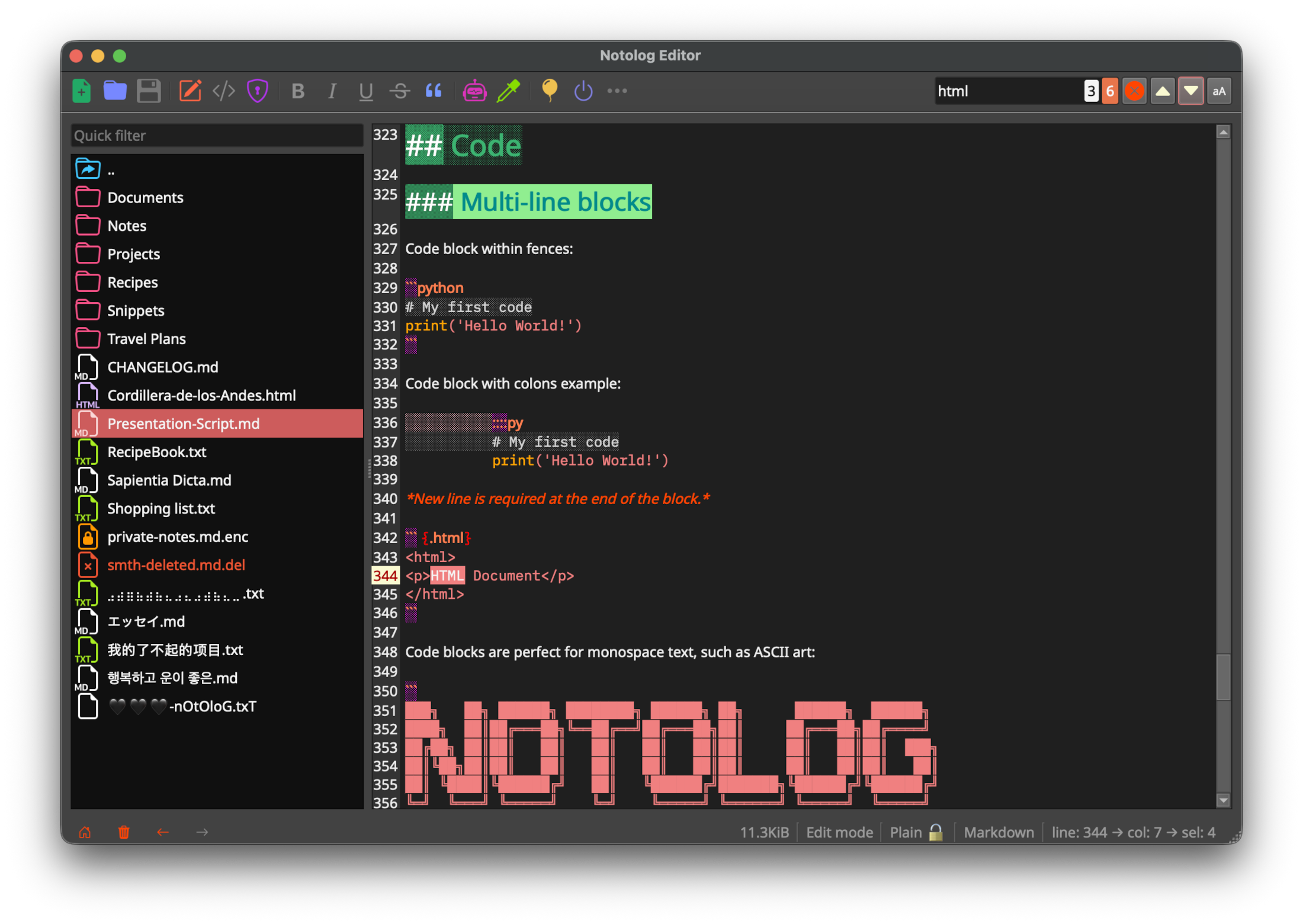
- Markdown Editor - Real-time syntax highlighting in edit mode (implemented specifically for Notolog), live preview, adaptive line numbers, code blocks
- AI Assistant - Supports: OpenAI API, ONNX Runtime GenAI (local), and llama.cpp (local, GGUF models)
- Text-to-Speech - Read documents or selections aloud locally with NeMo-Speech.cpp and MagpieTTS
- File Encryption - PBKDF2HMAC key derivation with Fernet (AES-128 CBC mode) for optional file encryption
- Multi-Language - 19 languages supported
- Customizable - 6 built-in themes
- Cross-Platform - Windows, macOS, Linux
See the User Guide for complete feature documentation.
Requirements
- Python 3.10–3.14 (python.org)
- 4 GB RAM minimum (8+ GB for local AI models)
Installation
Using a virtual environment is recommended:
python3 -m venv notolog_env
source notolog_env/bin/activate  # Linux/macOS
notolog_env\Scripts\activate     # Windows
pip install notolog
For detailed instructions including conda and Debian packages, see Getting Started.
AI Assistant
Notolog supports three AI backends:
- OpenAI API - Cloud-based inference via OpenAI-compatible endpoints
- On-Device LLM - Local inference using ONNX Runtime GenAI (e.g. Phi-3, Llama)
- Module llama.cpp - Local inference with GGUF quantized models (e.g. Llama, Mistral, Qwen)
See the AI Assistant Guide for setup instructions.
Text-to-Speech
The built-in Text-to-Speech module reads Markdown documents, selected text, or text from the cursor aloud locally, with play, pause, and stop controls. It supports spoken heading announcements and separate options to replace inline and multiline code with short labels.
The context-length slider controls the maximum characters in each speech request. Its far-right position uses the whole document between heading breaks. Larger contexts increase startup time and memory use; the runtime's limits still apply. Speech text and generated audio travel through local pipes and memory, without temporary text or audio files. Operating-system swap, crash dumps, and external recording are outside this protection.
Install the audio dependencies with pip install "notolog[tts]" (sounddevice/PortAudio). Linux pip users
also need their system PortAudio library, such as libportaudio2 on Debian/Ubuntu, plus curl and CA certificates
for model downloads. In Settings → Text-to-Speech, enable the
module and use Get runtime to find the compatible NeMo-Speech.cpp release. Extract the complete archive,
select bin/nemo-speech (bin/nemo-speech.exe on Windows), choose a model folder, and download the models.
The runtime and models are installed separately; they are not bundled with Notolog.
Choose the document language in the module settings. English is the default; Spanish, German, French, Italian, Vietnamese, and Hindi are also supported. Mandarin and Japanese require a runtime built with support for those languages. Language detection is not automatic, and heading/code labels use English.
See the Text-to-Speech Guide for setup, supported models, and troubleshooting. See Text-to-Speech third-party notices for runtime, model, and audio library licenses. Notolog is not affiliated with or endorsed by NVIDIA.
Development
git clone https://github.com/notolog/notolog-editor.git
cd notolog-editor
python3 -m venv .venv && source .venv/bin/activate
pip install -e .
python -m notolog.app
Run tests:
python dev_install.py test
python -m pytest
See CONTRIBUTING.md for guidelines.
License
Notolog is open-source software licensed under the MIT License.
This project uses third-party libraries, each subject to its own license. See ThirdPartyNotices.md for details.
Security
Notolog prioritizes data protection and user privacy:
- Encryption: File encryption (optional) uses PBKDF2HMAC key derivation with Fernet (AES-128 CBC mode).
- Auto-Save: Changes are saved automatically to prevent data loss.
- Privacy: No telemetry or tracking. Local-only AI inference options available.
For vulnerability reporting, see SECURITY.md.
Disclaimers
Third-Party AI Services and Libraries
This project integrates third-party AI services and libraries:
- OpenAI API: Users are required to supply their own API keys and adhere to OpenAI's applicable terms, policies, and API documentation.
- ONNX Runtime GenAI: Used for local ONNX model inference. More info: onnxruntime-genai
- llama.cpp: Used for local GGUF model inference via llama-cpp-python.
Notolog is developed independently and is not affiliated with these organizations or projects.
Legal
- Compliance: Users are responsible for ensuring their use complies with applicable laws and regulations.
- Liability: The developers disclaim liability for misuse or non-compliance with legal or regulatory requirements.
- Trademarks: All trademarks and brand names are the property of their respective owners and are used for identification purposes only.
⭐ If you find Notolog useful, please consider giving it a star on GitHub!
This README.md file has been crafted and edited using Notolog Editor.
1 maintainer

Metadata
1 maintainer
Release files for notolog 1.2.3
For a detailed explanation of source distributions (sdists) and built distributions (wheels), please see the package formats documentation.
Source distribution (sdist)
| File | Size | Uploaded | |
|---|---|---|---|
| notolog-1.2.3.tar.gz | 6.0 MB | Details |
Built distribution (wheel)
| File | Interpreter | ABI | Platform | Reset |
|---|---|---|---|---|
| notolog-1.2.3-py3-none-any.whl | Python 3 | none | any | Details |
Total release size: 7.3 MB
Release files / notolog-1.2.3.tar.gz
| Download URL | notolog-1.2.3.tar.gz |
|---|---|
| Size | 6.0 MB |
| Tags | Source |
|
SHA-256 checksum How to use checksums |
f33258d65e17af39dbb4754339f38c5b230f98d14a8b35a9f42c4d4cd6e3799c
|
|
BLAKE2b-256 checksum How to use checksums |
8ce7575ddb44a6436005a92929d6db43514e0d7fd1ebd448c500554a4ae613ea
|
| Upload date | |
|
Uploaded using Trusted Publishing? What is trusted publishing? |
No |
| Uploaded via |
twine/7.0.0 CPython/3.14.4
|
Release files / notolog-1.2.3-py3-none-any.whl
| Download URL | notolog-1.2.3-py3-none-any.whl |
|---|---|
| Size | 1.2 MB |
| Tags | Python 3 |
|
SHA-256 checksum How to use checksums |
6380e8c1c4ca07ee3e8faa5727bb978ee7d6cd98afce9bccc2a9fecac9310e9c
|
|
BLAKE2b-256 checksum How to use checksums |
a421e4c475edf4a2ebf5bc1096a4a67ae2e2b346071fc4a7ed657e197f7f5305
|
| Upload date | |
|
Uploaded using Trusted Publishing? What is trusted publishing? |
No |
| Uploaded via |
twine/7.0.0 CPython/3.14.4
|














