
Modern SFTP explorer with remote preview-first workflows.

Project description
Nova SFTP Explorer
A modern, cross-platform SFTP desktop explorer focused on remote-first file inspection.
Current version: 0.1.5
Screenshot
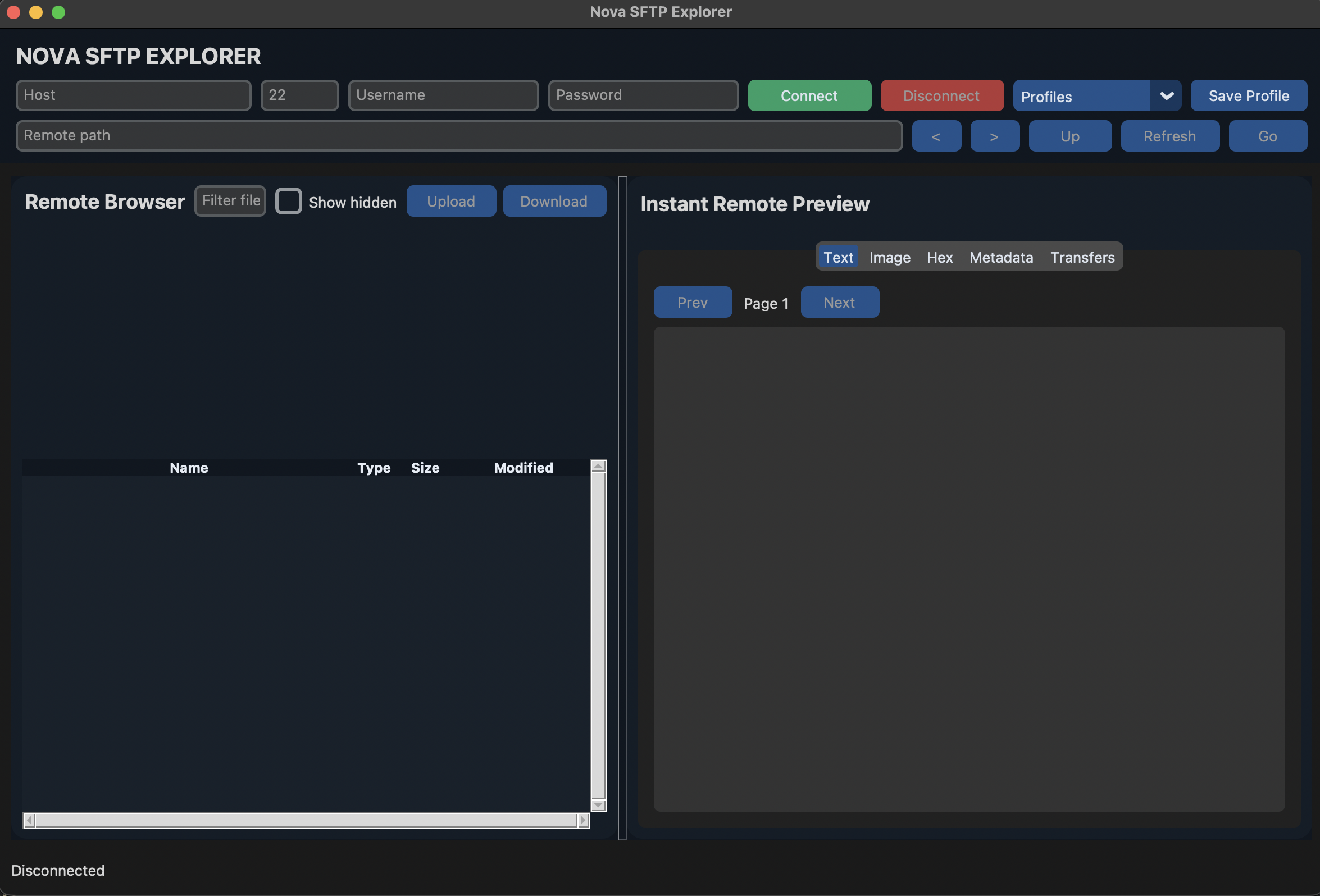
Why Nova SFTP Explorer
Most SFTP clients are optimized for transfers. Nova is optimized for fast remote inspection:
- Browse remote directories quickly
- Preview text/images/metadata without full local downloads
- Search/filter large directory listings
- Move through folder history with back/forward navigation
Key Features
-
Connection & navigation
- Host/port/user/password login via SFTP
Go,Up,Back,Forward, breadcrumbs- Hidden file toggle and live filter
-
Preview-first workflow
- Text preview with paging for large files
- Smart text decoding (
utf-8,utf-16, fallbacklatin-1) - Image preview with fit/zoom/pan controls
- Hex preview fallback for binary files
- Metadata tab (path, size, permissions, modified)
-
Transfers
- Upload/download with progress queue
- Transfer status tracking in-app
-
Persistence
- Saved connection profiles
- UI preferences (splitter, column widths, last profile)
- Per-user state file location on macOS/Linux/Windows
Installation
pip install nova-sftp-explorer
Run
nova-sftp-explorer
Upgrade
python3 -m pip install -U nova-sftp-explorer
Platform Notes
- Python
>=3.10 - Linux users may need Tk runtime:
sudo apt install -y python3-tk
Development
git clone https://github.com/tanmoy456/nova-sftp-explorer.git
cd nova-sftp-explorer
python -m pip install -e .
python sftp.py
Testing
python -m unittest tests/test_preview.py
Release (maintainer)
python -m pip install --upgrade build twine
rm -rf dist build *.egg-info
python -m build
python -m twine check dist/*
python -m twine upload dist/*
Roadmap
- SSH key auth + known_hosts verification
- Inline text edit and save-back-to-remote
- Enhanced conflict handling on remote file changes
License
MIT


Download files
Download the file for your platform. If you're not sure which to choose, learn more about installing packages.
Source Distribution
Built Distribution
Filter files by name, interpreter, ABI, and platform.
If you're not sure about the file name format, learn more about wheel file names.
Copy a direct link to the current filters
File details
Details for the file nova_sftp_explorer-0.1.5.tar.gz.
File metadata
- Download URL: nova_sftp_explorer-0.1.5.tar.gz
- Upload date:
- Size: 14.9 kB
- Tags: Source
- Uploaded using Trusted Publishing? No
- Uploaded via: twine/6.2.0 CPython/3.13.2
File hashes
| Algorithm | Hash digest | |
|---|---|---|
| SHA256 |
10386014e0e37b442eeeb94826d1424e9d869b12dba7e7da4d1ee8296dfcab0b
|
|
| MD5 |
9b2ccf10893b0e5f04eb91fa71263940
|
|
| BLAKE2b-256 |
0c6d94944f121bd7e6e4715339e03308580cd8f1582ee38524963dac50934c3f
|
File details
Details for the file nova_sftp_explorer-0.1.5-py3-none-any.whl.
File metadata
- Download URL: nova_sftp_explorer-0.1.5-py3-none-any.whl
- Upload date:
- Size: 15.6 kB
- Tags: Python 3
- Uploaded using Trusted Publishing? No
- Uploaded via: twine/6.2.0 CPython/3.13.2
File hashes
| Algorithm | Hash digest | |
|---|---|---|
| SHA256 |
ca392d49819288fb6e8221d8d3d8859827ab2ff9515aa0dfa8a45d70eed1e3f9
|
|
| MD5 |
f00761ad5a40946ed5b94359083ab5e3
|
|
| BLAKE2b-256 |
e522b809defe930abfedcb8b0c1d65b2157a1fe41cad768712df373fcafa7cb8
|






