
npcpy is the premier open-source library for integrating LLMs and Agents into python systems.

Project description

npcpy
npcpy is a flexible agent framework for building AI applications and conducting research with LLMs. It supports local and cloud providers, multi-agent teams, tool calling, image/audio/video generation, knowledge graphs, fine-tuning, and more.
pip install npcpy
Quick Examples
Create and use personas
from npcpy import NPC

simon = NPC(
    name='Simon Bolivar',
    primary_directive='Liberate South America from the Spanish Royalists.',
    model='gemma3:4b',
    provider='ollama'
)
response = simon.get_llm_response("What is the most important territory to retain in the Andes?")
print(response['response'])
Direct LLM call
from npcpy import get_llm_response

response = get_llm_response("Who was the celtic messenger god?", model='qwen3:4b', provider='ollama')
print(response['response'])
# or use ollama's cloud models

test = get_llm_response('who is john wick', model='minimax-m2.7:cloud', provider='ollama',)

print(test['response'])
Agent with tools
from npcpy import Agent, ToolAgent, CodingAgent

# Agent — comes with default tools (sh, python, edit_file, web_search, etc.)
agent = Agent(name='ops', model='qwen3.5:2b', provider='ollama')
print(agent.run("Find all Python files over 500 lines in this repo and list them"))

# ToolAgent — add your own tools alongside defaults
import subprocess

def run_tests(test_path: str = "tests/") -> str:
    """Run pytest on the given path and return results."""
    result = subprocess.run(["python3", "-m", "pytest", test_path, "-v", "--tb=short"],
                            capture_output=True, text=True, timeout=120)
    return result.stdout + result.stderr

def git_diff(branch: str = "main") -> str:
    """Show the git diff against a branch."""
    result = subprocess.run(["git", "diff", branch, "--stat"], capture_output=True, text=True)
    return result.stdout

reviewer = ToolAgent(
    name='code_reviewer',
    primary_directive='You review code changes, run tests, and report issues.',
    tools=[run_tests, git_diff],
    model='qwen3.5:2b', provider='ollama'
)
print(reviewer.run("Run the tests and summarize any failures"))

# CodingAgent — auto-executes code blocks from LLM responses
coder = CodingAgent(name='coder', language='python', model='qwen3.5:2b', provider='ollama')
print(coder.run("Write a script that finds duplicate files by hash in the current directory"))
Streaming
from npcpy import get_llm_response
from npcpy.streaming import parse_stream_chunk

response = get_llm_response("Explain quantum entanglement.", model='qwen3.5:2b', provider='ollama', stream=True)
for chunk in response['response']:
    content, _, _ = parse_stream_chunk(chunk, provider='ollama')
    if content:
        print(content, end='', flush=True)

# Works the same with any provider
response = get_llm_response("Explain quantum entanglement.", model='gemini-2.5-flash', provider='gemini', stream=True)
for chunk in response['response']:
    content, _, _ = parse_stream_chunk(chunk, provider='gemini')
    if content:
        print(content, end='', flush=True)
JSON output
Include the expected JSON structure in your prompt. With format='json', the response is auto-parsed — response['response'] is already a dict or list.
from npcpy import get_llm_response

response = get_llm_response(
    '''List 3 planets from the sun.
    Return JSON: {"planets": [{"name": "planet name", "distance_au": 0.0, "num_moons": 0}]}''',
    model='qwen3.5:2b', provider='ollama',
    format='json'
)
for planet in response['response']['planets']:
    print(f"{planet['name']}: {planet['distance_au']} AU, {planet['num_moons']} moons")

response = get_llm_response(
    '''Analyze this review: 'The battery life is amazing but the screen is too dim.'
    Return JSON: {"tone": "positive/negative/mixed", "key_phrases": ["phrase1", "phrase2"], "confidence": 0.0}''',
    model='qwen3.5:2b', provider='ollama',
    format='json'
)
result = response['response']
print(result['tone'], result['key_phrases'])
Pydantic structured output
Pass a Pydantic model and the JSON schema is sent to the LLM directly.
from npcpy import get_llm_response
from pydantic import BaseModel
from typing import List

class Planet(BaseModel):
    name: str
    distance_au: float
    num_moons: int

class SolarSystem(BaseModel):
    planets: List[Planet]

response = get_llm_response(
    "List the first 4 planets from the sun.",
    model='qwen3.5:2b', provider='ollama',
    format=SolarSystem
)
for p in response['response']['planets']:
    print(f"{p['name']}: {p['distance_au']} AU, {p['num_moons']} moons")
Image, audio, and video generation
from npcpy.llm_funcs import gen_image, gen_video
from npcpy.gen.audio_gen import text_to_speech

# Image — OpenAI, Gemini, Ollama, or diffusers
images = gen_image("A sunset over the mountains", model='gpt-image-1', provider='openai')
images[0].save("sunset.png")

# Audio — OpenAI, Gemini, ElevenLabs, Kokoro, gTTS
audio_bytes = text_to_speech("Hello from npcpy!", engine="openai", voice="alloy")
with open("hello.wav", "wb") as f:
    f.write(audio_bytes)

# Video — Gemini Veo
result = gen_video("A cat riding a skateboard", model='veo-3.1-fast-generate-preview', provider='gemini')
print(result['output'])
Multi-agent team
from npcpy import NPC, Team

team = Team(team_path='./npc_team')
result = team.orchestrate("Analyze the latest sales data and draft a report")
print(result['output'])
Or define a team in code:
from npcpy import NPC, Team

coordinator = NPC(name='lead', primary_directive='Coordinate the team. Delegate to @analyst and @writer.')
analyst = NPC(name='analyst', primary_directive='Analyze data. Provide numbers and trends.', model='gemini-2.5-flash', provider='gemini')
writer = NPC(name='writer', primary_directive='Write clear reports from analysis.', model='qwen3:8b', provider='ollama')

team = Team(npcs=[coordinator, analyst, writer], forenpc='lead')
result = team.orchestrate("What are the trends in renewable energy adoption?")
print(result['output'])
Team from files — .npc, .jinx, team.ctx
team.ctx:
context: |
  Research team for analyzing scientific literature.
  The lead delegates to specialists as needed.
forenpc: lead
model: qwen3.5:2b
provider: ollama
output_format: markdown
max_search_results: 5
mcp_servers:
  - path: ~/.npcsh/mcp_server.py
lead.npc:
#!/usr/bin/env npc
name: lead
primary_directive: |
  You lead the research team. Delegate literature searches to @searcher,
  data analysis to @analyst. Synthesize their findings into a coherent summary.
jinxes:
  - {{ Jinx('sh') }}
  - {{ Jinx('python') }}
  - {{ Jinx('delegate') }}
  - {{ Jinx('web_search') }}
searcher.npc:
#!/usr/bin/env npc
name: searcher
primary_directive: |
  You search for scientific papers and extract key findings.
  Use web_search and load_file to find and read papers.
model: gemini-2.5-flash
provider: gemini
jinxes:
  - {{ Jinx('web_search') }}
  - {{ Jinx('load_file') }}
  - {{ Jinx('sh') }}
Jinxes can reference a specific NPC to always run under that persona, and access ctx variables from team.ctx:
jinxes/search_and_summarize.jinx:
#!/usr/bin/env npc
jinx_name: search_and_summarize
description: Search for papers and summarize findings using the searcher NPC.
npc: {{ NPC('searcher') }}
inputs:
  - query
steps:
  - name: search
    engine: natural
    code: |
      Search for papers about {{ query }}.
      Return up to {{ ctx.max_search_results }} results.
  - name: summarize
    engine: natural
    code: |
      Summarize the findings in {{ ctx.output_format }} format:
      {{ output }}
The npc: field binds the jinx to a specific NPC — when this jinx runs, it always uses the searcher persona regardless of which NPC invoked it. Any custom keys in team.ctx (like output_format, max_search_results) are available as {{ ctx.key }} in Jinja templates and as context['key'] in Python steps.
my_project/
├── npc_team/
│   ├── team.ctx
│   ├── lead.npc
│   ├── searcher.npc
│   ├── analyst.npc
│   ├── jinxes/
│   │   └── skills/
│   └── models/
├── agents.md             # Optional: define agents in markdown
└── agents/               # Optional: one .md file per agent
    └── translator.md
.npc and .jinx files are directly executable:
./npc_team/lead.npc "summarize the latest arxiv papers on transformers"
./npc_team/jinxes/lib/sh.jinx bash_command="echo hello"
MCP server integration
Add MCP servers to your team for external tool access:
team.ctx:
forenpc: assistant
mcp_servers:
  - path: ./tools/db_server.py
  - path: ./tools/api_server.py
db_server.py:
from mcp.server.fastmcp import FastMCP

mcp = FastMCP("Database Tools")

@mcp.tool()
def query_orders(customer_id: str, limit: int = 10) -> str:
    """Query recent orders for a customer."""
    # Your database logic here
    return f"Found {limit} orders for customer {customer_id}"

@mcp.tool()
def search_products(query: str) -> str:
    """Search the product catalog."""
    return f"Products matching: {query}"

if __name__ == "__main__":
    mcp.run()
The team's NPCs automatically get access to MCP tools alongside their jinxes.
Agent definitions in markdown & Skills
agents.md — multiple agents in one file:
## summarizer
You summarize long documents into concise bullet points.
Focus on key findings, methodology, and conclusions.

## fact_checker
You verify claims against reliable sources and flag inaccuracies.
Always cite your sources.
agents/translator.md — one file per agent with optional frontmatter:
---
model: gemini-2.5-flash
provider: gemini
---
You translate content between languages while preserving tone and idiom.
Skills are knowledge-content jinxes that provide instructional sections to agents on demand.
npc_team/jinxes/skills/code-review/SKILL.md:
---
name: code-review
description: Use when reviewing code for quality, security, and best practices.
---
# Code Review Skill

## checklist
- Check for security vulnerabilities (SQL injection, XSS, etc.)
- Verify error handling and edge cases
- Review naming conventions and code clarity

## security
Focus on OWASP top 10 vulnerabilities...
Reference in your NPC:
jinxes:
  - {{ Jinx('skills/code-review') }}
CLI tools
# The NPC shell — the recommended way to use NPC teams
npcsh                        # Interactive shell with agents, tools, and jinxes

# Scaffold a new team
npc-init

# Launch AI coding tools as an NPC from your team
npc-claude --npc corca       # Claude Code
npc-codex --npc analyst      # Codex
npc-gemini                   # Gemini CLI (interactive picker)
npc-opencode / npc-aider / npc-amp

# Register MCP server + hooks for deeper integration
npc-plugin claude
NPCArray — parallel jinx across multiple NPCs
Run any jinx in parallel across a list of NPC instances and collect results as an array:
from npcpy import NPC
from npcpy.npc_array import NPCArray

# Three NPCs with different models/providers
npcs = [
    NPC(name='drafter', primary_directive='Draft concise commit messages.', model='qwen3:4b', provider='ollama'),
    NPC(name='reviewer', primary_directive='Review and improve commit messages for clarity.', model='gemini-2.5-flash', provider='gemini'),
    NPC(name='enforcer', primary_directive='Check commit messages follow Conventional Commits spec.', model='gemini-2.5-flash', provider='gemini'),
]

arr = NPCArray.from_npcs(npcs)

# Run the same jinx on all three in parallel, collect results
results = arr.jinx('summarize', inputs={'topic': 'fix auth middleware to propagate clerkUserId through GraphQL resolvers'}).collect()
for npc, result in zip(npcs, results.data):
    print(f"[{npc.name}] {result}")
You can also pass a list directly to jinx.execute():
from npcpy.npc_compiler import load_jinx_from_file

jinx = load_jinx_from_file('npc_team/jinxes/analyze.jinx')
results = jinx.execute({'topic': 'rate limiting'}, npc=npcs)  # list → parallel NPCArray run
Knowledge graphs
Build, evolve, and search knowledge graphs from text. The KG grows through waking (assimilation), sleeping (consolidation), and dreaming (speculative synthesis).
from npcpy.memory.knowledge_graph import (
    kg_initial, kg_evolve_incremental, kg_sleep_process,
    kg_dream_process, kg_hybrid_search,
)
from npcpy.data.load_file import load_file_contents

# Seed the KG from a design doc PDF and a migration script
design_doc = load_file_contents("docs/auth_migration_plan.pdf")
migration_sql = load_file_contents("migrations/003_clerk_auth.sql")

kg = kg_initial(
    content=design_doc + "\n\n" + migration_sql,
    model="qwen3:4b", provider="ollama",
)

# Assimilate follow-up commits and PR descriptions
kg, _ = kg_evolve_incremental(
    kg,
    new_content_text=(
        "PR #412: Replaced Stripe customer-session lookup with Clerk JWT verification. "
        "Removed /api/stripe/webhook endpoint. Added ClerkMiddleware to all protected routes. "
        "CSP headers updated to allow clerk.accounts.dev origin."
    ),
    model="qwen3:4b", provider="ollama", get_concepts=True,
)

# Consolidate — merge redundant nodes, strengthen high-frequency edges
kg, sleep_report = kg_sleep_process(kg, model="qwen3:4b", provider="ollama")

# Dream — generate speculative connections between loosely related concepts
kg, dream_report = kg_dream_process(kg, model="qwen3:4b", provider="ollama")

# Search across facts, concepts, and speculative edges
results = kg_hybrid_search(kg, "How does auth propagate through GraphQL resolvers?",
                           model="qwen3:4b", provider="ollama")
for r in results:
    print(r['score'], r['text'])
print(f"{len(kg['facts'])} facts, {len(kg['concepts'])} concepts")
Extract structured memories from conversations:
from npcpy.llm_funcs import get_facts

conversation = """
User: We're ripping out Stripe entirely and moving auth to Clerk. The JWT verification
      will happen in ClerkMiddleware instead of the custom verify_stripe_session helper.
Assistant: Got it. I'll update the middleware chain. What about the existing session store?
User: Kill the Redis session cache — Clerk handles session state on their end.
      Also, the CSP headers need clerk.accounts.dev and clerk.enpisi.com added to connect-src.
"""

facts = get_facts(conversation, model="qwen3:4b", provider="ollama")
for f in facts:
    print(f"[{f.get('category', 'general')}] {f['statement']}")
# [architecture] Auth provider migrated from Stripe to Clerk with JWT verification via ClerkMiddleware
# [infrastructure] Redis session cache removed — Clerk manages session state
# [security] CSP connect-src updated to include clerk.accounts.dev and clerk.enpisi.com
Sememolution — population-based KG evolution
Maintain a population of KG variants that evolve independently. Each individual has Poisson-sampled search parameters, producing different traversals each query. Selection pressure from response ranking drives convergence toward useful graph structures.
from pathlib import Path
from npcpy.memory.kg_population import SememolutionPopulation
from npcpy.data.load_file import load_file_contents

pop = SememolutionPopulation(population_size=100, sample_size=10)
pop.initialize()

# Ingest a heterogeneous corpus — PDFs, DOCX, source code, meeting transcripts
corpus_dirs = [Path("docs/architecture"), Path("docs/meeting_notes"), Path("src/auth")]
for d in corpus_dirs:
    for f in sorted(d.glob("*")):
        if f.suffix in (".pdf", ".docx", ".md", ".py", ".ts", ".txt"):
            text = load_file_contents(str(f))
            pop.assimilate_text(text)

# Sleep/dream cycle — each individual consolidates according to its genome
pop.sleep_cycle()

# Query: sample 10 individuals, generate competing responses, rank them
rankings = pop.query_and_rank("How does the auth middleware chain interact with the GraphQL context?")
for rank, entry in enumerate(rankings[:3], 1):
    print(f"#{rank} (individual {entry['id']}, score {entry['score']:.3f}): {entry['response'][:120]}...")

# Selection + reproduction — top performers breed, bottom are replaced
pop.evolve_generation()

stats = pop.get_stats()
print(f"Generation {stats['generation']} | avg fitness {stats['avg_fitness']:.3f} | "
      f"best fitness {stats['best_fitness']:.3f} | diversity {stats['diversity']:.3f}")
Fine-tuning (SFT, RL, MLX)
from npcpy.ft.sft import run_sft

# Train a model to extract structured decisions from meeting notes
# LoRA fine-tuning — auto-uses MLX on Apple Silicon
X_train = [
    "Meeting: Auth Migration Sync (2025-01-15)\nAttendees: Sarah, Mike, Priya\n"
    "Discussion: Evaluated Clerk vs Auth0 for replacing Stripe auth. Clerk chosen "
    "for lower latency and native Next.js support. Migration starts sprint 12. "
    "Redis session store will be removed once Clerk JWT verification is stable.",

    "Meeting: API Rate Limiting Review (2025-01-22)\nAttendees: Mike, Jordan\n"
    "Discussion: Current per-session token bucket is incompatible with Clerk's "
    "stateless JWTs. Agreed to switch to per-IP sliding window with 100 req/min "
    "default. Premium tier gets 500 req/min. Jordan to implement by Friday.",

    "Meeting: GraphQL Schema Freeze (2025-02-01)\nAttendees: Sarah, Priya, Jordan\n"
    "Discussion: Schema v2 locked for release. Nested auth context propagation "
    "through dataloaders confirmed working. New 'viewer' pattern adopted for "
    "all authenticated queries. Breaking changes documented in CHANGELOG.",

    "Meeting: Deployment Postmortem (2025-02-10)\nAttendees: full team\n"
    "Discussion: Production outage caused by missing CSP header for clerk.accounts.dev. "
    "Root cause: deploy script didn't pick up new env vars. Fix: added CSP validation "
    "to CI pipeline. New rule: all external origins must be in csp_allowlist.json.",
]
y_train = [
    '{"decisions": [{"what": "Adopt Clerk for auth", "why": "Lower latency, native Next.js support", "owner": "team", "deadline": "sprint 12"}, {"what": "Remove Redis session store", "why": "Clerk handles session state", "owner": "team", "deadline": "after JWT verification stable"}]}',
    '{"decisions": [{"what": "Switch to per-IP sliding window rate limiter", "why": "Token bucket incompatible with stateless JWTs", "owner": "Jordan", "deadline": "Friday"}, {"what": "Set rate limits to 100/min default, 500/min premium", "why": "Tiered access control", "owner": "Jordan", "deadline": "Friday"}]}',
    '{"decisions": [{"what": "Freeze GraphQL schema v2", "why": "Release readiness", "owner": "Sarah", "deadline": "immediate"}, {"what": "Adopt viewer pattern for authenticated queries", "why": "Consistent auth context in nested resolvers", "owner": "Priya", "deadline": "immediate"}]}',
    '{"decisions": [{"what": "Add CSP validation to CI pipeline", "why": "Prevent missing CSP headers in deploys", "owner": "team", "deadline": "immediate"}, {"what": "Require external origins in csp_allowlist.json", "why": "Enforce explicit approval of external domains", "owner": "team", "deadline": "immediate"}]}',
]

model_path = run_sft(X_train=X_train, y_train=y_train)
Features
- Agents (NPCs) — Agents with personas, directives, and tool calling. Subclasses:
Agent(default tools),ToolAgent(custom tools + MCP),CodingAgent(auto-execute code blocks) - Multi-Agent Teams — Team orchestration with a coordinator (forenpc)
- Jinx Workflows — Jinja Execution templates for multi-step prompt pipelines
- Skills — Knowledge-content jinxes that serve instructional sections to agents on demand
- NPCArray — NumPy-like vectorized operations over model populations
- Image, Audio & Video — Generation via Ollama, diffusers, OpenAI, Gemini, ElevenLabs
- Knowledge Graphs — Build and evolve knowledge graphs from text with sleep/dream lifecycle
- Sememolution — Population-based KG evolution with genetic selection and Poisson-sampled search
- Memory Pipeline — Extract, approve, and backfill memories with self-improving quality feedback
- Fine-Tuning & Evolution — SFT, USFT, RL/DPO, diffusion, genetic algorithms, MLX on Apple Silicon
- Serving — Flask server for deploying teams via REST API
- ML Functions — Scikit-learn grid search, ensemble prediction, PyTorch training
- Streaming & JSON — Streaming responses, structured JSON output, message history
Providers
Works with all major LLM providers through LiteLLM: ollama, openai, anthropic, gemini, deepseek, airllm, openai-like, and more.
Installation
pip install npcpy              # base
pip install npcpy[lite]        # + API provider libraries
pip install npcpy[local]       # + ollama, diffusers, transformers, airllm
pip install npcpy[yap]         # + TTS/STT
pip install npcpy[all]         # everything
System dependencies
Linux:
sudo apt-get install espeak portaudio19-dev python3-pyaudio ffmpeg libcairo2-dev libgirepository1.0-dev
curl -fsSL https://ollama.com/install.sh | sh
ollama pull qwen3.5:2b
macOS:
brew install portaudio ffmpeg pygobject3 ollama
brew services start ollama
ollama pull qwen3.5:2b
Windows: Install Ollama and ffmpeg, then ollama pull qwen3.5:2b.
API keys go in a .env file:
export OPENAI_API_KEY="your_key"
export ANTHROPIC_API_KEY="your_key"
export GEMINI_API_KEY="your_key"
Read the Docs
Full documentation, guides, and API reference at npcpy.readthedocs.io.
Links
- Incognide — Desktop environment with AI chat, browser, file viewers, code editor, terminal, knowledge graphs, team management, and more (download)
- NPC Shell — Command-line shell for interacting with NPCs
- Newsletter — Stay in the loop
Research
- A Quantum Semantic Framework for natural language processing: arxiv, accepted at QNLP 2025
- Simulating hormonal cycles for AI: arxiv
- TinyTim: A Family of Language Models for Divergent Generation arxiv
- The production of meaning in the processing of natural language: arxiv
- ALARA for Agents: Least-Privilege Context Engineering Through Portable Composable Multi-Agent Teams: arxiv
Has your research benefited from npcpy? Let us know!
Support
Monthly donation | Merch | Consulting: info@npcworldwi.de
Contributing
Contributions welcome! Submit issues and pull requests on the GitHub repository.
License
MIT License.
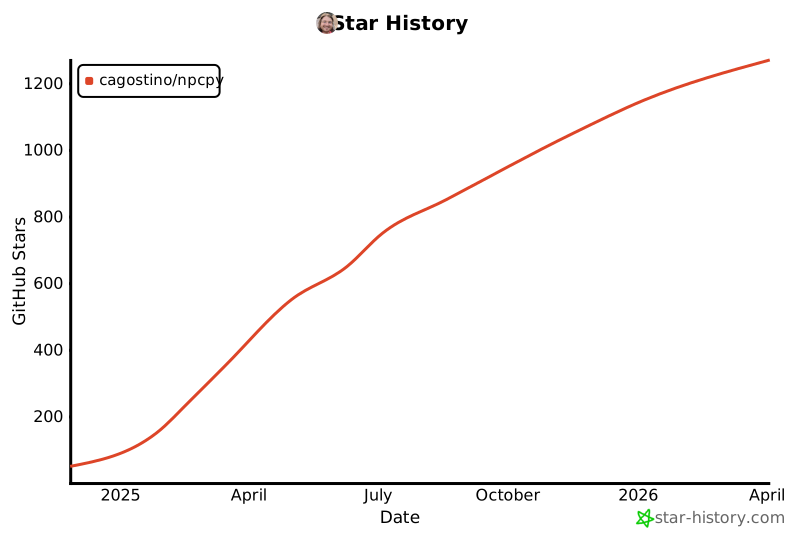
Star History
Release history Release notifications | RSS feed


Download files
Download the file for your platform. If you're not sure which to choose, learn more about installing packages.
Source Distribution
Built Distribution
Filter files by name, interpreter, ABI, and platform.
If you're not sure about the file name format, learn more about wheel file names.
Copy a direct link to the current filters
File details
Details for the file npcpy-1.4.19.tar.gz.
File metadata
- Download URL: npcpy-1.4.19.tar.gz
- Upload date:
- Size: 377.6 kB
- Tags: Source
- Uploaded using Trusted Publishing? No
- Uploaded via: twine/6.2.0 CPython/3.9.25
File hashes
| Algorithm | Hash digest | |
|---|---|---|
| SHA256 |
b773d078a5c168c61bbaf78d9c3d67786b0b9575d7a0f6ce91b92ea381c304cd
|
|
| MD5 |
9e17ef46302209a1b93bf871ee2b07fe
|
|
| BLAKE2b-256 |
e9869172aa7ac68d655ee9fc6c0554da47e960afec7a1a3eef4a9f5ea57c0434
|
File details
Details for the file npcpy-1.4.19-py3-none-any.whl.
File metadata
- Download URL: npcpy-1.4.19-py3-none-any.whl
- Upload date:
- Size: 341.2 kB
- Tags: Python 3
- Uploaded using Trusted Publishing? No
- Uploaded via: twine/6.2.0 CPython/3.9.25
File hashes
| Algorithm | Hash digest | |
|---|---|---|
| SHA256 |
31c500c705c1d636c45e34e4f14a1e89cb5e6a5b44400d41529737871dee21f8
|
|
| MD5 |
bbc4b4cda9c7760ae7aeceb3ead597be
|
|
| BLAKE2b-256 |
dc2853b35691e71498fbc2b296384aa1bc577363e530e0bccec6e6ab06122778
|






