
npcsh
The agentic shell for building and running AI teams from the command line.



npcsh makes the most of LLMs and agents through slash commands and interactive modes, all from the command line. Build teams of agents, schedule them on jobs, engineer context, and design custom Jinja Execution templates (Jinxes) for you and your agents to invoke.
To get started, view the latest release in the sidebar on github, and download the executable binary for your system. Once downloaded, ensure that it is executable.
#linux
chmod +x npcsh-binary-path
Then run the executable
./npcsh-binary-path
Alternatively, you can install with brew or pip.
brew install npcsh
pip install 'npcsh[lite]'
Once installed, run npcsh to enter the NPC shell. Also provides the CLI tools npc and npcsh-bench.
.npc files are directly executable with shebangs (#!/usr/bin/env npc):
npc ./myagent.npc "summarize this repo"     # run an NPC with a prompt
./myagent.npc "hello"                       # or just execute it (with shebang)
Benchmark Results
How well can a model drive npcsh as an agentic shell? 125 tasks across 15 categories — from basic shell commands to multi-step workflows, code debugging, and tool chaining — scored pass/fail. Comparisons with other agent coders coming soon. For a more comprehensive view of npcsh's capabilities and the advantages of the NPC Context-Agent-Tool data layer, check out ALARA for Agents: Least-Privilege Context Engineering Through Portable Composable Multi-Agent Teams
| Family | Model | Score |
|---|---|---|
| Kimi | k2.5 | 121/125 (97%) |
| Qwen3.5 | 0.8b | 31/125 (24%) |
| 2b | 81/125 (65%) | |
| 4b | 77/125 (62%) | |
| 9b | 100/125 (80%) | |
| 35b | 111/125 (88%) | |
| 397b | 120/125 (96%) | |
| Qwen3 | 0.6b | — |
| 1.7b | 42/125 (34%) | |
| 4b | 94/125 (75%) | |
| 8b | 85/125 (68%) | |
| 30b | 103/125 (82%) | |
| Gemma4 | e4b | 34/125 (27%) |
| 31b | 105/125 (84%) | |
| Gemma3 | 1b | — |
| 4b | 37/125 (30%) | |
| 12b | 77/125 (62%) | |
| 27b | 73/125 (58%) | |
| Llama | 3.2:1b | — |
| 3.2:3b | 26/125 (20%) | |
| 3.1:8b | 60/125 (48%) | |
| Mistral | small3.2 | 72/125 (57%) |
| ministral-3 | 51/125 (40%) | |
| large-3 | 59/125 (47%) | |
| Devstral | 2 | 60/125 (48%) |
| MiniMax | M2.7 | 120/125 (96%) |
| Phi | phi4 | 58/125 (46%) |
| GPT-OSS | 20b | 94/125 (75%) |
| OLMo2 | 7b | 13/125 (10%) |
| 13b | 47/125 (38%) | |
| Cogito | 3b | 10/125 (8%) |
| GLM | 4.7-flash | 102/125 (82%) |
| 5 | 120/125 (96%) | |
| Nemotron | 3-super | 49/125 (39%) |
| Gemini | 2.5-flash | — |
| 3.1-flash | — | |
| 3.1-pro | — | |
| Claude | 4.6-sonnet | — |
| 4.5-haiku | — | |
| GPT | 5-mini | — |
| DeepSeek | v4-flash | 99/125 (79%) |
| chat | — | |
| reasoner | — |
Category breakdown (completed models)
| Category | Qwen3.5 | Qwen3 | Gemma4 | Gemma3 | Llama | Mistral | Phi | GPT-OSS | Cogito | GLM | Kimi | Qwen3.5 | MiniMax | Devstral | Nemotron | DeepSeek | |||||||||||||
|---|---|---|---|---|---|---|---|---|---|---|---|---|---|---|---|---|---|---|---|---|---|---|---|---|---|---|---|---|---|
| 0.8b | 2b | 9b | 35b | 1.7b | 4b | 8b | 30b | 0.6b | e4b | 31b | 4b | 12b | 27b | 3.2:3b | small3.2 | ministral-3 | large-3 | phi4 | 20b | 3b | 4.7 | 5 | k2.5 | 397b | M2.7 | 2 | 3-super | v4-flash | |
| shell (10) | 5 | 6 | 10 | 10 | 8 | 8 | 9 | 9 | — | 6 | 10 | 6 | 6 | 9 | 6 | 10 | 7 | 8 | 9 | 10 | 0 | 10 | 10 | 10 | 10 | 10 | 9 | 7 | 8 |
| file-ops (10) | 8 | 9 | 10 | 10 | 8 | 10 | 9 | 10 | — | 5 | 8 | 6 | 9 | 10 | 2 | 6 | 10 | 8 | 10 | 10 | 0 | 10 | 9 | 10 | 10 | 9 | 10 | 5 | 9 |
| python (10) | 0 | 3 | 9 | 10 | 0 | 5 | 6 | 6 | — | 1 | 10 | 0 | 3 | 1 | 0 | 3 | 6 | 6 | 4 | 10 | 0 | 10 | 10 | 10 | 10 | 10 | 6 | 5 | 10 |
| data (10) | 0 | 2 | 4 | 6 | 2 | 4 | 5 | 6 | — | 0 | 9 | 1 | 5 | 7 | 0 | 5 | 9 | 5 | 4 | 6 | 0 | 5 | 9 | 9 | 9 | 9 | 4 | 4 | 9 |
| system (10) | 2 | 8 | 9 | 10 | 7 | 9 | 7 | 10 | — | 6 | 10 | 5 | 9 | 7 | 2 | 9 | 6 | 10 | 6 | 9 | 0 | 10 | 10 | 10 | 10 | 10 | 8 | 6 | 9 |
| text (10) | 1 | 7 | 6 | 8 | 2 | 10 | 6 | 7 | — | 0 | 8 | 3 | 9 | 8 | 1 | 7 | 0 | 0 | 4 | 8 | 0 | 7 | 10 | 10 | 10 | 10 | 0 | 0 | 10 |
| debug (10) | 2 | 6 | 10 | 10 | 0 | 4 | 2 | 10 | — | 4 | 0 | 0 | 3 | 0 | 0 | 4 | 0 | 2 | 0 | 9 | 0 | 9 | 10 | 10 | 10 | 10 | 0 | 3 | 10 |
| git (10) | 0 | 8 | 6 | 9 | 2 | 9 | 9 | 8 | — | 2 | 9 | 4 | 6 | 9 | 4 | 8 | 4 | 0 | 6 | 8 | 0 | 5 | 10 | 10 | 9 | 9 | 0 | 1 | 9 |
| multi-step (10) | 0 | 6 | 7 | 6 | 0 | 6 | 3 | 7 | — | 0 | 9 | 3 | 5 | 5 | 2 | 3 | 0 | 0 | 5 | 4 | 0 | 5 | 8 | 9 | 9 | 9 | 2 | 0 | 4 |
| scripting (10) | 1 | 5 | 8 | 10 | 0 | 7 | 2 | 6 | — | 0 | 9 | 0 | 2 | 1 | 0 | 3 | 1 | 6 | 3 | 7 | 0 | 8 | 10 | 9 | 9 | 10 | 8 | 2 | 5 |
| image-gen (5) | 5 | 5 | 5 | 5 | 5 | 5 | 5 | 5 | — | 5 | 5 | 3 | 5 | 3 | 5 | 5 | 1 | 5 | 2 | 5 | 5 | 5 | 5 | 5 | 5 | 5 | 5 | 5 | 0 |
| audio-gen (5) | 5 | 4 | 5 | 5 | 5 | 5 | 5 | 5 | — | 5 | 5 | 4 | 5 | 5 | 4 | 5 | 1 | 5 | 5 | 5 | 5 | 5 | 5 | 5 | 5 | 5 | 5 | 5 | 5 |
| web-search (5) | 1 | 5 | 4 | 5 | 1 | 5 | 4 | 5 | — | 0 | 5 | 1 | 5 | 5 | 0 | 4 | 5 | 0 | 0 | 3 | 0 | 5 | 5 | 5 | 5 | 5 | 0 | 2 | 5 |
| delegation (5) | 0 | 2 | 3 | 3 | 0 | 2 | 2 | 4 | — | 0 | 4 | 0 | 2 | 0 | 0 | 0 | 0 | 3 | 0 | 0 | 0 | 3 | 4 | 4 | 4 | 4 | 2 | 3 | 1 |
| tool-chain (5) | 1 | 5 | 4 | 4 | 2 | 5 | 2 | 5 | — | 0 | 4 | 1 | 3 | 3 | 0 | 0 | 1 | 1 | 0 | 0 | 0 | 5 | 5 | 5 | 5 | 5 | 1 | 1 | 5 |
| Total (125) | 31 | 81 | 100 | 111 | 42 | 94 | 76 | 103 | — | 34 | 105 | 37 | 77 | 73 | 26 | 72 | 51 | 59 | 58 | 94 | 10 | 102 | 120 | 121 | 120 | 120 | 60 | 49 | 99 |
python -m npcsh.benchmark.local_runner --model qwen3:4b --provider ollama
Usage
-
Get help with a task:
npcsh>can you help me identify what process is listening on port 5337?
-
Edit files:
npcsh>please read through the markdown files in the docs folder and suggest changes
-
Search & Knowledge
/web_search "cerulean city"            # Web search
/db_search "query"                     # Database search
/file_search "pattern"                 # File search
/memories                              # Interactive memory browser TUI
-
Computer Use
/computer_use
-
Multi-Agent Discussions
/convene "Is the universe a simulation?" npcs=alicanto,corca,guac rounds=3


Agent Formats
npcsh supports multiple ways to define agents inside your npc_team/ directory. You can mix all three formats — .npc files take precedence if names collide.
.npc files — Full-featured YAML agent definitions with model, provider, jinxes, and more:
#!/usr/bin/env npc
name: analyst
primary_directive: You analyze data and provide insights.
model: qwen3:8b
provider: ollama
jinxes:
  - skills/data-analysis
agents.md — Define multiple agents in a single markdown file. Each ## heading = agent name, body = directive:
## summarizer
You summarize long documents into concise bullet points.

## fact_checker
You verify claims against reliable sources and flag inaccuracies.
agents/ directory — One .md file per agent. Filename (minus .md) = agent name. Supports YAML frontmatter:
---
model: gemini-2.5-flash
provider: gemini
---
You translate content between languages while preserving tone and idiom.
All three formats are supported by both the Python and Rust editions of npcsh. Agents from agents.md and agents/ inherit the team's default model/provider from team.ctx.
The full team structure:
npc_team/
├── team.ctx           # Team config (model, provider, forenpc, context)
├── coordinator.npc    # YAML agent definitions
├── analyst.npc
├── agents.md          # Markdown-defined agents
├── agents/            # One .md file per agent
│   └── translator.md
├── jinxes/            # Workflows and tools
│   ├── research.jinx
│   └── skills/        # Knowledge-content skills
└── tools/             # Custom tool functions
This means you can bring agents from other ecosystems — if you already have an agents.md or an agents/ directory from Claude Code, Codex, Amp, or any other tool, just drop them into your npc_team/ and npcsh will pick them up alongside your .npc files.
Launching AI Coding Tools with NPC Teams
Your npc_team/ works beyond npcsh — you can launch any major AI coding tool as an NPC from your team using the CLI launchers from npcpy. Each tool gets the NPC's persona injected and gains awareness of the other team members.
pip install npcpy   # if not already installed

# Launch Claude Code as an NPC (interactive picker)
npc-claude

# Launch as a specific NPC
npc-claude --npc corca

# Same for other coding tools
npc-codex --npc researcher
npc-gemini --npc analyst
npc-opencode --npc coder
npc-aider --npc reviewer
npc-amp --npc writer

# Point to a specific team directory
npc-claude --team ./my_project/npc_team
The launcher discovers your team from ./npc_team or ~/.npcsh/npc_team, lets you pick an NPC, and starts the tool with that NPC's directive. For Claude Code, it also passes the other NPCs as sub-agents via --agents.
For deeper integration (jinxes exposed as MCP tools, team switching mid-conversation), register the NPC plugin:
npc-plugin claude    # install MCP server + hooks
npc-plugin codex     # same for Codex
npc-plugin gemini    # same for Gemini CLI
Features
- Agents (NPCs) — AI agents with personas, directives, and tool sets
- Team Orchestration — Delegation, review loops, multi-NPC discussions
- Jinxes — Jinja Execution templates — reusable tools for users and agents
- Skills — Knowledge-content jinxes with progressive section disclosure
- NQL — SQL models with embedded AI functions (Snowflake, BigQuery, Databricks, SQLite)
- Knowledge Graphs — Build and evolve knowledge graphs from conversations
- Deep Research — Multi-agent hypothesis generation, persona sub-agents, paper writing
- Computer Use — GUI automation with vision
- Image, Audio & Video — Generation via Ollama, diffusers, OpenAI, Gemini
- MCP Integration — Full MCP server support with agentic shell TUI
- API Server — Serve teams via OpenAI-compatible REST API
- Self-updating —
/updatechecks pip/cargo/brew and tells you the command to upgrade - Self-healing —
/doctorauto-fixes stale permissions, broken configs, and DB corruption
Works with all major LLM providers through LiteLLM: ollama, openai, anthropic, gemini, deepseek, openai-like, and more.
Installation
pip install 'npcsh[lite]'        # API providers (ollama, gemini, anthropic, openai, etc.)
pip install 'npcsh[local]'       # Local models (diffusers/transformers/torch)
pip install 'npcsh[yap]'         # Voice mode
pip install 'npcsh[all]'         # Everything
System dependencies
Linux:
sudo apt-get install espeak portaudio19-dev python3-pyaudio ffmpeg libcairo2-dev libgirepository1.0-dev
curl -fsSL https://ollama.com/install.sh | sh
ollama pull qwen3.5:2b
macOS:
brew install portaudio ffmpeg pygobject3 ollama
brew services start ollama
ollama pull qwen3.5:2b
Windows: Install Ollama and ffmpeg, then ollama pull qwen3.5:2b.
API keys go in a .env file:
export OPENAI_API_KEY="your_key"
export ANTHROPIC_API_KEY="your_key"
export GEMINI_API_KEY="your_key"
Rust Edition (experimental)
A native Rust build of npcsh is available — same shell, same DB, same team files, faster startup. Still experimental.
cd npcsh/rust && cargo build --release
cp target/release/npcrsh ~/.local/bin/npc   # or wherever you want
Both editions share ~/npcsh_history.db and ~/.npcsh/npc_team/ and can be used interchangeably.
Read the Docs
Full documentation, guides, and API reference at npc-shell.readthedocs.io.
Links
- npcpy — Python framework for building AI agents and teams
- Incognide — Desktop workspace for the NPC Toolkit (download)
- Newsletter — Stay in the loop
Research
- Quantum-like nature of natural language interpretation: arxiv, accepted at QNLP 2025
- Simulating hormonal cycles for AI: arxiv
Community & Support
Discord | Monthly donation | Merch | Consulting: info@npcworldwi.de
Contributing
Contributions welcome! Submit issues and pull requests on the GitHub repository.
License
MIT License.
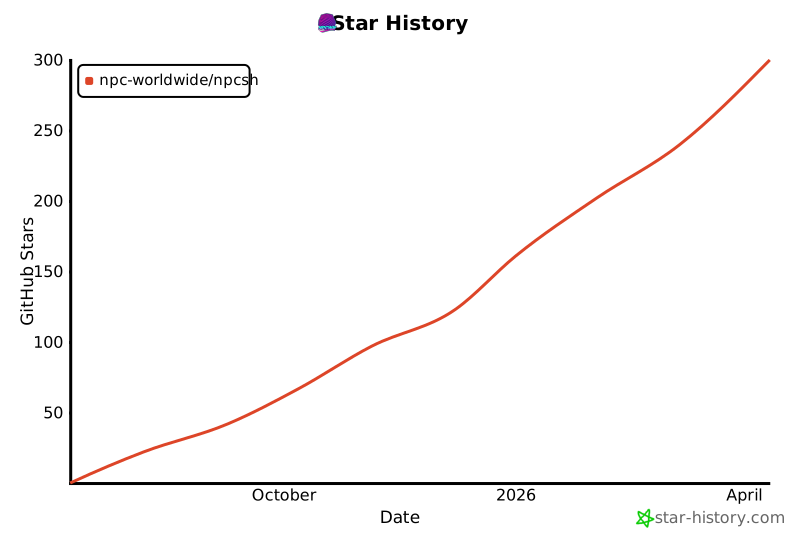
Star History
1 maintainer

Download files
Download the file for your platform. If you're not sure which to choose, learn more about installing packages.
Source Distribution
Built Distributions
Filter files by name, interpreter, ABI, and platform.
If you're not sure about the file name format, learn more about wheel file names.
Copy a direct link to the current filters
File details
Details for the file npcsh-1.2.37.tar.gz.
File metadata
- Download URL: npcsh-1.2.37.tar.gz
- Upload date:
- Size: 20.0 MB
- Tags: Source
- Uploaded using Trusted Publishing? No
- Uploaded via:
twine/6.2.0 CPython/3.9.25
File hashes
| Algorithm | Hash digest | |
|---|---|---|
| SHA256 |
330fb75f5cc8fdbffb0af6342d058a619c70227c19e0101c73fd3e823f690bef
|
|
| MD5 |
8fda88fcc03d6c1dbda2ef6e5fb18e0e
|
|
| BLAKE2b-256 |
53cd21a28bda63054f5b9e6b209c3646426effa2a4fc4344261316b8d479e67c
|
File details
Details for the file npcsh-1.2.37-py3-none-win_amd64.whl.
File metadata
- Download URL: npcsh-1.2.37-py3-none-win_amd64.whl
- Upload date:
- Size: 27.6 MB
- Tags: Python 3, Windows x86-64
- Uploaded using Trusted Publishing? No
- Uploaded via:
twine/6.2.0 CPython/3.9.25
File hashes
| Algorithm | Hash digest | |
|---|---|---|
| SHA256 |
27f1a160df134f5baa59decdf34a1ea15563c867298d9b135fc2f103d90ba244
|
|
| MD5 |
7fd5555cd7781fd2d9ec1ae2b2ac5ce2
|
|
| BLAKE2b-256 |
f2de1a83151cd6f4eab81f5c0d7641b2f87ecac8cdfe550f3437d77e20f6422b
|
File details
Details for the file npcsh-1.2.37-py3-none-manylinux_2_35_x86_64.whl.
File metadata
- Download URL: npcsh-1.2.37-py3-none-manylinux_2_35_x86_64.whl
- Upload date:
- Size: 29.1 MB
- Tags: Python 3, manylinux: glibc 2.35+ x86-64
- Uploaded using Trusted Publishing? No
- Uploaded via:
twine/6.2.0 CPython/3.9.25
File hashes
| Algorithm | Hash digest | |
|---|---|---|
| SHA256 |
3078cd0dc99b2061c31d63dbe40c3605ab768d0e7fac0bb323e95fa3f5946182
|
|
| MD5 |
93da0ff9f76380c4837cf0b9b024d45a
|
|
| BLAKE2b-256 |
2e6c60da19636a03a7723d33b80f788ab5b60f9bfa88db2951ff7e92298e8046
|
File details
Details for the file npcsh-1.2.37-py3-none-macosx_14_0_arm64.whl.
File metadata
- Download URL: npcsh-1.2.37-py3-none-macosx_14_0_arm64.whl
- Upload date:
- Size: 28.0 MB
- Tags: Python 3, macOS 14.0+ ARM64
- Uploaded using Trusted Publishing? No
- Uploaded via:
twine/6.2.0 CPython/3.9.25
File hashes
| Algorithm | Hash digest | |
|---|---|---|
| SHA256 |
1377eea7e1aac8748bf6878dfe935d85b09613f3a458287fa173fc13e0c5522e
|
|
| MD5 |
8fdbfea2e293286f599ec6a8fb04da88
|
|
| BLAKE2b-256 |
52a443e8d860c5735eb795064ac33232d6a5464c4a6847da3d7e8a5903ee5601
|
File details
Details for the file npcsh-1.2.37-py3-none-macosx_13_0_x86_64.whl.
File metadata
- Download URL: npcsh-1.2.37-py3-none-macosx_13_0_x86_64.whl
- Upload date:
- Size: 28.5 MB
- Tags: Python 3, macOS 13.0+ x86-64
- Uploaded using Trusted Publishing? No
- Uploaded via:
twine/6.2.0 CPython/3.9.25
File hashes
| Algorithm | Hash digest | |
|---|---|---|
| SHA256 |
3cd810d6f89002772fe0c6641aa7fd0781c7b9122946ee81d4c3e24042c87c85
|
|
| MD5 |
cc1ea0dcad31d5a14c067ba9f5a8780c
|
|
| BLAKE2b-256 |
beb2151a1bf31b1f479421015130f6a76219e95f4b011268b1eede1b509963f0
|







