
CLI Tools to check dependencies of a node project github repository

Project description

NPMVALIDDEP
CLI tool made in python to check and update the npm package dependencies in github repositories
Explore the docs »
View Demo
·
Report Bug
·
Request Feature
Table of Contents
About The Project
NPMVALIDDEP is a cli tool made in python used to check the version of NPM packages in a github repository of NodeJs project. You can specify multiple packages to check and also specify if you want to raise a PR in case the packages are not up-to-date. It works for public as well as private repositories (provided that you are authorised to access the repository), in case you are the owner of the repository then instead of raising a PR it will directly commit to the repository main brach.
Built With
Getting Started
Below listed are the detailed steps to install the package with the prereqisites required.
Prerequisites
You need to have following things installed:
Installation
Create a python virtual environment and install the npmvaliddep package using pip project_url
pip install npmvaliddep
Usage
In order to ensure that you can access the private repositories, you need to add your github username and authentication token (Don't worry we store your token locally and never reveal it even to you :sunglasses:)
To check your cofigured github username and password:
npmvaliddep --getgithubcreds
To configure your cofigured github username and password:
npmvaliddep --setgithubcreds
To check if the stored password matched your password:
npmvaliddep --matchgithubpass
To perform dependency check of multiple github repositories and packages:
-
(Required) Create a csv file with the following headers and enter the rows accordingly.
-
(Required) Specify the path to the csv using --check flag
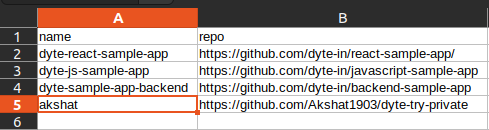
npmvaliddep --check '/home/user/checkrepos.csv'
- (Required) Specify the dependencies you need to check using the --deps flag
npmvaliddep --check '/home/user/checkrepos.csv' --deps axios@0.23.0 cookie-parser@1.4.6
- (Optional) By default the output csv will be generated in the user home directory but if you want to change that you can specify the path using --output flag
npmvaliddep --check '/home/user/checkrepos.csv' --deps axios@0.23.0 cookie-parser@1.4.6 --output '/home/user/Downloads/output.csv'

- (Optional) If you waant to generate a PR to update the dependencies then you can pass a --createpr flag
npmvaliddep --check '/home/user/checkrepos.csv' --deps axios@0.23.0 cookie-parser@1.4.6 --output '/home/user/Downloads/output.csv' --createpr

Contributing
Contributions are what make the open source community such an amazing place to learn, inspire, and create. Any contributions you make are greatly appreciated.
If you have a suggestion that would make this better, please fork the repo and create a pull request. You can also simply open an issue with the tag "enhancement". Don't forget to give the project a star! Thanks again!
- Fork the Project
- Create your Feature Branch (
git checkout -b feature/AmazingFeature) - Commit your Changes (
git commit -m 'Add some AmazingFeature') - Push to the Branch (
git push origin feature/AmazingFeature) - Open a Pull Request
License
Distributed under the MIT License. See LICENSE.txt for more information.
Contact
Akshat Gupta - @linkedin_handle - Mail me
Project Link: https://github.com/dyte-submissions/dyte-vit-2022-Akshat1903
Acknowledgments
- I would like to thank dyte recruitment team to give this challenging task and focusing on the other half of the students who don't only crave for DSA :wink:
Release history Release notifications | RSS feed

Download files
Download the file for your platform. If you're not sure which to choose, learn more about installing packages.
Source Distribution
Built Distribution
Filter files by name, interpreter, ABI, and platform.
If you're not sure about the file name format, learn more about wheel file names.
Copy a direct link to the current filters
File details
Details for the file npmvaliddep-2.1.3.tar.gz.
File metadata
- Download URL: npmvaliddep-2.1.3.tar.gz
- Upload date:
- Size: 12.8 kB
- Tags: Source
- Uploaded using Trusted Publishing? No
- Uploaded via: twine/4.0.0 CPython/3.10.4
File hashes
| Algorithm | Hash digest | |
|---|---|---|
| SHA256 |
01e38568badbac61e9eaaba3c931d1607735d4c3e36bf0d8ef55ffcbd2b5c5df
|
|
| MD5 |
bb146441ff2257418e3f471675ed9d7e
|
|
| BLAKE2b-256 |
a78385b90e99df98ddf5a130e7626a0eab5de9aee3b1c78a46cb039c486d8faf
|
File details
Details for the file npmvaliddep-2.1.3-py3-none-any.whl.
File metadata
- Download URL: npmvaliddep-2.1.3-py3-none-any.whl
- Upload date:
- Size: 10.2 kB
- Tags: Python 3
- Uploaded using Trusted Publishing? No
- Uploaded via: twine/4.0.0 CPython/3.10.4
File hashes
| Algorithm | Hash digest | |
|---|---|---|
| SHA256 |
a521a736d26bab06676174237ee2006f1d4f48088f663cdaf205b737d24f3288
|
|
| MD5 |
c7d91dcbd2b9fb49c16a31638092a0ba
|
|
| BLAKE2b-256 |
c4e5ec5729dfcdb34ff42b28f1c6328871ce29925d38c8aba24d44023f0e0442
|






