
nprompter
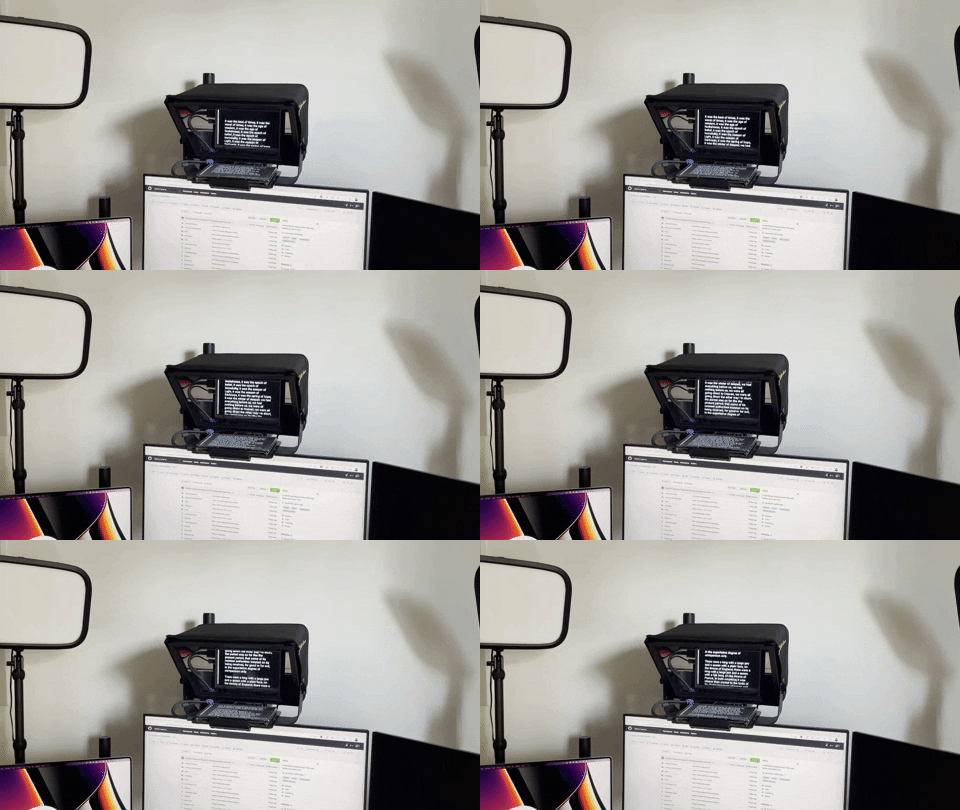
A browser-based web teleprompter powered by Notion as a backend for editing and storing scripts.



Read the full documentation: https://nprompter.org/
Key Features
- 📝 Write in Notion: Draft and update scripts in your existing Notion workspace.
- 📺 Browser Teleprompter: High-contrast, smooth auto-scrolling with horizontal mirroring for teleprompter glass.
- 🎛️ Full Keyboard & Remote Control: Adjust speed, font size, padding, line height, or jump to top with keyboard or wireless presenter remotes (clickers).
- 🏷️ Director Cues & Formatting: Hide private stage notes via custom colors or brackets (
[...]), and ignore footnotes after dividers (---). - 📚 Multi-Database Support: Aggregate scripts across multiple Notion databases with customized filtering and sorting.
- 📱 Installable PWA: Offline-ready Progressive Web App with local settings persistence.
Installation
Install nprompter using pip or uv:
pip install nprompter
Quickstart
1. Set your Notion API Key
export NOTION_API_KEY="secret_..."
(See the Notion Integration Guide to learn how to create your token and share your database).
2. Generate Your Teleprompter
Build the static teleprompter files for a Notion database:
nprompter build [DATABASE_ID]
3. Launch the Teleprompter
Start a local web server and open the teleprompter directly in your browser:
nprompter serve
Quick Reference & Commands
nprompter build [DATABASE_ID] [OPTIONS]: Fetch pages and render the HTML teleprompter website.nprompter serve [PORT] [DIRECTORY]: Serve the generated files locally (default port:8889).nprompter create-config: Generate a customizablenprompter.tomlconfiguration file.
Essential In-Prompter Shortcuts
| Key | Action |
|---|---|
| Space / F5 | Start / Pause auto-scrolling |
| → / ← | Adjust scroll speed |
| Q / W | Decrease / Increase font size |
| M | Mirror screen (horizontal flip for glass reflection) |
| F | Fullscreen mode |
| H | Show keyboard shortcuts help modal |
See the Keyboard Controls & Remote Guide for all available shortcuts.
1 maintainer

Metadata
1 maintainer
Release files for nprompter 4.4.4
For a detailed explanation of source distributions (sdists) and built distributions (wheels), please see the package formats documentation.
Source distribution (sdist)
| File | Size | Uploaded | |
|---|---|---|---|
| nprompter-4.4.4.tar.gz | 109.5 kB | Details |
Built distribution (wheel)
| File | Interpreter | ABI | Platform | Reset |
|---|---|---|---|---|
| nprompter-4.4.4-py3-none-any.whl | Python 3 | none | any | Details |
Total release size: 222.0 kB
Release files / nprompter-4.4.4.tar.gz
| Download URL | nprompter-4.4.4.tar.gz |
|---|---|
| Size | 109.5 kB |
| Tags | Source |
|
SHA-256 checksum How to use checksums |
9c3a472d23c1974d712209ea51ad3fc18000b4bac19aad659ac45316a3ad4bab
|
|
BLAKE2b-256 checksum How to use checksums |
aadd9f100a49781f487283864668ea74600a5d9c72f9a3012b558f75c4f298ed
|
| Upload date | |
|
Uploaded using Trusted Publishing? What is trusted publishing? |
No |
| Uploaded via |
uv/0.12.7 {"installer":{"name":"uv","version":"0.12.7","subcommand":["publish"]},"python":null,"implementation":{"name":null,"version":null},"distro":{"name":"Ubuntu","version":"24.04","id":"noble","libc":null},"system":{"name":null,"release":null},"cpu":null,"openssl_version":null,"setuptools_version":null,"rustc_version":null,"ci":true}
|
Release files / nprompter-4.4.4-py3-none-any.whl
| Download URL | nprompter-4.4.4-py3-none-any.whl |
|---|---|
| Size | 112.6 kB |
| Tags | Python 3 |
|
SHA-256 checksum How to use checksums |
7523fe6704e3fe94969f97fcd17db4b869c0486d285f11153999ac9276d2ed50
|
|
BLAKE2b-256 checksum How to use checksums |
dbe4ff7d87c081e807e55e89bf3ddfe447ae593291578277598be14713b7b63f
|
| Upload date | |
|
Uploaded using Trusted Publishing? What is trusted publishing? |
No |
| Uploaded via |
uv/0.12.7 {"installer":{"name":"uv","version":"0.12.7","subcommand":["publish"]},"python":null,"implementation":{"name":null,"version":null},"distro":{"name":"Ubuntu","version":"24.04","id":"noble","libc":null},"system":{"name":null,"release":null},"cpu":null,"openssl_version":null,"setuptools_version":null,"rustc_version":null,"ci":true}
|














