
npviz
visualize how neural network architectures change during training. built for models that grow, shrink, prune heads, add layers, or rewire themselves while they learn.
what it does
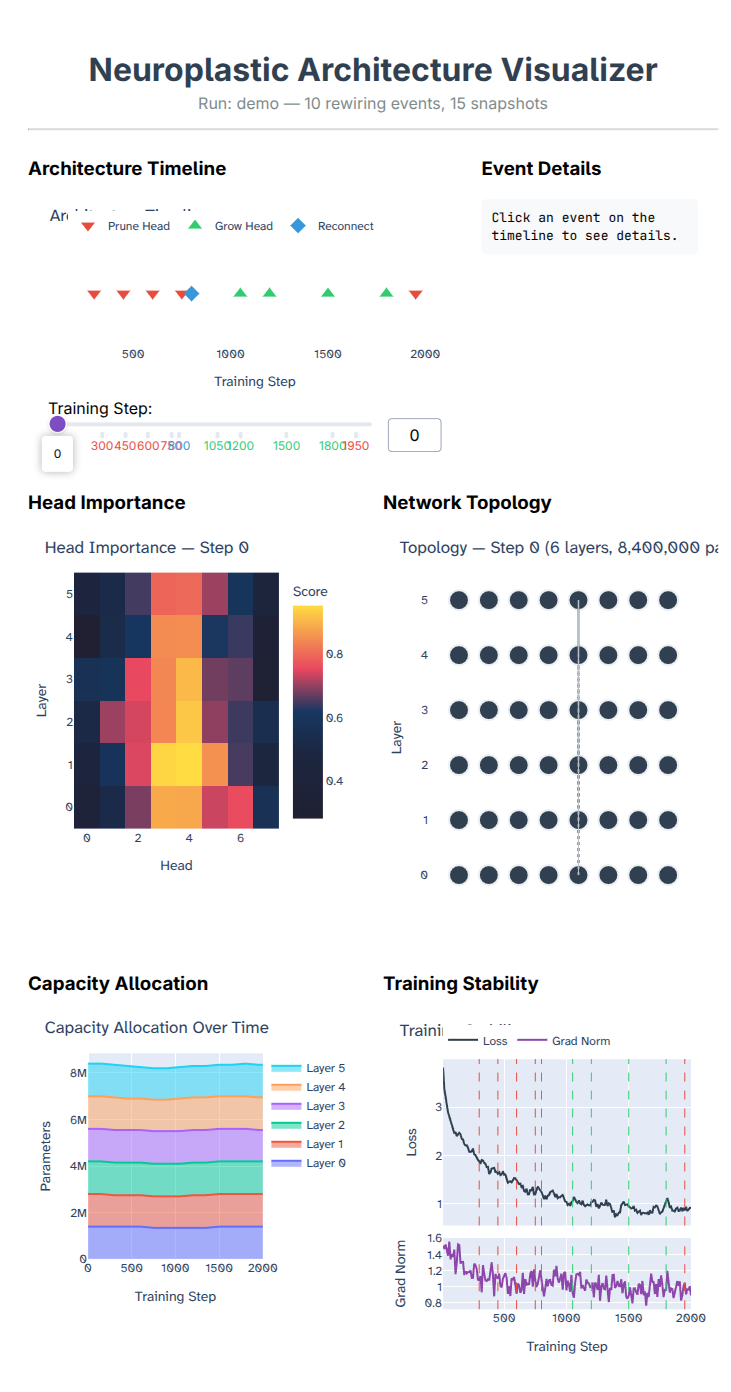
you hook npviz into your training loop. it records snapshots of the architecture (how many layers, how many heads, parameter counts) and any structural events (pruned a head, grew a layer, etc). then you point the viewer at the logs and get an interactive dashboard.
the dashboard has six panels:
- architecture timeline - every structural event plotted on a horizontal axis. click one to see details
- event details - what happened, which layer, why, and the loss impact
- head importance - heatmap of attention head importance scores across layers
- network topology - the actual shape of the network at a given step. heads as circles, layers as rows
- capacity allocation - stacked area chart of parameter count per layer over time. you can see the model redistribute capacity as it trains
- training stability - loss curve with vertical markers at every rewiring event, plus grad norm subplot
there's also a slider to scrub through training steps and watch the architecture evolve.
install
pip install npviz
for model adapters (hooking into real pytorch models):
pip install npviz[adapters]
for structured pruning integration:
pip install npviz[pruning]
for video export:
pip install npviz[video]
quick start
python -m npviz serve path/to/run/logs

python -m npviz serve examples/resnet56-pruning
python -m npviz serve examples/neuroplastic-transformer
recording your own runs
from npviz import Recorder
from npviz.schema import RewireEvent, ImportanceSnapshot

recorder = Recorder("runs/my_experiment")

recorder.log_snapshot(step=0, model)

recorder.log_metrics(step=100, loss=2.34, grad_norm=1.2, lr=3e-4)

recorder.log_rewire(RewireEvent(
    step=5000,
    event_type="prune_head",
    layer_idx=4,
    head_idx=2,
    reason="importance below threshold",
    loss_before=1.82,
    loss_after=1.91,
))

recorder.log_importance(ImportanceSnapshot(step=5000, scores=[[0.9, 0.1, ...], ...]))

recorder.close()
if you're using pytorch, the adapters handle the model introspection for you:
from npviz.adapters import auto_detect

adapter = auto_detect(model)
recorder.attach(adapter)
recorder.log_snapshot(step, adapter)
torch-pruning integration
if you're using Torch-Pruning for structured pruning, there's a callback that auto-logs everything:
from npviz.adapters.torch_pruning import TorchPruningAdapter, PruningCallback

adapter = TorchPruningAdapter(model)
recorder = Recorder("runs/pruning")
cb = PruningCallback(adapter, recorder)

cb.wrap_pruner(pruner)
pruner.step()
examples
neuroplastic transformer (growing + pruning)
a transformer language model that starts at 2 layers and grows its own architecture during training. it adds layers when gradient signals suggest the model needs more capacity, prunes layers whose residual weights drop to zero, splits high-utility attention heads, and merges redundant ones. trained on FineWeb-Edu on a single A100.
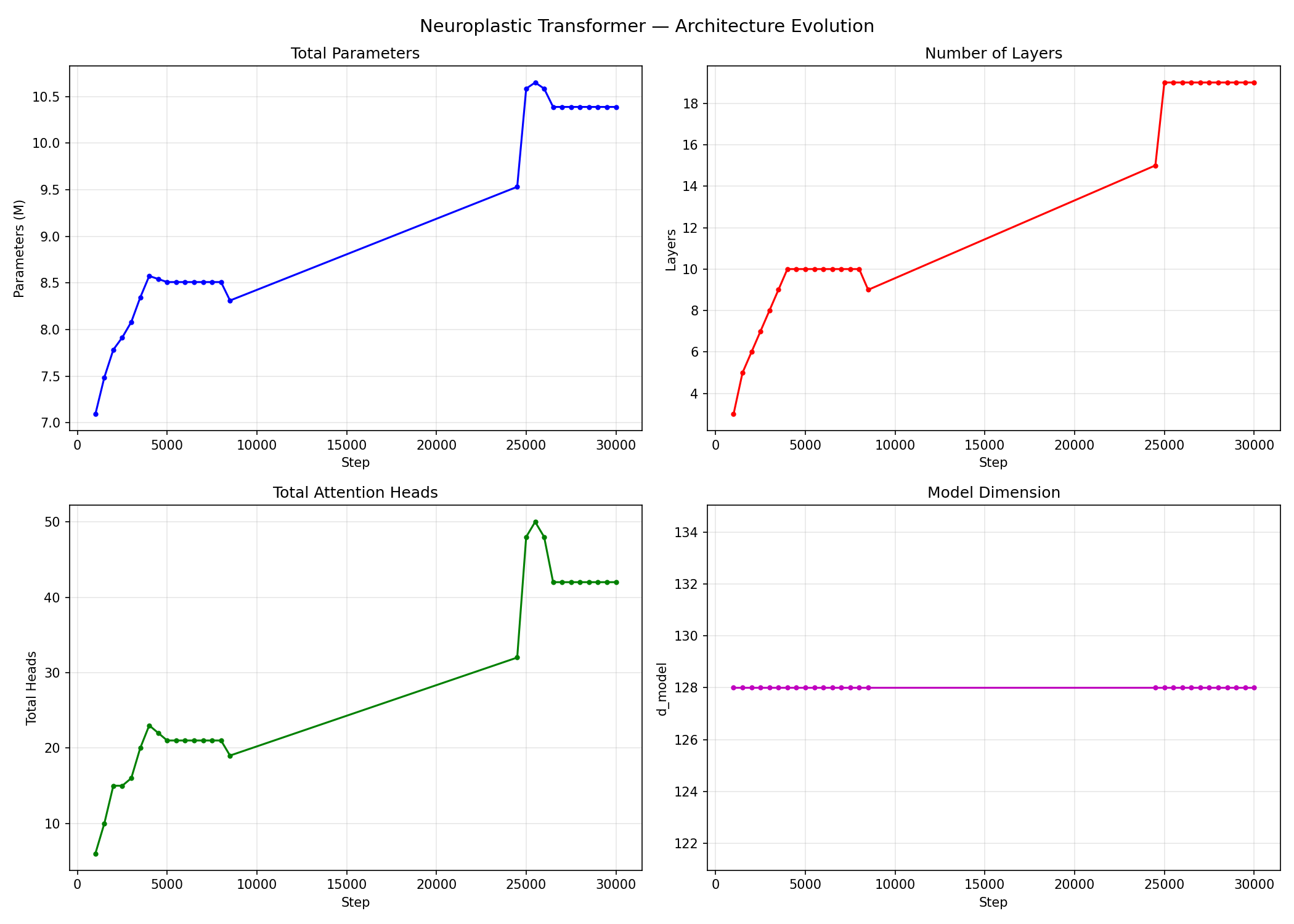
over 30k steps the model made 236 structural changes and went from 2 layers / 6.9M params to 19 layers / 10.4M params. it discovered a non-uniform architecture on its own. middle layers grew 3 attention heads while everything else stayed at 2. between steps 10k-20k it stopped growing entirely and just refined weights, then went through a second growth burst around 25k.
| start | end | |
|---|---|---|
| layers | 2 | 19 |
| params | 6.9M | 10.4M |
| heads | 4 | 42 |
| loss | 10.69 | 4.17 |
| structural events | 0 | 236 |
python -m npviz serve examples/neuroplastic-transformer
resnet56 structured pruning (shrinking)
resnet-56 on CIFAR-10, pruned with Torch-Pruning using L1 magnitude importance. every 5 epochs, 15% of channels get removed globally. the model recovers accuracy within a few epochs after each round.
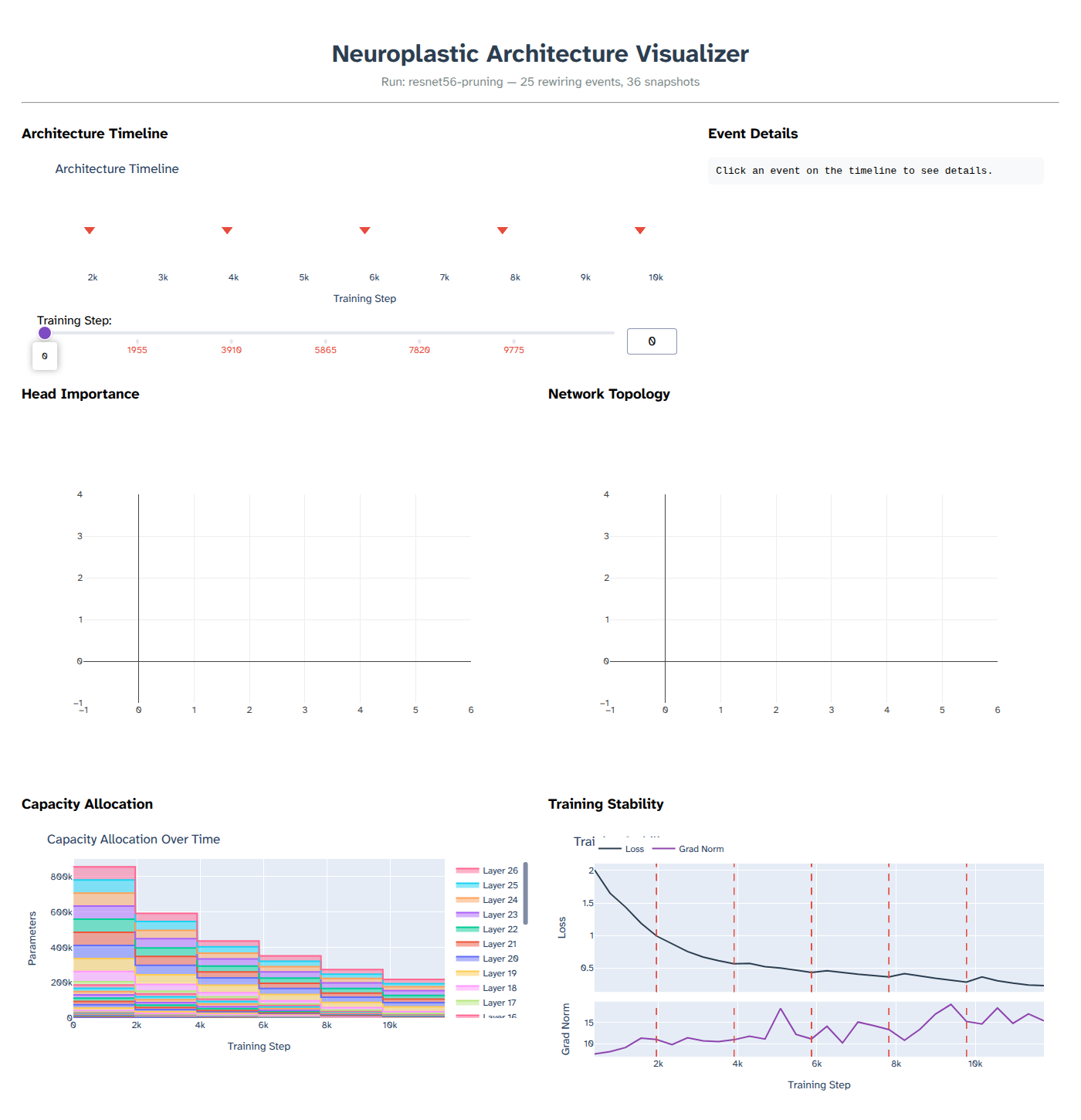
trained on a T4 GPU. 5 pruning rounds over 30 epochs. the model lost 74.5% of its parameters and still hit 87.4% test accuracy, only a couple points below a full-size resnet-56.
| start | end | |
|---|---|---|
| params | 855,770 | 218,643 |
| pruned | - | 74.5% |
| test accuracy | - | 87.4% |
| pruning rounds | - | 5 |
the capacity allocation chart shows how the model shrinks asymmetrically. some layers lose more channels than others depending on their L1 importance scores.
python -m npviz serve examples/resnet56-pruning
the training script is at examples/resnet56-pruning/run_pruning.py if you want to reproduce it.
cli
python -m npviz serve <log_dir> [--port 8050] [--debug]
python -m npviz summary <log_dir>
python -m npviz export <log_dir> [-o figures/] [-f svg|pdf|png]
python -m npviz video <log_dir> [-o evolution.mp4] [--scene overview|architecture|importance] [--quality low|medium|high|4k]
data format
npviz stores everything as newline-delimited JSON in a directory:
runs/my_experiment/
  snapshots.jsonl
  events.jsonl
  importance.jsonl
  metrics.jsonl
each file is append-only so you can watch a live run. the viewer reloads from disk.
project structure
npviz/
  schema.py
  recorder.py
  plots.py
  export.py
  cli.py
  viewer/
  video/
  adapters/
  examples/
  screenshots/
1 maintainer

Metadata
1 maintainer
Release files for npviz 0.1.1
For a detailed explanation of source distributions (sdists) and built distributions (wheels), please see the package formats documentation.
Source distribution (sdist)
| File | Size | Uploaded | |
|---|---|---|---|
| npviz-0.1.1.tar.gz | 518.1 kB | Details |
Built distribution (wheel)
| File | Interpreter | ABI | Platform | Reset |
|---|---|---|---|---|
| npviz-0.1.1-py3-none-any.whl | Python 3 | none | any | Details |
Total release size: 1.0 MB
Release files / npviz-0.1.1.tar.gz
| Download URL | npviz-0.1.1.tar.gz |
|---|---|
| Size | 518.1 kB |
| Tags | Source |
|
SHA-256 checksum How to use checksums |
d3bda35b7bc41e4f86d766fc08f0f962b9a00255971742f26627b02081efae55
|
|
BLAKE2b-256 checksum How to use checksums |
527a5977cf6eb4ab19e67271489da7beeeea79694a6585787dd2d0de134122d0
|
| Upload date | |
|
Uploaded using Trusted Publishing? What is trusted publishing? |
No |
| Uploaded via |
twine/6.2.0 CPython/3.14.3
|
Release files / npviz-0.1.1-py3-none-any.whl
| Download URL | npviz-0.1.1-py3-none-any.whl |
|---|---|
| Size | 520.5 kB |
| Tags | Python 3 |
|
SHA-256 checksum How to use checksums |
00812017b9f386a6eece290fadef19d1d16d05a83be1d7600f75b4d90a17d3b4
|
|
BLAKE2b-256 checksum How to use checksums |
42e76e9c3851869c1f82450b552356276c3e92ad1037a20c11ce0bafc0ab74bd
|
| Upload date | |
|
Uploaded using Trusted Publishing? What is trusted publishing? |
No |
| Uploaded via |
twine/6.2.0 CPython/3.14.3
|














