
NQRduck
Installation
Requirements
- Python 3.10+
- pip
- virtualenv
Setup
-
Clone the repository
-
Create a virtual environment and activate it:
python -m venv venv
source venv/bin/activate
You can install the nqrduck core via PyPi or from the cloned repository.
3. Install the package with pip install .[all] to install all available NQRduck modules inside the cloned repository or just pip install "nqrduck[all]" to install the core package from PyPi.
Careful here you might need additional dependencies specified in the respective module repositories.
If you only want to install some base modules use pip install .[base] inside the cloned repository or with pip install -U "nqrduck[base]" .
You can find the different modules here.
4. Run the program with nqrduck.
Usage
Individual features of the software can be installed as separate Python packages, like spectrometer control, pulse sequence programming or simulation of magnetic resonance experiments. The available functionality of the NQRduck program therefore depends on the installed packages.
The UI is structured as follows:
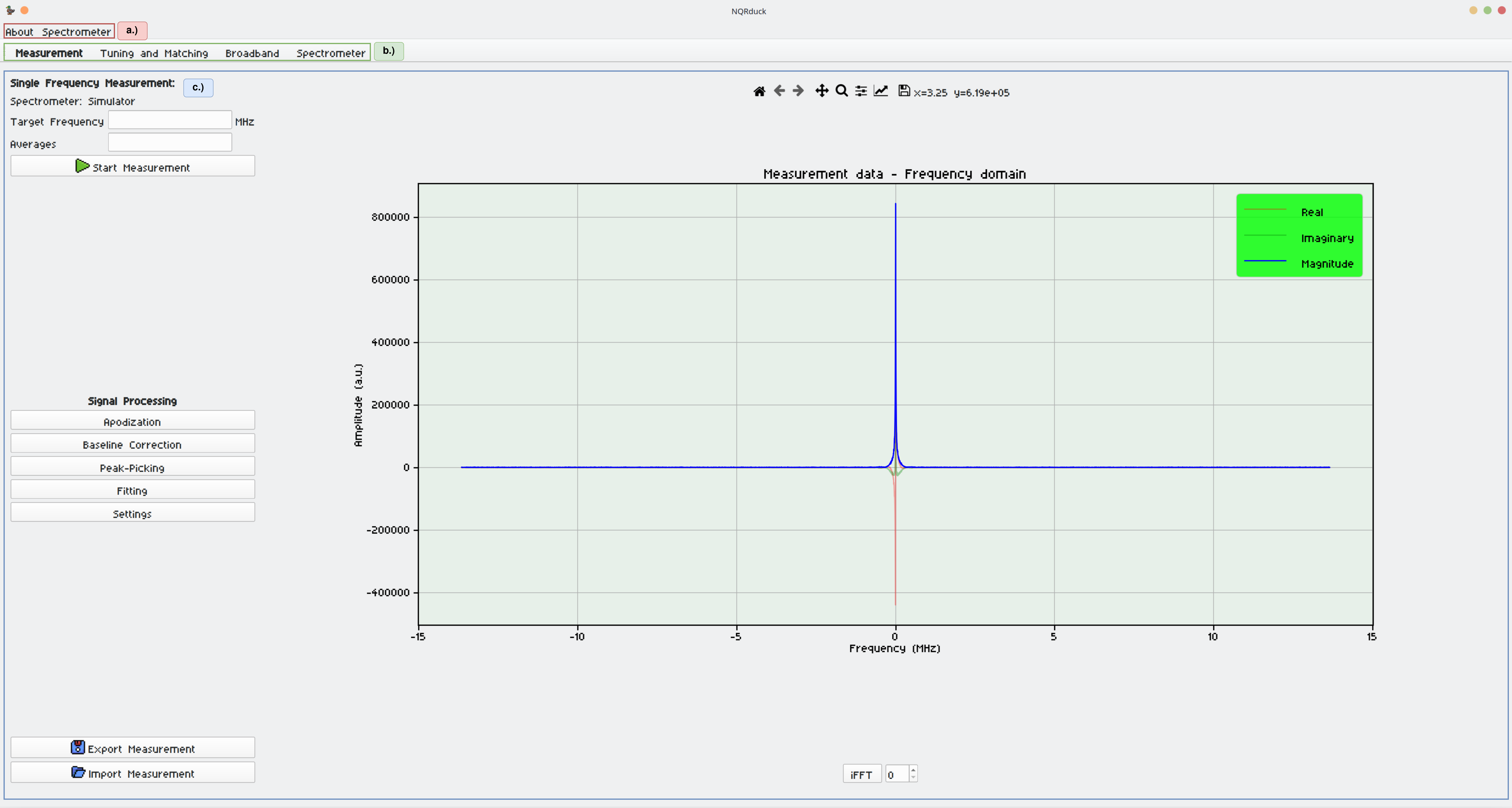
The UI is separated into different areas. Section 'a', highlighted in red, represents the menu bar used for general settings of the program and spectrometer selection. Section 'b', outlined in green, allows switching among various modules within the main view of the core, with the active module displayed in bold. Section 'c', depicted in blue, is the active module's view. The currently active module in the figure is the nqrduck-measurement module used for single frequency mangetic resonance experiments. The overall application is part of the NQRduck core and opens when the NQRduck core is started.
Uninstall
To uninstall the nqrduck program you can run the following command in the terminal while the virtual environment is activated:
nqrduck --uninstall
License
This project is licensed under the MIT License - see the LICENSE file for details
Contributing: Developing NQRduck modules
A template module is provided here. It is a good starting point for developing new modules.
If you want to contribute to the core, please add an issue or a pull request :).
Metadata
Release files for nqrduck 0.0.12
For a detailed explanation of source distributions (sdists) and built distributions (wheels), please see the package formats documentation.
Source distribution (sdist)
| File | Size | Uploaded | Provenance | |
|---|---|---|---|---|
| nqrduck-0.0.12.tar.gz | 1.1 MB | Without provenance | Details |
Built distribution (wheel)
| File | Interpreter | ABI | Platform | Reset |
|---|---|---|---|---|
| nqrduck-0.0.12-py3-none-any.whl | Python 3 | none | any | Details |
Total release size: 1.3 MB
Release files / nqrduck-0.0.12.tar.gz
| Download URL | nqrduck-0.0.12.tar.gz |
|---|---|
| Size | 1.1 MB |
| Tags | Source |
|
SHA-256 checksum How to use checksums |
da3f56aa0db8b1e00655e9c939a2be71cd17a3d145c1e9cc19fcad4fc6753cce
|
|
BLAKE2b-256 checksum How to use checksums |
4649ebe942444b27d35ea6d17ebb4b43e6ec7f9780a6e4415f325f113e0f9749
|
| Upload date | |
|
Uploaded using Trusted Publishing? What is trusted publishing? |
No |
| Uploaded via |
twine/6.1.0 CPython/3.11.2
|
Release files / nqrduck-0.0.12-py3-none-any.whl
| Download URL | nqrduck-0.0.12-py3-none-any.whl |
|---|---|
| Size | 174.8 kB |
| Tags | Python 3 |
|
SHA-256 checksum How to use checksums |
d2ea607cd923dfe8b67ee5bf1722f5c2bfc474ab3393d74cda04f757396511ea
|
|
BLAKE2b-256 checksum How to use checksums |
6e56069552093aeafac3ad468f4af8a986a31f6d879643111d20288e02d60ad0
|
| Upload date | |
|
Uploaded using Trusted Publishing? What is trusted publishing? |
No |
| Uploaded via |
twine/6.1.0 CPython/3.11.2
|
Security for nqrduck 0.0.12
Provenance
Provenance describes where a file came from. On PyPI, provenance is shared via attestations, which provide a verifiable record of the build or publishing details. View details, limitations and caveats.
No provenance found
None of the files in this release were uploaded with provenance metadata.
A note on package security
PyPI is a repository for distributing packages, not a service for auditing them. While third-party security researchers and our staff do their best to detect and remove malicious packages, PyPI cannot guarantee the quality, security or suitability of any given package.
To learn more about protecting yourself from malicious actors, visit our package security documentation.














