
Model Visualizer

Project description
NRTK EXPLORER
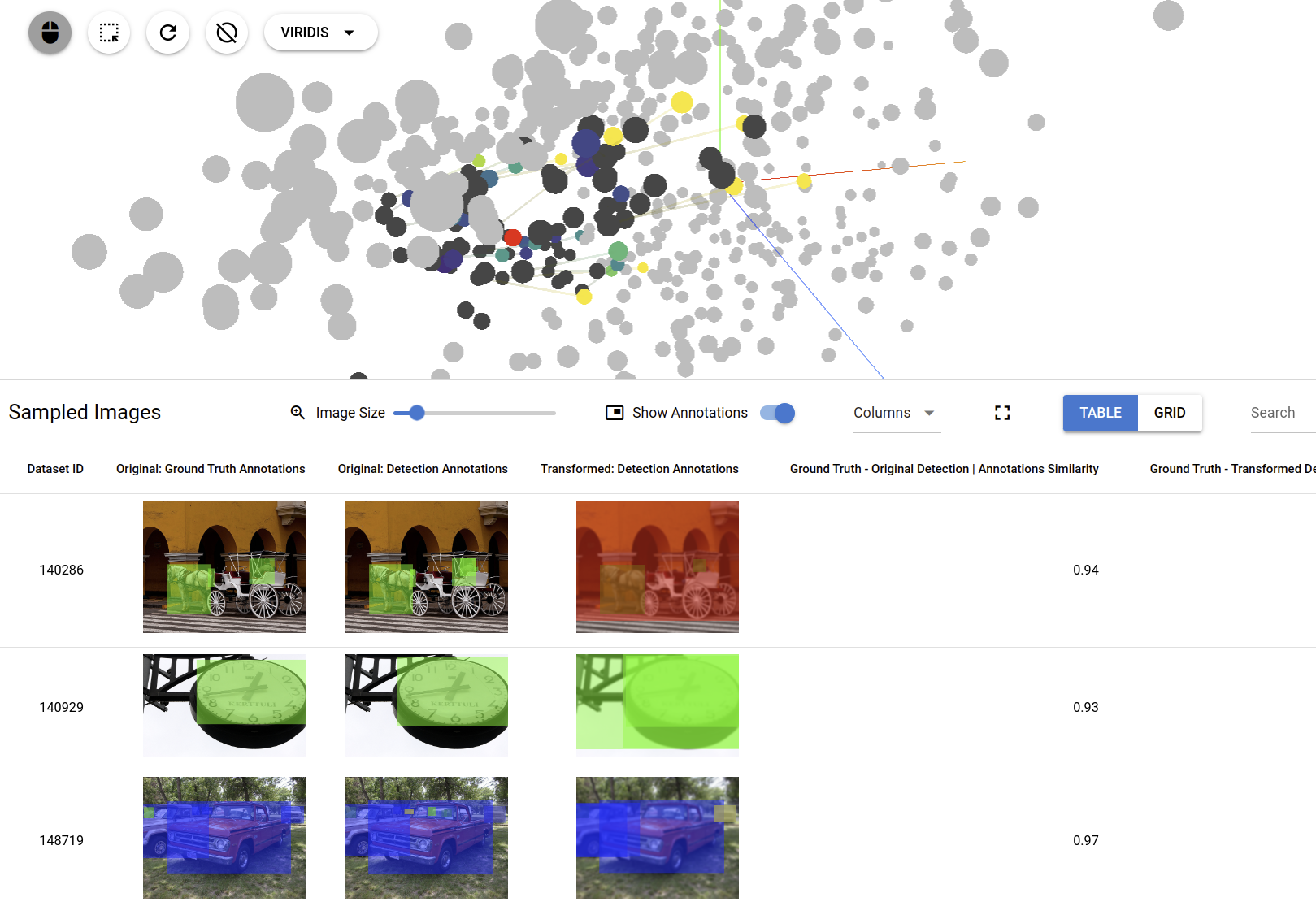
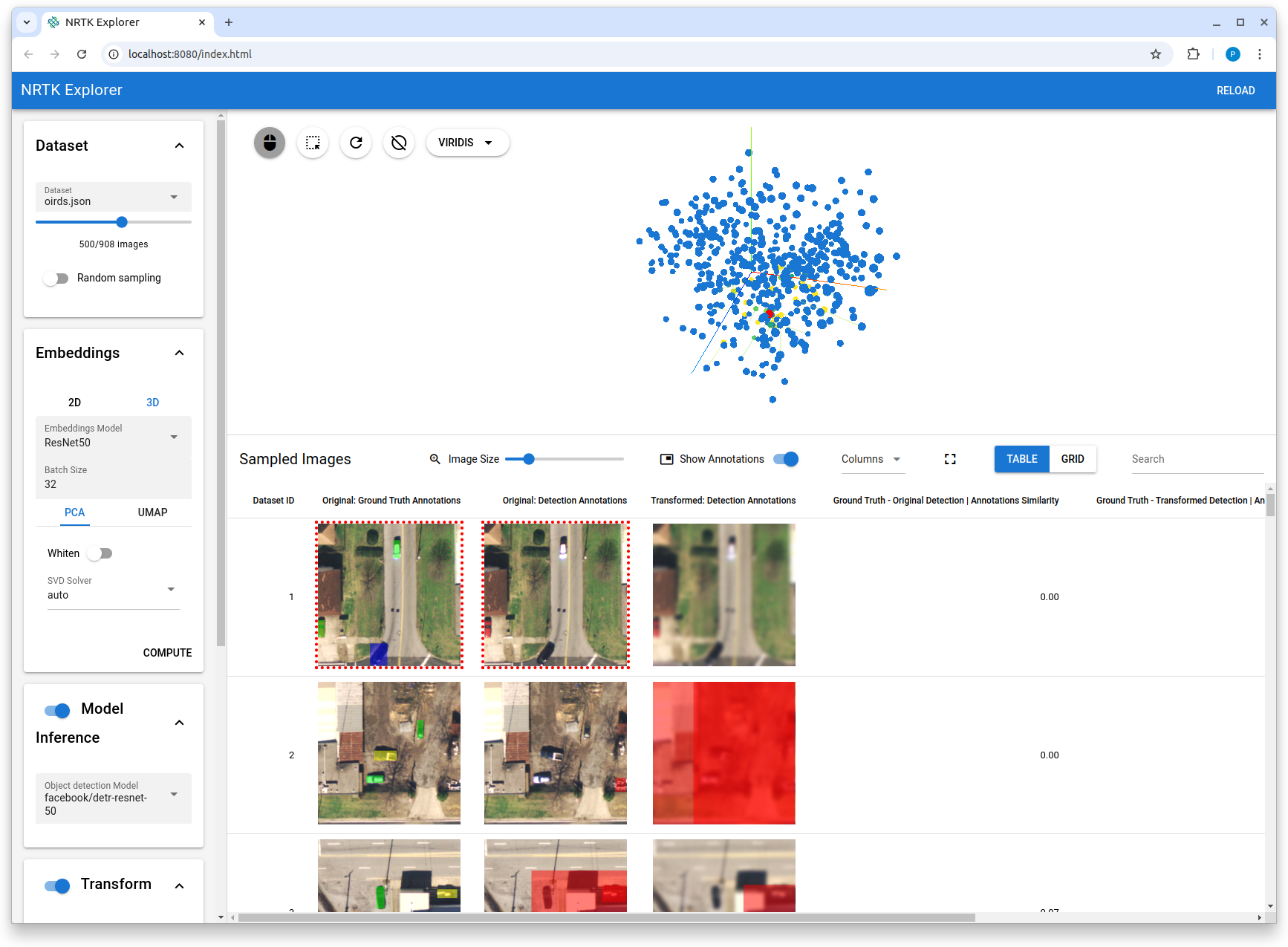
NRTK Explorer is a web application for exploring image datasets. It provides insights of a image dataset in COCO format and it evaluate image transformation and perturbation resilience of object recognition DL models. It is built using trame by the kitware team.
Features
- Explore image datasets in COCO format.
- Apply parametrized image degradation (such as blur) to the images.
- Benchmark dataset resilience with a differential PCA|UMAP analysis on the embeddings of the images and their transformations.
- Evaluate object detection DL models in both the source images and its transformations.
- When possible it will attempt to utilize the user GPU as much as possible to speedup its computations.
Installing
Install it from pypi:
pip install nrtk-explorer
Usage
Explore Hugging Face hosted dataset:
nrtk-explorer --dataset rafaelpadilla/coco2017
Compare inference results for Hugging Face hosted models:
nrtk-explorer --dataset cppe-5 --models qubvel-hf/detr-resnet-50-finetuned-10k-cppe5 ashaduzzaman/detr_finetuned_cppe5
2 COCO format datasets are available at: https://github.com/vicentebolea/nrtk_explorer_datasets/
git clone https://github.com/vicentebolea/nrtk_explorer_datasets.git
nrtk-explorer --dataset ./nrtk_explorer_datasets/coco-od-2017/mini_val2017.json ./nrtk_explorer_datasets/OIRDS_v1_0/oirds.json
CLI flags and options
--datasetspecify the path to a COCO dataset JSON file, a Hugging Face dataset repository name, or a directory loadable by the Dataset library. You can specify multiple datasets using a space as the separator. Example:nrtk-explorer --dataset ../foo-dir/coco.json cppe-5--downloadCache Hugging Face Hub datasets locally instead of streaming them. When datasets are streamed, nrtk-explorer limits the number of loaded images.--modelsspecify the Hugging Face Hub object detection repository name or a directory loadable by the Transformers library. Load multiple models using space as the separator.
Example:nrtk-explorer --models hustvl/yolos-tiny facebook/detr-resnet-50-h|--helpshow the help for the command line options. nrtk-explorer inherits the trame command line options and flags.
Contribute to NRTK_EXPLORER
git clone https://github.com/Kitware/nrtk-explorer.git
cd nrtk-explorer
python3 -m venv .venv
source .venv/bin/activate
pip install -U pip
pip install -e '.[dev]'
pytest .
For more details on setting up a development environment see DEVELOPMENT docs.
Create release
- Merge
maintoreleasewith a merge commit. - Run "Create Release" workflow with workflow from
releasebranch. - Merge
releasetomainwith a merge commit.
Release history Release notifications | RSS feed


Download files
Download the file for your platform. If you're not sure which to choose, learn more about installing packages.
Source Distribution
Built Distribution
Filter files by name, interpreter, ABI, and platform.
If you're not sure about the file name format, learn more about wheel file names.
Copy a direct link to the current filters
File details
Details for the file nrtk_explorer-0.6.0.tar.gz.
File metadata
- Download URL: nrtk_explorer-0.6.0.tar.gz
- Upload date:
- Size: 7.1 MB
- Tags: Source
- Uploaded using Trusted Publishing? No
- Uploaded via: twine/6.0.1 CPython/3.12.8
File hashes
| Algorithm | Hash digest | |
|---|---|---|
| SHA256 |
9b689454f15607a23bd6b81a887f402cb209a7fd983f58a3811b3115e121f16a
|
|
| MD5 |
b233dcba9b703edaf883d7431b4e5f9c
|
|
| BLAKE2b-256 |
a0b5d9156810f5dd0b3897b27ba9fee8f5705548bfcf8fb6db793b06fb8fe8d8
|
File details
Details for the file nrtk_explorer-0.6.0-py2.py3-none-any.whl.
File metadata
- Download URL: nrtk_explorer-0.6.0-py2.py3-none-any.whl
- Upload date:
- Size: 3.5 MB
- Tags: Python 2, Python 3
- Uploaded using Trusted Publishing? No
- Uploaded via: twine/6.0.1 CPython/3.12.8
File hashes
| Algorithm | Hash digest | |
|---|---|---|
| SHA256 |
035c73a3b60227196e44460f47f32b169039a0dcc74ca795aa86c0af3b6ce1d0
|
|
| MD5 |
54e7649f2373e6c32e255ba177dfc833
|
|
| BLAKE2b-256 |
b650cf71400d888e8bc71dc34610fd974349e6c235287d84431c9497c218d8df
|






