
Natural Robustness Toolkit (NRTK) is a platform for generating validated, sensor-specific perturbations and transformations used to evaluate the robustness of computer vision models.


Project description




Natural Robustness Toolkit (NRTK)
The Natural Robustness Toolkit (NRTK) is an open source toolkit for generating operationally realistic perturbations to evaluate the natural robustness of computer vision algorithms.
The nrtk package evaluates the natural robustness of computer vision
algorithms to various perturbations, including sensor-specific changes to camera
focal length, aperture diameter, etc.
We have also created nrtk.interop module to support AI T&E use cases and
workflows, through interoperability with
MAITE and integration with
other JATIC tools. Users seeking to use
NRTK to perturb MAITE-wrapped datasets or evaluate MAITE-wrapped models should
utilize this module. Explore our
T&E guides
which demonstrate how nrtk perturbations and maite can be applied to assess
operational risks.
Why NRTK?
NRTK addresses the critical gap in evaluating computer vision model resilience to real-world operational conditions beyond what traditional image augmentation libraries cover. T&E engineers need precise methods to assess how models respond to sensor-specific variables (focal length, aperture diameter, pixel pitch) and environmental factors without the prohibitive costs of exhaustive data collection. NRTK leverages pyBSM's physics-based models to rigorously simulate how imaging sensors capture and process light, enabling systematic robustness testing across parameter sweeps, identification of performance boundaries, and visualization of model degradation. This capability is particularly valuable for satellite and aerial imaging applications, where engineers can simulate hypothetical sensor configurations to support cost-performance trade-off analysis during system design—ensuring AI models maintain reliability when deployed on actual hardware facing natural perturbations in the field.
Target Audience
This toolkit is intended to help data scientists, developers, and T&E engineers who want to rigorously evaluate and enhance the robustness of their computer vision models. For users of the JATIC product suite, this toolkit is used to assess model robustness against natural perturbations.
Installation
nrtk installation has been tested on Unix and Linux systems.
To install the current version via pip:
pip install nrtk
To install the current version via conda-forge:
conda install -c conda-forge nrtk
This installs core functionality, but many specific perturbers require additional dependencies.
Installation with Optional Features (Extras)
NRTK uses optional "extras" to avoid installing unnecessary dependencies. You can install extras with square brackets:
# Install with extras (note: no spaces after commas)
pip install nrtk[<extra1>,<extra2>]
Common Installation Patterns
# For basic OpenCV image perturbations
pip install nrtk[graphics]
# For basic Pillow image perturbations
pip install nrtk[pillow]
# For pybsm's sensor-based perturbations
pip install nrtk[pybsm]
Note: Choose either graphics or headless for OpenCV, not both.
More information on extras and related perturbers, including a complete list of extras, is available in the perturber requirements documentation.
Details on the perturbers and their dependencies can be found in the implementations reference.
For more detailed installation instructions, visit the installation documentation.
Getting Started
Explore usage examples of the nrtk package in various contexts using the
Jupyter notebooks provided in the ./docs/examples/ directory.
Example: A First Look at NRTK Perturbations
Via the pyBSM package, NRTK exposes a large set of Optical Transfer Functions (OTFs). These OTFs can simulate different environmental and sensor-based effects. For example, the JitterPerturber simulates different levels of sensor jitter. By modifying its input parameters, you can observe how sensor jitter affects image quality.
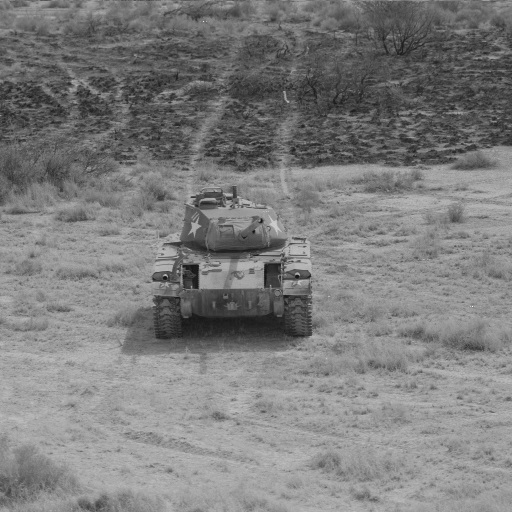
Input Image
Below is an example of an input image that will undergo a Jitter OTF perturbation. This image represents the initial state before any transformation.
Code Sample
Below is some example code that applies a Jitter OTF transformation:
from nrtk.impls.perturb_image.optical.otf import JitterPerturber
import numpy as np
from PIL import Image

INPUT_IMG_FILE = 'docs/images/input.jpg'
image = np.array(Image.open(INPUT_IMG_FILE))

perturber = JitterPerturber(s_x=8e-6, s_y=8e-6)
out_image, _ = perturber(image=image, img_gsd=0.03)
This code uses default values and provides a sample input image. However, you
can adjust the parameters and use your own image to visualize the perturbation.
The s_x and s_y parameters (the root-mean-squared jitter amplitudes in the x
and y directions) are the primary way to customize a jitter perturber. Larger
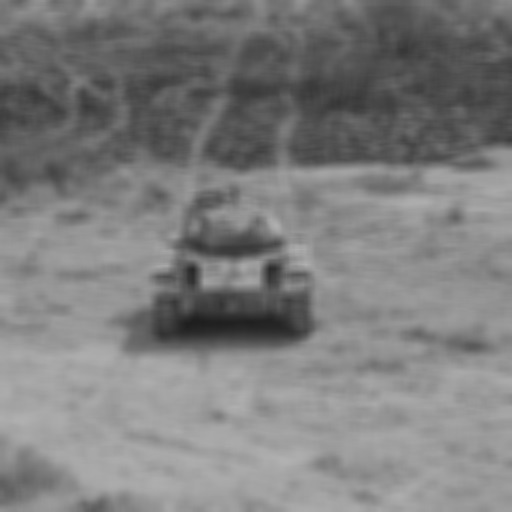
jitter amplitudes generate a larger Gaussian blur kernel.
Resulting Image
The output image below shows the effects of the Jitter OTF on the original input. This result illustrates the Gaussian blur introduced due to simulated sensor jitter.
Documentation
Documentation for both release snapshots and the latest main branch is available on ReadTheDocs.
To build the Sphinx-based documentation locally for the latest reference:
# Install dependencies
poetry sync --with main,linting,tests,docs
# Navigate to the documentation root
cd docs
# Build the documentation
poetry run make html
# Open the generated documentation in your browser
firefox _build/html/index.html
Contributing
Contributions are encouraged!
The following points help ensure contributions follow development practices.
- Follow the JATIC Design Principles.
- Adopt the Git Flow branching strategy.
- See the release process documentation for detailed release information.
- Additional contribution guidelines and issue reporting steps can be found in CONTRIBUTING.md.
Developer Tools
Ensure the source tree is acquired locally before proceeding.
Poetry Install
You can install using Poetry:
[!IMPORTANT]
NRTK requires Poetry 2.2 or higher. If you're new to Poetry, review the installation documentation first — Poetry has its own conventions for virtual environments and dependency resolution that can trip up users expecting pip semantics.
poetry install --with main,linting,tests,docs --extras "<extra1> <extra2> ..."
Pre-commit Hooks
Pre-commit hooks ensure that code complies with required linting and formatting
guidelines. These hooks run automatically before commits but can also be
executed manually. To bypass checks during a commit, use the --no-verify flag.
To install and use pre-commit hooks:
# Install required dependencies
poetry sync --with main,linting,tests,docs
# Initialize pre-commit hooks for the repository
poetry run pre-commit install
# Run pre-commit checks on all files
poetry run pre-commit run --all-files
For running the test suite, see the Testing Architecture guide.
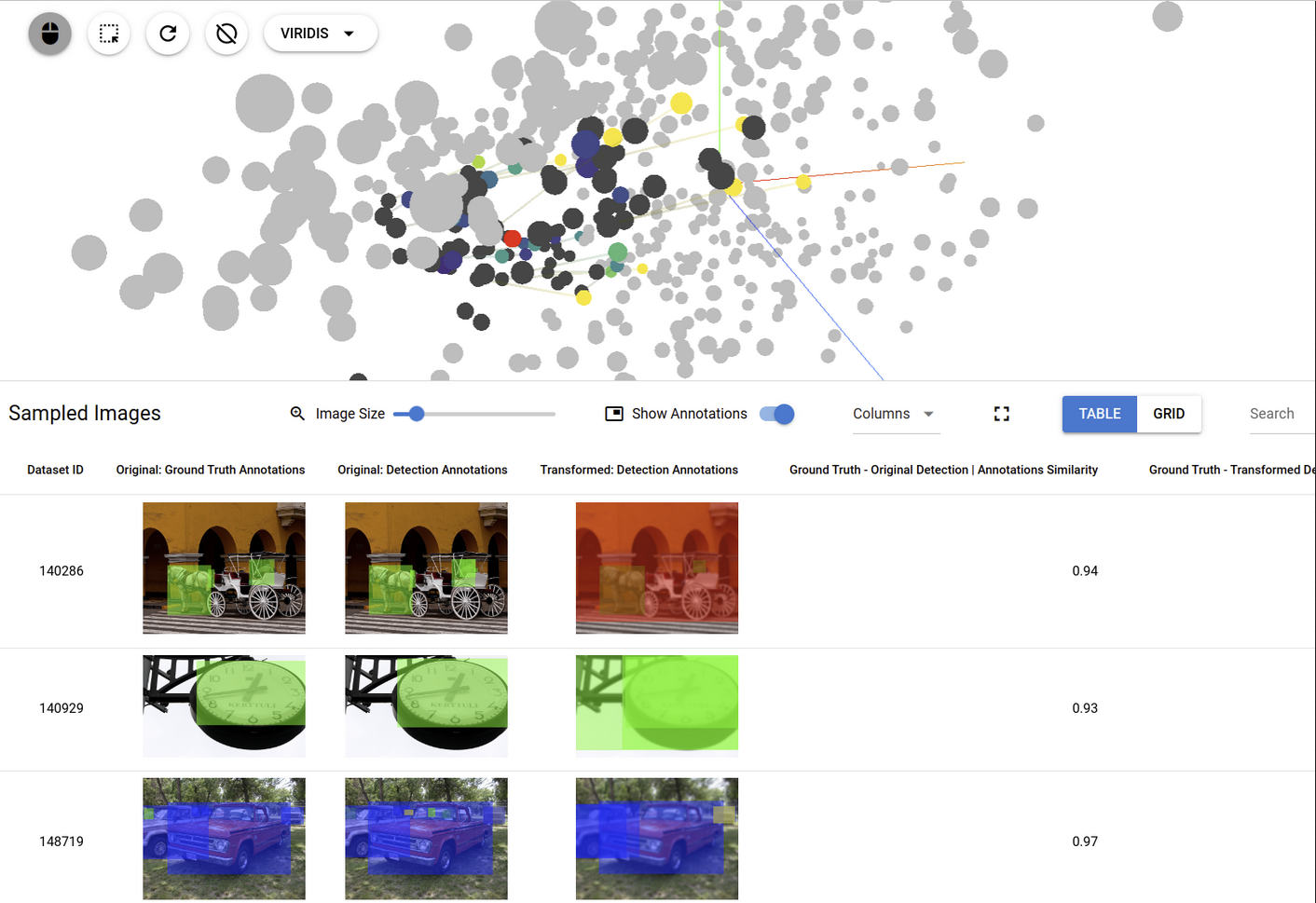
NRTK Demonstration Tool
This associated project provides a local web application that provides a demonstration of visual saliency generation in a user interface. This provides an example of how image perturbation, as generated by this package, can be utilized in a user interface to facilitate dataset exploration. This tool uses the trame framework.
License
Contacts
Current Maintainers: Brandon RichardWebster (@bjrichardwebster), Emily Veenhuis (@eveenhuis)
We welcome contributions to NRTK! Please start discussions by opening an issue or pull request on GitHub. This keeps the conversation visible and helps the whole community benefit. Our preferred channels are public, but if you'd like to reach out privately first, feel free to contact us at nrtk@kitware.com.
Acknowledgment
[!NOTE] JATIC Maturity I — Release v1.0.4 has been assessed against and meets the requirements associated with JATIC Maturity Level I.
This material is based upon work supported by the Chief Digital and Artificial Intelligence Office under Contract No. 519TC-23-9-2032. The views and conclusions contained herein are those of the author(s) and should not be interpreted as necessarily representing the official policies or endorsements, either expressed or implied, of the U.S. Government.
Release history Release notifications | RSS feed


Download files
Download the file for your platform. If you're not sure which to choose, learn more about installing packages.
Source Distribution
Built Distribution
Filter files by name, interpreter, ABI, and platform.
If you're not sure about the file name format, learn more about wheel file names.
Copy a direct link to the current filters
File details
Details for the file nrtk-1.0.4.tar.gz.
File metadata
- Download URL: nrtk-1.0.4.tar.gz
- Upload date:
- Size: 86.8 kB
- Tags: Source
- Uploaded using Trusted Publishing? No
- Uploaded via: poetry/2.4.1 CPython/3.10.20 Linux/6.14.0-1011-aws
File hashes
| Algorithm | Hash digest | |
|---|---|---|
| SHA256 |
9ae62e41903257cd2c44e92a9bd5bf3cf69fcd9863314806263912048b711fbd
|
|
| MD5 |
d967cd6f8ea33dd54c49346c08f9ae8d
|
|
| BLAKE2b-256 |
9c83ba83bc8b8d1de09f7bfba4ba9c623ad8dbc7330e108ec5a0aaff5e5e1917
|
File details
Details for the file nrtk-1.0.4-py3-none-any.whl.
File metadata
- Download URL: nrtk-1.0.4-py3-none-any.whl
- Upload date:
- Size: 144.0 kB
- Tags: Python 3
- Uploaded using Trusted Publishing? No
- Uploaded via: poetry/2.4.1 CPython/3.10.20 Linux/6.14.0-1011-aws
File hashes
| Algorithm | Hash digest | |
|---|---|---|
| SHA256 |
2bb9feda5d27046e56a52388d8ca97ceea75ba6a9647b209a93a9f88a5a3e79b
|
|
| MD5 |
e2499fe57a5bdfed960e9b0b26cc36c4
|
|
| BLAKE2b-256 |
ab13f57275e918ce0c548d7671db9441ee1ebfd6af0502e6d38b1a7af1494dd3
|






