
Package of NtcPlot

Project description
Welcome to NtcPlot!
NtcPlot plots geo-referenced and other arrays from netCDF files. It's a single person's effort to provide a simple tool for data visualisation. Far from being perfect, it's a work in progress. Feel free to download the files and adapt them to your needs.
NtcPlot is a cross-platform application that runs on Windows, Linux and other desktop computers. NtcPlot only requires that your computer has a compatible Python 3.12 (or later version) installed.
Version
The current version of NtcPlot is 0.0.2, released on 24/10/2024.
Applications
- Make a line plot, with multiple lines if needed.
- Make a scatter plot, with multiple datasets if needed.
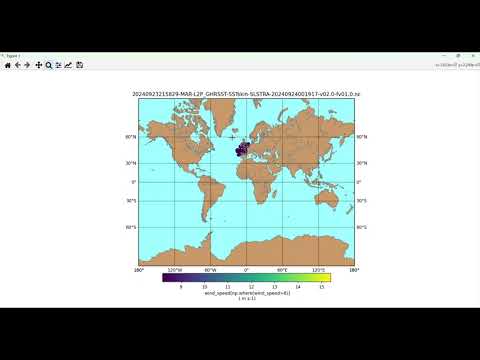
- Plot a map with 2D data.
- Usage of NumPy to edit the visualised data.
Video Tutorial
Installation Tips
I would recommend using a virtual environment to test dependencies. For this, the user car open a terminal and run the following command.
python -m venv ntcplot_env
If on Windows, the user will need to have permission to run scripts. The following command will give permission for the running session.
# Windows user only
Set-ExecutionPolicy -ExecutionPolicy Unrestricted -Scope Process
Activate virtual environment (Unix)
cd ntcplot_env
.\Scripts\activate
Activate virtual environment (Windows)
cd ntcplot_env
.\Scripts\Activate.ps1
Install software
pip install NtcPlot
If the following error occurs, do not falter.
INFO: pip is looking at multiple versions of ntcplot to determine which version is compatible with other requirements. This could take a while.
ERROR: Could not find a version that satisfies the requirement PyQt6>=6.7 (from ntcplot) (from versions: none)
ERROR: No matching distribution found for PyQt6>=6.7
The installation script has determined that at least one dependency is missing or is of an older version. The following dependencies should be installed. For more proficient users, the git repository contains the requirements.txt
# Optional
pip install PyQt6==6.7
pip install numpy==1.26
pip install netCDF4==1.7
pip install matplotlib==3.8
pip install basemap==1.4.1
Launch NtcPlot
ntcplot /your_path/file.nc
Contact
The author will soon share contact details.
Project details
Release history Release notifications | RSS feed


Download files
Download the file for your platform. If you're not sure which to choose, learn more about installing packages.
Source Distribution
Built Distribution
Filter files by name, interpreter, ABI, and platform.
If you're not sure about the file name format, learn more about wheel file names.
Copy a direct link to the current filters
File details
Details for the file ntcplot-0.0.2.tar.gz.
File metadata
- Download URL: ntcplot-0.0.2.tar.gz
- Upload date:
- Size: 8.3 kB
- Tags: Source
- Uploaded using Trusted Publishing? No
- Uploaded via: twine/5.1.1 CPython/3.12.3
File hashes
| Algorithm | Hash digest | |
|---|---|---|
| SHA256 |
e74c7771fd0d6306fd6c05bfbea5ec4366b9d2de5f9a2d277550fd78033c812b
|
|
| MD5 |
3f3899f9944b4e9db8375583633ededd
|
|
| BLAKE2b-256 |
4ade8d3ec6829fb134eafaed14d6eb525653cd315ae2ee2c2b0aa7108d833e7a
|
File details
Details for the file NtcPlot-0.0.2-py3-none-any.whl.
File metadata
- Download URL: NtcPlot-0.0.2-py3-none-any.whl
- Upload date:
- Size: 9.3 kB
- Tags: Python 3
- Uploaded using Trusted Publishing? No
- Uploaded via: twine/5.1.1 CPython/3.12.3
File hashes
| Algorithm | Hash digest | |
|---|---|---|
| SHA256 |
bffab01862f5f26a6db6d37a4afa2e7c2903b91b7ce2dd360acd56eb6d8ee313
|
|
| MD5 |
63bdaffcedf6e8eb82b1f74bda6cce3c
|
|
| BLAKE2b-256 |
ffc802580c2ace0886cfee7bf5e27b03b3481592bfb6fa05d0e90dec7dbd33bd
|






