
A network-aware SSH terminal that understands what it sees.

Project description
nterm
A network-aware SSH terminal that understands what it sees.
nterm combines a multi-tab SSH terminal, real-time output parsing, and live device telemetry in a single desktop application. Run a show command, click a gutter mark, and get structured, exportable data — without ever leaving the terminal.
Why nterm
Every network engineer lives in a terminal. You run commands, read output, copy-paste into spreadsheets, and repeat. nterm sits in that workflow and makes the output useful:
- You type a command. The terminal works exactly like any SSH session.
- nterm detects the response. A sniffer pipeline identifies command boundaries in real time — no agents, no API calls, no device-side config.
- A gutter mark appears. Subtle amber indicators line up next to each detected command block.
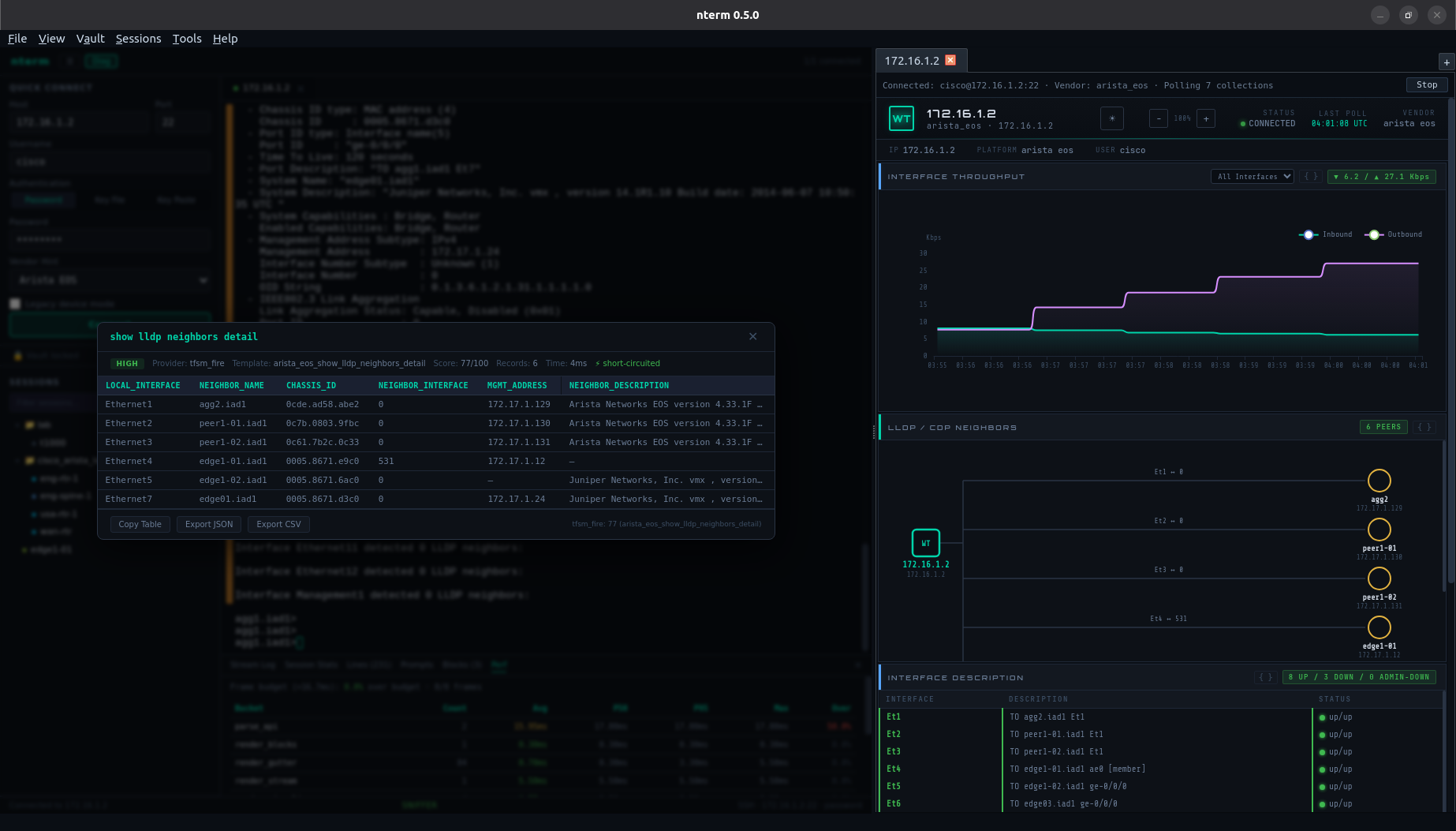
- You click when you want insight. Right-click a mark → Visualize, and the output is parsed into a structured table you can copy into a Word doc, export as JSON/CSV, or just read without squinting at fixed-width columns.
The terminal is never interrupted. You opt in to the intelligence. That's the difference between a tool engineers adopt and one they ignore.
Features
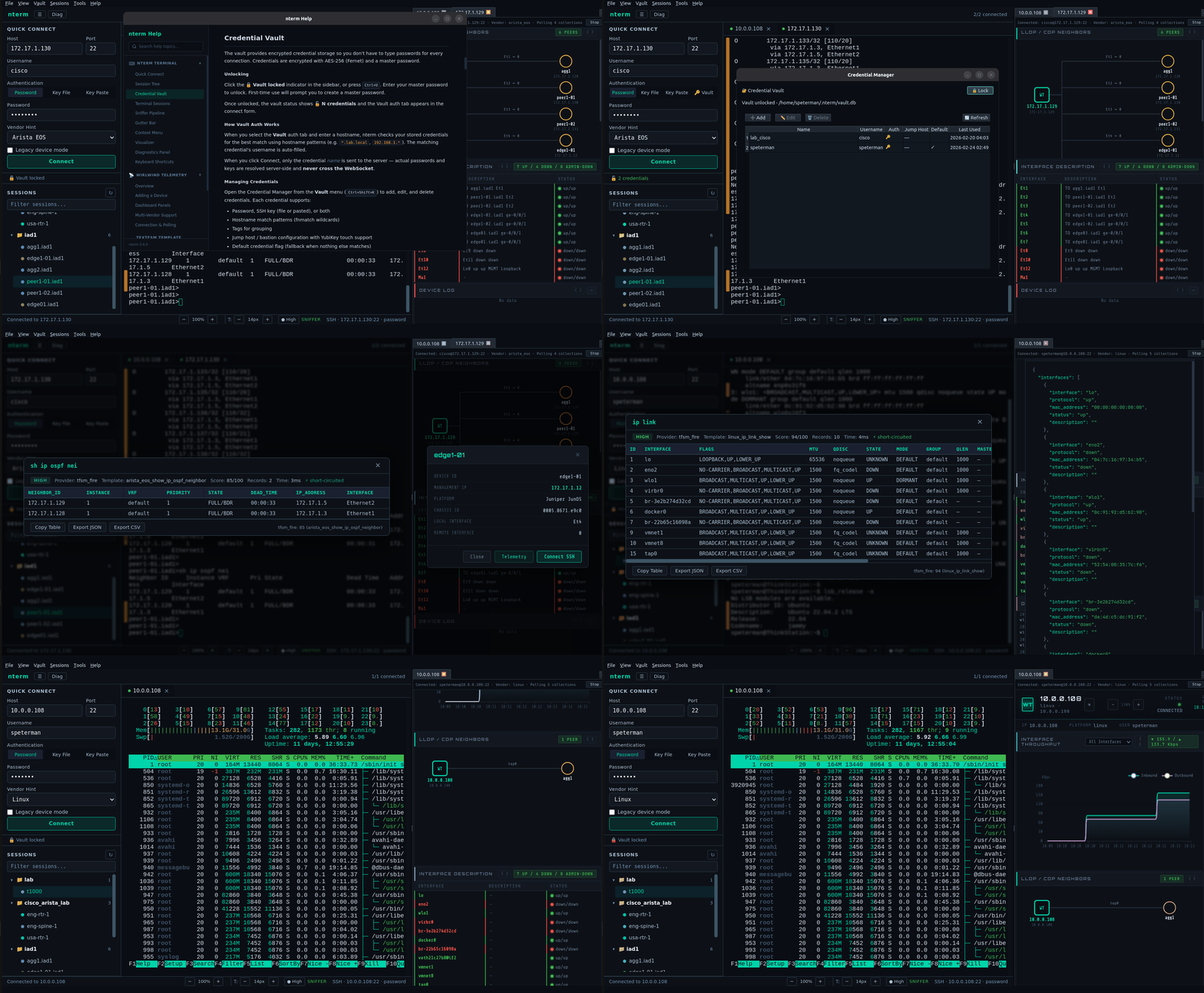
Multi-Tab SSH Terminal — xterm.js rendering with full color support, resize, and the nterm dark palette. Password, key file, key paste, and vault-backed authentication. Legacy device mode for older equipment with deprecated ciphers.
Session Sniffer — A client-side pipeline that processes every byte of the SSH stream through four stages: line accumulation → interruption detection → prompt detection → block extraction. No server load, no round-trip latency. Works across vendors without device-side configuration.
Gutter Bar — CRT-phosphor amber marks rendered alongside the terminal viewport, one per detected command block. Dynamic offset algorithm keeps marks aligned even through scrollback and line wrapping.
Visualizer + Parse Engine — On-demand structured parsing via a provider chain: 1,000+ TextFSM templates → 800+ TTP templates → LLM fallback. High-confidence results short-circuit in milliseconds. Results cached per block.
Credential Vault — Fernet-encrypted SQLite storage with PBKDF2 key derivation (480K iterations). Pattern-based credential matching by hostname. Secrets never cross the WebSocket — the server resolves credentials and injects them into SSH connections. Optional keychain integration for auto-unlock (requires keyring — see Optional Dependencies below).
Live Telemetry (Wirlwind) — Right-pane dashboard with per-device polling: interface throughput (ECharts), LLDP/CDP topology (SVG), interface status table, CPU/memory gauges, syslog, and BGP summary. Independent SSH connections per telemetry tab. Supports network devices and generic Linux hosts — any SSH-reachable system can be monitored.
Neighbor Hop — Click any node in the live LLDP/CDP neighbor map to open an SSH terminal or telemetry tab on that device. Credentials carry forward automatically — enter your password once, then click through the entire topology. No inventory required. No IP copying. No re-authentication. At 2 AM during an outage, the network is one click deep from wherever you are. See NEIGHBOR_HOP.md for the full guide.
Session Management — Saved sessions in a searchable tree with folder hierarchy, vendor-colored indicators, and click-to-connect. Import from CSV, JSON, TerminalTelemetry YAML, or Secure Cartography topology maps. Drag-and-drop organization via native session editor.
Diagnostics Panel — Six views: Stream log, session stats, sniffer output, prompt detector state, block history, and performance instrumentation with P50/P95/P99 timing across all hot paths.
Neighbor Hop
Walk the network from any starting point. One click per device.
SSH into a device and open a telemetry tab. Wirlwind polls the device and renders a live LLDP/CDP neighbor map. Every neighbor node is clickable:
- Connect SSH — opens a terminal tab connected to the neighbor, reusing your existing credentials
- Telemetry — opens a Wirlwind tab monitoring the neighbor, with its own clickable LLDP map
Enter your password once. Click through the entire fabric. Each hop auto-detects the vendor (Arista → Juniper → Cisco → Linux) and adjusts the parse chain and collection templates. The vault provides per-device credential matching when the environment requires it.
This is the workflow for outage triage: land on one device at the edge of the problem, and trace the blast radius by clicking neighbors. No context switching, no IP lookup, no re-authentication.
See NEIGHBOR_HOP.md for the full feature guide, architecture, and credential reuse details.
Quick Start
Requirements
- Python 3.10+
- PyQt6 with QtWebEngine
Install
pip install nterm-ng
Or install from source:
git clone https://github.com/scottpeterman/nterm-ng.git
cd nterm-ng
pip install .
Run
nterm
Starts a local FastAPI server on an auto-discovered port and opens the two-pane desktop window. Multiple instances are supported — each finds its own port automatically. Connect to a device via Quick Connect or the session tree.
On first launch, nterm copies its parsing config and template databases to the working directory if they aren't already present.
Optional Dependencies
| Package | Purpose |
|---|---|
keyring |
OS keychain integration for vault auto-unlock |
Multi-Vendor Support
| Vendor | Terminal + Sniffer | Telemetry | Parse Templates |
|---|---|---|---|
| Arista EOS | ✅ First-class | ✅ | ✅ |
| Cisco IOS / IOS-XE | ✅ Tested | ✅ | ✅ |
| Cisco NX-OS | ✅ Tested | ✅ | ✅ |
| Juniper JunOS | ✅ Tested | ✅ | ✅ |
| Cisco IOS-XR | ✅ | — | ✅ |
| Linux | ✅ | ✅ | ✅ |
Arista EOS is the optimized experience — the cleanest CLI output in the industry means the sniffer, gutter, and visualizer work at their best.
Wirlwind Telemetry supports Arista, Cisco, Juniper, and generic Linux platforms. The Linux driver works on any SSH-reachable host — bare-metal servers, VMs, containers, and Linux-based network devices (Cumulus, SONiC, VyOS). It uses standard Linux tools (
top,free,ip,journalctl,lldpctl) with custom TextFSM templates and requires no agent installation.The parse engine includes the full NTC TextFSM template library (1,000+ templates across 30+ vendors), so structured parsing may work out of the box for vendors not listed above. Templates are added regularly.
Architecture
PyQt6 desktop shell with two QWebEngineView panes sharing a unified theme:
┌────────────────────────────────┬─────────────────────────┐
│         nterm Terminal          │   Wirlwind Telemetry    │
│                                │                         │
│  xterm.js + Sniffer Pipeline   │  ECharts + SVG Topology │
│  Gutter Bar + Visualizer       │  Per-device SSH polling  │
│  Session Tree + Vault UI       │  QWebChannel bridge     │
├────────────────────────────────┴─────────────────────────┤
│  FastAPI Backend (uvicorn daemon thread, in-process)      │
│  SSH sessions · Parse API · Session tree · Vault API      │
├──────────────────────────────────────────────────────────┤
│  Paramiko SSH · ParseBroker (TextFSM → TTP → Ollama)     │
│  CredentialStore (Fernet) · SessionStore (SQLite)         │
└──────────────────────────────────────────────────────────┘
The frontend is vanilla JavaScript — 8 purpose-built modules, no framework, no build step, directly debuggable. The desktop wrapper is ~350 lines of Python tiling two existing web surfaces.
See README_Arch.md for the full architecture document.
Context Menu Actions
Right-click any gutter mark:
| Action | What It Does |
|---|---|
| Visualize | Parse output via provider chain, display as structured table |
| Copy Block | Clean output text to clipboard (no ANSI, no prompts) |
| Copy Command | Extracted command string to clipboard |
| Copy Table | Parsed table to clipboard — rich HTML for Word/Docs, plain text fallback |
| Export JSON | Download block with metadata as .json |
| Export CSV | Download line-numbered output as .csv |
| Export Markdown | Download with metadata table + fenced code block |
| Re-run Command | Send command over the active SSH session |
Keyboard Shortcuts
| Shortcut | Action |
|---|---|
Ctrl+T |
Add telemetry tab |
Ctrl+\ |
Toggle telemetry panel |
Ctrl+U |
Toggle vault lock/unlock |
Ctrl+Shift+K |
Credential manager |
Ctrl+Shift+S |
Session editor |
Ctrl+Shift+T |
Template tester |
Ctrl+Shift+R |
Reload nterm |
Ctrl+Q |
Quit |
Ecosystem
nterm is the operational interface for a network management workflow:
| Phase | Tool | Function |
|---|---|---|
| Day 0 | Secure Cartography | Network discovery, topology mapping |
| Day 1 | VelocityCMDB | Device inventory, configuration management |
| Day 1 | nterm Secure Cartography Import | Import topology map into session tree |
| Day 2 | nterm | Operational terminal, real-time interaction |
| Day 2 | Neighbor Hop | Walk the live topology from any device |
| Day 2 | Day 2 validation tools | fibtrace, trafikwatch, BGP validation |
Secure Cartography discovers your network and exports a map.json. Import it into nterm's session tree (Sessions → Import from Secure Cartography) to get an organized inventory by site. Connect to any device, then use Neighbor Hop to walk the rest of the fabric live. The full pipeline works end-to-end — but each tool also operates independently.
Documentation
| Document | Purpose |
|---|---|
| README_Arch.md | System architecture, data flows, module contracts |
| README_Sniffer.md | Sniffer pipeline spec, test strategies, class interfaces |
| README_vault.md | Vault encryption, resolution, API, integration guide |
| README_SSH.md | SSH transport architecture, auth methods, legacy mode |
| README_Parsing_providers.md | Parse provider chain documentation |
| NEIGHBOR_HOP.md | Neighbor Hop feature guide, credential reuse, architecture |
| README_Current_State.md | Living reference for implementation state |
Known Issues
See README_Arch.md — Known Issues for the current list.
Author
Scott Peterman — Principal Infrastructure Engineer github.com/scottpeterman
License
GPLv3 — See LICENSE for details.


Download files
Download the file for your platform. If you're not sure which to choose, learn more about installing packages.
Source Distribution
Built Distribution
Filter files by name, interpreter, ABI, and platform.
If you're not sure about the file name format, learn more about wheel file names.
Copy a direct link to the current filters
File details
Details for the file nterm_ng-0.6.3.tar.gz.
File metadata
- Download URL: nterm_ng-0.6.3.tar.gz
- Upload date:
- Size: 12.4 MB
- Tags: Source
- Uploaded using Trusted Publishing? No
- Uploaded via: twine/6.2.0 CPython/3.10.12
File hashes
| Algorithm | Hash digest | |
|---|---|---|
| SHA256 |
b84c0fab71f6135d22eb37fa866e14400f651cdc114414811718bf5001840970
|
|
| MD5 |
9e9e58620cda1d50b6492323503247b0
|
|
| BLAKE2b-256 |
851da677d859db968a2c99f5c8fc3328babd834ae21edf01627f25e559b95c62
|
File details
Details for the file nterm_ng-0.6.3-py3-none-any.whl.
File metadata
- Download URL: nterm_ng-0.6.3-py3-none-any.whl
- Upload date:
- Size: 12.6 MB
- Tags: Python 3
- Uploaded using Trusted Publishing? No
- Uploaded via: twine/6.2.0 CPython/3.10.12
File hashes
| Algorithm | Hash digest | |
|---|---|---|
| SHA256 |
cb511842ad56d90ea9ec1242b5bb89e524fda6e8e258aa3cbd2aff029ff3a776
|
|
| MD5 |
f48ee3536ed122dc3379fa55d5610283
|
|
| BLAKE2b-256 |
18e5324fa014757a8ae29bed26901aac9f40eb95a795586d200fe3628953aaf9
|






