
NTON
Nintendo Switch NRO-to-NSP Builder



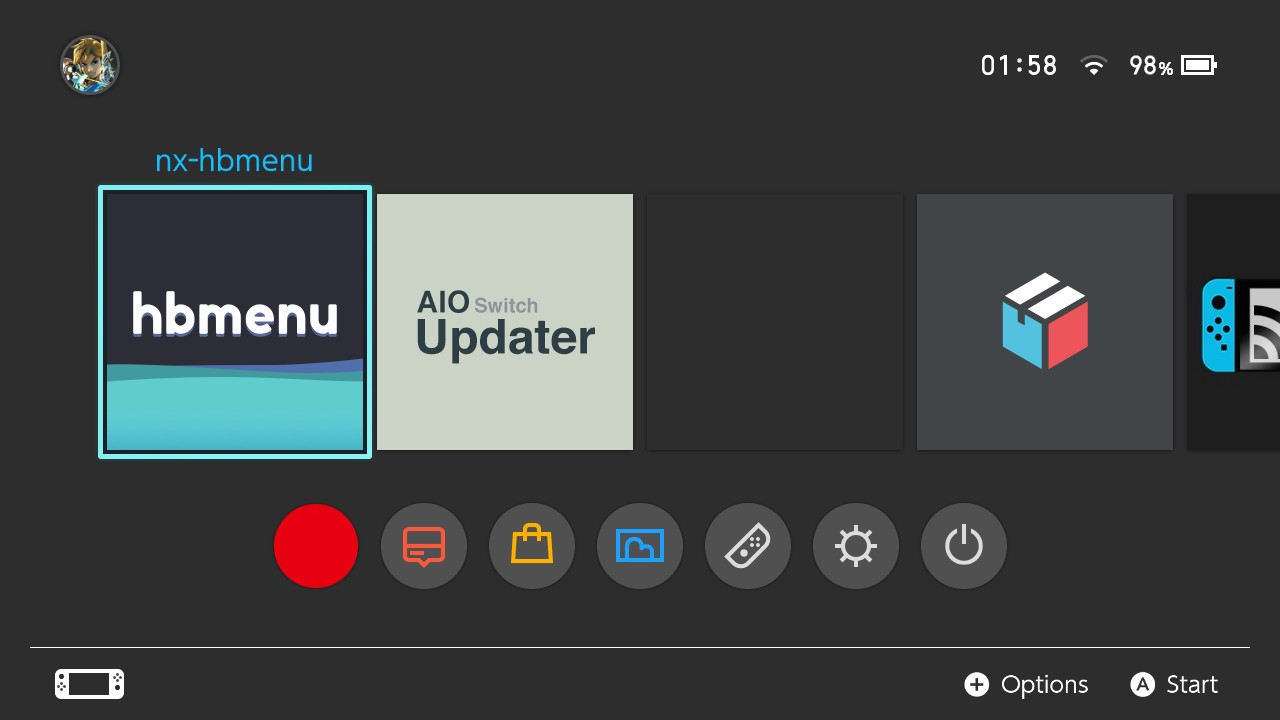
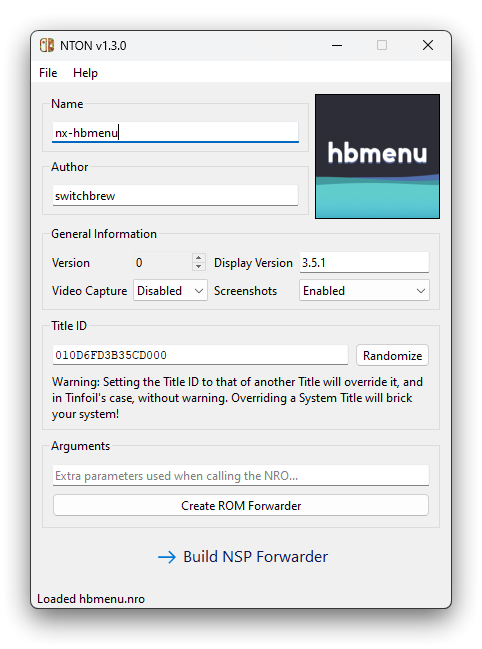
NTON is a PC utility that let's you build an NSP application that launches right into an NRO file. Firmware 12.0.0 and newer is supported.
If you want to generate NSP forwarders directly on your Switch, then check out TooTallNate's switch-nsp-forwarder
Features
- ⚙ Firmware 12.0.0+ Support
- 🛡️ Title ID Conflict Checks
- 🤖 Automatically Extracts Title Information and Icon from NRO
- 🕹️ Direct Game Forwarding
- 🎥 Enable or Disable Video Capture and Screenshots
- 💾 1MB NSP Install Size
- 🖼️ Custom Icons
- 🧩 Plug-and-play
- ✨ GUI and CLI Interfaces
- ❤️ Forever FOSS!
Installation
Windows Installers for the GUI version is available on the Releases page.
Alternatively you can download and install NTON from PIP/PyPI:
$ pip install nton[gui]
(Exclude [gui] if you do not plan on using the GUI)
If pip gives you a warning about a path not being in your PATH environment variable then promptly add that path then
close all open command prompt Windows, or running nton won't work as it will not be recognized as a program.
You now have the nton package installed - Voilà 🎉!
Launch the GUI by running nton without another subcommand in your Terminal or Windows Run.
Otherwise, use the CLI by checking out nton --help.
Keys
Proprietary Keys known as prod.keys are required. You can obtain them from your own personal Switch using
Lockpick_RCM.
It must be placed at C:\Users\<User>\.switch\prod.keys, in your current working directory, or in
NTON's installation directory for NTON to be able to find and use the keys.
Usage
NTON is quite simple, just give it the path to the NRO on your microSD card!
For example, to create a forwarder for the Daybreak Homebrew included with Atmosphere, it's as simple as:
nton build "D:/switch/daybreak.nro"
This will build a forwarder with the Title Name, Publisher, Version, and Icon automatically extracted from the NRO.
The Title ID will be a randomly assigned value within generally conformed bounds. You may manually set a value with
--name, --publisher, --version, --icon, and --id respectively.
The Title ID is automatically checked against a periodically updated list of pre-existing System and Software Title IDs to ensure a collision does not occur. However, you should still be cautious and verify the Title ID is not already used by other Software before using.
For example, to make a forwarder for an NRO that is on your PC:
nton build "C:/Users/rlaphoenix/Downloads/haze.nro" --sdmc "/switch/haze.nro"
Direct RetroArch Game forwarding
Use a RetroArch Game Core as the NRO path and provide the path to the ROM on your Switch's microSD card with --rom.
This will then load the Core directly under RetroArch and provide the path to the ROM as a startup argument to the
RetroArch Core.
Storage Sizes
On Installation an NSP can allocate storage for specific purposes. There's three primary types of Storage:
- User Account Save Data: Storage allocated to each User profile. Most titles use this to save game progress.
- Device Save Data: Storage allocated to the Device itself. Typically used for data or information that should be set to and used by all User profiles. For example, Animal Crossing: New Horizons uses this to store the Island data for all profiles to use.
- Cache Storage: Storage allocated for temporary data. Data stored here will be wiped without warning.
The NSP can specify how much data to allocate initially, as well as the maximum amount of storage that data can occupy over time. Furthermore, the initial and maximimum size allocated for Journaling (a form of recovery and data integrity) can also be specified.
A Forwarder like the ROM NTON uses does not need any form of storage or save data. Therefore, NTON automatically sets
all storage sizes to 0 to reduce storage usage.
Troubleshooting
Before continuing try running the homebrew from the Homebrew Launcher and see if it works through there. If it does not work through the Homebrew launcher either, then it was never the forwarder's fault, and you should check on your NRO or application installation.
Please note that using Forwarders others have created has a good chance of not working on your system. The location of the NRO on their system may differ from the location on your system, hence the NSP won't be able to load the homebrew. I will not provide support if you are having an issue with a Forwarder you did not build yourself.
The forwarder does not launch, "The software was closed because an error occurred."
As the NSP forwarder's signature is not valid as we do not possess Nintendo's private signing keys, you cannot boot any NSP forwarder with CFW alone. Nintendo has DMCA'd the options that allow you to run these kinds of NSP files due to it allowing piracy. Support on this matter cannot be provided as I do not support piracy on any Nintendo system.
If you do not agree with enabling piracy, do not want to enable piracy, or do not know how to proceed from here, then I do not recommend using NRO to NSP forwarders at all and stick with the Homebrew launcher through the Album icon, or by opening any Game or Software while holding (R).
However, it's also possible the prod.keys you used with NTON is outdated for your firmware. Re-download the latest
Lockpick_RCM and re-obtain this prod.keys file from your own Switch. Make sure you choose to get keys from the SysMMC
or EmuMMC that you will be installing the forwarder on (or whichever has a newer firmware version).
The forwarder starts loading but then crashes
The NRO path set when building the forwarder is incorrect or the NRO file is currently missing (or your microSD card is
not inserted). Make sure the path you choose starts with / and is an absolute path to an existing NRO file on your
Switch's microSD card (not your PC).
The forwarder's icon is a '?'
This happens when the icon_AmericanEnglish.dat within the built forwarder is not to the spec that Nintendo likes, in
some way. This is usually caused by the format of the image not being JPEG, or it has EXIF data or other unnecessary
extra metadata.
This is considered a bug if it happens to you after using NTON as it should automatically sanitize the images when building the forwarder. If this happens to you, please report what image you chose to use, or give information on what exact NRO you were making a forwarder from.
The forwarder's icon is a loading circle, opening fails
The installation of the Forwarder NSP failed in some way and the result is a corrupt title under that Title ID. This may have happened when trying to install data to the Title ID you chose or had randomly assigned to your forwarder NSP on an unsupported firmware version. This also happens when trying to install DLC to a Title without having the minimum required Game Update for that DLC (i.e. Installing the DLC Courses while on Mario Kart 8 Deluxe v1.0). However, since this happened on your Forwarder NSP you can likely rule that out.
When this happens deleting and reinstalling the same NSP likely won't fix it or do anything. You may need to reinstall the NSP via Goldleaf and hit "Proceed" when it warns yo uthat the title is already installed. Goldleaf will deal with the pre-existing files properly unlike Tinfoil (where you likely had the corruption in the first place). DBI may also help you resolve this issue as it has tools to remove partial installs and leftover files.
The forwarder randomly stopped working, I've read everything so far
There are numerous reasons why this could be, see the following main reasons:
- Make sure you haven't deleted or moved the NRO on your Switch's microSD card. It cannot be moved as the built forwarder has a hardcoded file path that it loads the NRO from when launched.
- You may have since updated Atmosphere or your Firmware which broke the changes you made to the bootloader that enabled the use of custom NSP files. As this project does not support piracy on any Nintendo system, support is not provided.
- It's possible a firmware update has broken the Forwarder ROM binary (source under /rom in this repo) and needs to be re-compiled against a newer libnx / devkitpro version. Firmware 9.0.0, 12.0.0, 19.0.0, and 21.0.0 have previously broken different forwarder ROMs requiring updates. If you believe this to be the case then please make an Issue.
If after reading all of these troubleshooting steps, you still cannot get the NSP forwarder to work, then I do not recommend the use of them and instead recommend using the Homebrew launcher from the album or from title takeover (holding R while booting any Game or Software).
Development
- Install uv
uv sync --all-extras --all-groups.venv\Scripts\activate(orsource .venv/bin/activateon macOS and Linux)uv tool install pre-commit --with pre-commit-uv --force-reinstallpre-commit install
Now feel free to work on the project however you like, all code will be checked before committing.
You can run nton with the GUI with nton or without the GUI with nton --help.
If you make any changes to the QT UI file (main.ui) or any of the icon/image files, then you must
run .\make to re-compile them to Python files.
Credit
- meliodas2255 for their open-source forwarder ROM supporting v12.0.0 to v18.1.0 with both direct RetroArch Forwarding and general forwarding both supported.
- TooTallNate for their edit of meliodas2255's ROM to support v19.0.0+ by patching a few flags. Also thanks to catfromplan9 for notifying that support broke and kindly making a pull request.
- peacepenguin for fixing support for v21.0.0+ and adding the ROM source code to the repository, verifying for once which ROM source code we use.
- vgmoose for the sdl-hello-world NRO that is used in CI/CD testing.
Licensing
This software is licensed under the terms of GNU General Public License, Version 3.0. You can find a copy of the license in the LICENSE file in the root folder
This project uses the following software:
- hacBrewPack by The-4n licensed under GPL-v2 for packing the NSP: https://github.com/rlaphoenix/hacBrewPack
- nstool licensed under MIT for NRO extraction and verification: https://github.com/jakcron/nstool
- hptnacp from hacPack by The-4n licensed under GPL-v2 for creating new NACP partitions if the NRO did not have one: https://github.com/rlaphoenix/hacBrewPack
- rom from switch-nsp-forwarder licensed under MIT for actually launching the NROs: https://github.com/TooTallNate/switch-nsp-forwarder/tree/main/romfs/template/exefs
No changes were made to any of the aforementioned software and copies of their licenses can be found next to their binaries within the bin folder.
- Open folder icons created by Freepik - Flaticon
- Close icons created by Freepik - Flaticon
- Delete icons created by Pixel perfect - Flaticon
© rlaphoenix 2022-2026
1 maintainer

Metadata
1 maintainer
Release files for nton 3.0.1
For a detailed explanation of source distributions (sdists) and built distributions (wheels), please see the package formats documentation.
Source distribution (sdist)
| File | Size | Uploaded | Provenance | Actions |
|---|---|---|---|---|
| nton-3.0.1.tar.gz | 3.0 MB | Without provenance | Details for nton-3.0.1.tar.gz |
Built distribution (wheel)
| File | Interpreter | ABI | Platform | Actions Reset |
|---|---|---|---|---|
| nton-3.0.1-py3-none-any.whl | Python 3 | none | any | Details for nton-3.0.1-py3-none-any.whl |
Total release size: 5.0 MB
Release files / nton-3.0.1.tar.gz
| Download URL | nton-3.0.1.tar.gz |
|---|---|
| Size | 3.0 MB |
| Tags | Source |
|
SHA-256 checksum How to use checksums |
eb33032ed3660da9936ba9c3d0802ce03a7e2f5fb2f3fca285d39b298e8ccfc3
|
|
BLAKE2b-256 checksum How to use checksums |
3b684eea92c12e715b5da5a206712ad5711af1153bdf21f126a3b7ad4286bcfd
|
| Upload date | |
|
Uploaded using Trusted Publishing? What is trusted publishing? |
Yes |
| Uploaded via |
uv/0.12.14 {"installer":{"name":"uv","version":"0.12.14","subcommand":["publish"]},"python":null,"implementation":{"name":null,"version":null},"distro":null,"system":{"name":null,"release":null},"cpu":null,"openssl_version":null,"setuptools_version":null,"rustc_version":null,"ci":true}
|
Release files / nton-3.0.1-py3-none-any.whl
| Download URL | nton-3.0.1-py3-none-any.whl |
|---|---|
| Size | 2.0 MB |
| Tags | Python 3 |
|
SHA-256 checksum How to use checksums |
d0a9afc967eb4695b44ce1119a599cf495cefdaa2a9ed72b59bd73489c1a816d
|
|
BLAKE2b-256 checksum How to use checksums |
636b6a9049f62c84d7e6b34fb8f72d7706cb9f8d65dbc4a577e063e0a4d8ea70
|
| Upload date | |
|
Uploaded using Trusted Publishing? What is trusted publishing? |
Yes |
| Uploaded via |
uv/0.12.14 {"installer":{"name":"uv","version":"0.12.14","subcommand":["publish"]},"python":null,"implementation":{"name":null,"version":null},"distro":null,"system":{"name":null,"release":null},"cpu":null,"openssl_version":null,"setuptools_version":null,"rustc_version":null,"ci":true}
|
Security for nton 3.0.1
Provenance
Provenance describes where a file came from. On PyPI, provenance is shared via attestations, which provide a verifiable record of the build or publishing details. View details, limitations and caveats.
No provenance found
None of the files in this release were uploaded with provenance metadata.
A note on package security
PyPI is a repository for distributing packages, not a service for auditing them. While third-party security researchers and our staff do their best to detect and remove malicious packages, PyPI cannot guarantee the quality, security or suitability of any given package.
To learn more about protecting yourself from malicious actors, visit our package security documentation.














