

NuBoard
Experiment tracking that lives in a folder.
Log from Python with three calls. Every run is a folder. View thousands of runs in your browser.
import nuboard as nb

with nb.init("my-project", run_name="baseline", config={"lr": 3e-4}) as run:
    for step in range(10_000):
        loss = train_step()
        run.add_scalar({"train/loss": loss}, step=step)  # a few µs, never blocks training
nuboard up experiments # http://localhost:6070
Why
- No setup. No account, no server, no database.
pip install nuboardgives you logging and the viewer; logging uses only the standard library, so it adds nothing to the import time of a training script. - Folder-contained. Each run is one folder (
run.json, an append-only binary log, a media pack, a Parquet file at the end). Copy it, rsync it, zip it, delete it. Notes, tags, saved views and hypothesis boards live in the project folder too, so they can be committed to git. - Fast. Logging is an in-memory append; a background thread writes columnar frames. The viewer reads a million points in about a tenth of a second and lists thousands of runs instantly (see the benchmarks).
- Records what you forget. Config, git commit and uncommitted diff, installed packages, GPUs, command line, rank, console output and CPU, memory and GPU use, automatically.
- Crash-safe. A killed process loses at most the last second of data; torn writes are ignored; crashes are marked with their traceback.
Quick start
pip install nuboard                   # or: uv pip install nuboard
nuboard demo demo-runs --up --open    # a demo workspace with a live run
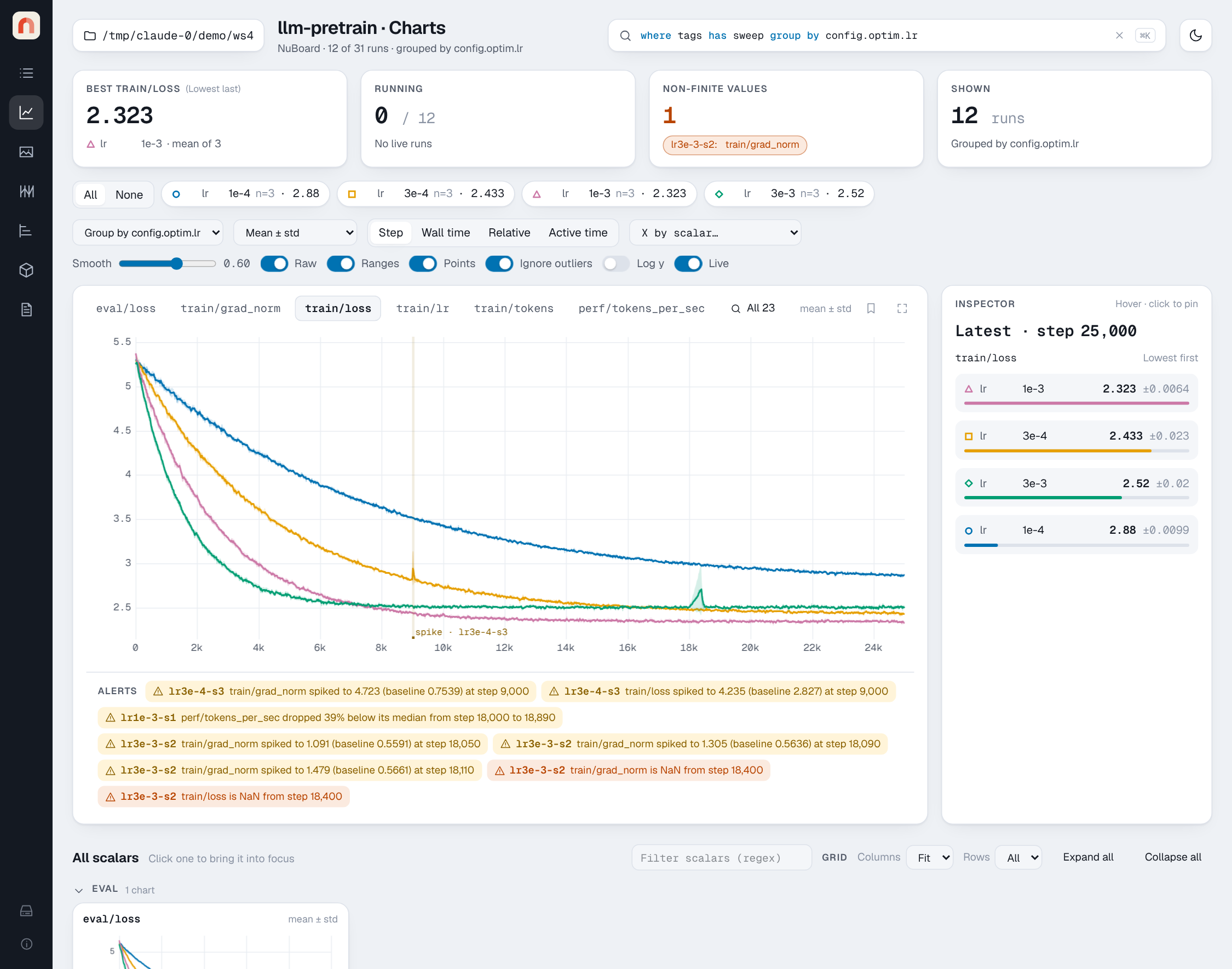
Then try where tags has "sweep" group by config.optim.lr in the query bar and
open the Charts page. The quickstart has a tour, and
installation covers building from source.
Features
| Area | What you get |
|---|---|
| Python API | init (with resume, fork, ranks and extra jobs such as an evaluator), add_scalar and add_* for text, images, audio, video, figures (Plotly, Vega-Lite, Bokeh, matplotlib, waveforms), histograms, PR curves, tables, point clouds, HTML and files; versioned artifacts with add_artifact and use_artifact; timers (run.timer) for epochs, validation and callbacks; system metrics and console capture. See the Python API |
| Storage | a documented file format, Parquet compaction with zoom levels, versioned artifacts |
| Analysis | nb.load("project").scalars("loss", group_by="config.lr") returns Arrow tables |
| Runs | a query language, stars, notes, tags, typed properties, collections, saved views, run details and config and file diffs |
| Charts | grouped lines with bands, smoothing, zoom that loads finer data, a linked crosshair, live updates, any scalar as the x axis |
| Timing | where a run's time went: each timer's calls, mean, p95, total and share, its duration per step, findings such as spikes and slow ranks, and a timeline of one step with a lane per rank |
| Media | every logged kind with a step slider, side-by-side comparison across runs and steps, and interactive figures |
| Hypotheses | boards that track what each run was testing and which result led to the next idea |
| Reports | Markdown reports with logged items, live charts and snapshots; export as HTML or a zip |
| Sweeps, Timeline, Artifacts | parallel coordinates and per-parameter scatters, runs over wall-clock time, artifact versions and lineage |
| Health alerts | NaN/Inf, loss and gradient spikes, throughput drops, per scalar and rank |
| CLI | nuboard up, demo, ls, rm, compact, merge, artifact, import-tensorboard; see the command line reference |
What changed in each release is in the changelog, and the known limitations page lists what doesn't work yet.
Documentation
The docs are a MkDocs site in docs/:
uv run mkdocs serve # http://localhost:8000
- Installation and Quickstart
- Logging from Python, Using the viewer, Sweeps, Health alerts, Artifacts and lineage, Analysis API, Reports, Hypotheses, Reproducibility, Distributed training, Evaluating while training, Working on several machines, Importing from TensorBoard
- Python API, one page per call
- Reference: command line, query language, file format, architecture, benchmarks, development
Development
uv sync                                              # Python + dev tools
(cd frontend && pnpm install && pnpm build)          # builds the viewer into src/nuboard/static/
uv run pytest && uv run ruff check . && uv run pyright
(cd frontend && pnpm test && pnpm check && pnpm lint && pnpm e2e)
uv build                                             # wheel with the frontend bundled
See Development for the repository layout, the rules for the logging side, and how to rename the project (the name lives in three places).
License
NuBoard is released under the MIT License.
Requirements
Python 3.10+ on Linux, macOS or Windows. It installs NumPy, PyArrow, Starlette and
uvicorn for the viewer; logging uses only the standard library. Building the
frontend from source needs Node 20+ and pnpm (brew install pnpm on macOS);
installing from PyPI does not.
1 maintainer

Metadata
1 maintainer
Release files for nuboard 0.24.1
For a detailed explanation of source distributions (sdists) and built distributions (wheels), please see the package formats documentation.
Source distribution (sdist)
| File | Size | Uploaded | Provenance | Actions |
|---|---|---|---|---|
| nuboard-0.24.1.tar.gz | 14.2 MB | Without provenance | Details for nuboard-0.24.1.tar.gz |
Built distribution (wheel)
| File | Interpreter | ABI | Platform | Actions Reset |
|---|---|---|---|---|
| nuboard-0.24.1-py3-none-any.whl | Python 3 | none | any | Details for nuboard-0.24.1-py3-none-any.whl |
Total release size: 18.6 MB
Release files / nuboard-0.24.1.tar.gz
| Download URL | nuboard-0.24.1.tar.gz |
|---|---|
| Size | 14.2 MB |
| Tags | Source |
|
SHA-256 checksum How to use checksums |
db2f30075996dbc65e645eead427c419288f97419f1fbd0f2a11336efc0bfcbc
|
|
BLAKE2b-256 checksum How to use checksums |
f501d34c4d378ff5928dfb2463de05da64b67b11abd6e8753920cc7db06257b2
|
| Upload date | |
|
Uploaded using Trusted Publishing? What is trusted publishing? |
No |
| Uploaded via |
uv/0.13.7 {"installer":{"name":"uv","version":"0.13.7","subcommand":["publish"]},"python":null,"implementation":{"name":null,"version":null},"distro":{"name":"macOS","version":null,"id":null,"libc":null},"system":{"name":null,"release":null},"cpu":null,"openssl_version":null,"setuptools_version":null,"rustc_version":null,"ci":null}
|
Release files / nuboard-0.24.1-py3-none-any.whl
| Download URL | nuboard-0.24.1-py3-none-any.whl |
|---|---|
| Size | 4.4 MB |
| Tags | Python 3 |
|
SHA-256 checksum How to use checksums |
014c0dfbc72b3cdc1da23ef2c7d413660ac77e60dd5bdbebbfcacaccbaae3718
|
|
BLAKE2b-256 checksum How to use checksums |
9c77731a89ebed37b763e6de1c1a5a22fc52f93bda454a1e5f1d7fdfac8a767a
|
| Upload date | |
|
Uploaded using Trusted Publishing? What is trusted publishing? |
No |
| Uploaded via |
uv/0.13.7 {"installer":{"name":"uv","version":"0.13.7","subcommand":["publish"]},"python":null,"implementation":{"name":null,"version":null},"distro":{"name":"macOS","version":null,"id":null,"libc":null},"system":{"name":null,"release":null},"cpu":null,"openssl_version":null,"setuptools_version":null,"rustc_version":null,"ci":null}
|
Security for nuboard 0.24.1
Provenance
Provenance describes where a file came from. On PyPI, provenance is shared via attestations, which provide a verifiable record of the build or publishing details. View details, limitations and caveats.
No provenance found
None of the files in this release were uploaded with provenance metadata.
A note on package security
PyPI is a repository for distributing packages, not a service for auditing them. While third-party security researchers and our staff do their best to detect and remove malicious packages, PyPI cannot guarantee the quality, security or suitability of any given package.
To learn more about protecting yourself from malicious actors, visit our package security documentation.














